Point of Sale Software

Lottery outlets seem to be doing okay in retail sales

POS SOFTWARE

Yesterday many of you would have got the newsletter about Tatts Group FY15/16 Report for those that did not it's available here.

If you look at the FY16 Investor Presentation there, the relevant pages for retailers are pages 6 & 7. From that I created this table.
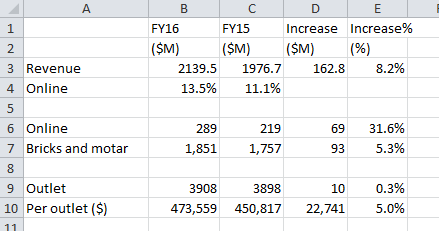
I double checked and the figures match the report.

Overall sales went up by 8.2%, clearly, online sales went up rapidly by $69 million but Bricks and motor outlets went up even more - $93 million. For retailers as the number of outlets went up slightly the average sales for their outlets went up over $22,000 or 5% to $473,559 an outlet, which is a terrific result for a mature industry in today's retail environment at the point of sale.

Clearly though many of these retailers would have concerns with digital, I still think this though is a long-term threat, here are some figures from the page.
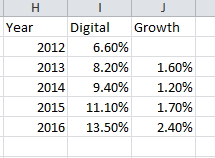
On a graph, it looks like this, as you can see the growth currently is not that rapid and there does not appear to be that much of a relationship between the digital and the Bricks and motar customer.
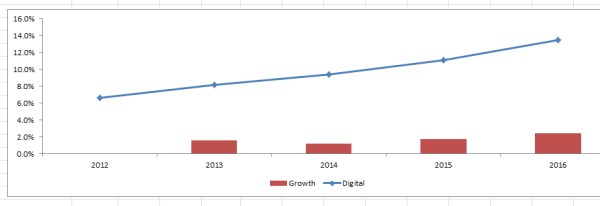
Looking at this, I would say that the retailers still have more good years before being replaced by digital.

For those that have a mathematical interest, I did an S curve calculation to 2020 based on these figures and got about 25% of the market will be digital then.
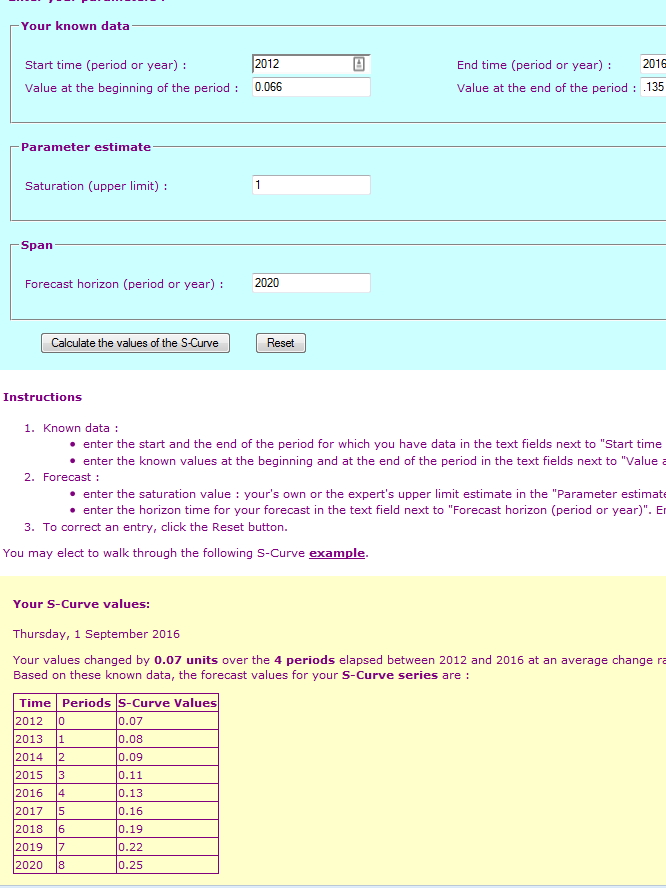


I would not be surprised if it higher but I think it gives an idea.


Improved the quoting system

When you do a quote for a client, what can happen is, that by the time they come back much needs to be changed. Now you can select the make invoice button which returns you to the customer select page, and you can edit it but what we have done is now given you the ability to edit a quote by pressing the edit button in the history view tab which is much faster and easier to use.

Check it out on the new update.

Quick and easy check prices of your stock

Tomorrow many of you will need to check your tobacco prices, but even those without tobacco are often faced by a sudden price rise and need a quick and easy way to check the items' price for what they have on hand.

Now with our point of sale software, this is a quick way of doing it.

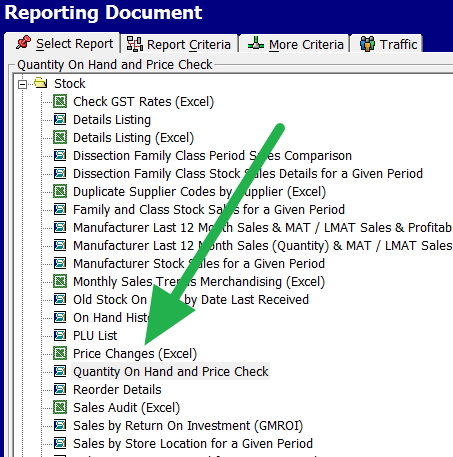
In your reports, there is an option Quantity On Hand and Price check, so click on that.

POS Software menu

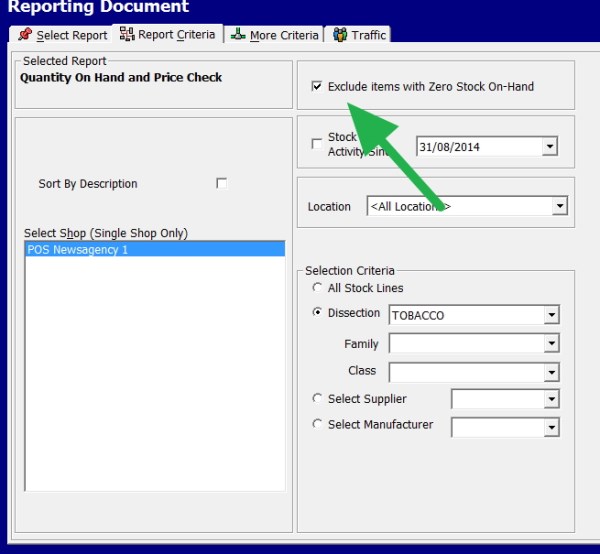
Now for this exercise, we exclude that item that we have zero stocks. If you do not have accurate stock control, you would use the line below, stock activity since a selected date.

Then we pick the dissection (department); in this case, I use tobacco.

Now some of you for this exercise may prefer to select by supplier okay, whatever is quicker.

POS Software On hand and preice options

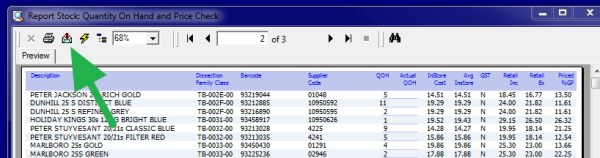
Now out comes a report showing the items, cost, the quantity on hand and the retail price.

POS Software On hand and price report

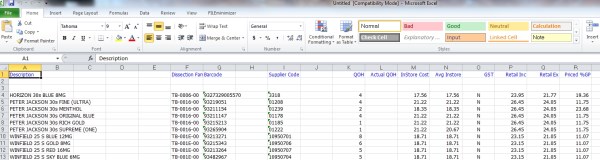
I think it is easier to use it in an excel spreadsheet as I can tick it off and do calculations if required so I pressed where the red arrow is and the report comes out in an excel, or if I do not have excel openoffice an spreadsheet like here.

POS Software On hand and price in excel

Using our POS Software, you can take care of all your stock control needs quickly.

Warning! A loyalty program may cost you at the point of sale.

On POS Systems like ours, it is very easy to set up a loyalty marketing program.

However here is something for you to consider. A study which is probably the best and largest study in Australia in 2016, released an interesting set of statistics. An executive study is available here free.

From what I can see the report does not show a lot of difference between this year and last year. Last years report 2015 is available here free. Which is an fascinating powerpoint presentation?

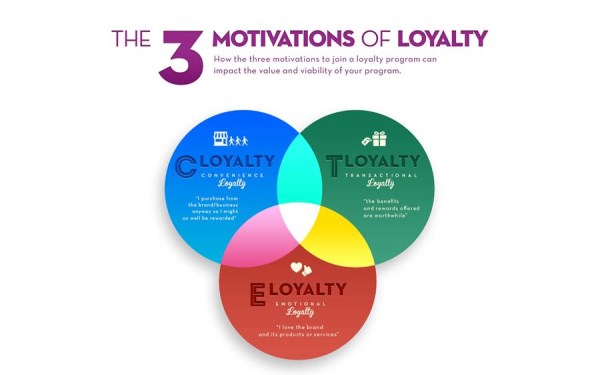
The 3 motivations of Loyalty marketing were:

55% were motivated by Convenience Loyalty = “I purchase from the brand/business anyway, so I might as well be rewarded”
34% were motivated by Transactional Loyalty = “The benefits and rewards offered are worthwhile”
10% were motivated by Emotional Loyalty = “I love the brand and its products or services”

Looking at this much of the marketing you will get anyway.

This fits in well with our research that we released in April 2014, that stated as a working approximation probably half the money spent on loyalty marketing is wasted.

So if for example you are giving half the profit away as some schemes push, you are probably working for nothing.


Why replace Your Desktop with a Laptop?

We are living currently is a more mobile society. Years ago, we went around with a brief case, filled with the documents and our diary at present many of us go around with a laptop. So it makes perfect sense to think that we might want to move when our desktop computer gets too old to a laptop.

Right now, for example, we sell as many desktops as we do laptops as portability is a big plus and overall there is a clear trend to smaller, lighter, and more portable computing.

Here is my list of the pros and cons:

Power: Desktops

They are generally cheaper, so buying a desktop will get you more computing power and features.

Portable: Laptops

Personally, I just love being able to take all my information with me wherever I go. This makes me a lot more productive. With my laptop, I can do a lot of work while commuting. What I really like is the wide scale availability of WIFI and when I cannot get it, I can use my mobile as a WIFI carrier.

Setup: Laptops

Desktops often require some computer skills to set up. Every now and then, you need to pull out cables and put them in. They also require more space. Laptops are standard off the shelf packages with no cables to install.

Usage: Desktop

The monitors tend to be larger on a desktop, and the keyboard and mouse on a desktop are easier to use. What I do is at home or at work, I plug in the screen, mouse and keyboard into my laptop and its like having my desktop.

Upgrading and repairs: Desktop

It is often impossible to upgrade or repair a laptop. Desktops you can replace almost anything, and they are also more expandable. The parts are cheaper to buy and more readily available. With a laptop, it's much harder. If a video card dies on a laptop, for example, often you need to return it to the supplier.

Ransomware: Laptops

What I love is being able to pull my laptop off the network, if I have any doubts about a file or email and while I do my emails. Okay I may lose my computer until I repair it but I am not going to bring down every computer in the place.

Ultimately the final decision depends on what you need.

You can help to prevent fraud in your store

You have some doubts about one of your employees what signs should you look for in the till rolls in your point of sale system. You should be homing in on anything that looks strange. After having done this job over the years many times here are some ideas for you to look at.
The most dangerous situation is my experience is when people work alone.
- Shortages or overages at the end of a day report
- Unusally large numbers of cash shortages during an employee’s shift
- Unusually high number of refunds, discounts or voids
- Unusually high number of no-sale transactions
- A low number of expensive sales, thieves tend to take from these transactions.
- Customer complaints about not receiving a receipt, a sure sign if something is wrong is if a customer complaint and your point of sale shows something different. This is something that cameras can help.
- Cash receipts found in the bin at the end of the day
- Incomplete refund slips without customer information

Another useful tip is to compare the video camera image and the till rolls.

How do I protect my Confidential Information

POS SOFTWARE

It is your legal and social responsibility to keep a lot of information you have confidential and you can get into big trouble if you do not.
I have spoken about this problem before but a few days ago. One of our clients in the middle of processing the weekly payroll system suddenly had to go. While he was gone an employee looked up the pay sheets for the bank and noticed another employee was being paid considerably more than him and complained that his pay was less. Whatever you think of this; I think most of us would agree that an unnecessary problem occurred that should never have happened.

On a computer as anywhere else there is no magic method to stop the invasion of your privacy but there are some points you can do to reduce the problem. The problem in most point of sale retail environments in SMB businesses is that generally anyone in the organisation can get access to everything on your computer. I divide these people into four groups, government officials - who can come in with a court order; coworkers and computer support people - who have access because it's necessary for their work, family and hackers.

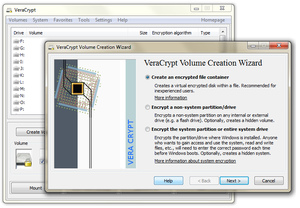
That is why we like VeraCrypt. It's free. Your information once it is set up is automatically encrypted before it is saved on the hard drive and only decrypted after it is loaded. The information cannot be read without the use of a correct password. I do warn you it does somewhat slow down processing.

So what we do is set up our users with an encrypted VeraCrypt system. Anything in this until they supply a correct password is unreadable. Once they put in a password, it acts as a normal drive with its own letter, accessible like any other drive but only on that computer so only that computer can read the information. So I downstairs on another computer in the network cannot read that information. When they finish and close VeraCrypt, the information becomes unreadable again to anyone without their password.

VeraCrypt can be set up so secure, few could break it.

 
It is free
 
Enjoy your privacy.
 
Note here is some information on the new key disclosure laws.
https://en.wikipedia.org/wiki/Key_disclosure_law
 

Retail Purchasing: Ordering in POS Software

POS SOFTWARE

The reality is that many suppliers do not offer EDI invoicing even though EDI invoicing saves you a lot of time. The problem is increased if you order frequently to save resources, but the problem is the increase in management costs in controlling a large number of orders.


Our system provides a solution to this problem by giving you an automated stock control system which can run either manually with its replenish or Min/Max systems or the completely automatic focus ordering system. It also creates an electronic order that can be printed, faxed or sent by email. It can then create an EDI file that when the goods arrive can like any other EDI invoice be adjusted and imported after you check the supply when the stock arrives. There is no need to enter all that stock anymore. This will save you considerable time and resources.


If the fully automatic ordering system is adopted what the point-of-sale system will do is consider the ordering cycle (designed to reduce carry costs), the purchasing cost and lowest order quantities to produce the maximum profit for the minimum outlay in your store. This is unique to our system unlike the many manual systems out there, which end out in getting you to place orders that are larger than your immediate needs so tending to increase purchasing costs and produce overstock, which requires discounts on sales to get rid of extra stock.


Overall it releases resources, which allows you to respond to unexpected market opportunities. This will also reduce the number of stockouts on many items and its associated costs leading to increases in your clients' satisfaction.


If you want to learn more, please contact us, as only we offer at present focus ordering in our marketplace.

Making Staff roster simple

Creating a roster is not easy and to do it properly can be a lot of work.

So we have recently added more facilities to help our clients to make their rosters easier. This allows them to improve business efficiency.

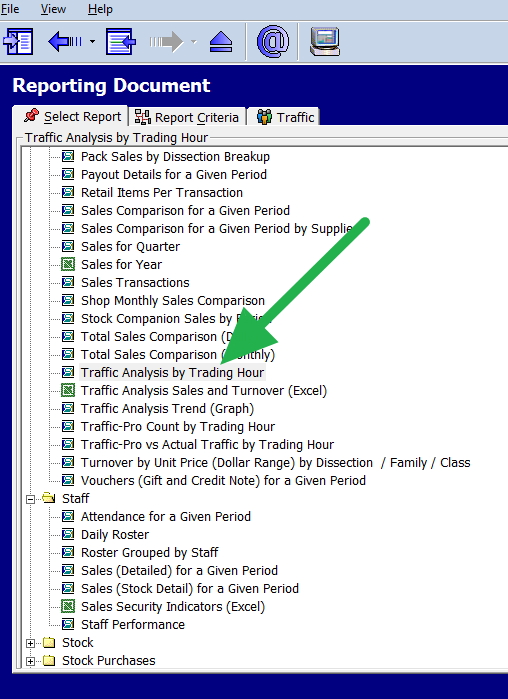
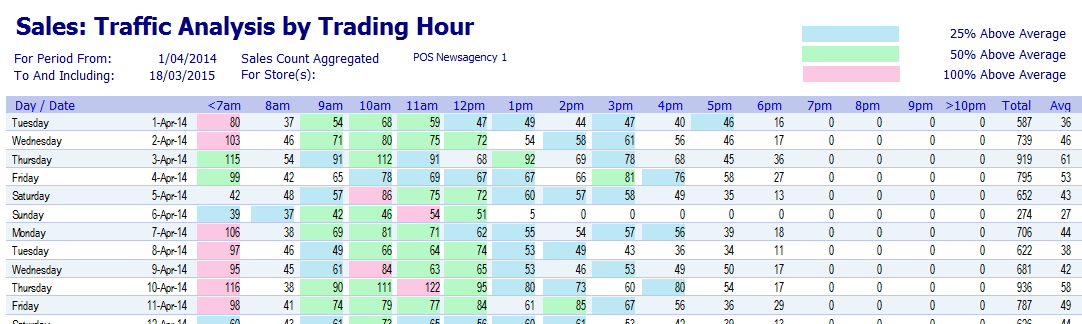
One report that I do recommend you study while creating a roster is the traffic analysis report by the hour which you will find marked with a green arrow below.

Put in dates from a previous period that you feel will give you a typical results for the roster you are trying to create.

Now what you will get is a colour coded analysis which shows the activity in the shop divided into four groups with red the busy period.

This graphically shows you when you can expect to be busy.

This is just one example of how our point of sale gives you the tools to help you to achieve profitability.

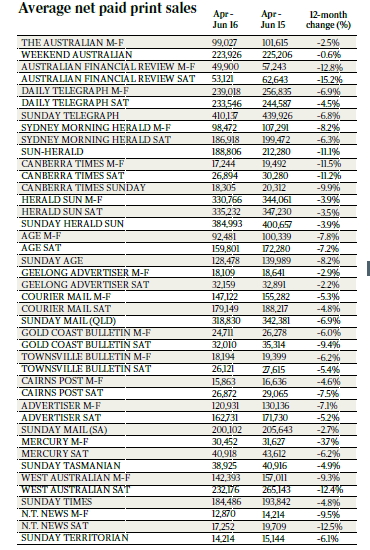
The latest Audit Bureau of Circulations figures for newspapers

The latest Audit Bureau of Circulations (ABC) figures show no surprises – print sales are still declining.

Overall about 5% down.

What is going to happen now? Fairfax has already announced that it is inevitable that they will axe the Monday to Friday print editions of both the Sydney Morning Herald and The Age and go digital. The rumours are it will happen this year, although I am sure that more profitable print than digital there is no future in newspaper print, for newspaper companies if they want to survive they must go digital.

The latest Audit Bureau of Circulations figures for magazine

Overall, these have dropped marginally worse than newspapers, but unlike newspapers, which are all down, there is some good news here for some publications. Not only that but as a magazine can run quite successfully on lower circulation, the immediate long term print view is not so critical.

Click here is a good report on the state of magazines in Australia. Check out Cosmoplitian its a real shocker, 43% down.

Frequent discounting

This is just something to make you think.

There are three types of pricing philosophies.

1) Have your regular price and occasionally run sales.

This is the traditional model for most large retailers. Then every now and then, they run a big sale. The problem many retailers see is that the regular customers after awhile learn to wait until the sale happens.

2) Make your prices a bit cheaper and run with it all year.

Many discount shops use this approach. One problem I see here is that it is very hard to be the cheapest all the time.

3) Flexible which raise your prices when the market is high and lower it when it is low.

An example would be many of our customers when supermarkets are open lower their cigarette prices and when the supermarkets closes they raise them. As they can get more after hours.

So which model is the best, obviously there is not one answer that fits all, but a study in the US showed that generally (1) is the best. Run with your regular prices and occasionally run a sale.

Have a read here.

Power your POS system with Microsoft Word

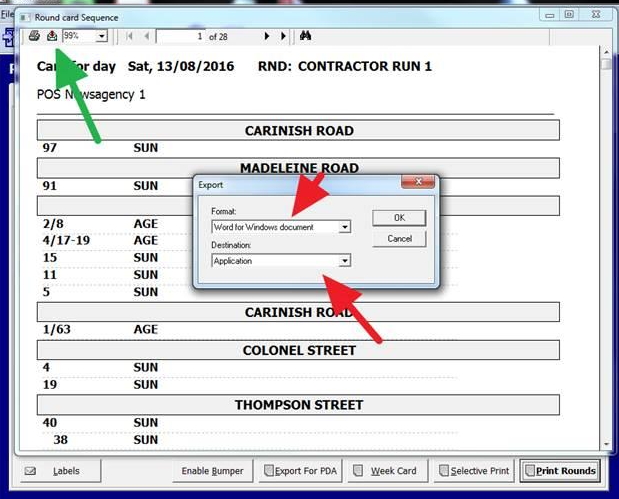
As readers here will know, our point of sale system uses integration in Microsoft Office to allow users to gain insights into their business. What they can also do is use it to make life easier too. Let us say you needed the print larger on a report.

What you can do is send the report into Microsoft Word and then select the font and size to make the report easier to read. What you do as above is press the export button shown by the arrow in green. Now selected the format to Word for Windows and destination as application shown with the red arrows. Once in Word, you can pick any font or size you like.

This is just another example of how much better our software is.

Look at the Amazon brick and mortar bookstore

POS SOFTWARE

People who sell books will probably think that Amazon is hypocritical by having a brick and mortar store.


From the pictures, it does look like a typical bookshop except, there is a lot more full face then spine-out.


What does look unique is the way they have linked in their website in the shop. They show on the shelf labels rating, user recommendations and reviews all that are useful information to someone buying particularly if they do not know much about the product. This is something that I think many retailers in many different industries could consider copying.


I think you will get some ideas looking through these photos which are available here.


The Best Retail strategy for you

Here are four common mistakes that people make when it comes to putting in this great idea into practice their shop, that I have seen.

Mistake #1: Have a plan

What are you trying to do? It is a good idea to write down a few words like a school science project. List what you are trying to do? Why you are trying to do it? What you hope to accomplish? etc. Set up key goals and failure criteria.

A short note in the diary is often enough.

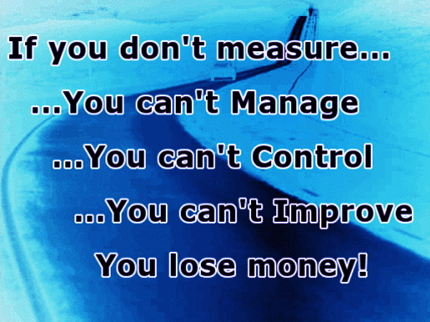
Mistake #2: No measuring (KPI)

So currently you have your goals, as you have a terrific point of sale system (ours), that has incredible flexibility is setting up reporting where you can do reports by department, location, time, supplier, etc. Set it up before. So set up some sort of measurement. Furthermore, try to get some before snapshots to compare. For example, if you are replacing a printer because its keeps breaking down and is slow. Note how many times does it break down and how slow is it?

Note your measuring does not have to be 100% accurate, in fact, some goals cannot be measured but even a vague measure is better than no measurement. As the Wikipedia said here.

"In practice, overseeing key performance indicators can prove expensive or difficult for organizations. Some indicators such as staff morale may be impossible to quantify. As such dubious KPIs can be adopted that can be used as a rough guide rather than a precise benchmark"

If you don't measure, then how do you know how you are doing?

Mistake #3: Do it!

Often people buy it but do not use it. I saw a few days ago, a perfectly good shelf sitting in the store room collecting dust as no-one had the time to put it up. Why did they buy it?

Mistake #4: Not having an exit strategy

The reality is that despite all our efforts and thoughts, a lot of ideas do not work. Ideas that you have such great hopes for just do not work. A common rule of the thumb is that in any new product line we can have two failures out of three as long as its not the first. That the idea can fail is a fact.
Make sure you have an out.

Extending Data visualisation

Reader here, might be interested in knowing that Friday post on data visualisation created much discusion.

Several questions were raised. One was very interesting was that much of the data that you want to investigate with your shops data is not available in your shop's information, for example, the weather, retail statistics, unemployment, inflation, etc.

So the asked can you get something like this say the weather into the data visualisation?

The answer is yes. If it can go into SQL or excel not a problem.

So how was the next question.

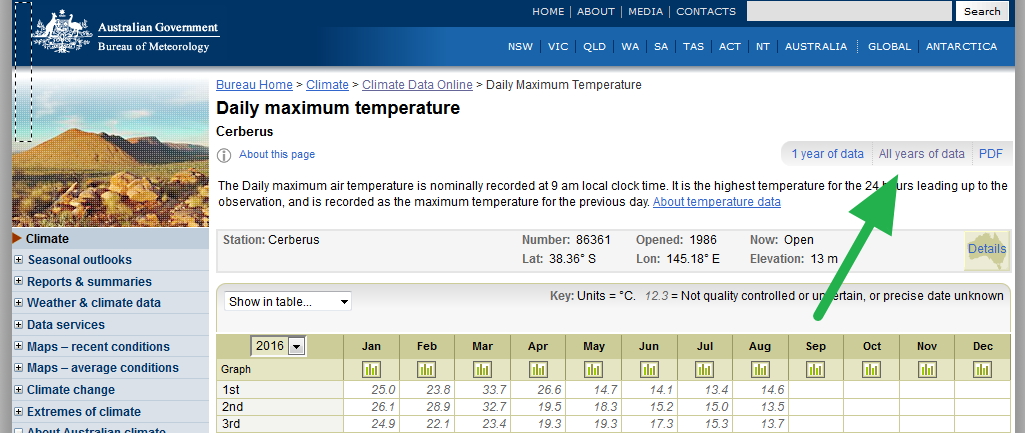
The first point is you go to the Meteorology Bureau website, then you go

Bureau home > Climate > Climate Data Online > Daily Maximum Temperature

And click where I have highlighed with a green arrow to download an excel file of date and maximum temperature.

and do the same for rainfall.

Bureau home > Climate > Climate Data Online > Rainfall.

Now you can put these into an excel spreadsheet and then import it into your table.

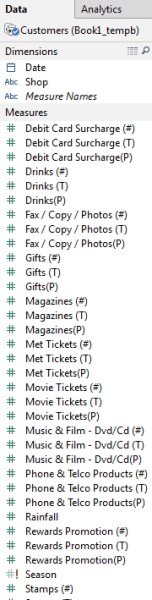
As you can see Rainfall been added.

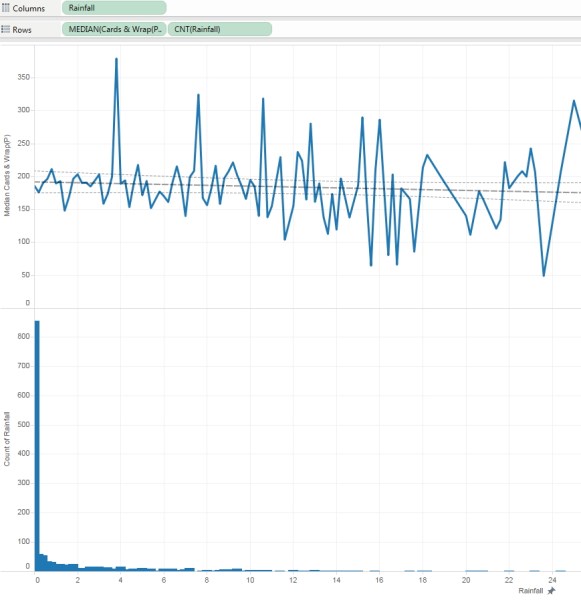
Now let us compare sales of greeting cards by rainfall. This produces the following graph.

On the top is the average profit of cards per day and on the bottom is the how many points for each measurement. I then added a trend line, and as you can see there is not much there of a trend. Card sales are clearly not much affected by rain here.

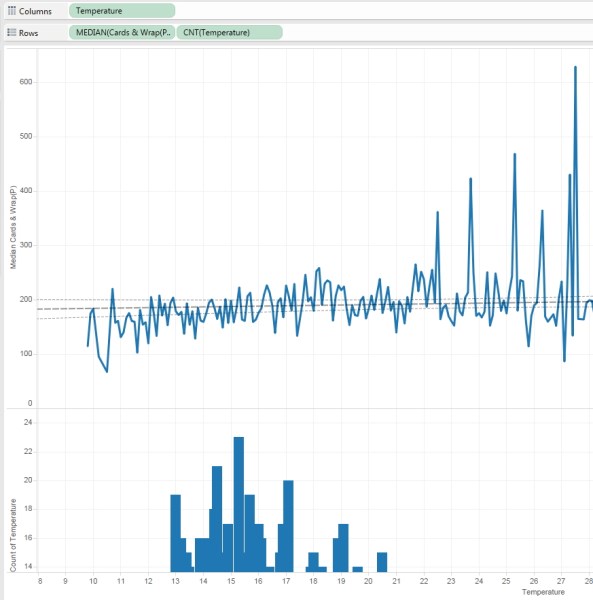
I then decided to do it by the temperature. Again if you look at the trend, there is not much although a nice hot day is making some improvement.

This makes me conclude that the weather does not make that much difference in this store to card sales.

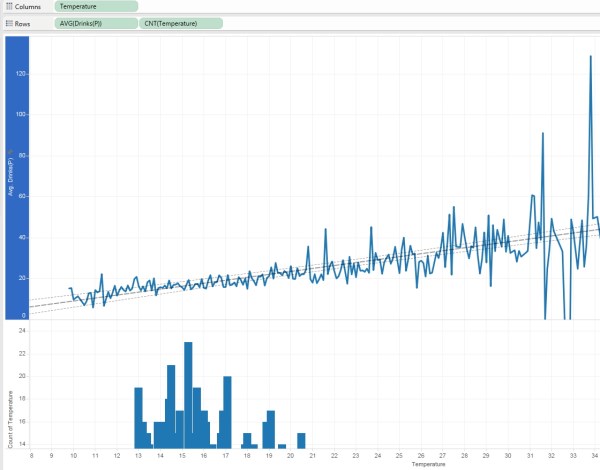
However, I decided to measure the drink department. Now you will see that the weather here made a big difference.

The trend is clearly up, hotter weather is generating more sales here.

This simple example shows the power of our data visualisation.

Lucky Charm Group

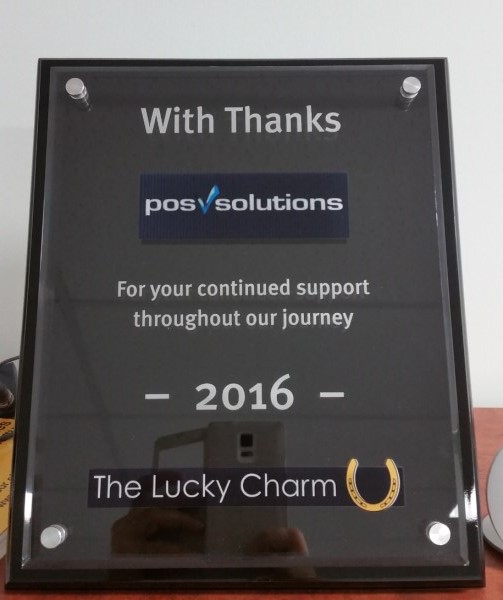
POS Solutions was honored this year by being the recipient of the award by the Lucky Charm group. Here Helen Kentros, the Manager of Operations at The Lucky Charm group is officially thanking POS Solutions with an award for all our help.

This award recognizes that we have made significant contributions to retail management and the group.

It was wonderful to be bestowed the Lucky Charm Award.

POS Solutions was honored this year by being the recipient of the award by the Lucky Charm group. Here Helen Kentros, the Manager of Operations at The Lucky Charm group is officially thanking POS Solutions with an award for all our help.

This award recognizes that we have made significant contributions to retail management and the group.

Data visualisation

A picture it is said, "is worth a thousand words" so in this day of huge amounts of information, pictures make a terrific way of showing things.

With our point of sale software, you can have some amazing data visualization exploration that is I think head and shoulders above what many offer.

It does, however, require some training to use this visualisation but once you master it, you can do some amazing stuff creating your own graphs, charts and even personalised dashboards in a way that is meaningful to you.

I will show you an example here.

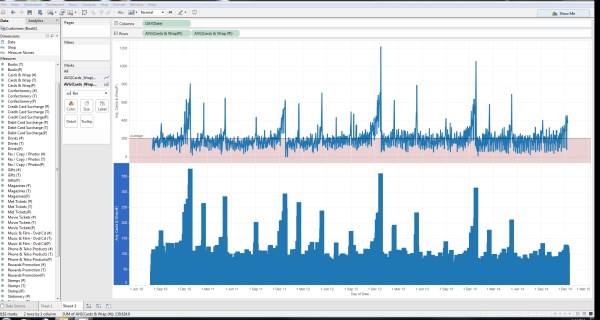
This is a graph of card profits per day in a shop over four years

What I have done is on the top showing the profit per day, I made average line and marked in red all days that were below average.

On the bottom, is the number of sales per day.

Now if you look at the graph, you can see that it does have a yearly variation and a lot of other variations, but its not obvious why.

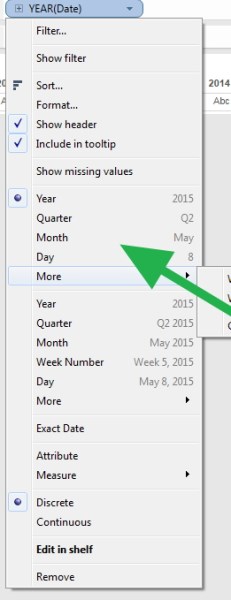
So what I can do is click the date field

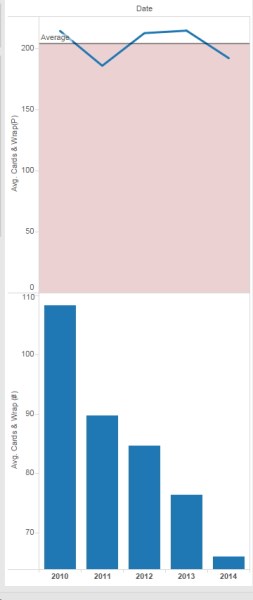
Now I pick year, and I get instantly a graph like this.

Do not worry too much about 2014 as its only a partial year, but you can see that daily sales on average are dropping dramatically by numbers over the years but that the profit is fairly stable. You can see the shop has gone up market with its cards.

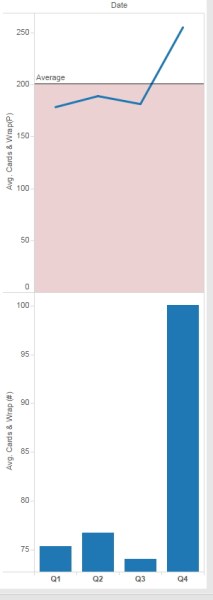
Now I click on quarter and look at sales per quarter, and get this.

No surprises here as you can see that in the fourth quarter, come Christmas sales of cards go up.

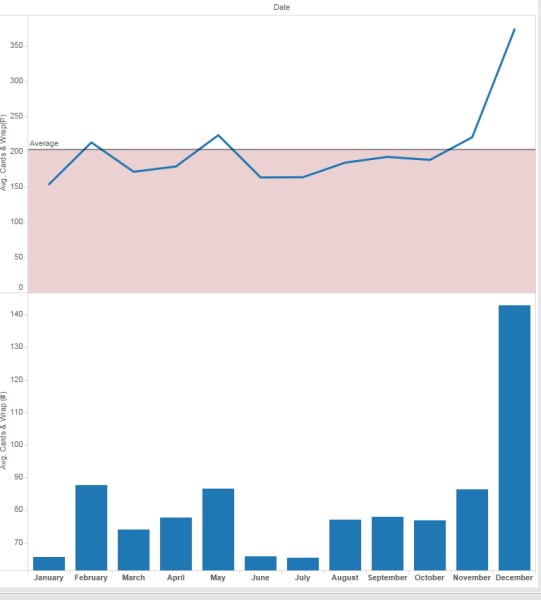
So I decide to click on month,

As you can see, December in this shop is a good month for card sales.

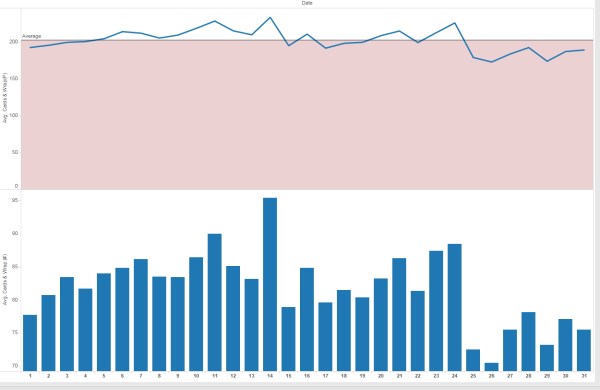
So now I click on days of month.

I do not see any meaningful pattern here, although interestingly days of low sale, seem to be days where more profitable cards are sold.

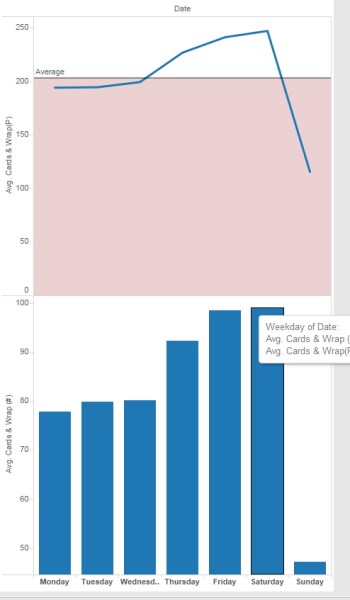
So now I click on weekdays

As you can see Friday and Saturday are the best days, and Sunday is generally a bad day for them to sell cards. All things being equal if they were doing any disruptions to the card department, Sunday would be the day to do it.

As this very simple example shows, data visualisation can show us a lot. The shop has gone up market on cards, we have good month sales in December, and poor card sales on Sunday.