Point of Sale Software

Full service bookkeeper

POS SOFTWARE

Most SMB companies cannot justify internally because of cost a full time financial controller, however, they often feel a need for a part-time full service bookkeeper who has the responsibly for looking after the accounting operations within the business, and as they are not charging like an accountant, the costs are affordable. What they do is much more complex than a regular bookkeeper and they also sometimes include the preparation of interim reports and snapshots, which lets you know how you are going. This is a section from a sample report from BAS and More which is one that we do recommend to our clients which come online through an API in their software.
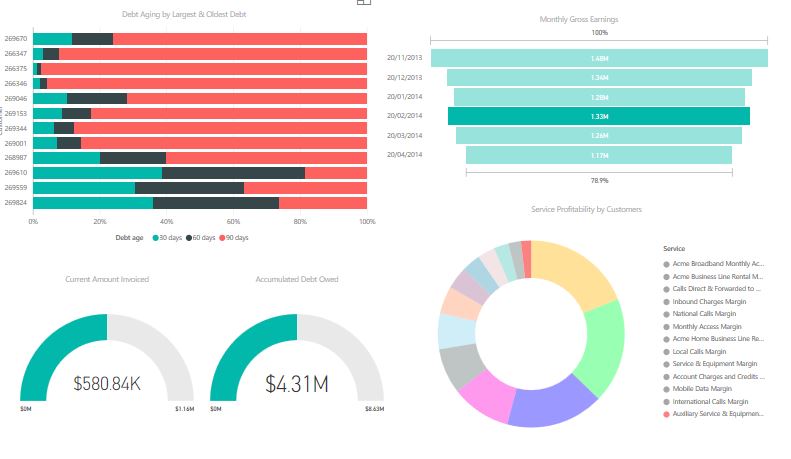
These Full-service bookkeeper also handle the accounting cycle duties and supervise others in the basic tasks, code the accounts, check the payroll, do spot checks and ensure that the correct ledger accounts are being debited or credited and monitoring cash flow. As well, they produce the figures for the financial statements and general ledgers for your accountant at the end of the year, although some do produce these for their clients say quarterly. No doubt there is much more that I have not mentioned.

The information they use comes from a range of sources, including our point of sale software, bank statements, etc.


full service bookkeeping

Our point of sales software integrates into a wide variety of accounting software packages, and so we do not actually recommend any accountancy program as such.

We do, however, as we service so many retailers have access to accountants with skills in many such programs.

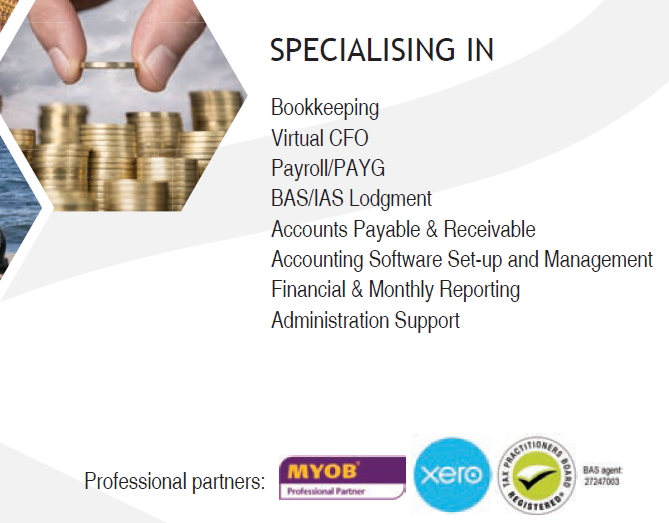
One that we do recommend is BAS & MORE mainly as they have helped us in the past, and because I do know that they are good. They are professional partners with MYOB and Xero, and they can handle a wide variety of other accountancy software packages, plus they have access to special deals, e.g. Xero subscription is free for their clients.

Here are some of the services that they do

If you want to know more, please click here.

http://basnmore.com.au/

Starbucks - A Great Customer Loyalty Program Example

Our point of sale software can handle a wide range of rewards programs, so before embarking upon a rewards program its worth reviewing what is available.

You need to be careful, for example, if you are a Woolworths customer, you probably remember after they scrapped their Qantas-linked point rewards system, they replaced their rewards system with a program of discounts on specific products. This program did not last long and shortly after it was quickly scrapped, then Woolworths went back to a point Rewards point system. This change was generally regarded as a disaster. Clearly Australian wanted points, not discounts on selected products.

However, that still leaves a wide range of point programs you can offer with our POS software.

One of the best and most popular ones available is the Starbucks Rewards Program, which I think is one of the best in the world. It is certainly very successful. Have a read here of how it works.

https://zinrelo.com/loyalty-rewards-case-study-new-starbucks-rewards-pr…

Four questions for your EFTPOS provider

Here are some questions, that I recommend you ask any EFTPOS/credit card provider for your point of sale software.

1. What is the tiered pricing on cards?

Not all cards have the same pricing, what you need to find out is what is the pricing on the cards not only the standard MasterCard and Visa. AMEX is always a problem for low margin retailers, but it's not the only one as many cards have extra costs.

2. Cancellation and termination fee?

Some providers insist that you sign for a fixed period. If possible try not to get locked into a contract that requires a hefty fee to get out.

3. What are the charges after the first year?

Some providers only guarantee the charges on the first year.

4. Check what other extra fees will be charged?

Many credit providers have something, e.g. compliance fees, statement fees, annual fees, monthly minimum fees, etc. Make sure to always ask what other fees may be charged.

How to host an event

Our point of sale software can handle the mechanics of holding an event, but there is much more involved then just that. So I really liked this article and after reading it, I corresponded with the author, and we threw a few ideas together.

Now after seeing an ANZAC day event being advertised in one of our client's shops in Bright Victoria today, I thought I would share it with my readers.

https://blog.vendhq.com/post/64901826781/step-step-guide-hosting-store-events-generate-foot-traffic-loyalty-sales

Three points I wish to add.

1) If you are small consider holding an event when you expect to be busy as you could look really silly if going to a lot of trouble to host an event, and few show up.

2) Make the event if possible towards the end of the month as many business and event diaries update monthly, so the second or third of the month will give you less exposure compared to the twenty second or twenty third.

3) Rather then make it a monthly, hold next month a different event eg spring, summer, big cup race, school holidays etc. Make the event relevant to the local people.

Windows 10 what now?

POS SOFTWARE


It is looking that the original concept most are saying that Windows 10 will be the last version of Windows, is a myth.

Microsoft has recently announced that the original Windows 10 version they launched in July 2015, will not any more receive security and improvements after May 9, 2017. So the original Windows 10 version, will soon no longer be supported. To be fair Windows 10, did get two major updates, namely the Anniversary Update and the Creators Update which is about normal for a windows system.
So soon I think we can expect new Windows maybe 11.

Microsoft will of course tell us about the wonderful new features in Windows 11 that they added to improve their system but they will of course fail to mention the older programs and most importantly the device when you upgrade that suddenly stop working as the drivers are no longer available as the supplier is not updating their device drivers.

Onwards and upwards.


Easter latest updates

Easter with all the changes in newspaper distribution was a big project so it took a lot of work and testing to get it to work this time. But it was done. Considering the scope the savings in time for many of our clients will be huge now.

For those on DOS or what is called semi DOS systems that cannot do scripting, I think now is the time to serious considering to upgrade to a modern system.

Scripting as an advanced feature on automatic updates, which is done now in almost every software package. I do not update my anti-virus program or my windows software it updates itself.

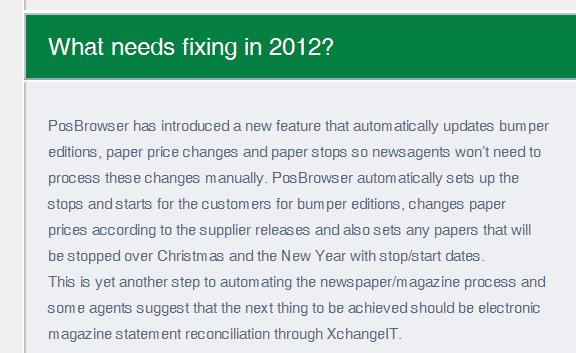
Scripting however now has progressed to the next level. Using it allows us to do changes like newspaper price changes, bumper editions modifications as well as order changes, etc. Rather than the user having to waste their time entering information on the correct day for a task; we send a script down the line. It does the changes.

Which is imprtant as our clients were flat out now and did not need to remember what to do with their computer work, at least ours can get on running their businesses.

EFTPOS Tyro latest offer

POS SOFTWARE


Since now is the time of year, I have noticed many companies with shareholders come up with their best deals, as now is when they want figures. So here is a heads-up on what a very good deal is.

Tyro will announce an EOFY campaign. The offer is to new customers, provide savings of 10% in merchant service fees and provide a free terminal rental period of six months. In order to qualify for this offer, you must submit an application to Tyro between now and the 30 June.


Major upgrade to our online help system coming

Next User meeting

POS SOFTWARE


We will be hosting on the 10 May 2017 at 10:00 am in our Melbourne Office.

POS Solutions Australia Pty. Ltd.
Fiveways Business Centre
2 Keysborough Close
Keysborough Victoria 3173

In person user meeting for our POS software.

Everyone is invited to attend.

The agenda will be.

1) Bpay Payment
Learn how to integrate Bpay into cash register and process bill payments for any Bpay bill!

2) Website Integration
See our great new integrated Webstore integration with Webtail. Stock control, processing orders, managing customers from your webstore is now all possible through the point of sale software!

3) Stock management
Learn how to use our unique dead/slow reconciliation reports to make sure your stock is on track!

4) Layby management
Still, by far the most popular form of credit in retail today. Learn some of its finer functions.

5) General questions.
Where you can ask anything, you like.

We hope to see you there.

Reservations are essential as if attendance is less than five (5) the meeting may be cancelled. So please send an email to us if you intend to come.


Big windows update coming

POS SOFTWARE

Microsoft's plan is that Windows will no longer be Vista, XP, Windows 8, etc.; it will just be windows 10 soon. We are not expected to buy new versions of windows. What we will be getting are many updates to Windows 10 released over time. When Microsoft released Windows 10, they promised us updates for life.

As Microsoft has this rigid timetable of releasing major updates and security fixes on the second Tuesday of the month. They now have the next version of Windows 10 ready for release.

Unfortunately, nobody at Microsoft has a calendar, so they have decided to release it in April. The second Tuesday is the 11th of April. Next Tuesday, the Tuesday before Easter. However, that is Tuesday United States time, which is Wednesday Australian time for all extents and purposes.

That is when the Windows 10 update may start downloading; some systems may take longer to get the update than others. So if your Internet and computers are slow over Easter, they probably download and install a new version of Windows 10.

Then there is the inevitable restart, and something is bound to work longer afterwards. Murphy's Law will demand that your point of sale system will slow down right in the middle of a weekend when everyone does not need this headache too.

Thank you, Microsoft.

If you have a Professional edition of Windows 10. There is an easy way to stop this update being installed now and delay getting the update over Easter by setting the following option.

Details on how to check if you are unsure whether you have Windows 10 home or professional are here.

Video removed

If you have professional, please.

Click on Start
Settings
Click Update & Security
Click Advanced options
Tick the box “Defer feature updates.”

This option is supposed to defer new Windows features and upgrades for several months. How long several months is not defined anywhere, so I cannot tell you how long that is. You will still get the new Windows 10 Creators update version, just not over Easter.

If you have Windows Home, there is a hack that can stop the updates over Easter so that you can do it later. To use the hack, I do not suggest anyone tries this who is not an advanced user of windows. Details are available here.


This is a great program, and I use this software on my laptop so that Windows does not overload my laptop by doing updates when I need the computer for work NOW.


Are you ready for an unexpected?

POS SOFTWARE

How many times have we heard the comment "We know what we are doing and its perfectly okay," just before it happens? I am sure of the people over a 1000 kilometres south of the cyclone in Northern New South Wales said that too before the floods came down.


Well, Cyclone Debbie has been an education. Just before the Cyclone hit, we rang up every client we had in Northern Queensland from Townsville to Rockhampton to make sure that they had an offsite backup. To our horror, we discovered that almost none of these sites had an emergency backup, and practically all of these people had no idea how to make such a backup. We had to talk them through it.

Then the floods started and the telephone cut out, and we could not warn people and of those, a few went down with no backup. One told me, he is a country newsagency, has over a $100,000 of debts and no records as to who owes what. The odds are that those that do owe them do not have much of a record either now.

How this for a heading "BUSINESS LOSS DUE TO NO BACKUP." There will be many such stories, I am sure.

There is any number of disasters that can happen with computers, flood, theft, fire, ransomware, etc. The only solution is to have a backup off-site.


This was totally unnecessary, as we have a cloud backup solution that is completely free for our clients.

Bulk buying

POS SOFTWARE

A successful retail business depends greatly on having the right product, at the right price, at the right time. Ideally, they want to have the threshold inventory quantity which is the minimum amount of stock required because of our point of sale software, our clients can track stock levels. Threshold levels can be monitored and stock orders implemented.

However, sometimes, what happens is for some reason suppliers offer our retailers special prices for bulk orders. Sometimes they are once off, but sometimes they are ongoing offers. A typical offer here maybe be "Buy a pallet load and the price is reduced by X%"


Now our POS system can help you monitor these bulk offers.

If you go to the stock system.


Now in maintenance, under suppliers, you can set these bulk quantities by a range of different criteria. See in green the Bulk discount offer, I referred to. What is a very idea to put for these items the offers from several different to suppliers to allow you to determine the best price for these bulk buys?

If you do such bulk purchases, then I do suggest going through this part of our system.

Check your computer times

For many of us, daylight saving has come into effect. So check each of your computers and every other clock that the time is correct.

This will this week be the principal support call issue we will get, that the time somewhere in the data file is incorrect. The reason will be because a computer on the point of sale system is wrong.

If the time is not correct check why, I have seen computers that update when they should not and do not update when they should. Generally, it's because the computer is set for the wrong time zone. If you do not know how to do this, here is a video to show you how to do so.

Cyclone Debbie and Disaster Planning

POS SOFTWARE

Well we have been busy today because of the calls from Queensland and the flooding there. Every place has its own story.

What it does show is, that although we cannot sometimes avoid disasters, we can with careful planning minimise the damage.


The first point to do to prepare for a disaster is to make a plan now of how you will respond to a numbers of disaster threats for example floods, fire, theft, no electricity, etc. Your disaster recovery plan does not need to be overly complicated. What you want is something simple, useful and available.


Run though a few scenarios, say you do not have the Internet now what happens. With one client who had an offline backups stored overseas, we had to download their data in our office from one of these services and post it up to them.


Say you do not have electricity now what happens? Do you have a spare computer somewhere else you can use? Have you tested that it can do the job?


Above all in computers, do you have backups, backups and backups for your work, including your pos software. If yes, have you tested them?

What Should I Get for my point of sale Hardware

POS SOFTWARE

If you want to know what you have go control panel > system and you will get a screen like this one.

[Image was removed]

Check the arrows for where you can get the specs.


Now assuming that its time for an upgrade, and you want to buy new hardware for your POS software, here is what I would recommend as your minimum specifications.


As buying a computer for business is not the same as buying a computer for home. At home, if my computer goes down tonight, and I have to wait until tomorrow for an engineer to fix it, is not serious. If a server goes down in the shop for a few hours, it can bring the shop to a halt. The other problem is that you are paying for time. Say, for example, a computer takes 3 minutes longer a day to do its work over four years that 3 minutes would cost you about


360 days x 3 minutes x $26 hour / 60 minutes x 4 years = $1,872.


Of course, modern computers are saving more than 3 minutes a day.

Now the operating system, I recommend is Windows 10. Not only does it run the fastest and latest SQL 2016. Its is also that Windows 7 is already out of mainstream support and has only about two years left of support which is not long enough as most of us buy a computer for 3 to 5 years. Windows 8, I do not recommend at all as do few others, which leave us with Windows 10. Plus of course, why buy something new, to have something old like Windows 7.


This does present a problem in that Windows 10 uses a lot more RAM than previous versions of Windows. I have noticed on a 4GB RAM computer about half the RAM is just being used by windows 10. However, it seems that extra RAM is required even by people now on Windows 7 as some of the updates have caused their RAM requirements to go up too, that is partly why the old computers are slowing down. So I would recommend as the price has dropped that you insist on RAM of no less than 16GB, and I would strongly recommend the new DDR4 RAM as its faster.


For the hard drives, it depends what important to you if speed is all powerful, then get the SSD, which will give you less space, then an HDD but faster speeds, if, however, you need lots of storage, then select the bigger mechanical HDD (Hard Disk Drive). On both systems, our software runs well.


As far as CPUs, I would not recommend anything under 3.30 GHz. Anything less is just too slow today.


Video card generally in point of sale is not so important as the graphics are rarely that demanding so I would not be so concerned about that.


Monitor size is a hard question, Often it depends on what can fit in a spot if it's too big, and it does not fit, then the monitor is useless. Another point I find is that people have very different preferences. It really worthwhile checking out a few sizes to find the one suitable for yourself. Now if you have older people that will be using the monitor, particularly if they are a bit of a distance from the monitor remember they have to read the screen too so maybe get something a bit bigger. Then the other problem you have to balance is that if it's too big, extended use can hurt people's eyes.


I hope this helps; any questions let me know.


Cash Register cameras

POS SOFTWARE

All cash registers should be observed by a camera always as its one of the few pieces of evidence the courts do accept. If possible, this cash register camera should be behind the cashier on the wall, so it is out of immediate reach. It needs to display all the activities taking place at the cash register, including transactions, money counting and refunds. Too much information is never a problem.

If it cannot be done with one camera consider having more than one camera.

Here is a video of such a system.

Note you can if you want to put the text on the screen from our point of sale software too. This is something I do suggest as it makes it much faster and easier to match up the computer records to the video.

Managing Customer Accounts flexibility

POS SOFTWARE

One problem we all have is that customers, accountants, bankers, etc call all the time, demand information about their accounts on a range of dates such as current account information, last financial year, the financial year before last, last month, three months earlier, two weeks ago, it can be anything. Not only that but they often change their mind, they say this date, and once you give it to them, they can say oh no, I meant the date a week earlier.

So what our clients need from their POS Software is the ability to find out at any time what a client or the total clients owed on this nominated date.

So go to main menu.

Register reports

Now normally, I would recommend using Trial Balance(excel) but for this example, I just wish it to be simple, so I selected Trial Balance.

Now select the date that the client or whoever requested, just to show you the power of our system, I picked a random date five years ago.

I also selected by order by Surname as I think it makes it easier to find, and I ignored the "More Criteria" because I do want to keep it simple, but I urge you to experiment later with these options.

Now out pops among other details a page like this one below Although for security reasons, I blanked out the names, you can see all the relevant information is here.

A Grand total will be printed at the end for say a banker or accountant.

Birthday marketing

With our POS software, you can run many extremely powerful smart loyalty programs, which are running on a large number of shops across many different businesses across Australia for more than 30 years. Unlike many others, it is data driven, and it does give a significant boost to a shop.

There are many reasons to contact your clients, here is one idea that works very well - Birthday offers. These record typically of about 25% success with us, which is a slightly higher result then a well-known loyalty marketing solution provider knowITall which claims 23%.

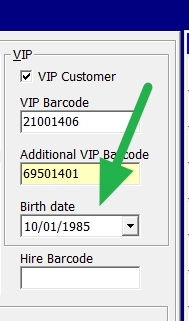
It is easy to set up, when you are entering a VIP customer, simply put in their birthday. It is much better if they use their real birthday but if not, put in their join date. You can always correct it later, if they point it out.

Then towards the end of the month, send a VIP email or letter to all your clients who have birthdays coming up next month with your offer.

You will quickly know how well it goes for you as using our point of sale software, you will have access to targeted, data-driven marketing reports that let you know.
Give it go!