
Today, many shops are losing customers because shoppers now look online before shopping. What you need to do is review your local online presence. Then fix the biggest issues, and make your shop easier to find.
Key Takeaways Box
- Conducting a local online audit to show you what customers see when they search for you.
- Use private or incognito search. This is as it provides a clearer view of what customers see.
- An incorrect business name, address, or phone number will confuse shoppers and search engines.
- A Google Business Profile helps your shop appear in Google Search and Google Maps.
- An incorrect location can lead customers to the wrong shop, so you should test directions yourself.
- Some simple tricks can help Google and shoppers know what you sell.
What Is a Local Web Presence Audit?
A local web presence audit is a simple check of how your shop appears online. For example, a customer might search for "lotto near me", "dog food <suburb>", or "magazines <suburb>" before deciding where to shop.
Next, this audit looks beyond your website. For example, it also checks your Google Business Profile, business name, address, phone number, social pages, map pin, and how your shop appears in search results.
Also, this kind of audit is not hard. For example, you can do it in less than half an hour with a phone, a computer, and a simple checklist.
Fact: wrong details lose sales.
Why Local Web Presence Matters
A local web presence matters because many shoppers often search first and visit second. For example, if they need a card, magazine, gift, or stationery item quickly, they usually look online before they leave home.
Next, local SEO works best when your business details are clear and consistent across the web. For example, if your shop name is one thing on Google and another thing on Facebook, search engines can get mixed signals.
Also, your online details shape trust. For example, if something looks wrong, for example, your address looks wrong, many customers will choose another shop.
Clear local data builds trust.
Search for Your Shop Like a Real Customer
On a paper list note:
- Your business type, e.g. newsagency, pet shop, chemist, etc.
- Top three products you sell
- Name of your shop
- Phone number of your shop
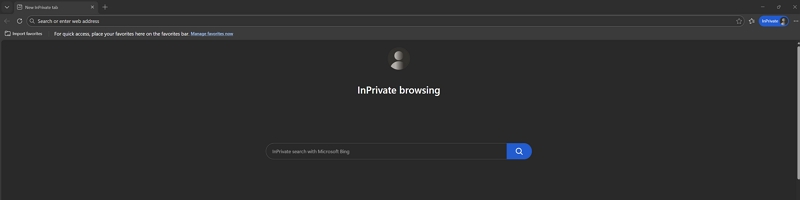
Searching like a real customer means using the same words and search habits a shopper would. Since I mainly use Chrome, I tend to use Edge in private mode for this work, but in truth, Chrome in incognito mode works well too. This helps reduce the effect of my online usage.
You need to do the Local Web Presence Audit in four stages:
- With your computer using Google
- With your computer using Bing
- With your smartphone, using Google
- With your smartphone, using Bing
Smartphone results can differ from computer results, and it's about 50/50 which shoppers will use.
For each stage:
Put your business type into the search and add your suburb, e.g., "gift shop <your suburb>" or "Flower shop near me", etc.
Check what you see, note whether your shop shows up, and whether what the search says about you is correct.
Now search for the top three products you sell, e.g. you may say "lotto near me", "dog food near me", "butcher <your suburb>".
Check what you see, note whether your shop shows up, and whether what the search says about you is correct.
After that, search your exact business name on its own. For example, this shows whether your main listing is easy to find and whether old pages, old addresses, or other shops appear instead. Check spelling, punctuation, and the trading name. For example, if one listing says "Smith's Newsagency" and another says "Smiths News & Gifts", you may be making it harder for search engines to connect the dots.
How Do I Check My Google Business Profile and Map Pin?
In my experience, most problems stem from errors in your Google Business Profile. Your Google Business Profile is one of the most important local listings you have because it helps your business appear in Google Search and Google Maps. For example, when someone searches for a nearby shop, the map result often shapes the visit before the website does. I have discussed how to set it up and fix it here.
https://www.possolutions.com.au/blog/boost-your-shop-sales-with-google-business-profile
A modern business needs to have this right. Fix any errors straight away. For example, if the pin is off, move it to your real front door and check that the address matches what appears on your website.
A map pin can make or break a visit.
Finally, also important to look at your business category and photos. For example, good categories and fresh shopfront photos help customers understand what you sell before they visit. Use your POS system's sales reports to make sure that all your major stock items are listed.
How Do I Review My Facebook and Social Media Pages?
Your social media pages should support your local search presence and help shoppers trust your shop. For example, when someone searches your business name, a good Facebook page can confirm that your store is active and real.
Next, ensure your business details match across all platforms. For example, your Facebook page, Instagram bio, and website should all show the same name, address, phone number, and web link.
Then, look at your last ten posts. For example, if the page has been quiet for six months, it may make shoppers think the business is not active.
Also, post what people buy. For example, show new stock, seasonal products, popular gifts, school supplies, card displays, or shopfront photos.
After that, make your posts useful. For example, short posts like "New puzzle books in store now" or "Mother's Day cards now available" can turn a search into a visit.
Finally, check your contact buttons. For example, a customer should be able to call, message, or get directions with one tap.
How Do I Check My Competitors Online?
Checking your competitors online helps you see what local shoppers see first and what people are looking for now. For example, if three nearby shops appear before you for the same product search, you need to know why.
Next, search the same phrases and note who shows up. For example, look at their Google listings, photos, reviews, website pages, and social media activity.
Then, look for patterns. For example, they may use clearer category names, better shopfront photos, or better local wording than you do.
Also, copy the structure, but not the wording. If it's working for them, it can work for you too.
Conclusion
A local web audit is a simple way to make your shop easier to find. When shoppers search online, they need to see the right name, the right products, and the right location without confusion.
Written by:

Bernard Zimmermann is the founding director of POS Solutions, a leading point-of-sale system company with 45 years of industry experience, now retired and seeking new opportunities. He consults with various organisations, from small businesses to large retailers and government institutions. Bernard is passionate about helping companies optimise their operations through innovative POS technology and enabling seamless customer experiences through effective software solutions.
```

