Point of Sale Software

Black Friday Offers

POS SOFTWARE

Come this Friday it is "Black Friday" which the Wikipedia states is the beginning of the Christmas shopping season.

In Australia, it is mainly used by online and technology companies like us to offer special sales on selected items on this day to their clients. So to get into the spirit, we will be passing on some special offers for some useful items for our Black Friday sale too, so be prepared.

A tip if you shop online, since early last week's deals for Black Friday have started to appear on online shops, and it is possible now to snap up some good deals by doing some selective googling.


Is the world going to come to an end tomorrow?

According to the rumours, Amazon Australia is going live tomorrow.

Australians are already buying electronic products from Amazon in Australia, and products from offshore, but having a warehouse locally is a big plus and having warehouses allows the retailer to cut delivery times and often costs. So it does not mean the end of the world. In the short term, I expect that Amazon will be coming out with low margin items to drive volume, in the medium term, they will be stressing their website, which is not yet up and running in Australia for the warehouse and in the long term, once they get organised, it will be delivery.

Based on what I read in other countries, this is going to be a huge shakeup. A qualitative change is now underway in Australian retail.

Top Stock item sales in a department

Now let say you wanted to study the top items sold in a department based on more criteria from your POS software. These would be the ones that are making most of the sales in the department.

Here is a step by step method for doing this.

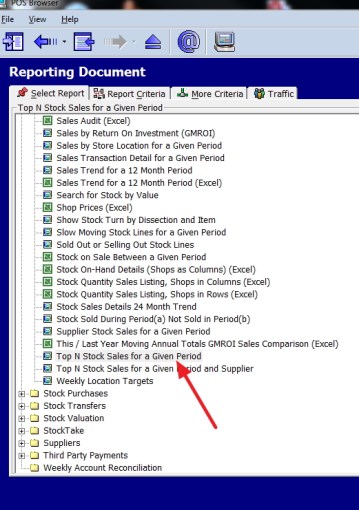
Go to register reports and select the top stock report as marked with the red arrow here

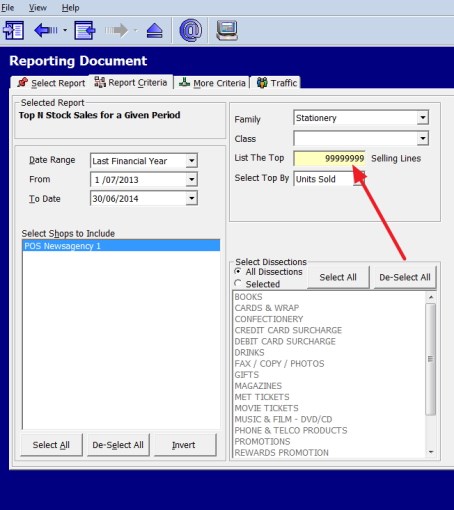
You get this screen

Now select your criteria,note there is also a tab called "More Criteria" which has more options plus the traffic (which is people in the shop) option

In this case I used the stationery department. In red, I put in 99 million in to make sure I get everything and as I like to get a long term view, I selected a whole year as small periods can have major fluctuations.

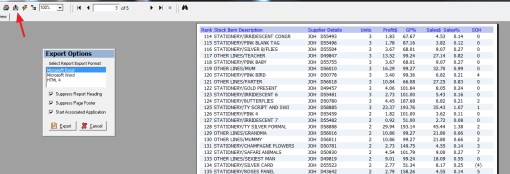
Then I got this report

I decided to import the data into excel for further study as you can see here with the red arrow.

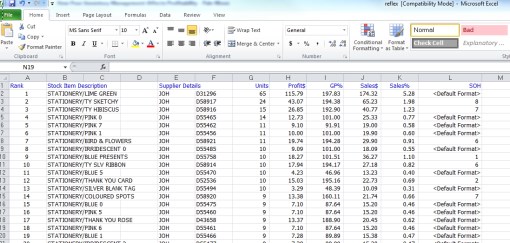
This then produced for me an excel spreadsheet of my report.

Retail loyalty programs video

POS SOFTWARE


Many of the readers are aware of a loyalty program called "Discount voucher."

Its promoters make great claims for it. Its critics are not so sure. A detailed and I think a fair review is available here on this blog which has not been answered by it promoters using what is the best publicly available information about the scheme.

However, Discount Vouchers are far from the only loyalty program available to a retailer. They are certainly not necessarily the best way to go. With our point of sale system, you have lots of choices. I invite to check out this video on several other options here.


Debtors Trail Balance report

Our point of sale software has a brilliant report that helps you keep track of debtors.

You will find it in register reports > customers trial balance.

What this is a list of customers who owe payment to your business broken down by age periods generally current, 30, 60 and 90 days. It can be run anytime, and widely done to give you an overview of when payments are expected. How much is overdue, and which customers need a reminder? This report is commonly requested by banks and financial institutions too.

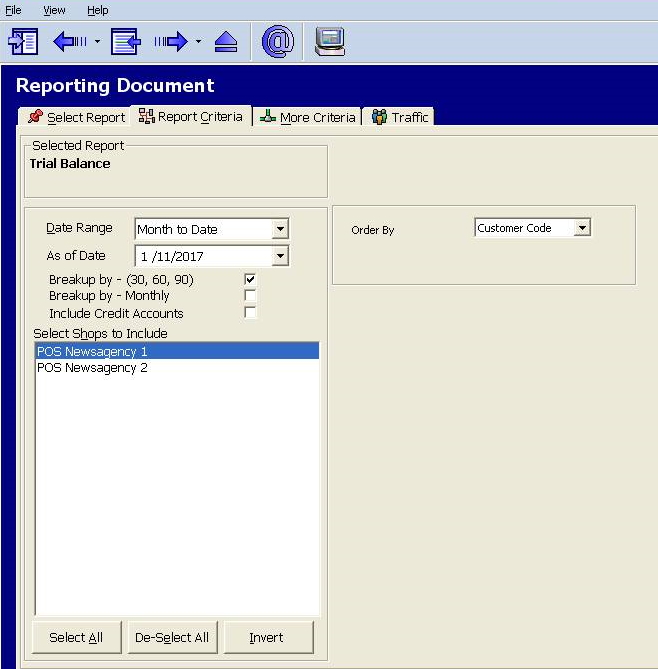
This report comes with two flavours, one for adhoc reporting and the other standard reporting. If you go into the standard report, you will get a list of options.

Most important is what date do you want this trial balance from. You can do it from any date since the system went live, for example, last financial year, today, 1/1/17 whatever you like.

Furthermore, among the other options what you get is the date range you wish it broken into too. Generally, most people use months but some use weeks; others use a four weekly cycle, etc. This is your decision.

If you wish, more options click the More Criteria tab.

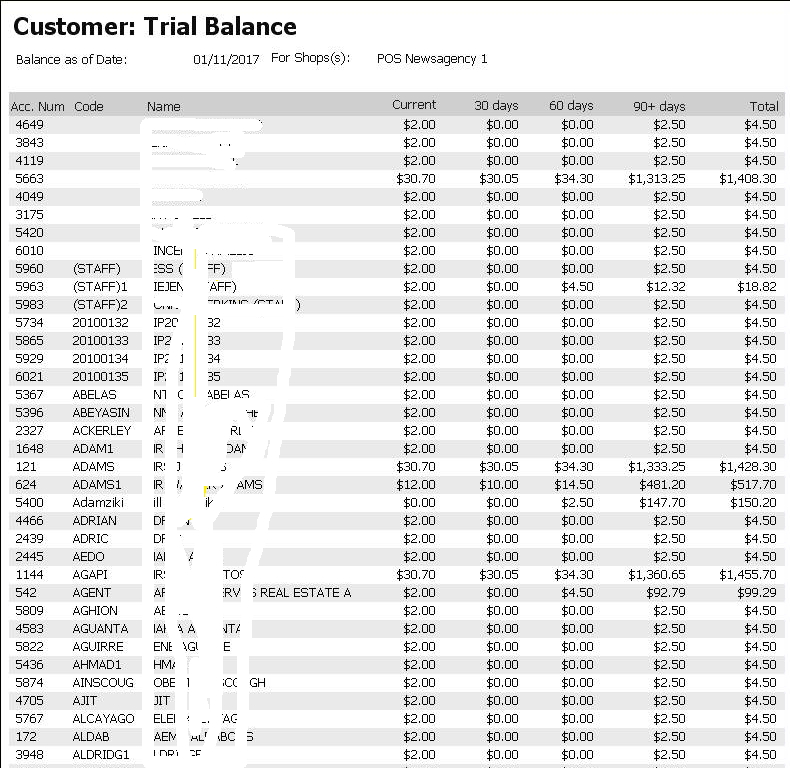
In standard report you will get something like this

The names have been whited out here but what does appear if you look, here is that initially just about everything here is in 90+ Days. That would not be a good sign at all if this was real data.

I recommend you take a good look at this report, as it is financially one of the most common and important reports used in business and also check out the adhoc report below it, which will give you much more options.

Xero accountancy part 2

One of our competitor's has issued a statement which looks like it disputes the claims made here. They have, I note issued no evidence to show why the information supplied by Xero about their API which I reported is incorrect.

In any case, my advice is unchanged there are six systems servicing the Australian Cloud accountancy market - MYOB, QuickBooks, Reckon, Saasu, Sage and Xero. All are good systems. All are worthy of looking into. For the record after an internal review, we decided on Quickbooks for our business.

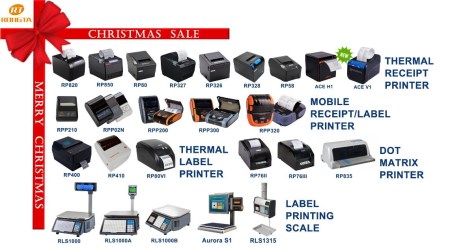
Christmas Promotion for POS scanners, printers and scales

Now is the time of year when importers of POS scanners, printers and scales start cutting prices to move the equipment that they have not been able to sell.

They are sitting on piles of equipment that they have purchased for expected sales, which did not happen. They know that little of this stock will move until February or March next year, and they have the large holiday pays to make as people are going on holidays soon. So to raise funds, they cut their prices currently to move this dead stock.

So if you are interested in upgrading your Point of Sale equipment, now is the best time to do it.

POS Solutions and Xero Accounting

Xero accounting

You can with us, unlike others seamlessly integrate your Point of Sale software into a range of accounting systems, including Xero.

There are, however, a few limitations in importing into Xero that you need to be aware of, this is not caused by us but the importing mechanism used by Xero.

The main limitations that worry us are:

1) Xero is designed for people that have less then 1,000 Debtors Sales invoices a month. We have many clients that do more than 50 invoices a day.

2) Xero can handle only up to 2,000 bank transactions a month. A person with a decent website could easily go over that.

3) Xero recommends no more then 4,000 stock items. Most of our clients are way over that.

None of these is going to be a problem, if you decide to use your Xero as a summary tool for your accounting, but it will if you intend to do detailed accountancy in Xero.

There are many more limitations and its a worth a read here if you are thinking of using Xero.

Overall, my advice is unchanged. Think carefully how your business works, please do not assume that all accountancy programs are the identical, as they all have pluses and minus even though they do the equivalent task. What I would suggest is you take advantage of the free trial periods that many accountancy systems offer to test the system to see how it works in your business.

Looks like a good Christmas coming for retailers

Well early figures released by the Australian Retailers Association (ARA) with Roy Morgan Research are showing an increase in sales and consumer demand compared to last year. As these people have been accurate in previous years, and this prediction does have a ring of truth to them, as economic growth is up, employment growth is also up although we have not had a pay rise in a number of years, I tend to believe them.

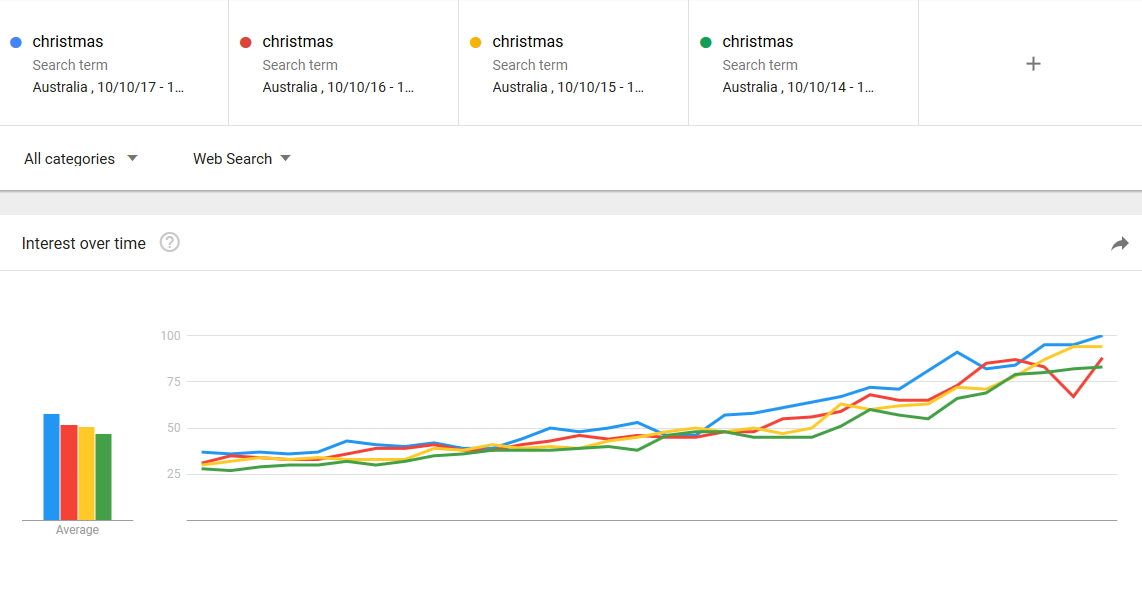
When I did a google trend analysis it shows the same upward trend for Christmas.

Blue is 2017 from the 10/10/17 to now, red is 2016, yellow is 2015 and green is 2014. As you can see blue(2017) is up.

So overall the signs look good for a good Christmas for retailers this year.

Make sure your prepared.

Using two KPIs for promotions

"You Can't Manage What You Don't Measure"

Retail big sale

Every now and then, you are going to have a big event in your shop, a local fair, a major sporting event near your shop, some advertising that you surged on. Etc ., You need to measure your shop to see how it went for you.

Here are two KPIs that I recommend you use in your shop as an absolute minimum for shop management.

Foot traffic

If you are in a shopping center, you may get this figure from the center management, if not or want personalised figure to measure this you need a simple counter that can be purchased from many electrical shops. Now what you do is set it up and generally last thing every day, you record the number of people that entered your shop on that day. You can get dearer ones that automatically do this but people counters, I have noticed is if you want something better then simple, the price and complexity goes up dramatically. As such I would suggest going with a cheap one first and afterwards if you discover you need more, look for a better one at least you will, then know what you need.

Now what you need to establish is a base count which is what you are your staff do everyday. Say, for example, you establish that you and your staff cause about 20 counts a day; you need to deduct this from the recorded number.

Profit per day

There are three measurements usually used - Number of sale, Turnover and Profit. The main reason that people use turnover is because marketers rarely get access to profit figures so most of the books and reference material work on turnover. This is not a problem with most SMB shops. So I would suggest my clients concentrate on Number of sale and Profit and ignoring turnover.

Now there are a number of profit reports in your POS system, check a few until you find one you like. I like the top sales report as it gives all the information, but you may prefer something else.

After a while, you can start doing the analysis.

Select a day say a week before the promo and compare its foots traffic to the promo foot traffic.

Similarly compare the profit figure to the promo.

This gives you six points to consider.

Foot traffic Profit Possible causes
Up Up A great result - you need to figure out what you did right
Up Similar People came but maybe those promo people did not like what you had or maybe you did not present the promo correctly.
Up Down Almost certainly the discounts you offered were too large for what it was
Similar Up No-one came because of the promo but interestingly your regulars brought more
Similar Similar Nothing, promo was a waste of time and money. Unfortunately, this is all too common.
Similar Down No-one was interested in the promo but your clients who are bargain hunters took advantage of the promo
Down Up Probably something stopped people coming like the weather, but I would not write off the promo yet as those people that did come did buy more
Down Similar Again, something stopped people coming, but this needs investigation as less people and you have more sales per person
Down Down Again, probably something stopped people coming, but less people so less sales is in this case a normal result

This sort of analysis is commonly done by professional marketers. So have a play and see how you go.

Contactless costs

mobile payment

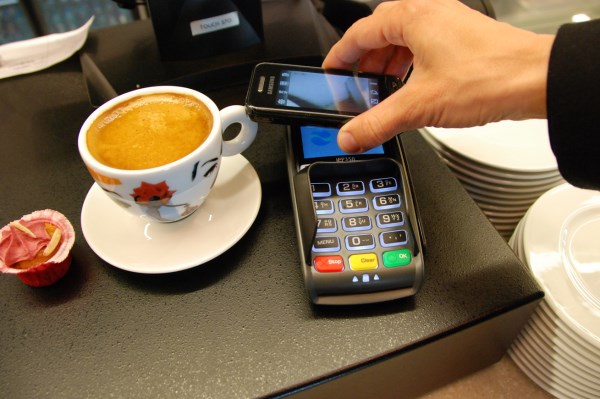
Today’s retailers are in the middle of a revolution in payment receipts as cash and cheques are going and being replaced by electronic money, which goes straight into your pos system. The question here is at whose expense is this change? This question worries my readers here.

Firstly, let me say that cash and cheques handling is not free. It takes time just taken to get cash from the bank, time taken to prepare documents for banking and after that time taken to take cash to the bank, after that there are costs such as incorrect change, stealing, etc. These costs are in total difficult to measure, but as a rule, a retailer needs a few percent margin just to pay these costs say 1.5%. These costs are NOT INSIGNIFICANT. Hold that thought!!

Then there are also hygiene factors for many of our clients in the food industry. Who wants to get a cash notes and coins in a bakery with cream on it.

Secondly do we really have a choice? Many people now for example carry almost no cash. For many people if you cannot handle electronic money, they cannot buy from you. The really bad news for retailers is that the enthusiasm with which Australian consumers have taken to contactless transactions, has created the conditions were they have no choice but to accept them.

Contact unit where a person has to enter a pin number or sign is generally about 9 cents fixed.

As contactless payments are now starting to take off. The problem here is that being contactless they are being routed through a different part of this complex chain through the banking network and so will incur extra costs. Although these costs tend to vary, they generally are about. 9% to 1.2% say 1.05%.

Now let's do some calculations, say you are in an SMB where you are doing 40 transactions of about $50 a day or about $2,000 on EFTpos daily.

With cash, assuming, you can get it; this will cost you about 1.5% or about $30. Despite what many think cash is the most expensive and least insecure payment service you have.

With the contact system, it costs you 40 transactions x 9 cents = $3.60.

With paywave, contactless, it will cost you about $21 less then cash but sigificantly dearer then contact.

This is the"hidden" burden.

There is some good news. EFTPOS Australia has begun to roll out cards capable of contactless transactions with cheaper fees.


Electronic scales

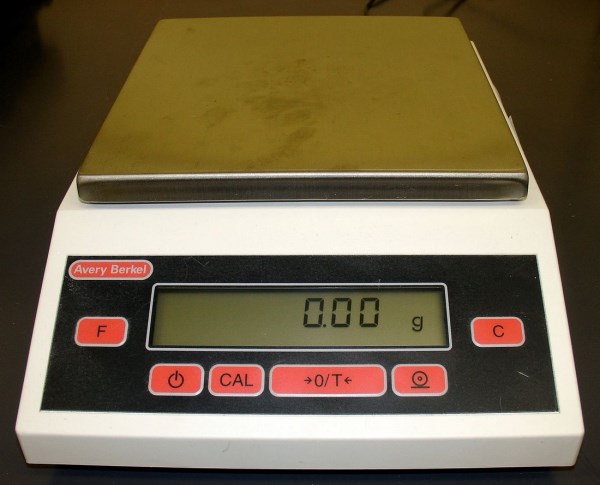
If you sell or handle items by weight, for example, you sell groceries, etc. you sell or handle items by weight, and so you can speed up your processing in our point of sale system by integrate directly with an electronic POS Scale.

There are many advantages to doing this, here are some in no particular order.

- There is no reason for price embedded barcodes. Not having these will give you flexibility when selling plus it also makes it easier to change prices.

- It is faster as there is no double handling. At present, what you probably do is weigh out the items and then manually type it into the computer.

- As your client moves through the shop, each weighing can be stored in a held transaction so saving time at the end, only one weighing required.

- All the information is clearly displayed on the receipt unlike now.

- The information is stored on the computer for future reference.

- Cost as you automatically get a top of the range scale with functions only available on very expensive scales.

- The information can be shown on the clients' double display, so showing them all the details about the transaction while it's being done.

- Fewer mistakes as no double handling

- Goverment certification of weighing as our scales are certified by the National Measurement Institute

All our scales integrate seamlessly.

Once you get it, you are going to love it. If you want to know more let me know.

With us your Credit Card Payments are Surcharge Free!

POS SOFTWARE

Our clients are our most foremost asset and providing them with the best service is what we strive to deliver. One way we do this is by not surcharging our cclient'spayments. We understand that our clients like using credit/EFTPOS cards so penalising them when they pay us, is annoying to tthem. So POS Solutions is a surcharge-free merchant, that means you are free to use your credit/EFTPOS when shopping with us without any extra fees.

Furthermore, continue benefit clients and will accept payments in the mode that our client is most comfortable with.


Melbourne Cup 2017

Melbourne Cup 2017

Our office will be open during the Melbourne Cup day tomorrow for your support calls.

Good luck if you are having a punt and wishing you a happy Melbourne Cup day.

Stock turns a useful method to review ordering

One aim in successful retailing is reducing the stock holding. One of the most common metrics used in measuring the number of times your stock is replaced every year, generally the higher the number of turns, the better it is. If you can get your stock turning over in less than a month, then you are not paying for it.

However high stock turns do have problems such as.

-You are probably ordering stock frequently. This often increases ordering changes and takes more time. If, for example, you order daily (five times a week) in contrast to weekly it takes five times as long to do an order. It also means more shipping costs, more handling costs, etc.

- Typically it means you do not have enough stock so more lost sales due to being often out of stock.

Low stock turns often mean.

-Stock that is not moving and needs to be accessed.

We have this very good report that can tell you among many other details just how much each department is turning over, what it is costing you in stock holding and what sales you are making out of it.

To get this report, go to your point of sale software.

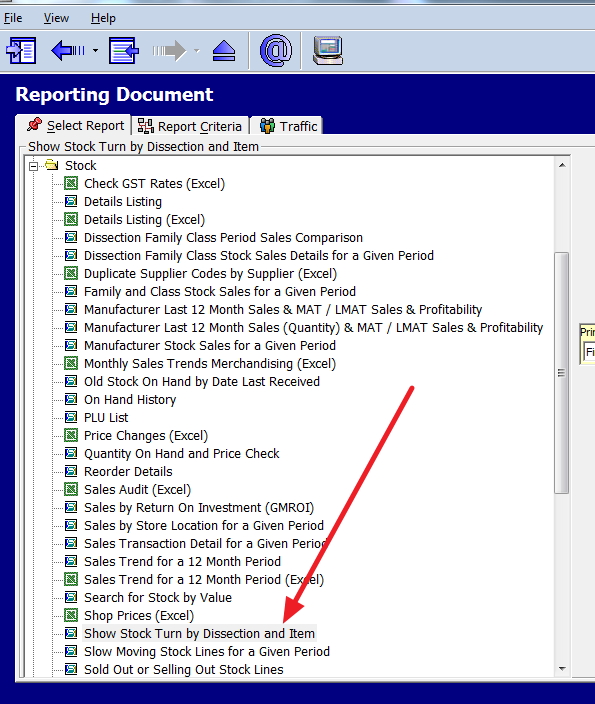
Main Menu > Cash Register > Register Reports > expand Stock > select/double click the report “Show Stock Turn by Dissection and Item.

Now select the relevant options and then click the View Report button.

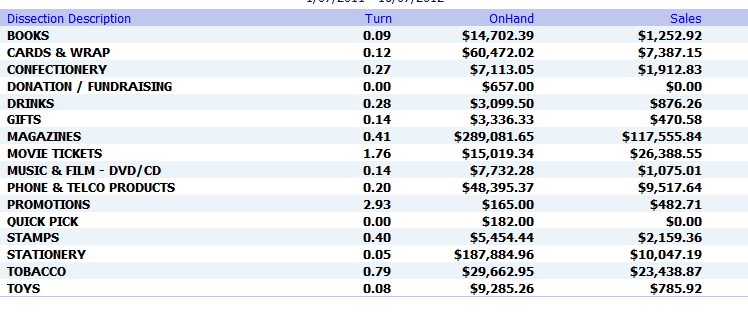
Here is one by department (dissection)

In this particular case, if I got this, I would be looking at stationery, big department, a lot of stock holdings but little in sales.

Print a custom message on a receipt

Often you sell some item in the shop, and you want to place a special short note on the receipt message which is added at the bottom of every receipt you print. This is generally used to suggest new products that a person that purchased this item would probably like or to provide information on that product.

This in our point of sale is easy to do.

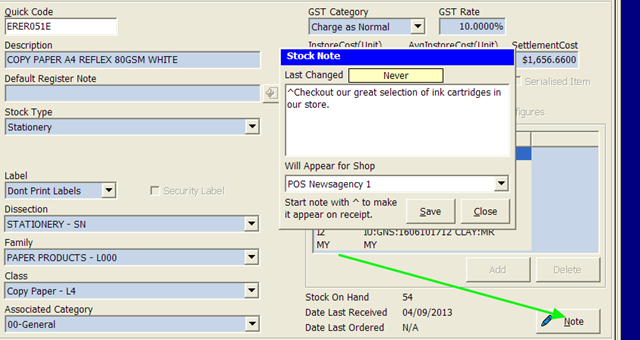
In this case in this shop if someone sold a printer paper, the computer automatically suggests that they look at the shop's ink cartridges.

image

Now to set it up, is simple, call up the stock item in stock maintenance, see where the arrow in is green, press the box notes. Now when putting in the note and start it with a "^". When this item is sold, and you print a receipt this note will appear.

Going the VISA/Mastercard Card

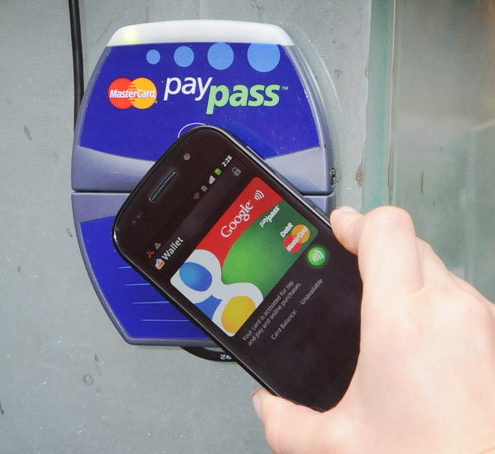
I was reading here a Commonwealth Bank promotion which started me thinking of how for a while now, I have been saying that retailers need to prepare and get credit/debit card terminal from their banks and EFTpos providers who can work with mobile phones because it's only a comparatively short period of time when instead of using your credit or debit card to pay for an item, a meal or a taxi, you will tap your mobile phone on your point of sale system.

What I have noticed that the banks are all behind it. Not sure exactly why but I am sure just getting rid of cards will save the banks a lot of money.

The promotion itself is quite simple, if you met the conditions, the Commonwealth Bank will give you $20 after using your mobile phone to do payments three times instead of using your MasterCard card. It is an easy $20 assuming you are eligible. All you need is an Android phone which most have as it is the most popular mobile in Australia, the mobile has to run KitKat 4.4 or higher and have a Near-Field Communication (NFC) antenna and Host Card Emulation (HCE) support which I suspect would be possible on most mobiles younger than four years. So I suspect the real problem for many people is that many people in Australia use VISA.

I am sure we can expect many more such promotions so check your terminal.

Checking your GST rates

One big plus and probably unique advantage that our users have is that so much of their stock data can be imported from the suppliers direct without them having to manually enter in the information. It does, however, present a problem that despite our best efforts, some of the information submitted by the suppliers is wrong and as such this incorrect information gets into our clients' information. For this example sometimes, some of the GST rates in the suppliers' files are wrong; these inaccurate figures are imported into our clients' system, and so this results in the problem.

Note this problem does also occur when people manually enter in the products and make mistakes or follow the suppliers' documentation which is incorrect.

So what I do suggest is that you audit the GST figure regularly.

You will find it in here in your point of sale software.

Cash register> Register reports > Stock > Details Listing (Excel)

This allows you to use ad-hoc reporting.

As it can be much faster to check if you all departments at once, but you may prefer to do it by one department at a time.

Now you will get a screen that looks like this.

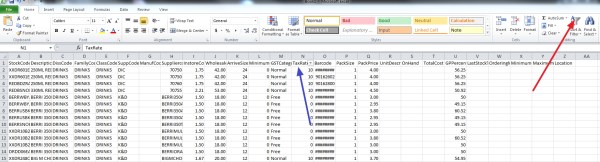
Where the red arrow is click on that "Sort & Filter", now click where the blue arrow is "Tax rate" and now click all the rates that are not 0% or 10% and review them. Then do it again only for 0% tax items and review them too.

Overall, I find this particularly useful is in tracking down GST errors.

Give it a try and see how you go.

Apology from a competitor over privacy

This is to bring up an important issue of privacy. Which are going to get much more important after February 2018 when the new privacy laws come into effect.

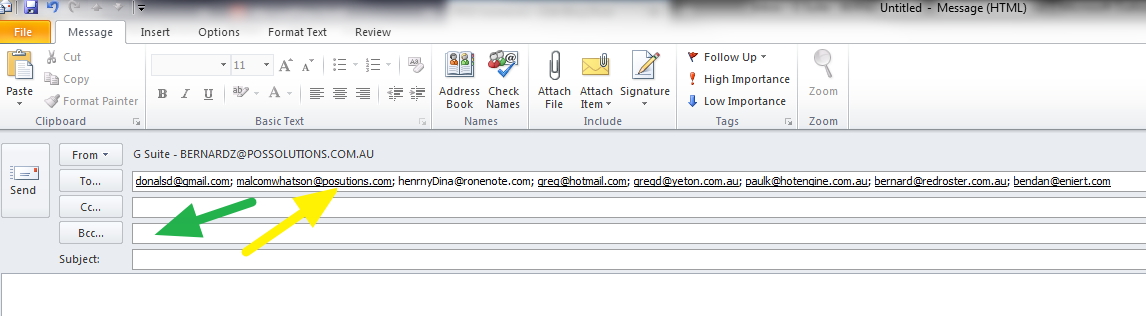
A small competitor of ours, have done the right thing and has sent out an email where they admitted having made a serious error by releasing in a bulk email the addresses of all recipients who appeared in the "to" section of the email. See the yellow arrow

What they should have done is put these emails in the Bcc line marked in green. What they have done does not follow the correct protocols required by the Australian government as they have broadcasted peoples email accounts.

I suggest that from this day forward, you be very careful, and if you are sending emails in bulk, you consider using Bcc rather than To or Cc. If it does happen make an investigation into the circumstances, try to determine how this happened and review your current processes and procedures to ensure suitable handling of personal information in the future as unfortunaly I cannot see any technological solution at present, there is no way I know of setting limits to the number of people in the To and Cc.. lines.

Remember legally you are reponsible for the privacy of the information you hold.

Technical note: This will outline the problems with Gmail making a technical solutiuon which I assume will be similar to others.

If you are using GMail you can have up to 2000 recipients in an email. There is a further limit that only 500 of them can have an email address that is not @gmail.com. If you are using group email addresses which can contain thousands of emails, this will be counted as ONE recipient, even though the email is received by many people. I cannot see anywhere these limits can be changed in Gmail.

The coming rostering requirements

To prepare for the approaching holiday season, I suggest you do a traffic analysis.

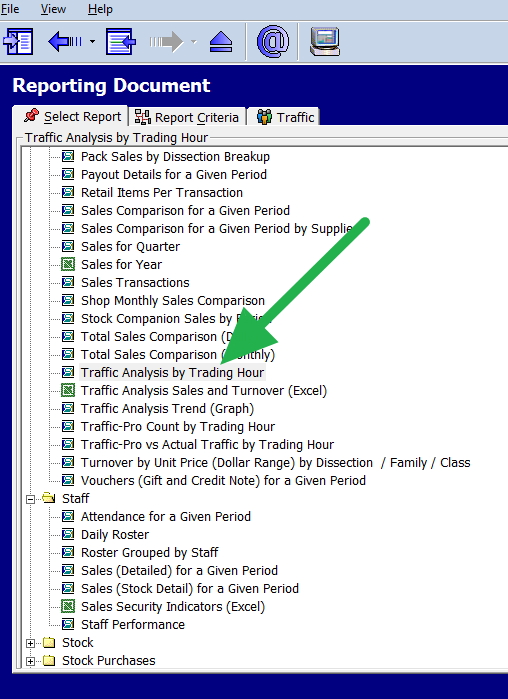
In your point of sale software

Go to your traffic reports shown in green in the reporting

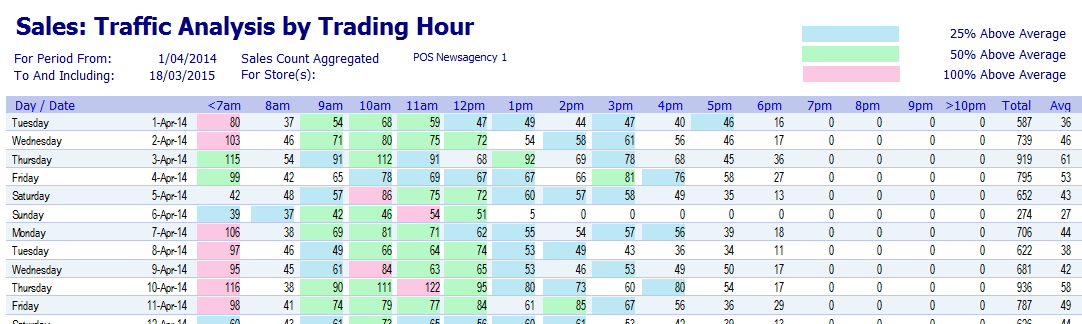
Out in the applicable dates, I would suggest running it both weekly and monthly.
Attached to the output produced; you will find a colour coded analysis showing how active the shop was divided into groups with red being the main busy period. I used some old dates.

Now these red ones are the periods you really need to consider.