Financial Review Queen's Birthday

An automatic patch to handle the Queens Birthday edition of the Financial Review has just been released. You will have it in version 1.1.79.O

An automatic patch to handle the Queens Birthday edition of the Financial Review has just been released. You will have it in version 1.1.79.O

A couple of people questioned me after my last post claiming that Microsoft did not give enough warning about windows 10.
I do not believe so, Microsoft gave many warnings, to many just ignored it. Nor do I think its a bad thing what Microsoft is doing. I agree with their advertising that they have been "consistent, transparent, and predictable timelines for which software is supported."
However, if you are wondering what your Microsoft product's status is, then you can find your answer here.
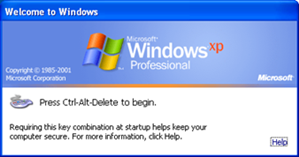
Those people that are running XP or early need to be aware that the old version of the windows XP security certificate runs out on 6/June/2016, which is less than four (4) days away. As such on that date and after many do not accept it, including the banks and courts do not like it, that people are running out of date and unsupported operating systems.
If you want to know technically what is happening please click here.
Now if you are running Windows XP and are running such programs like tyro on that computer, please check what service pack you are running.
To do this, please
Go to the start button and click on it
Then type run in the search.
Then type "winver" here and press the enter button.
Now a window will appear with details of service pack and the version of windows.
Now check here that you are running XP and if so what the service pack is?
Please only do this during business hours when you have access to support just in case something does go wrong but it most likely, it will not, but Windows being Microsoft, who knows?
Now click here.
Download and install this update. Problem should be fixed.
Note: I should say here, that we do recommend that you consider going to windows 10 as what you have is very old but this can be a subject of another post.

A key benefit our clients tell us about our system is the speed of the cash register.
Here is a sample report of the speed and efficiency of the transaction time being done in less than 3 seconds a transaction on our point-of-sale system.
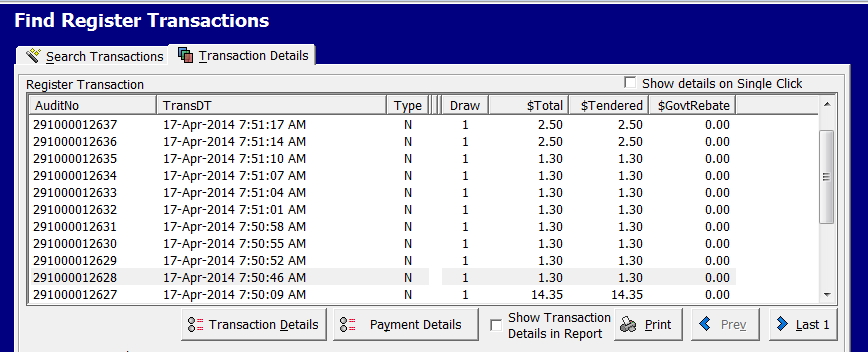
I believe one big advantage my clients have many other systems is the speed of processing transactions on the cash register where it is important that a person can come in and be done in seconds. Too long a wait and often people simply leave without buying, if they are nice, they will put the items back on the shelf. If not, they will dump them anywhere leaving you to put them back on the shelf.
Often this problem is ignored, and yet I believe it's one of the main advantages; I think our clients have over their competitors.
There are three main KPIs used for measuring queues. The first is called transaction time; this is how long it takes a customer from when you say "Hello," and they say "Good-bye." This is what is shown above.
The next is how many customers are in the checkout line at any time; this is important as many will look at the queue coming in and just walk out, if they think, the queue is too long. That is why some retailers put barriers up to hide the size of the queue from the people walking in and why many prefer small queues and many tills rather than one queue and many tills.
The last KPI commonly used is. How long does a person wait in the queue, that is why it's important to have a cash register system as fast as ours. People will walk out if they wait too long.
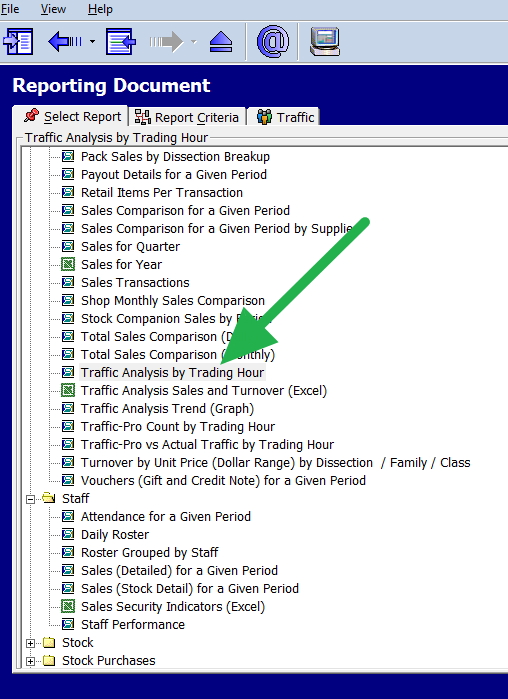
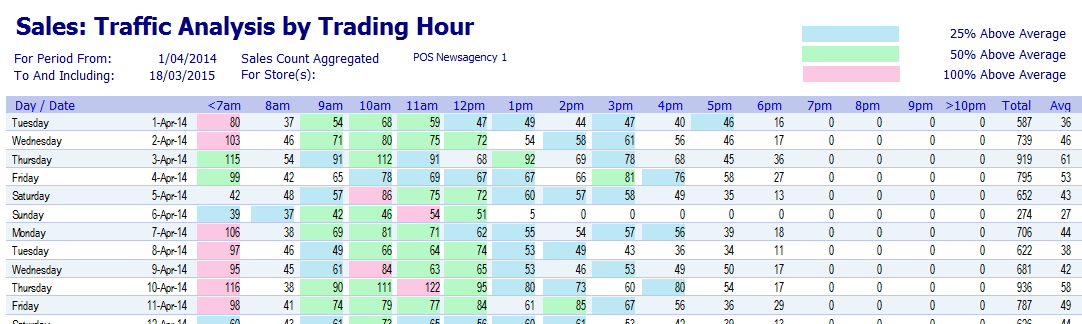
As a first step what you need to do is go to your traffic reports shown in green.
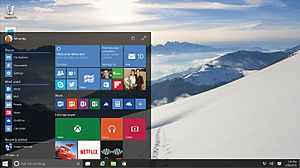
Despite what some people say, upgrading to Windows 10 is not a virus or whatever. We consider it not an additional cost but a necessary function that has to be done to keep up to date with technology.
Consider when you move house, it often is really difficult and stressful but in a short time, it is better than before. Plus you get a feeling of satisfaction that comes with having the latest. In a short time, you feel better than in the past. Who feels good living in the worst house in the street?
Windows 10 is the best Windows yet and for most of you its free. Sales of Windows 10 have been incredible. It starts faster, has many good functions such as the mail and calendar which are first rate; many of you will find onenote to being the best and most useful program you ever had, which interfaces both on your mobile and to our software. Furthermore, you no longer need any third party antivirus software. In Windows 10 there is a free built-in antivirus software Windows Defender, which is a pretty good product, and as it's built right into Windows, so it does not slow you down like so many others blotware security suites do. Plus that is what everyone will be using, and soon many of your staff will soon only know Windows 10.
Much of what is being said is in my view rubbish.
We were ready for it.
We released information for those that did not want to upgrade to Windows 10, on how to stop this upgrade.
The upgrade, although I do not like the sneeky way, it's being done now,
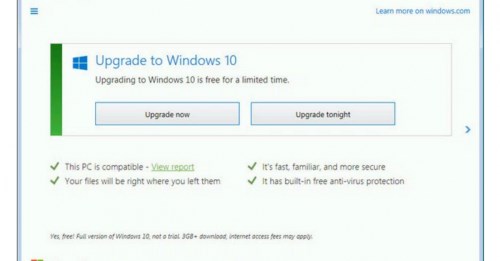
is almost always straight forward and quick. We have not had to increase staff. Just make sure that you do it when you have support just in case The big issue here is that not all equipment can handle Windows 10 particularly if it's very old.
Furthermore, when the first beta version of Windows 10 was released, we made sure that it would work with our software, which turned out to being pointless as our point-of-sale system even early versions could handle Windows 10. I confess I do not believe the people that are claiming on their system that the serialisation; anti-theft system cannot handle Windows 10. It is in my view a grab for money.
As such as we do not see our purpose in having our clients sit on obsolete old software and we think they should have the best that they can.
As such we do recommend the upgrade. Now is as good a time as any.

The MPA comprising of the magazine companies has just issued the MPA Pilot Interim Report in magazine to the ACCC. As we had much to do with this report, we were given an advanced briefing but told not to talk about it until its public release. Which means now.
To recap the events, the MPA went to the ACCC to be allowed to do a study of magazines to improve the efficiency of magazine retailing by doing tests in pilot programs. Well if its going to improve our clients' magazine efficiency, we are for it. So we got many of our clients to join these pilot programs. Overall those that did have mixed reactions to the program, but all found it overall positive.
Our readers will find nothing to amaze them as the conclusions are what I reported earlier here. Not surprising as much of the data comes from us. The only difference is that I used five years of history and worked on departments, while the magazine companies worked on a few months and used actual stock items. Nevertheless, the conclusions are basically the same that a substantial increase in efficiency (20%) can be achieved in magazine distribution within the current models using existing technology and marketing support. That 20% will be a big help to those clients of ours that distribute magazines.
Overall, I think it's been a great success, and I want to thank all our clients, the MPA, Network, GG, the ANF and of course our own technical staff that helped in this pilot.
The interim report is available here for you to read and hopefully soon the full report will be available.
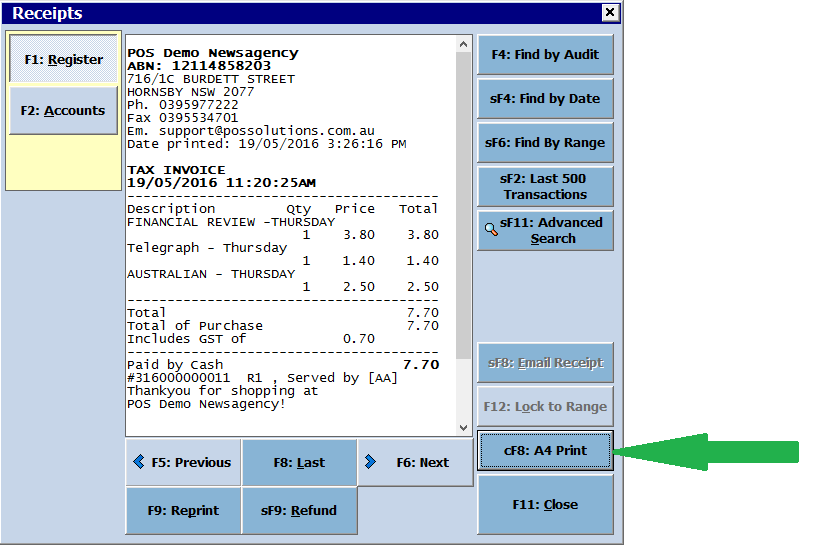
Sometimes customers may want an A4 receipt. This is especially true of business customers. This is very simple in PosBrowser. Simply click on the "Receipts" button, find the receipt you would like to print, then press the "A4 Print" button:
You will then get an A4 receipt:
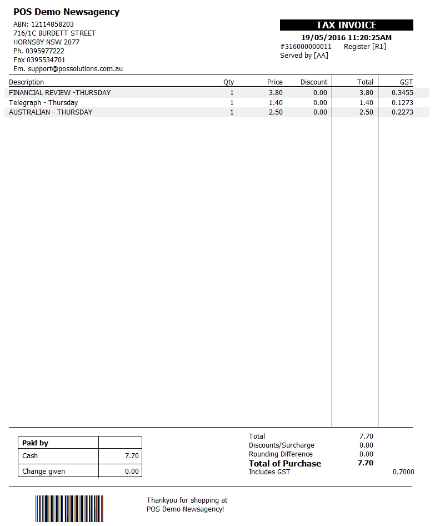
Note, this feature will print to the printer set as default on each machine.
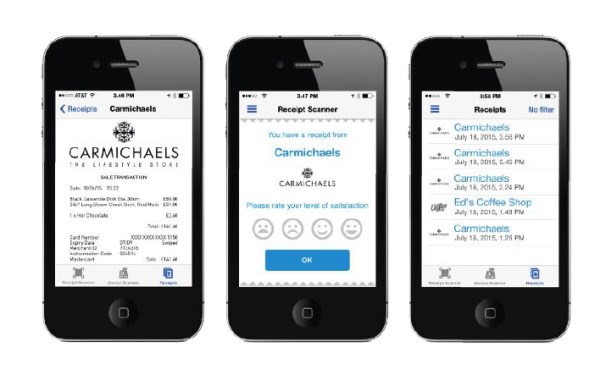
On a recent point, I spoke when you issue a receipt to a customer you can either print it or send it by email or dongle.
A dongle is a relatively inexpensive device on the counter which when a customer waves their smartphone over it, the receipt goes straight into the smartphone.
Like everything, there are plus and minus to everything so it brought some questions.
The major point is that checkouts have to be fast. Customers do not like to be kept waiting. The secondary issue is saving money by supplying so saving paper and printing costs. In an effort to do both many of our clients either email receipts or use a dongle rather than print them and both work.
Here are some advantages to the smartphone.
1) Asking for email addresses annoys customers as most people are reluctant to give out their email address as they are now being bombarded with emails.
2) Email addresses given are frequently wrongly transcribed.
3) Getting an email address takes time on the checkout increasing the wait time for people in the queue.
4) Smartphone receipts are better.
5) Many prefer smartphone receipts.
6) Smartphone receipts are faster.
Here are some advantages to using email.
1) You have an email address for marketing e.g. newsletters.
2) Not everyone has a smartphone handy; I sometimes forget it, and often it just runs out of juice.
3) Not everyone is sufficiently technical to use smartphone receipts.
4) Many prefer email receipts.
I agree it is imperative to improve the customer experience in the check-out line since this is the relevant and lasting impression a customer will have of your shop.
The problem with Windows 10 is continuing, several people here have started getting messages like this one.
Now they are being asked to do an update or wait till tonight. It is an advance on the previous one that looked like this.
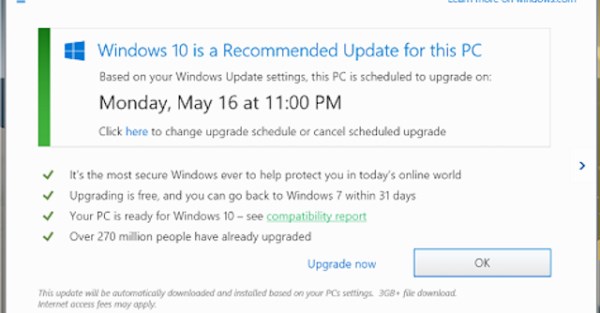
Readers here who do not want to do the update have NO excuses for getting these screens as we have told them several times how to stop it.
If now you are getting this message you have reasonably two choices, the first is to delay the update and then click here and carry out our instructions.
The other is to do the update. If so the best in the daytime when support staff both from Microsoft and us are readily available.
Under no circumstances abort the update if it starts or reverses it once its done. All you are going to do is make the problem much worse.
Here are some facts, I would like you to consider before you make your decision.
The Windows Update will not start unless it thinks it has all the drivers for your hardware so the hardware should not be a problem.
Many of the bugs have been worked out, and the problems that many had when doing the update is solved so there is a very good chance that this Windows update will go well.
Personally, I use Windows 10, love it, and it is great. Window 10 is better.
All Microsoft software and much of the rest are switching over to Windows 10, if you stay with what you got, you are going to be left behind very soon, you almost certainly will be locked out of many of the functions of Windows.
Lastly its not Microsoft fault, they have warned people repeatably; for example we prepared over a year ago and tested our software including old versions. All worked well on windows 10.
It is just time to move with the rest of the planet.
One of our clients, noticed that one customer billing details looked quite strange. They were sure that the details had been changed.
So I told them to call up the customer, press the Status marked with the red arrow.
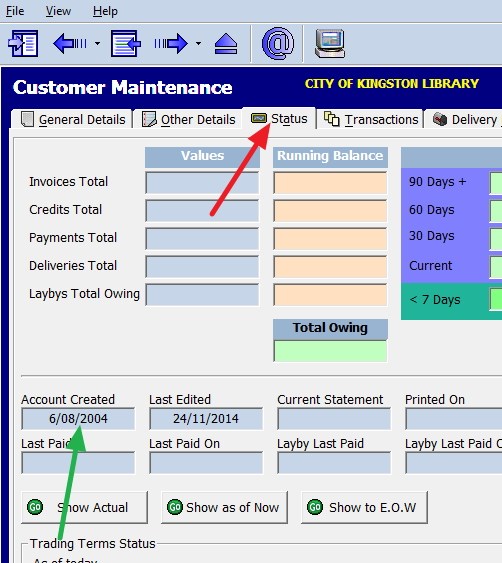
Now see where it is marked in green when the Account was created and next to it, you can see when the account was last edited, last paid and so on.
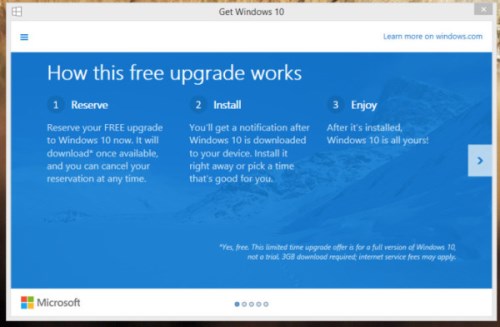
Many of our clients last night, not using Windows 10 suddenly had the Windows 10 upgrades forced upon them by Microsoft. Luckily, our software is up-to-date and cutting edge and functions well under Windows 10. I feel sorry for those on some of our competitors' systems whose old versions cannot handle Windows 10 upgrades! Many of these people are going to have to show their credit card details as they are now locked out of their system and will not be able to use their tills!
Was it forced by Microsoft, I am not sure? The messages to upgrade to Windows 10 are not exactly clear so many people never realised that they were being asked to start to do a Windows 10 upgrade when they said yes. In any case, the update started. If this happened to you what I stronger recommend is NOT reversing the upgrade when its finished, this reversal is causing more problems, then the upgrade to Windows 10.
On the positive side, there is no future with the old version of windows, and it probably is as good a time as any to go to Windows 10. However I can tell you there will be problems. For example, a few weeks ago several of our users were locked out for almost an hour in the morning of their system when a massive windows upgrade of Windows 10 happened. It is a trip to the unknown.
On the negative side, many people are happy with the system they have. Many would feel that they don’t have a need for the new feature provided by Windows 10, they do not want to learn a new system, and as they are having few problems with their current system so this upgrade is unnecessary. So if you feel “If it ain’t broke, don’t fix it” and you want to delay the Windows 10 upgrade, click here.
Update: Several people have asked me why is it happening now, well what happened is that Microsoft windows updater has done a check with your system and found that they have now all the correct drivers for your computer, it looked at the Australian timetable, it thinks it has your permission and said to itself, its all there so lets rock and roll.
What should you do if the install of Windows 10 starts?
The answer is do nothing, just let the Microsoft update to do its job; our windows point of sale system has been tested; it works under Windows 10 under its all versions and welcome to the 2016.

The latest copy of Artwrap catalogue file, is now available for download.
For this and other supplier files please visit here
There is a saying that a picture (graph) is worth a thousand words, and many graphs are better still. The problem is few people feel comfortable looking at rows of numbers on a graph you can see patterns and trends much easier and its not that hard to create millions of different types of graphs with our point-of-sale system.
I will do a simple one here as an example.
I decide I want to look at the department sale of Tobacco.
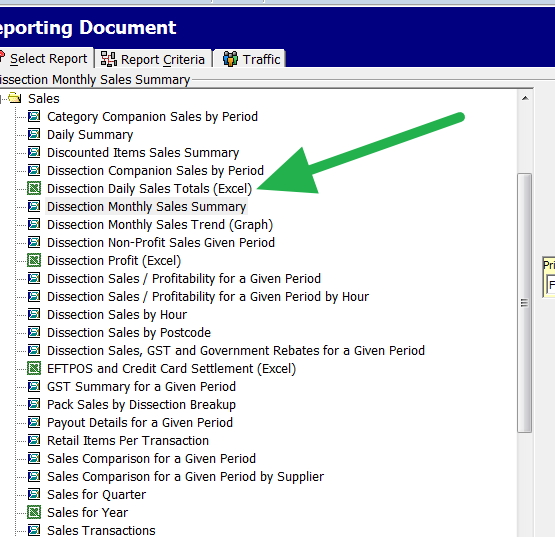
So I go into reports and select "Dissection Monthly Sales Trend (Graph), and I get a graph but say I wanted to do MORE. Say I want to experiment with many different scenarios; I wanted much more than a graph. This is of course where the power of our point of sale is shown. It's not just a static one-dimensional reporting tool. It can give you the flexibility to make your own reports and graphs.
So we pick the item above it the "Dissection Monthly Sales Summary"
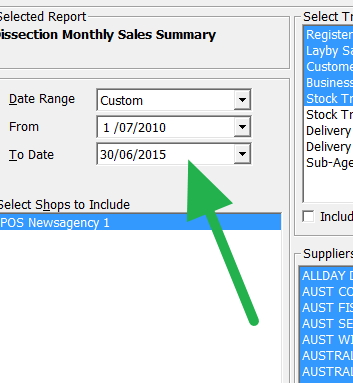
Since for this example, I will be working in whole financial years, I pick this range of five years.
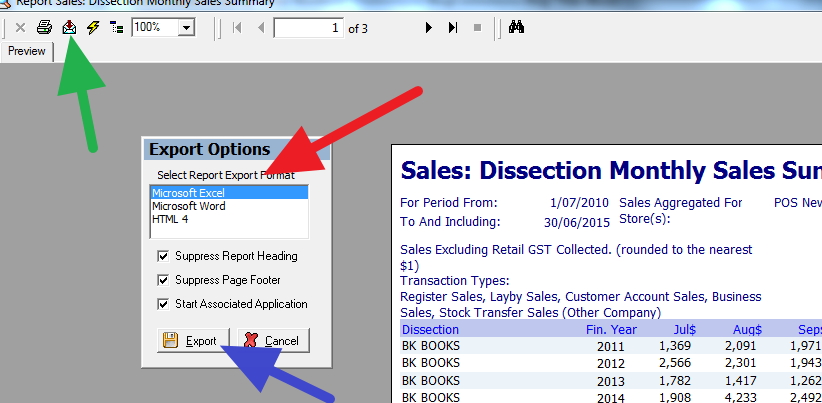
After the report comes out, I press the green button to export it to excel or openoffice which is free and very good
I do whatever I want there but in this example......
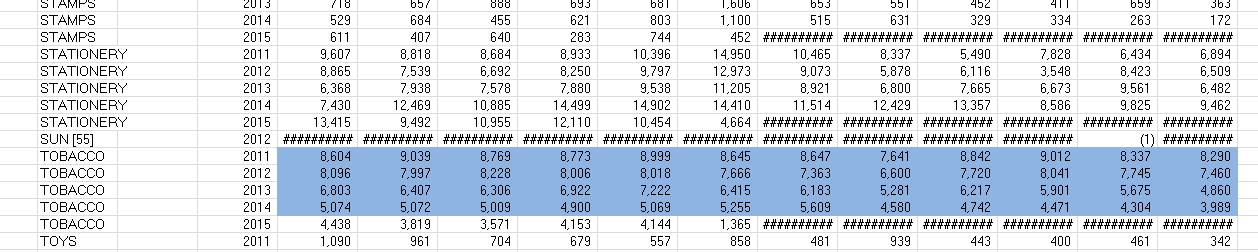
I highlight the Tobacco department.
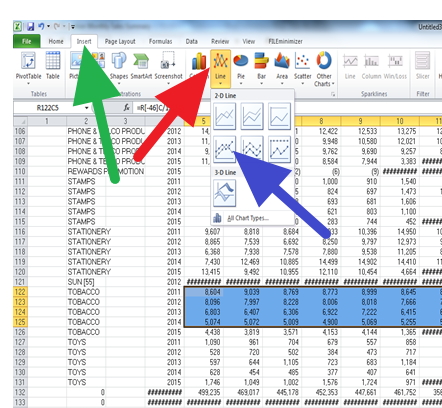
Press insert (green), Line (red) and for this case, I will use the fourth one but there are millions of different graphs available there.
And out pops my graph.
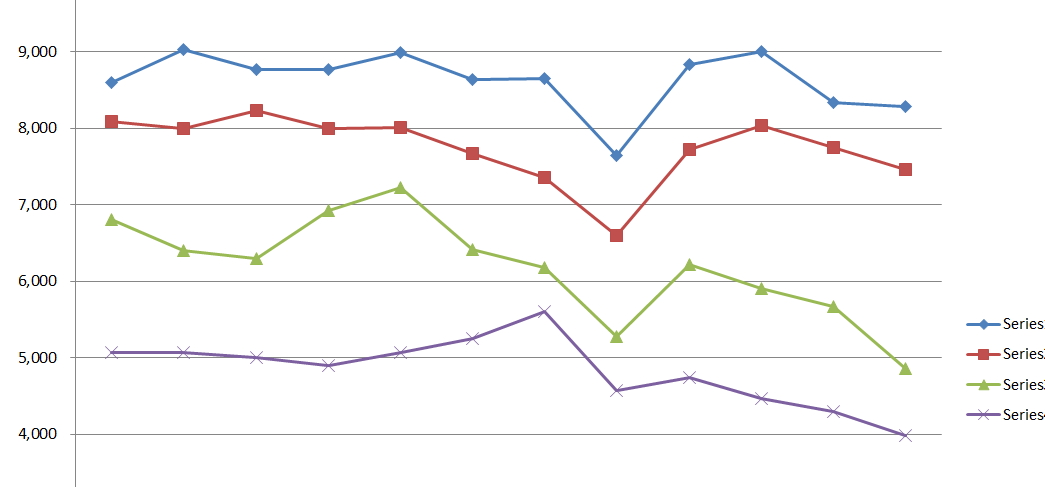
Which shows me the last five years of history. You can see its going down, down, down.
Have a shot, you will find it most useful...
Here is a tip one point many people should but do not is check is how the software looks and behaves. Ask yourself when seeing it. How easy is it to use when you do not have that technical person showing you? This is of course where our software shines as I will show.
Overall, I think software should be easy to operate, if people cannot determine how it application works or where to go all that is going to happen is people get confused and frustrated. You should check how a software looks and behaves. It is easy to be fooled when you have a technical person showing you who understands, but once he leaves now what. This is of course where our software shines, as this example will demonstrate. You should also look at the behavior. It should be the same everywhere, how many times do I see in software a button that does this and then in another part the same button does something different. The next point is that it should work fast; this is not just software speed but the user interaction. Why should someone have to press 10 key strokes to get something to happen?The less keystrokes the better! For example, in our cash register, you can do over 90% of the transactions with no keystrokes. Lastly, it should be forgiving; people do make mistakes, and sometimes they can be costly. That is why I love our undo functions.
Here is a sample of what I am talking about.
Everyone has their favourite report. Something that they need to run often. So how do we make it easy so that they can select it and run it as worry-free as possible. What we do is have a favourite section which you will find in the report section. I will show you how to use it.
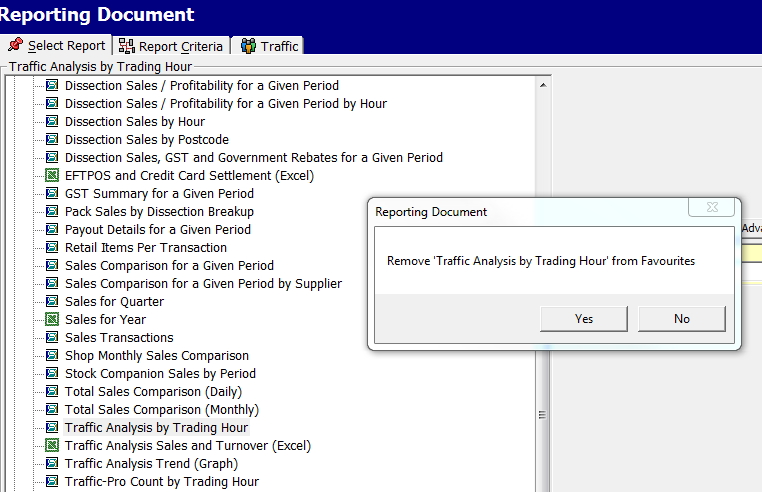
Say this report "Traffic Analysis by Trading Hour," is one I wish to run often. Actually, it is a very popular report well worth looking into. (see the green arrow).
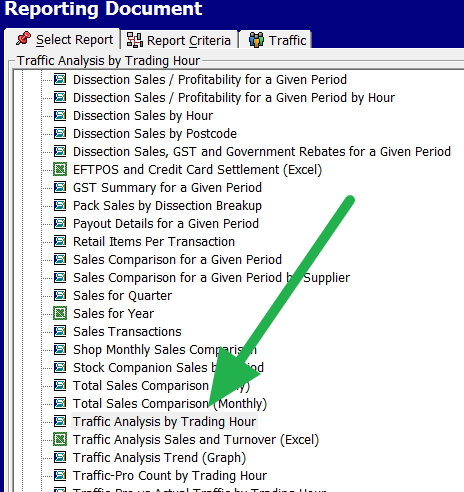
I now put the mouse on it and right click; of course, you can do this too on any report that you like.
It then shows a message to add it to favourites. If I go YES and now in my menu under favourites is this report. Next time, I want it all I have to do is go to the favourites which I am going often for my other reports and select it to run. As you can see here.
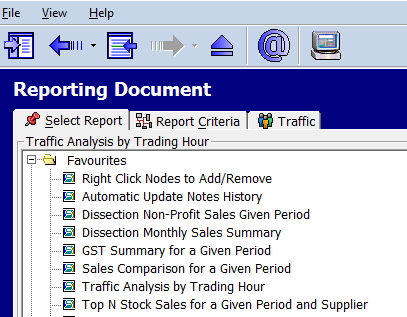
Now OOPS let us say, I made a mistake. I did not want that report but the one underneath, or just after reflection, I decide that I do not want it as a favourite as maybe I found something better or its not doing what I thought I needed. Okay so I need to undo it, not a problem, I right click on the item, and a message comes up, do I wish to remove it from favourites. If I press YES, it is out of the favourites.
Wow!!!!
Now what do you think of my comments, I’d love to read your thoughts.
Leading up to the end of the Financial Year, we thought we would highlight some of the most common EOFY questions and answers.
Part 1 - Stock Take
Many of our clients will be undergoing a stock take for the End of the Financial Year. This can often involve costly outside help or inaccurate results. Use PosBrowser to stock take many of your departments, the benefits are amazing:
Have a look at this document for more information on how to Stock Take with PosBrowser:
Now we recommend all our clients use cloud back up as a secondary and last emergency service. At the moment, we are finding cloud back up to be the best defence against ransomware viruses.
Although hopefully, you have your own internal backup system, which is your first call if a disaster takes place, and we do not suggest that you change that yet.
Cloud backup is very good, but it has problems too a cloud effectively is somone elses computer and nothing is 100%. For example one of our clients had a laptop that was stolen. They could not restore the information from the cloud, and it ended out in an argument with their cloud supplier as to who was responsible.
Still for many of you that use Telstra, there is currently a good offer for you to try a cloud backup free.
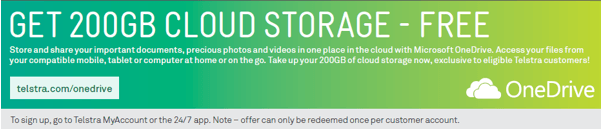
Onedrive works well with cloud backup and your systems and even the 5GB offer that onedrive has free for anyone is probably enough for most people. At the very least, it's a great way of testing cloud backups free of charge, and if you decide to pay for it, it is $1.99/month or if not you are still free to look elsewhere.
Here is an information sheet on how to set up and use cloud backs with onedrive and our system.
There are of course many other excellent providers of cloud back up too that our clients use, which have their own backup systems, and I am certainly not suggesting that there is anything wrong with these.
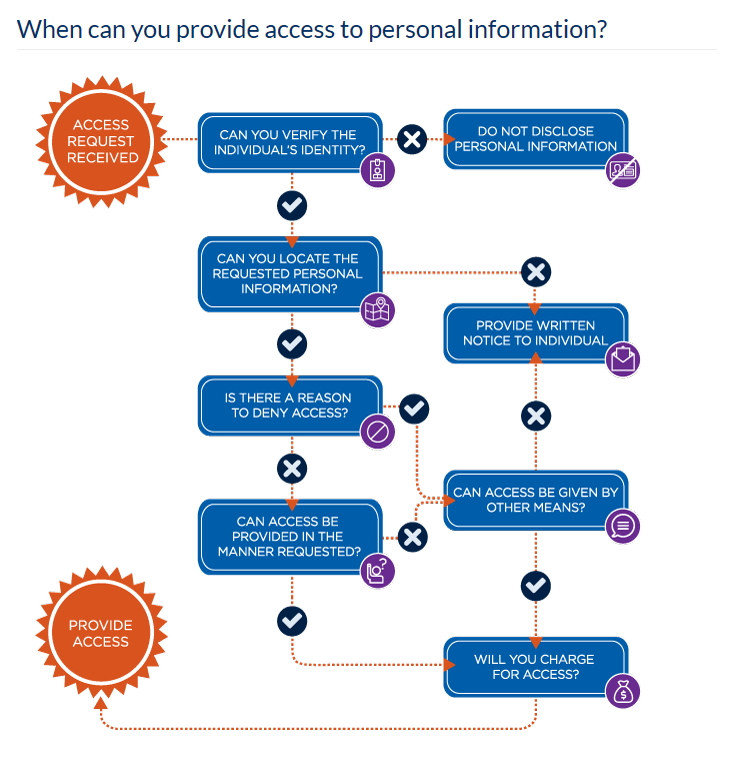
Everyone has the right to ask for all the personal information you hold about them. You, however, do not necessarily have to release this information, and if you do you may be able to charge for the work required to produce the information required. What the Australian government has done is created a flowchart to help you make these decisions.
There were no surprises this quarter as the latest Audit Bureau of Circulations figures show more of the same slide for the print circulation both in newspapers and magazines.
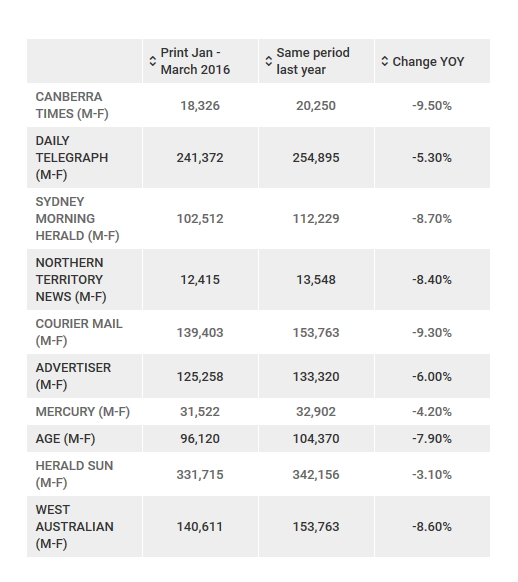
Note how Herald Sun and Mercury are amazingly less than the rest.
It is however, fair to say print newpaper sales are losing sales fairly consistently no matter what the publisher or region. Digital has certainly not made up the difference as you can read here.
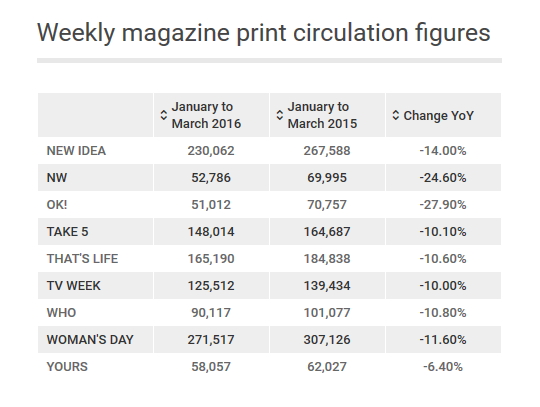
Weekly magazines are dropping even faster as you can read here
If you are thinking of doing a rewards program in your store, these are the KPIs that are generally used. I suggest getting these figures before starting to use as a benchmark, then over time track and measure your progress against this benchmark.
The first point to note, is that such programs do involve a lot of work, and they can be risky. Once your customers get used to the benefits of your program, they will be upset if they lose these benefits.
1) How many customers are IN your program? As a rule, most reward programs are looking for about 30% of all customers to join although 10% to 40% are acceptable.
2) How many are USING your program? The greatest program that is not being used is useless. What you need to know is what is the ratio of (customers in your progam)/(customers outside your program)
3) Now compare that ratio of the (transaction in your program)/(Overall transactions) by value or profit.
For example, I would be happy if 15% of my customers use the reward program, and the transaction ratio was 30% by profit. I would be upset if it had 15% of my customers on the reward program, and the transaction ratio was 15% by profit as I am doing a lot of work for nothing.
4) The average basket value and/or profit of people in your program compared to the rest. Is there an increase?
5) How much does it cost you to run the program, including discounts, overheads, etc.? The (cost for the program)/(turnover) as a rule is less than 1%, although I have seen people go to 2% with suppliers help.
These KPIs will give you a clear idea of whether or not your loyalty program is working.
Our direct receipt function is when a customer waves a smartphone over a dongle on your register and through the smartphone gets a copy of the receipt plus an advertising coupon if you wish to add it. This means your customer no longer has to get a receipt and the coupon as it is stored in their smartphone, which is accessible in a smartphone app. As the coupon is also stored in the cloud (Microsoft Azure) you can set it to be marked as redeemed once used so it cannot be claimed twice.
Two points that many customers like is that doing this is much faster and unlike an email, they can keep their anonymity intact as no email address is required.
This function has currently been included to allow you to do instant customer satisfaction surveys, after filing it out you can now drill down to the exact transaction, so you can know when and who actually served that customer.
If you want to print, then all, you need to do is print a QR code that identifies the transaction. If that QR code is scanned by a mobile, it will display on the screen instantly that receipt. This receipt is available anytime, and you do not have to do anything more. This will save you a fair bit of printing work.
The other advantage is that since the receipt is virtual, you can make it as big as you like so allowing you to put a few offers in there. Okay the 5% offer off a bike did not appeal but maybe an offer of a bike pump or a new bike seat will appeal to them. It cost nothing to add a heap of coupons.
Finally, all the customers now have to do is press your logo on the receipt, and the smartphone will go to your website or Facebook page.
If you want to know more, please contact us.
Phone: 0395977222
Ask for a quote or get more info.
[email protected]
For Support:
Phone: 0395977222
E-Mail:
[email protected]
Emergency After Hours Support: 0419553781

