Point of Sale Software

Problems with your point of sale scanner
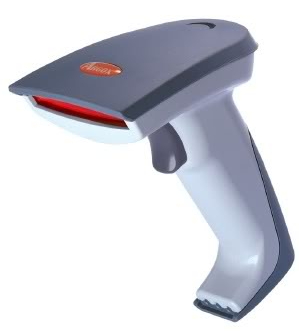
Sometimes what happens is that your scanner does not work occasionally. You change the angle of reading, and it works for a while and then progressively gets worse. The most common cause is a dirty len. In retail, fingerprints, smudges, dirt, often glues from sticky tape, etc. are all collecting over time on the lens and progressively having an impact upon the quality of your scanning so slowing you down. The only fix is cleaning.

However, you need to be careful when cleaning as you do not want to scratch the lens. It is for this reason I do not recommend cleaning your lens regularly as you are very likely to damage a good len. As a rule clean lens as infrequently as you can.

If the scanner is working fine, stop do not clean it even if it does not look right. If you think, you should do a clean first do a visual check on the lens to see if its required.

Here is what I do if I decide to clean it.

If there are large pieces of dirt or glue mark on it. I do not want to wipe this into the lens which can cause scratching. So I try to remove it gently, often by blowing, and if I have to touch it, I use a microfiber cleaning cloth to take off as much as I can. I do not use tissues as I think they are too rough and may scratch the lens.

Next what I do is breath carefully on the lens and wipe off the steam with the microfiber cleaning cloth. Usually just a gentle circular motion with a cloth will remove most marks on a lens. If that is not enough and there are difficult marks to remove, I then use a len cleaning tissue, which are available. The ones I prefer are alcohol based as they remove fingerprints and glue without leaving streaks. Then dry with the microfiber cleaning cloth. Remember it does not need to be 100% clean, many barcode scanners will work fine at 80%.

This advice is fairly generic and should work with all barcode scanners.

A good scanner well treated should last you for many years.
New position

POS SOFTWARE

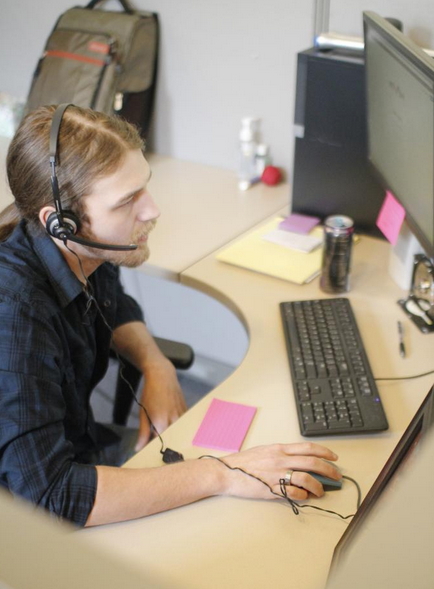
We have a new position in our helpdesk department in our Melbourne Office, and we are looking for someone to fill it. The successful candidate will require significant computer skills plus and knowledge of point of sale systems preferably ours but people who use other systems would be highly regarded too.


This program is widely considered the most advanced point of sale system in Australia so the position is demanding. They will also need good verbal and written communication skills, patience and a desire to help our clients. Significantly extended travel and some lifting are required.
 

For information about the position, please go to seek


A song written by one of our former engineers about POS Solutions,


Australia day marketing

An automatic script item number 2425, has been released that will automatically stop, the Australian Financial Review which will not be published on Thursday 26th January 2017, due to the Australia Day holiday.

This script will be a time saver for our clients.

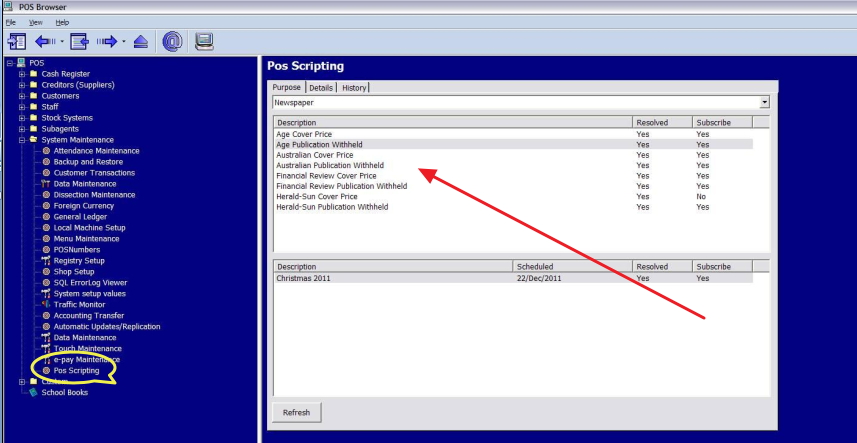
Newsagent scripting

This is another great example of how our system helps save our client time and worry!

Buy one, get one free

You can read about it in the wikipedia here. According to one study in Britain more than 80 per cent of all promotional activity in retail was a variation of this. Not surprising as it is probably the most effective and well-liked form of marketing used today in retail. Its easy to set up with our point-of-sale system and we can accompany its many varieties, e.g. buy 8 coffees and get one free. Another variation we can do is buy one, and you will get 50% off the second. Sometimes a a different product is is used completely e.g. buy a sandwich and chip and get a drink free.

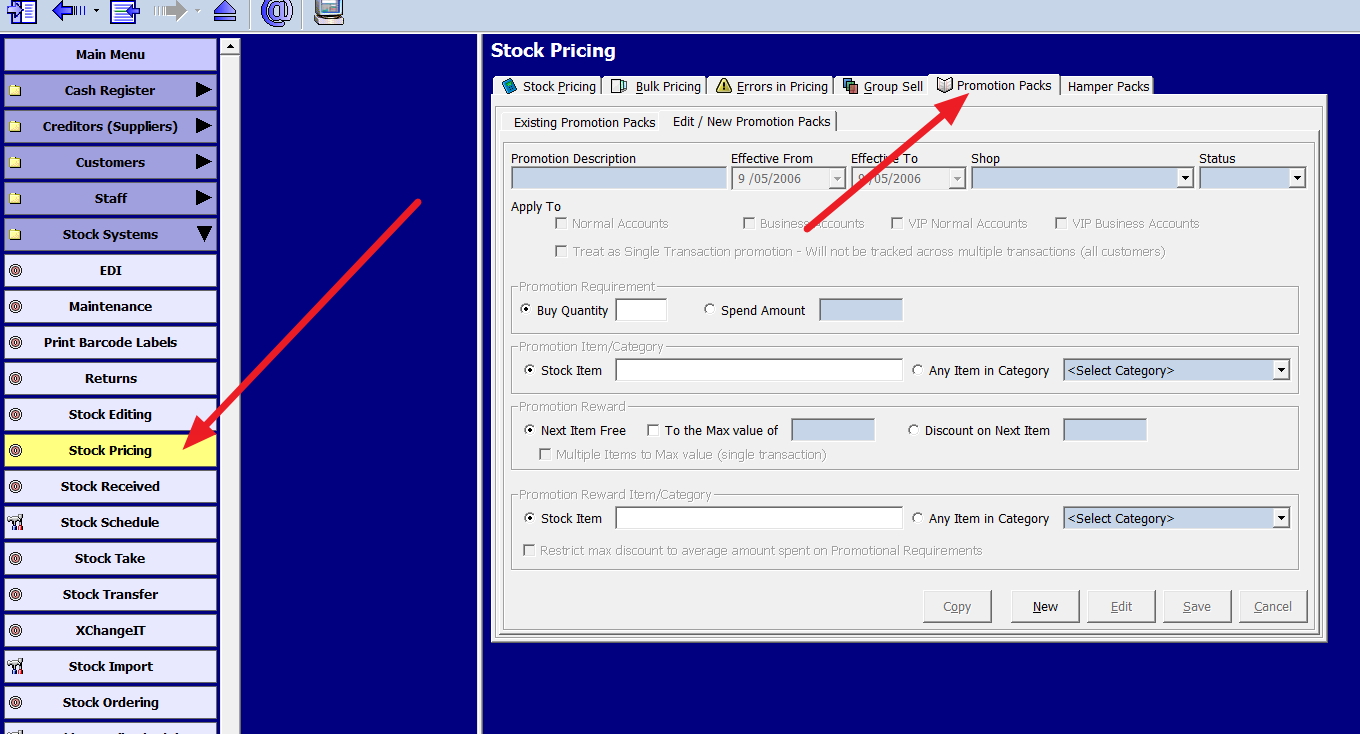
Our point-of-sale system does all this very well. To set this up all you need to do is follow the red arrows in the image below.

Promoting on social media.

Another business tip:

It's never been about having a business office or shop today, and waiting for people to come. 21st Century Business like any other century business means going out where the customers are and promoting your products and services. Today where the customers are online, Facebook, Google, Twitter, Pinterest and Instagram. So that is where you have to be too.

With Google, it's hard to beat the big guys but with the other social media systems the SMB size business can and do compete well with the big guys.

What I suggest you do is make a formal plan. Check out a few people in your line of business and see what they do on these social media sites. Write down notes, discuss it with them, find out what skills and assets you have. Maybe your daughter is a big user of Facebook and she can help. Now make a plan with a timetable e.g. three posts a week on Facebook and then start. Push your site with your clients and advertising and monitor what posts work, what people are interested in and adjust. Soon you will develop your own style that works for you and please do not let the knockers get to you, the only way you shut them up is by winning. Yes you are going to make mistakes; we all do. Keep going.

Your point of sale software can tell you the hot sellers now and last year about this time.
For content, many of the big guys (your suppliers) are only too happy to help you.
Google trend is a great way of finding out what people in your area are curious now. Put in your location, next put in a few top departments, and it will tell you what people are now interested in these departments.

Add a few photos, some comments and put it up.

As social media is instant, your content needs to be constantly updated to reflect new offers or services, otherwise potential customers will go away. You have to keep giving reasons to keep checking your page, reading your twitters and looking at your histograms.

Facebook is currently the favourite one as its the most affordable platforms and its very effective. Over 13 million Australians are active on Facebook each month and the average time Australians spend on Facebook every day is 1.7 hours.

Here are two of my clients that use facebook a lot for you to look at

Cooma Pet Shop

Sunbury news

Queues everyone wants to be first.

This is something to make you think. One big advantage SMB business has is that they can often process a transaction faster at the point of sale. Often people will come to a shop, even if they think its dearer just because of the speed. No-one wants to wait for a in a queue for a newspaper.

Now studies have been done of queues of people shopping and whether they preferred one long serpentine line like banks often use or the many smaller queues like supermarkets use.

The conclusion was that people generally preferred one long serpentine line because it guarantees first-come, first-served and people thought it was fairer. The study is here but what was interesting is that people still preferred one long serpentine line when it produced slower service as this mythbusters set up a store and tested it. The show is here and worth a look. It will certainly give you something to think about.

All our clients get priority support.

Unlike so many other point of sale software providers, POS Solutions does not have a special rate for priority or special treatment for customers. All our clients get VIP support.

We believe all of our customers should get the support they need without having to pay extra. As a business owner, you do not wait longer because a VIP client calls. We do not charge extra for priority support. What others call VIP/priority support we call standard. Our support is 24/7 no matter who you are.

Being Data-driven

I see many retailers, I can tell you those that do better are those who plan, that have a focus and evaluation their performance. To many get bogged down in day-to-day problems they forget the big picture. To be successful you need to create an information structure, manage, review your business and act.

The first step is to create a sales budget and in less than five minutes, you can make one with our point-of-sale system.

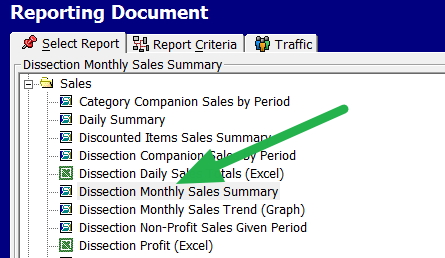
Go into reports,

Now select in sales, the "Dissection Monthly Sales Summary" ( see the green arrow)

Now for the options, select the period. In our marketspace, almost everyone uses two years because they get some history and easy comparisons. It is easy to relate too and gets out of the complexities of seasonally adjusted figures. In my experience, its best to work as well with financial dates.

Although of course you can select how many and what dates you want, it's your choice.

Now I got a report of two-year history, of each department.

I then on the top right, press the export button and nominate to excel.

Now you will get two years of history for each department. You can use them create a budget for next year. You can if you want use excel formulas to create a budget, there is one called forecast specially written for this, but I think its best to use your experience here plus the mathematics. Say, for example, toys were $1,900 two years ago; last year was $2,130, I would say another $200 are possible and make it $2,300. Now adjust this by your experience.

Some people prefer to make these budgets a bit high, so they can make it a challenge. Some would say its better to fail making $2,500 with a $2,700 budget then making budget at $2,300. The problem here is that in practice, you tend to start to ignore these budgets as you cannot make it.

Some managers prefer to make them a bit low. That way, it's not hard to make budget, and they look good if it comes in over budget.

So I think you are better off making them realistic and fair by making it something that we can make! If you do not make it, there should be no excuses, now something was wrong either in the planning or the market, which is it? If planning what should you know? If it's the market, what is happening out there?

If you do make it, then clearly you know the market, now what can we have done better.

If you exceed it, okay what do we not know or what did we do right here?

A common rule used is that the budget figure per month, over a year should give two months way below, two-month way above and the rest about what was expected.

The most important thing is that these plans are made. They are dynamic and are communicated to everyone involved. That the results are compared to what was projected.

Passwords time to change them

At least once a year, all high-security passwords must be changed and the start of the year is a good time for doing this. Although most people dislike the idea it is a necessary evil

Last year, it was not just big companies that got hacked like Yahoo with 500 million accounts passwords stolen but small companies too, for example, in 2016 after one small newsagency was taken for over $36,000, that got them on TV here after that, one of our competitors announced in 2016 that several times others sites of theirs too had been hacked; all were SMB businesses.

The problem is that as Point-of-sale systems have cash, because they process credit cards, virtual products, and they are on the Internet, they are highly desirable targets. The other problem to the retailer is beside the direct costs are the legal fees that result from a data breach.

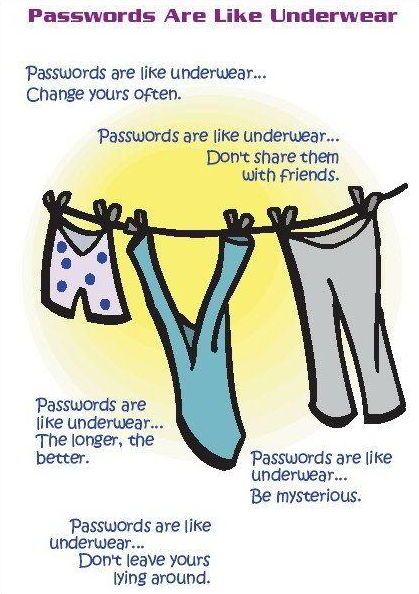
One action you can do to reduce this problem dramatically is to change your passwords regularly.

Please do not use a password like "123456", "qwerty" or "password". I would suggest not using your home address, date of birth, dog's name or grandmother's name either as people close to you may know them.

Here are some other tips, do not share your passwords with people at work, if you have too, then changed it ASAP. Do not write the passwords down in a spot where other people can read it.

Hackers often use two methods. The first simply try every word in the dictionary. Not a big job as there is plenty of software free readily available, especially to automate this process.

So as a rule never use a word in the dictionary.

If that fails a hacker, most of this cracking software have methods that will try every combination of letters, words and punctuation.

If you want to test your password, about how long it would take a hacker to crack your password if they have access to your desktop click on this site.

Some samples
bernard - Instantly
australia - instantly
smartphone - 59 minutes
white car - 5 hours

Finally do not check only yourself, what about your staff?

Nine Stupid stuff folks do with electricity to wreck their computers.

I would say in my experience most electrical problems with pos systems are due to the owners negligence.

Here are some free ideas that you can do to protect your computers and POS equipment.

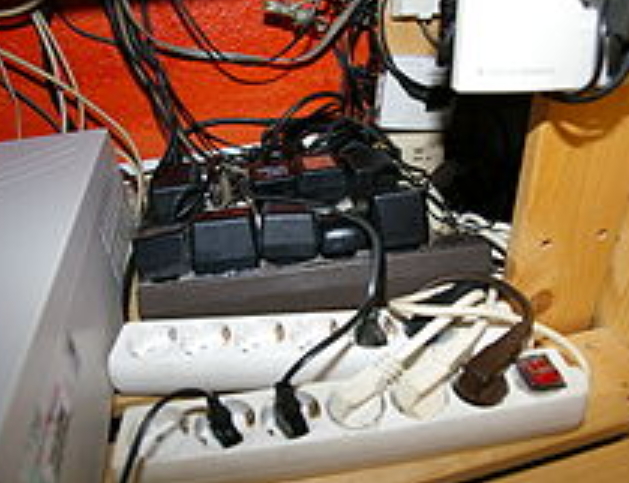
1) Do not overload your electricity plug like these people did.

Shift some of the items to another plug preferably on a different circuit.

2) On the same circuit try not to put the computer with printers, air conditioner units, refrigerators, etc. As a rule of thumb, if the electric item has moving parts, it can create an electric surge. Especially keep computers away from heavy-duty machinery, for example, commercial refrigerators and elevators.

2) Do not switch everything on at once. When an electrical device gets switched on what it does is create a power surge. This surge can go into other electrical machines. I have seen a defective air conditioner fry a computer.

3) Make sure the cables are not damaged; this is typically a problem with old cables.

4) Turn the computers off at night if not needed, besides saving power and giving you better security as hackers cannot get in if the computers are off, if an electric surge happens when the computer is switched off, it probably will not affect the computer.

5) Be careful of liquids near your computer or its equipment, I have seen what a milk shake did to a pos system when a customer accidentally spilt some of it on the point-of-sale desk. Clearly, some items are not meant to be scanned. In the event of such a spill turn everything off immediately in the area.

6) Do not move, open or rearrange your electric items while they are switched on. The other point is that the hard drive in the computer can get damaged when it's moved while its working.

7) Finally do something if you see something is wrong, for example, you smell of burning plastic, see sparks, black scorch marks, have fuses blowing regularly, etc.

8) If you have a power board with a surge protector, use it.

9) If you have a UPS, make sure the computer is on the circuit.

If you have any more ideas, please let me know.

2017 the end of credit cards in point of sale?

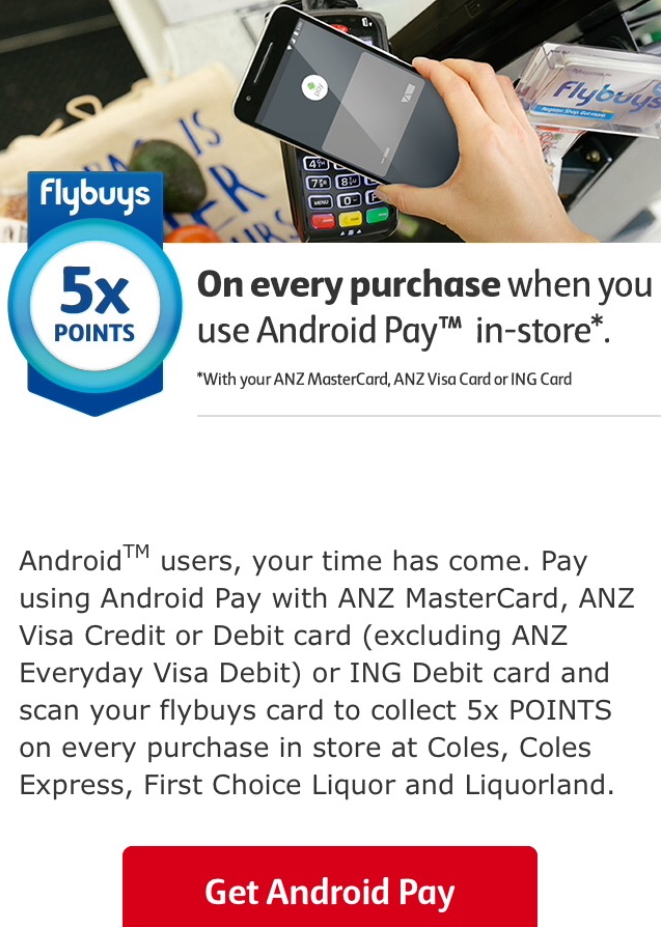
I got this advertisement this morning.

I would say its the start of a big push to replace the creditcard and it's not just ANZ, but Westpac too, which includes St.George, Bank of Melbourne and BankSA and there is also Bendigo Bank now on too. The other major banks, I am sure will quickly follow. So the message is pretty clear in 2017, we are going to see a big move from the banks to replace the credit card with the mobile. Why it will succeed is that in Australia is because everyone has a smartphone and smartphones are now upgraded to this system.

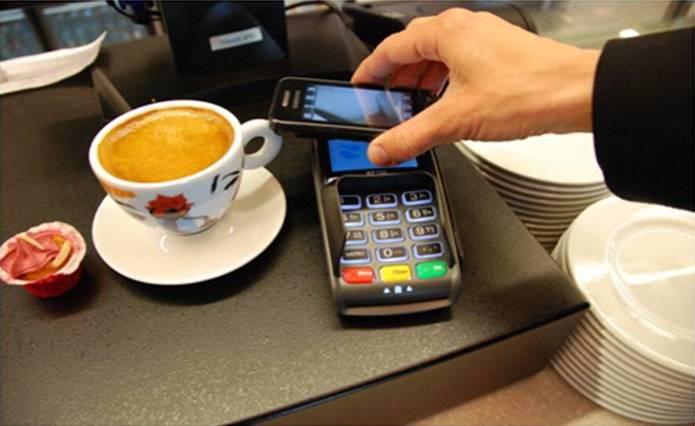
Readers, here will not be surprised as I said this before here and to accept these payments, a retailer needs a contactless terminals that is why we alerted our readers that there was a free upgrade offer from tyro to handle this new technology.

The big plus beside the convenience to consumers is that the mobile can use fingerprints rather than passwords. I am always reluctant to use my password in public, and am still concerned about contactless as anyone who has my card can swipe it. I prefer the security of my fingerprint, whatever else its certainly more secure then a swipe.

In 2017, you will need to get these contactless terminals.

Tracking items on sale

POS SOFTWARE


Many of you at the moment have many items on sale that are going out of sale. The problem can be that although you take the sale down, some of the items, you may have missed so that in the point of sale system they are still being marked as being on sale even though the sale is over. As such you could accidentally sell items at the wrong price. Here is a quick way of finding these items.

What you can do is this.

Go to the stock system.

Select Sales Promotion here


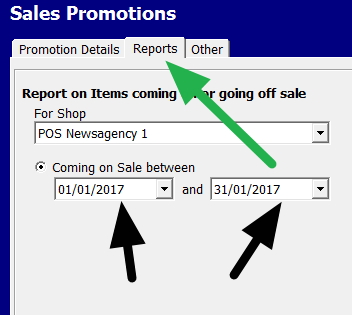
Which pops up a screen like this.


Select reports (marked with Green)

Now put in the dates in this case marked with a black arrow, I selected January and out pops a report of all items that in this period that are affected. Now you can investigate.


Security basics: Is your point-of-sale being used as a seedbox?

POS SOFTWARE

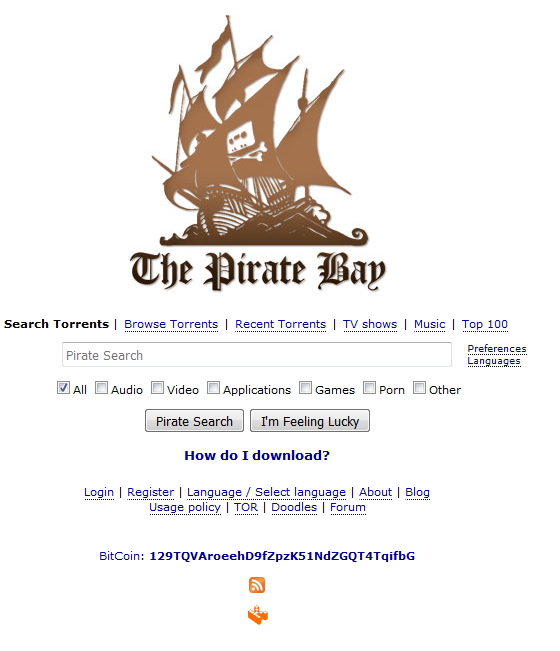
As from today, several well known pirate sites - The Pirate Bay, Torrentz, TorrentHound, IsoHunt and SolarMovies are being blocked in Australia.


Currently it is laughably easy to bypass these blocks as the ISPs are only doing the minimum but its early days.

What I have noticed is that these blocks, do not seem to be enforced on many business accounts. Which means that many people have discovered that using their business Internet, they have a free seedbox. All they need is a smartphone which most people have, the WIFI codes that most employees are given and a free torrent app.

This causes, however, several problems for the business.

1) Much of the bandwidth of their Internet is being used by these programs, and their Internet runs slow.

2) Then their plan limits are exceeded so they get extra charges or get put on slow.

3) And the big one, is they could get involved in a major legal problem.

The quickest way to see if your pos system is being used as a seedbox, which should catch most of them is to go to this site here.

If you come up, then I suggest you investigate. About 4% of my clients are finding something.

I find it very good, using it we caught an accountant who was doing a job here on behalf of one of our clients, downloading torrents from her laptop while she was working here.


Top Accounting Software for 2016 in POS

Picking the right accountancy software is important. So we decided due to the high interest with our clients on accountancy software, we would in our annual survey see what programs most of our clients are using. In our marketspace, because of our size, we are probably the best ones to do this in Australia. So in the point-of-sale market we discovered that

MYOB 47.3%
Quicken/Reckon 30.9%
Cashflow manager 7.3%
Xero 3.6%
Manual - None 2.0%

The remaining 8.9% used a wide range of products.

This figure has not changed, in June 2014 when we did a much smaller survey, we found similar results.

What we did not ask but became clear as we processed the information is that the overwhelming majority used desktop, not cloud.

It makes sense as desktop is much cheaper. As the financial officer in a point-of-sale environment is almost always in the shops, so the mobility of the cloud which is its big plus is not required. In fact, the cloud is a disadvantage in such environments as it introduces another two extra layers of complexity - the Internet and cloud.

Most people it was clear were pleased with what they used. Those that used it were happy with our integration into their accountancy program, although several did state they preferred to run it non integrated.

One interesting choice that came out of the survey was paywave, a free cloud accountancy program. I need to examine this one. It appears that for many of my smaller clients, it may be ideal. It has links to most Australian banks and an active support team. One point that did make me uneasy was I could not figure out how if it was free, the company made money while providing the service. Maybe its the add-ons or the credit card charges, I do not know but it did make me uncomfortable. My client who used it for three years, felt highly about it, confirmed it was free and did everything he needed and more. So I will try it, as I am looking for a personal accounting program and report back here.

Overall, these are all good solutions.

My thought on accountancy programs is that they all do similar functions, as Australian accountancy standards have not changed much in many years. So it should be said that any accountancy software package released since GST will do the job. It really depends what you like and what works for you.

Personally, I like Quickbooks or Reckon, although they are not free, they are by far; I think the best value.

I also looked at MYOB and found that it is nearly double Quickbook's price, but clearly it works well. I should say here that MYOB is now all subscription based unfortunately although you can get a perpetual licence if you ask for it. I recommend you do ask for it.

Xero seemed pricey to me for what it is, so I don't recommend it to anyone which doesn't mean it's a bad program; it just means when I looked at it, I found point I had doubts about but to be fair my doubts on the program is probably a case that I am used to something else. Not that it matters with less than 4% of the market to me.

Finally I am very tempted to look at Saasu again as I probably did not give it a fair go last time. I have been told the service is brilliant and it is certainly good value.

Tip: Clean your POS system regularly

Retail generally is a dirty environment. In time, dirt gets into everything quickly due to static electricity that the equipment generates. Left to itself the dust will clog up the fans which keep the units cool, this causes them to run hotter then they should. Furthermore, it can create an eye sore on the counter, so making a bad impression to your clients. Also its not pleasant to work on dirty machinery

Plus it is a health problem as university studies have shown. Most point of sale equipment are in common use. How many different people touch, for example, the EFTPOS unit? As a result, there is a high probability of transmission.

For all these reasons, I recommend cleaning your equipment regularly.

One point I must stress, always switch off the electricity before cleaning the equipment and never use any spray directly on the computer or parts.

Here is a youtube, I recommend you watch before you start cleaning.

Hey it's 2017

Remember it is 2017, not 2016.

This simple tip will save about a third of the support coming in now. People are forgetting its 2017, putting in 2016 into their point of sale software and soon finding out that something is wrong.

Forget the Past, welcome the Future

This is the last business day of the year 2016, as it comes to a close, it's a great time to reflect on this year, review what worked, what did not work and most importantly where it is going? Little in 2016 in retail in Australia was a shocker (a black swan), the trends in 2015, continued in 2016 and there is every reason to expect they will persist in 2017. A good question to ask now is

"How best to meet in your shop, the current market trends and demands?"

Although technology played a major part in retail this year, it was not exclusive, for example, Masters was $3bn disaster by Woolworths but I do not believe it was technology that was the cause but better competition from Bunnings. When I went to Masters, I often found that their product offering was not as good as Bunnings. Additionally, much of the reason I tended to go to Bunnings was although the people at Masters were extremely nice and friendly, the Bunning's staff were much more useful, as they knew what they were talking about as they have many experts on their products there.

Still I believe that regardless of your size, an updated POS software is one of the cheapest and easiest ways to improve your shop. It is the central hub of the shop. Everywhere you look; technology is transforming business. It brings you closer to customer. Updates in the software often give you new functions, improve efficiency and produce intelligence you can exploit. So another good question to ask yourself is

"Does your point of sale software give you the information you require to make timely and accurate decisions?"

Finally, I would like to thank you all for your ongoing interest in our point of sale software, our company's activities, and your support.

I wish you and your family a healthy, peaceful and prosperous New Year.

Regards

Bernard
Editor

Why nonstop Point of sale software Matters

Unlike many of our competitors, we know independent retailers. We know they work more than just business hours. That is why we proactively led by offering unlimited support. Today all our clients have easy access to personalised continuous support 24 hours a day, seven days a week, 365 days a year with our local, friendly and competent staff to help them when they need support. Unlike others, we do not close our offices over the season and New Year but worked straight through and this year; I noticed it was a longer season compared to previous years. The trend which I noted here for this seasonal shopping season to get longer is continuing. Which is good as most people stated that they were very active during this festive season! However, as a result, we are very busy here too. So I reckon that our clients are getting their support fees worth over the Christmas and New Year period.

This, however, I admit has been a significant cost to us, which explains why many others are now pushing their support particularly programming off-shore, limiting what they provide support for e.g. no XP, viruses, etc. and reducing telephone hours by closing their office. Neverless we believe our efforts do pay off and that providing ongoing support is much of the reason we have such an unusually high merchant retention of about 98% renewal and our Net Promoter Score (NPS) is over 30%

We certainly have received many unsolicited, enthusiastic feedback like this one from our clients thanking us for the excellent support service we are providing.

If you are interested in learning more about our point-of-sale system and seeing the difference let us know.

The old computers went down on Christmas eve - The biggest shopping day of the year

Murphy's law 'if anything can go wrong, it will and at the worst possible time"

This law was proven when one of our clients, who had an old main computer that was causing problems and despite many warning from us and other, he refused to change broken down on Christmas eve in the middle of his biggest shopping day of the year. So he had NO point of sale! He had no time to look around, get quotes or get organised. So he just had to buy the first big computer he could, get an engineer out and we had to help them get up and running which we did but it took a few hours. It was not a good time, to lose all the tills. It will cost this business, for example, in wages alone, as this engineer had to come back to straighten out many points over Christmas, as there was no time to do a standard update so there will be considerable overtime involved too.

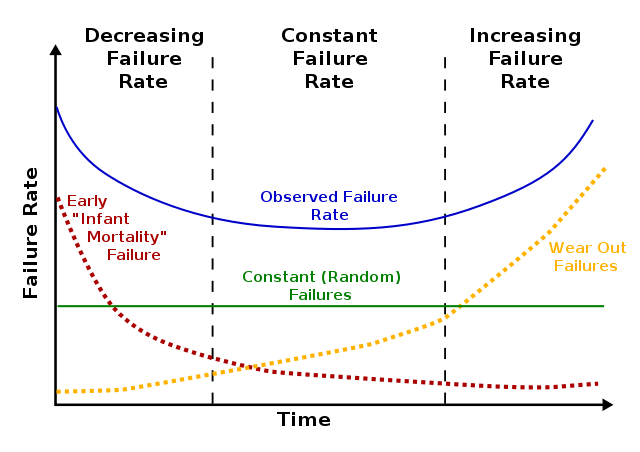
Every computer will fail. It is just a matter of time. Generally like here, it gradually grinds down like this one and then suddenly stops. Fortunately rarely as spectacularly like this one as most people do replace their computers long before this happens.

As a rule, it looks like the blue line in this graph, and it seems to be true of everything, computers, cars, people, etc.

At the start, you tend to get a lot of teething problems, which rapidly get sorted out. Then you get for a long time very few problems and after that as the item starts get more problems, and they never stop coming. That is when we tend to sell the car, junk the TV, etc.

Here are two ideas you can do to reduce the problem.

1) Monitor and record problems on your computer, to determine where it is on the cycle. If you have someone who is computer literate, you could use some monitoring software which can give you advanced warning. I recommend PRTG available here. It's free version should be more than enough for most of our clients. It will monitor just about everything on your computer system.

2) As the average useful lifespan of a computer is commonly considered to being three to five years. Make sure that your important equipment like your main computer is relatively new and working well. If not consider moving it to a less critical spot and putting something better in there.