Point of Sale Software

Doing a Business plan

POS SOFTWARE


After so many years of being involved in SMB, I have seen many write a business plan. I have also seen many give up on writing one because the amount of work involved they felt was more than what they got out of it. However everyone I know who has done a business plan said that they got much out of it. I think it is not essential but its a good idea.

I warn you it will be a lot of work. You will be running back and forwards to your point of sale software to get figures, probably talking it over with many of your staff and others. In general the more you put into your business plan, the more you will get out.

In my experience, there are two major factors in people writing a business plan. The first is if some want to formulise their business, as they like to be super organised and the other if they are trying to get finance. In finance, it's great as someone who does not know your business can pick up your plan and see where you are at and where you want to go.

It is also an advantage internally as it makes everyone think on the same wavelength which is particularly important in retail as it is a service industry and unlike many other industries, the retail business really depends on many small facts like services, atmosphere, image, etc., For example, heaps of people can buy magazines in many different outlets, why do they come to me? Possibly I have a bigger range of magazines, maybe I give faster service, perhaps ...... ? Now how do you think this will be in the next few years?

If you decide to go ahead, the next question is decided if you want to do it yourself or get a consultant. As many people don't know the first thing about writing such a plan, some people use these consultants once and then as they figure out what these guys are trying to do, do it themselves. I would say you are looking at a consultant budget between $800 and $2,000 for a typical SMB business. The big advantage here is that they do have industry insights here that you do not, and their business experience will help you. As they write the plan, they review your thoughts. Plus finance people think more of their plans.

If you want to do it yourself, there are several good resources available to you from writing a business plan, for example, the Australian government has free business plans and guides [Links removed].

Generally many of the books, from what I have seen are way over the top, probably because they are really written with insights from large companies and organisations.

In all likelihood, the best solution is to use business planning software, if you are doing it yourself as it will guide you through each step of making a plan and do much of the work for you. You are probably looking at $100 to $300 although Enloop has a free service here which is very good. At the very least with this free version, you can test it out, and if it does not meet your needs, then at least you will have some experience and know more about what you do require.

Here are some really good points with using business planning software based on the cloud.

1) It is easy to change.

90% of it will be the same as time goes on but that 10% will change dramatically. With software, you can print it out now, close the book on last month, then examine what went different and store it away for future examination.

You can also edit your figures and see what effect it will have on your plan. For example, you might say: I am budgeting for $1 million-dollar turnover and $220,000 gross profit, then you might say if I drive the business and push it to $1.5 million so producing a $280,000 gross profit, what will be the effect?

2) As it works on the cloud, you can be anywhere and when you get the urge, you can work on it. This is not a small factor as you need to be updating your business plan continuously; whenever things change, monthly as you do monthly reports and yearly as you review and plan for the next year.

Probably the biggest disadvantage is that these software have standard plans so you do not have much flexibility if your business requires something different there will be problems.

Hope this is of help.


Tip on route planning for delivery

POS SOFTWARE


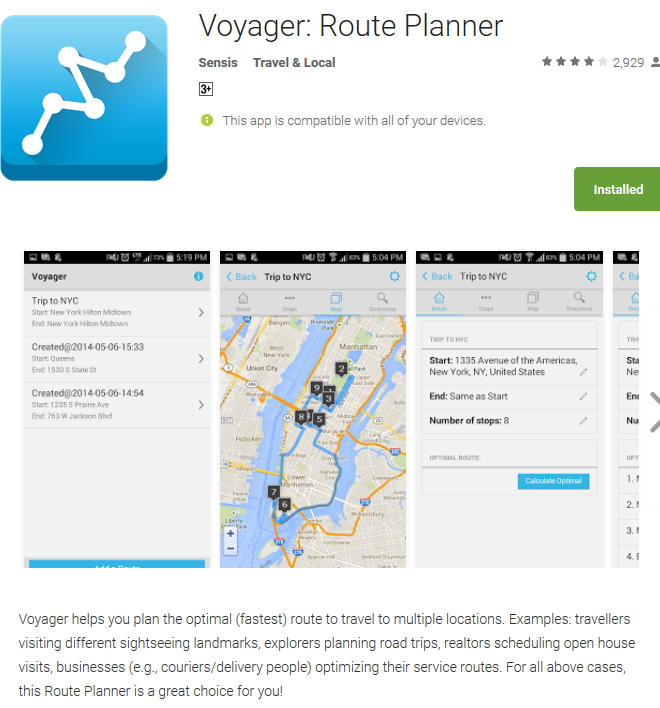
This is a tip if you are doing deliveries, something that today is becoming more and more important in retail, so I think you will find this app useful.

Voyager is available on the android. I am not sure about IOS.

What happens is when you get a list of delivery points, what you need to do is organise your route. To do this can take some time and much of the information like traffic and road repairs you probably will not know. That is why I like this app. with this app you enter your starting and ending position, and the delivery points into it. It then will optimise your trip to give you the fastest route accounting for the latest real-time traffic. Next, it links to Google Maps, so Google Maps can direct you.

This type of productivity software is used by large transportation companies for a long time but is only now available for SMB businesses. The maximum number of delivery spots is 100, but it may run very slow at that level. We normally run it at about 20 spots. One big advantage I find is that it gives me a timetable with travel times, so I have a good idea of how long the route will take to be done.

We find it saves us quite a lot of time.

Hope it helps you too.

PS If we get enough call for it, we will probably link it into our POS software.

Handling your stock holding efficiently

Stock holding takes a lot of time and money to get right. The most popular method of prioritising your stock is to divide up your stock items using the ABC method and what is done is that your stock is divided up into three.

Group A

Is the best group, it probably gives up about 80% of your sales and generally makes up about 20% of your stock. This is the group you need to spend most of your time on.

Group B

Does about 15% of your sales and tends to make up about a third of stock.

Group C

Does about 5% of your sales and tends to make up about half your stock. This group you really need to think about so this is what here I am going to concentrate on.

First, you need to get a rough idea on what your overall stock holding; I used a year, but many use three months of history. What you are looking for it about half of this.

Now this is a quick step by step way of finding your Group C.

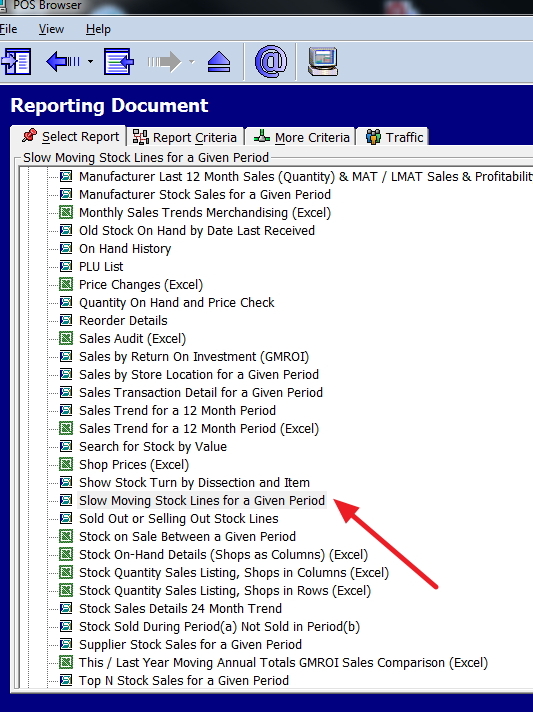
Go to reports and select stock, see the red arrow on the image here.

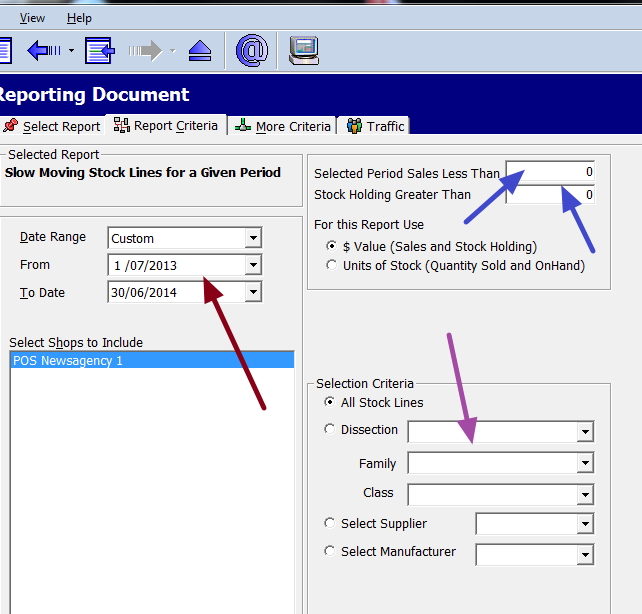
These are the criteria shown

I suggest that first you run this report with no options but the dates, to get a feel of what the report looks like and subsequently run this report again with the following options.

Where it is brown put the date range you decided.

Where it is blue enter in the size of the stock holding and sales. What I tend to do is ask for a list of all items that sell less then $50, not enough go to $200, and continue until I hit on about 50% of the stock. It takes about four runs. Since we use a very fast SQL, it takes only a minute or so to do a report on a decent computer.

If you wanted to do it by the department, it is purple where you would need to specify the type of stock.

Now start examining these stock items.

EFTPOS/Credit surcharge look

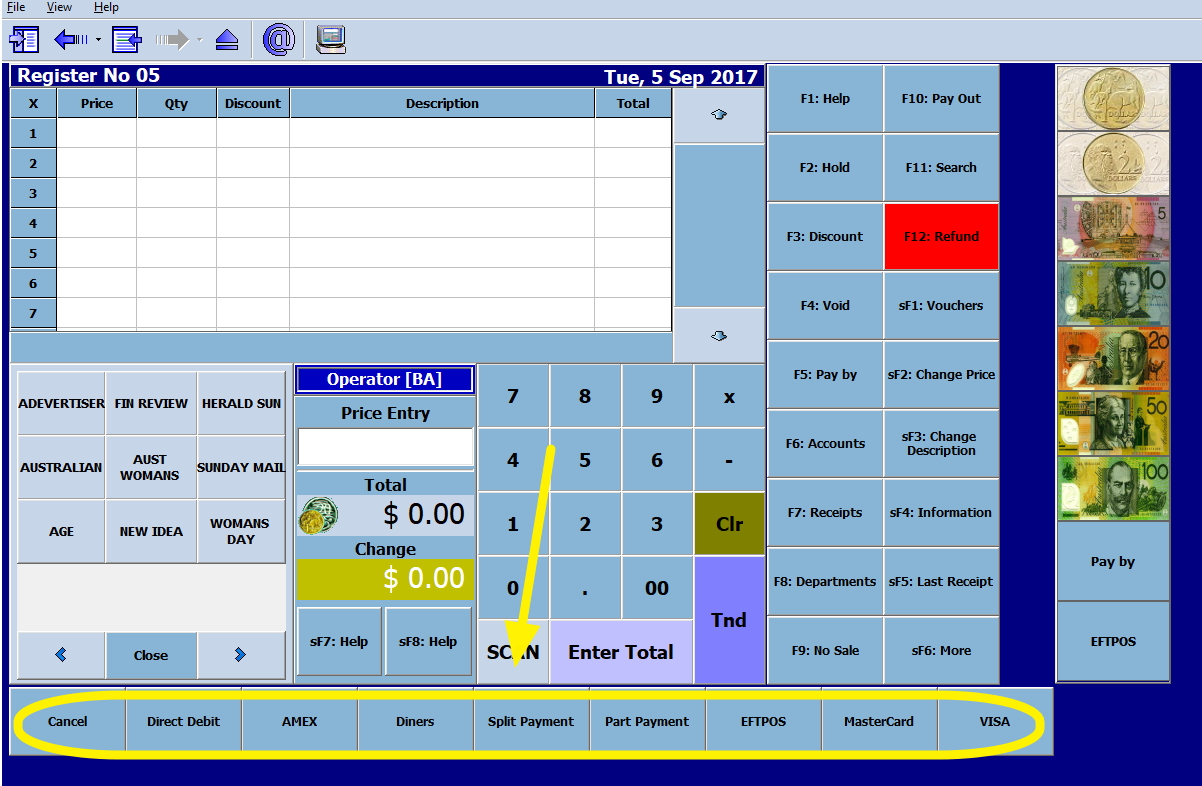
Cash register with credit EFTPOS displayed

At the moment, we have determined that this is the best method for surcharging.

If you look at the yellow arrow with the pay types circled on the point-of-sale screen. You set up your pay types with your surcharges so you can charge the new EFTPOS/Credit card surcharges for each pay type at the appropriate rate.

Heavy lifting items

As an employer, you have a legal duty to reduce the potential problems due to heavy lifting that your employees are exposed to. The first step is to identify the items that could cause a problem.

With our point-of-sale software, you can mark these items for reference.

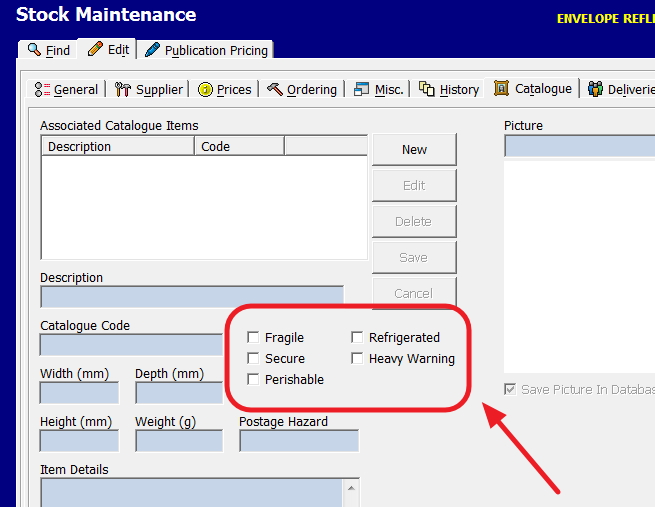
Go into stock maintenance and then catalogue, you will see there is a list of very specialised item categories.

See the area marked in red above.

Now tick the box "Heavy warning"

Note there are some other categories here that are worth your knowing about too such as.

1) Fragile are for those that are extremely breakable.
2) Those items that require special security.
3) Perishable are those items that have use by dates.
4) Refrigerated for those that need a fridge.
5) Heavy warning

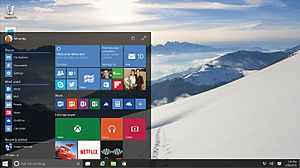
Another Windows 10 update

Well another round of windows updates, named the "the Fall Creators Update." It will be released worldwide on October 17. It is in line with their twice yearly update strategy. This keeps their operating system fresh and exciting. No doubt it will cause us some problems.

57% Of Consumers Will Boycott On Social Issues

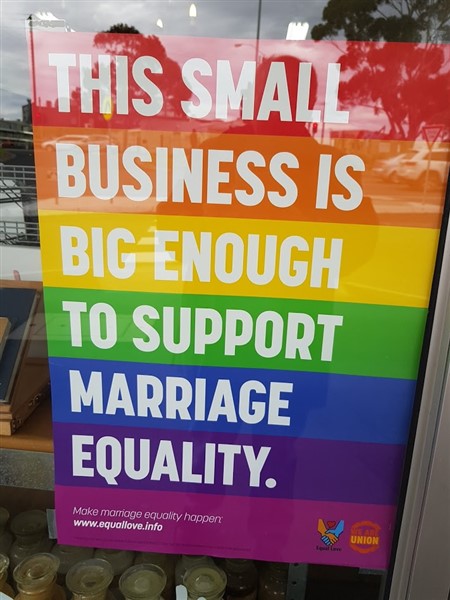
This came up in a discussion that I had with a client a few days ago. The retailer was wondering whether he should publically support this or not. Other people in their shopping centre had put up the following signs, here is a photo, I took of their next door neighbour.

This question really is one for a retailer to make their own decision but let me make some observations.

Putting aside the logic behind the sign which some question, to a retailer what is important, I think is that it is a very controversial issue now with strong emotions on both sides. A study which has a strong ring of truth to it, here stated 57% Per Cent Of Consumers Will Boycott A Brand Over Its Stance On Social Issues. That is a lot of people. If you are talking about an issue like this that is say 60% pro, 10% neutral and 30% against, we are talking of between 15% to 30% of the public whatever your position. That is a lot of potential customers who are likely to buy from others or just boycott your shop if they disagree with its social or political views. Money according to this study is not an issue. These consumers will pay more to buy a brand they approve of. Make no mistake the modern consumer can be a very political animal.

What I found particularly interesting was that Chinese (73%) and Indians (65%) are much more likely to boycott then Americans (47%). As a punt, native Australians are probably similar to the Americans about 47%. This implies to me that if you are in a strong ethnic area, the problem could be worse. The added problem here is that according to the polls, areas with large ethnic populations are showing very mixed results on this question. It does not appear that people in these areas have decided. In such an area you could pick wrong.

I would say to think carefully.

Of course, if you want to make a statement, you could easily put a note on your receipts using your point of sale software so all your clients know your stand.

Payments surcharging

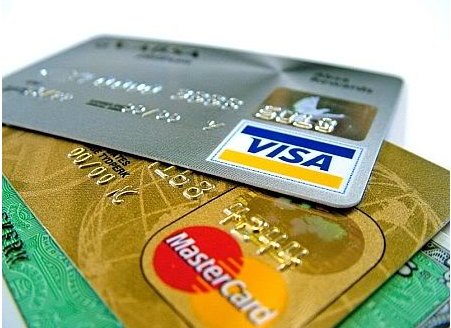
From tomorrow, there are new rules by the Reserve Bank of Australia (RBA) for surcharging. These are coming into effect for all businesses. If you are caught slapping excessive surcharges on credit card and debit card payments you face fines of thousands of dollars. So I do suggest that you check with your EFTPOS and credit card providers, write down in your diary what they say too.

What the government does not want you any more is charging a fixed fee for processing an electronic payment, although they will accept it in *some* circumstances. What they want is a percentage, something our system can do. First you need to do is review each electronic payment method to determine the cost percentage.

So say:

Eftpos $100,000, cost levied by the bank in the last 12 months on the EFTpos was $500, your extra fees were $200, then the percentage is ($500 + $200)/($100,000) = 0.7%

MasterCard credit was $150,000, cost levied by the bank in the last 12 months on this was $1500, your extra fees were $300, then the percentage is ($1500 + $300)/($150,000) = 1.2%

VISA credit was $200,000 turnover, cost levied by the bank in the last 12 months was $2000, your extra fees were $330, then the percentage is ($2000 + $330)/($200,000) = 1.2%

etc.

It does not affect most American Express, UnionPay, JCB, Diners Club and paypal as these are not Australian banks.

Furthermore, extra charges can be claimed, for example, merchant service fees, terminal fees, and any other fees incurred in processing card transactions but not the phone line for the terminal. If you pay extra insurance to cover VISA fraud, then you can claim that too. If you have extra charges, I suggest you check first before claiming them as the important point is that you need to justify your figures.

You can still keep your booking and service fee, but these need to be entered before the surcharge.

For details on how to handle this surcharging in our point of sale system, please click here.

Facebook - are your pages correct?

Facebook

While checking our upcoming Facebook integration updates, we were going through a few of our client's Facebook pages. What we noticed was many of them had information that was inaccurate. An example was the country of the shop were listed as Russia, others had categories which did not make sense e.g. a newsagency was listed as a cake shop, the email address on another was incorrect, etc. When we investigate it became clear that these were old pages that people had set up and had forgotten about. Many of them actually now had new pages. The problem was that the old pages were still there and if someone goes looking through Facebook, the odds were that they would find the wrong page.

My advice is search for your Facebook page and make sure that it is right. If you no longer have the password, and the email address listed you may have problems.

Telstra Outage 30/Aug/2017

POS SOFTWARE

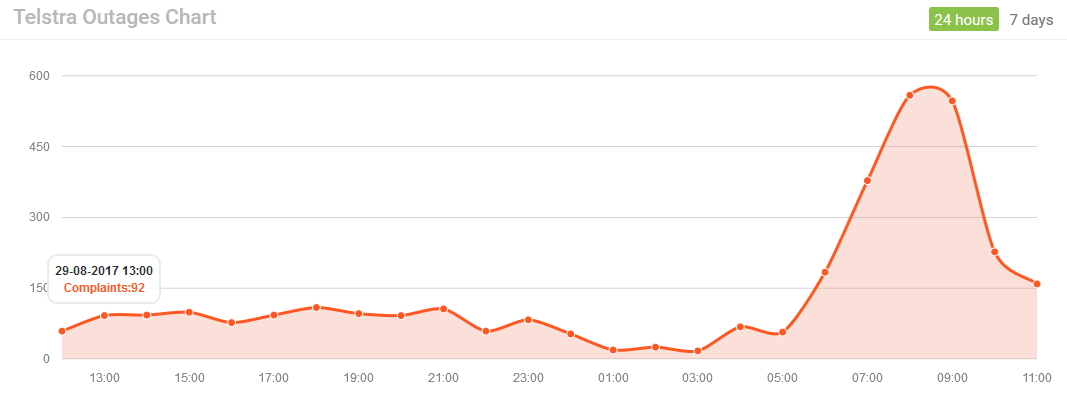
Our helpdesk is being hammered now as Telstra is suffering a major outage which appears to be Australia Wide and it is affecting both the internet and phones. We have been told that it will take them 24 hours to fix it.


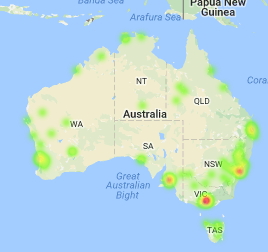
As you can see from the map, it is Australia Wide.


What does appear to help is changing your DNS server to 8.8.8.8. This, however, will slow down your internet a little if you do not change it back, although there are some other advantages to doing this. Details on how to do this are available here.


As far as EFTPOS is concerned, if you can switch to 3G, you should be okay. Details on how to do this with Tyro are here.


Instant Flash sales

POS SOFTWARE

Flash sales is a sale offered with very little notice for a short time, and it is extremely easy to set up on our point of sale software.

It can be an extremely effective way to quickly unload extra stock. For example, a sandwich bar, has at 2:00pm excess sandwitches. Rather then chuck them, it turns a negative into a positive by suddenly offering a great buy on sandwitches.Another example I have seen is a shop that suffered a fire needed to clearout most of the items in the shop because who wants the stock that been partly burnt and full of smoke. While the shoppers could see the shop had suffered a fire, they grabbed the bargains.

Properly used flash sales can be a great opportunity promote the shop.

This is also where it pays to have a functional VIP loyalty program as flash sale can be promoted with a personalised email offer. This way, you are as well rewarding the loyalty of those people that shop in your shop.

* A flash sale should be simple. You are not on a flash sale going to get much interest in buy six coffees, and the next is free.
* It should be of short duration. Its purpose is to get rid of limited excess stock.
* Your offer should stand out. If its not much of an offer what is the point of it?
* Promote as much as possible with signs, Facebook and your VIP loyalty program
* Be unexpected, you do not want to be too predictable, for example, if people learn that your sandwiches at 2:00pm are very cheaper, many full paying customers will delay their purchase until after 2:00pm


Financial Integration

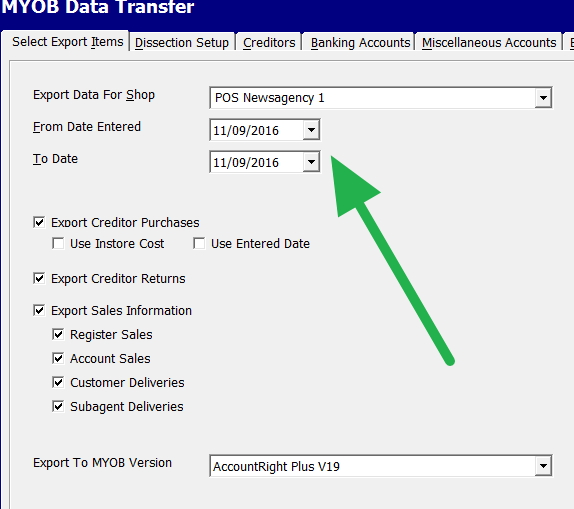
Our point of sale software can send information to the cloud automatically and there are many advantages to doing that such as you can do data entry with much less manual entry. You can get real-time financial reporting, which is accessible anywhere at anytime 24 hours a day, 7 days a week.

Now sometimes, people ask me what sort of information could be transferred to the cloud. Here are some examples and as you can see its a extremely extensive list, we send for each of your shops.

Customer balances
Subagent deliveries
Stock purchases
Stock returns
Stock on hand amounts
GST sales
non-GST sales
Account sales
Value of gift cards issued.
Cash Payments
Credit card payments
Cheque payments

And more.....

Tablets reality

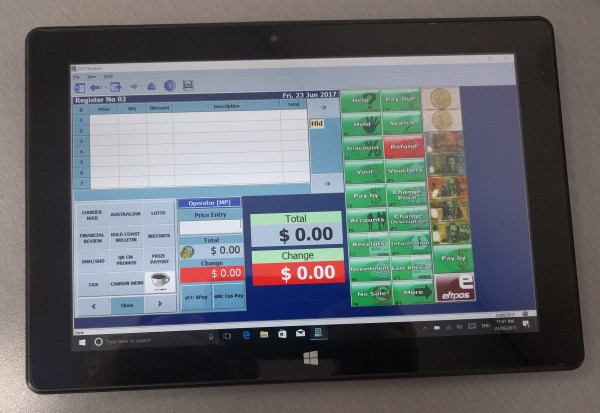
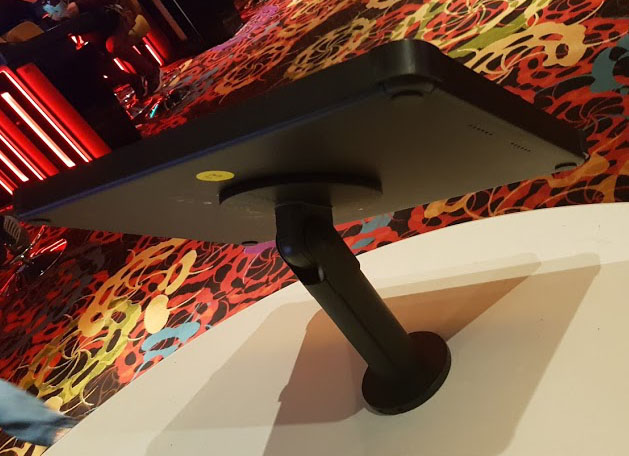
Tablet showing a cash register

This is a tablet and it looks really nice, surprisingly cheap and very practical in the shop.

However, tablets tend to be stolen as such this is often what the merchant has to do protect their tablets. That is why we do not recommend expensive pads like iPads but cheaper ones.

Tablet showing a cash register

Its the world we live in now.

Franchise expo Melbourne today

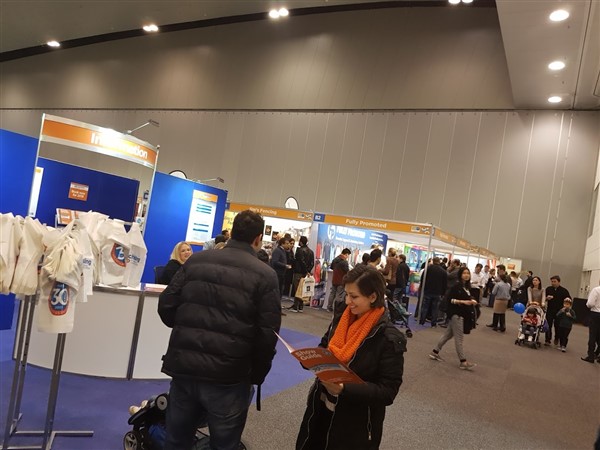
Franchise expo Melbourne 2017

I go every year to the franchise expo in Melbourne. It is growing bigger every year. It used to be very small and every year it's been growing. There I met many people and get ideas. As I talked with these people, I think to myself that these people are the sort of people that would be interested in buying many businesses in our market space. Many there have the money, ambition and will. I think that many in our market space missed here a golden opportunity to sell their industry.

Franchise expo Melbourne 2017

Windows 10 what is happening

Now I would say that about 55% of our users have moved over to Windows 10. It was an offer too good to refuse as Microsoft offered the upgrade free and our software because we had prepared was Windows 10 compatible. So they could move over at no cost.

Unfortunately Microsoft free offer is no longer available, so please contact us if you want to upgrade to Windows 10 as in many cases, we can do something.

Our view, we want as many of our users onto Windows 10, it's a better operating system, faster and safer from many of these ransomware and virus floating around. In fact, we strongly recommend that no-one uses anything before Windows 7, for surfing the net. The other problem is that unless you get second-hand or refurbished computers and equipment, you will find it hard to get equipment to keep your current system up. As one person running our point of sale software on Windows 2000 discovered that now everything is Windows 10.

The other issue is that our users should on principle not run old and outdated equipment so our Windows 10 update is free.

More customers

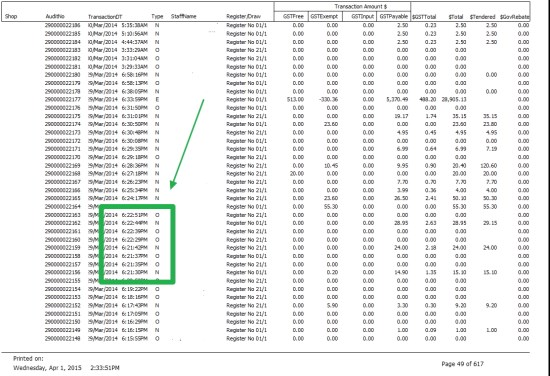
Our point of sale software is lighting fast, most likely the fastest as you can see from this report of transactions going through the cash register.

Speed of point of sale software

As you can see where I marked in green that the operators in this shop were regularly doing transactions at a rate of four a minute. How quickly would your queues be cleared if your shop had speed like that from your POS system. You would get more customers, cheaper staff costs, higher turnover and more profit.

Part of this is because scanning with POS is much quicker than keying by hand, plus our unique AI reduces the number of keystrokes required, in fact, you do not need to do any keystrokes if you wish it to set up like that and our use of a super-fast SQL database available.

That is why people who come to us, report the increase in speed.

Of course in addition, your customers will appreciate the extra detail available from our point-of-sale receipts from what they get now, but we will discuss that in another post.

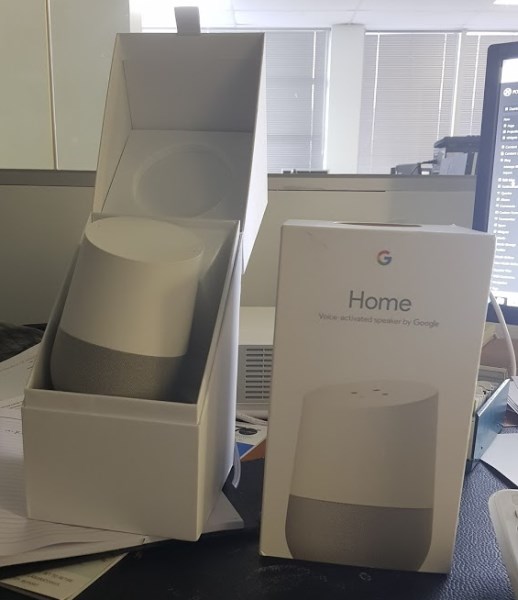
Google home for our clients

We are always trying new stuff for our clients; this google home is certainly one of the fun items to trying out.

We have integrated voice activated into our point of sale software for people with multiple sclerosis, which works well. As far as I know we are the only ones in our market space that can do this.

Anyway, this google home is certainly a very powerful voice integrated system. What I did like is that the big problems we have had in retail with voice activated item in the past is that in retail, there are many people in a relatively small area so as people talk, the machine gets confused, however, Google home can distinguish your voice from up to 6 people so you can get your own personal commute times, daily briefings, playlists, etc.

Exactly what we can do with it remains to be seen, although I can see a use for stock ordering. Instead of someone have to record on a paper or in a computer what stock they require they just speak and the unit notes it down, but overall I think its early days for business.

However, I will tell you what it's a real fun unit and its quite useful when you have a question you just ask it, so I went "what is the phone number for red energy" and it gave me instantly the phone number. It was very cool.

And NO it cannot make coffee, but I suspect it could order you a coffee.

Latest point of sale computers

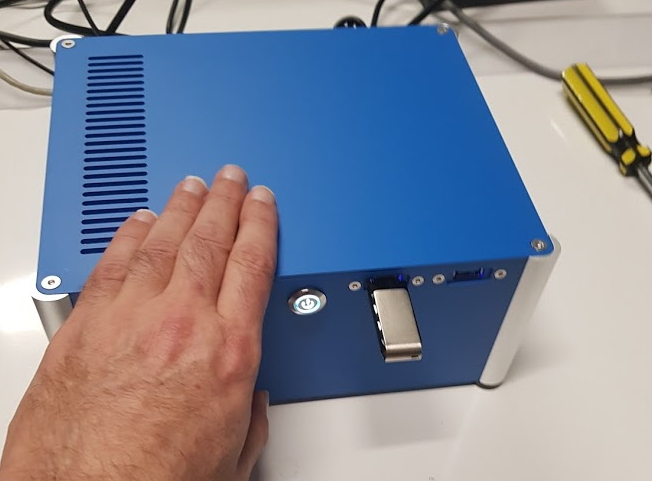
If you are short of place under the counter, how does this computer meet you requirements? It is a full blown computer.

As you can see they do not have to be black, this one in blue looks nice.

It is a small but very fast computer built to run up to eight computers in a network.

We have been installing these for a while now.

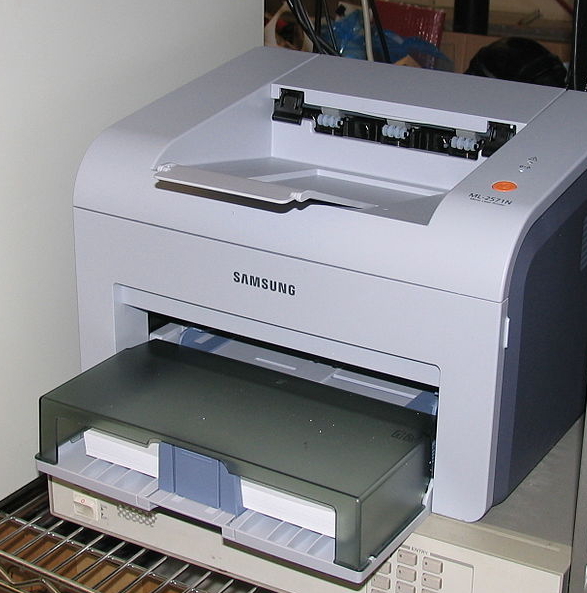
Some quick tips in buying a laser printer

Laser printers are the best printers for point of sale systems. Widely popular so here are a few tips to help you decide which one to buy.

First make sure that the proposed printer can work with your software.

Many now have wireless capability, which means that in theory, you do not need to connect them to a wire. I do not recommend this as with wireless, printing often tends to be slower and trickier particularly if you have a low-quality Internet connection. If you are in an area where there are plenty of devices such as a shopping centre, the wireless can be a problem. You also need to check whether the printers can use both cable and WIFI together. Some cannot.

Make sure the printer is solidly built. I have seen some put together with cheap plastic and in a retail shop where staff are in rush, do not know what they are doing and so are very rough with the equipment. As a result the printers tend to break.

Check to see the manual is in readable English. Some of the obscure brands have manuals that are unreadable.

Check the controls of the printer, I have seen some with touch screens that are too small making it very hard to change settings. Furthermore, check the responsiveness of the controls as some that are big enough are very unresponsive so making it difficult to change settings.

Check the price of toner, some printers are very cheap but the toners are very expensive. I know people now that buy printers with toners, use the printer until the toner runs out and then chuck the printer and buy a new printer as the printer and toner is cheaper then the toner.

Finally check the print and scanning quality. You do want to look professional. Somehow in practice the quoted specifications often do not match the result.

Hope this helps.

Selecting a domain name

POS SOFTWARE


If you are planning to move a little on on-line one of the first objective you need to consider is what is going to be your on-line name? It is going to be the very first thing that people will see about you, and you probably will live with that name for a long time so you need to make it a good one.

I suggest doing some thought about what you would like. Try to avoid any names that may get you in trouble, its not worth it. If an existing business often you can use much of the name of the business. If its a new business I suggest something shows your products and services, is short and different. On the internet it does not need to be a real word.

Some points, you should take into account.

1) Short is better, your customers need to remember it.

2) Make it pronouncable, again its easier to remember

3) Make it in Australia .com.au, trying to run a business with .com For example, in Australia is generally a NO NO

4) Make it an easy name, something like S7-y.com.au is not going to get you far, actually be careful with numbers, they can be very good just be careful.

5) Make it something that ideally represents you, remember your name will have a lot of bearings in the search engines like google and Yahoo. This point is something that cannot be stressed enough.

6) Remember many people like your accountant are not very good at picking marketing names.

7) If you are running out of ideas, you can buy one.

8) Finally remember a good name off-line maybe not be a good name on-line. What I find a very useful exercise for people to do and what I suggest you do is go onto google in another country like Canada here and do searches for your products and services and see what comes up there. This should give you some ideas for here. If it works there is probably will work here.

You need to check if your choice is available.

Do not be discouraged if you fail on the first attempt. For example, we initially picked POS Software which stands for Point of Sale software. I failed on my first attempt to register it. It took me a few hours of work, with some professional help and a lot of stress before we got a name what we were happy with POS Solutions.

A good name is very important for a business and remember that some thought should go into it.