Point of Sale Software

Black Friday Creep

POS SOFTWARE


Black Friday Creep

Black Friday 2025

Black Friday creep refers to the phenomenon where sales begin weeks early, shifting the peak shopping period to the Wednesday and Thursday before Black Friday, which now generate more sales than the actual day. This fundamental shift in shopping patterns means that retailers must reassess their entire Black Friday strategy and staffing approach.

Why People Are Shopping Earlier

There are several clear reasons why customers are changing when they shop. Retailers are starting their sales early to attract customers now, as waiting allows competitors to grab their customers first.

Many shoppers prefer to shop earlier to avoid crowds. We have all been to shops that sell out of items we want to buy, and buying early ensures that customers get what they want.

With deals available early, shoppers have more flexibility in their purchasing decisions. Additionally, many people have their payday on Thursday, making shopping easier during this critical period.

Understanding these shopping behaviours becomes clearer when examining actual sales data from Australian retailers over multiple Black Friday periods.

What the Sales Reports Show

Sales data from Australian retailers over multiple years reveals a consistent pattern of peak shopping occurring before Black Friday itself. Black Friday in Australia follows the US dates, and analysis of historical data shows clear trends.

2020: Friday, 27 November
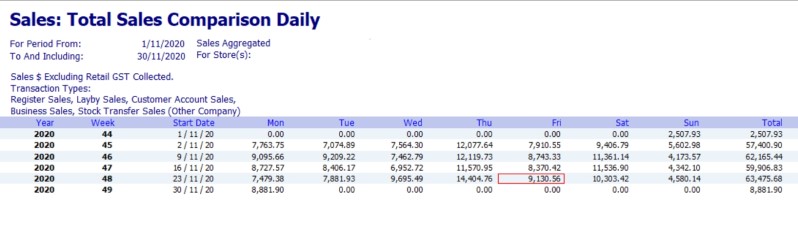
Black Friday Sales Report 2020

Wednesday and Thursday were excellent sales days, Black Friday was a good day but not as strong, and then Saturday was good but not brilliant. This marked the beginning of the visible shift in shopping patterns.

2021: Friday, 26 November
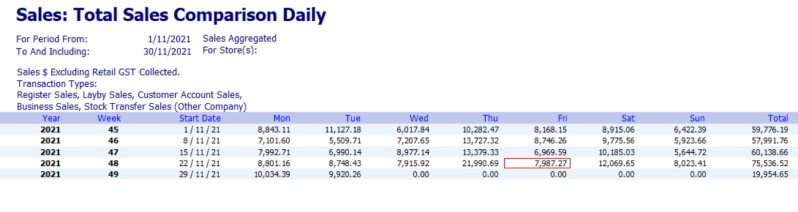
Black Friday Sales Report 2021

Thursday was the standout day with awesome sales, but Black Friday was only good by comparison. Saturday maintained strong performance with perfect sales results.

2022: Friday, 25 November
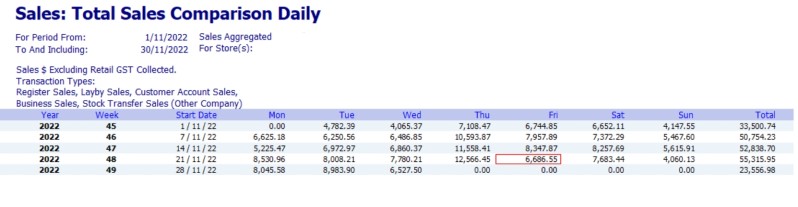
Black Friday Sales Report 2022

Black Friday was disappointing, but the pattern remained consistent with the busiest day being the day before Black Friday. This reinforced the trend of early shopping behavior.

2023: Friday, 24 November
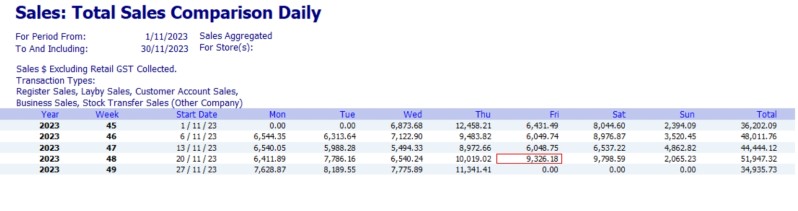
Black Friday Sales Report 2023

The same effect continued, with the day before Black Friday performing better than the actual day. The pattern was becoming increasingly predictable across retail sectors.

2024: Friday, 29 November
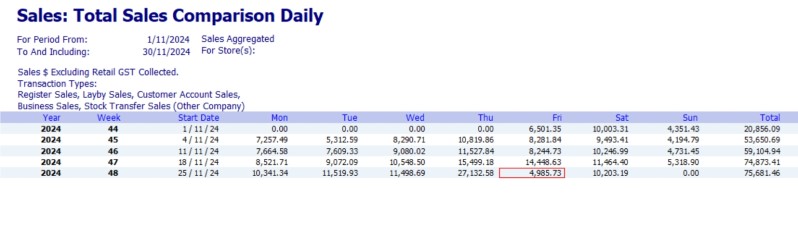
Black Friday Sales Report 2024

Retailers made a concentrated effort for Black Friday, which paid off with strong results, while the best days remained those leading up to it. This demonstrated that with proper preparation, the entire week could be optimized for sales.

Your 2025 Timeline

Pre-Black Friday Sales Launch: On November 1, start promoting your Black Friday sales. Many retailers will start actual sales this early to capture early shoppers and build momentum.

Black Friday Week Launch: On November 24, 2025, begin your main promotional week. Your customers are starting their central buying during this critical period.

Black Friday Sale: From November 26 to Saturday, you need to be fully prepared as Black Friday approaches. This represents the culmination of your month-long preparation and promotional efforts.

Your Black Friday Week Plan

You need to treat the entire week as your main sales event, not just Friday. Success depends on preparation, proper staffing, and strategic inventory management throughout the week.

Visual Merchandising

Set up your high-impact displays by Tuesday night so they're ready for Wednesday morning shoppers. Use your POS reports to identify your top-selling items from previous years and feature these prominently.

Create eye-catching displays for your popular items, as these are what early shoppers are explicitly looking for. Strategic product placement can increase conversion rates during the critical Wednesday-Thursday shopping window, and your top-selling reports can provide a valuable list of items to feature.

Staffing Your Shop

Wednesday: Your new pre-game day. Have extra staff for setup, but also be ready for real customers, as many people now consider Wednesday their primary shopping day.

Thursday: Likely your new peak day. Schedule maximum staff for sales, restocking, and click-and-collect services, which surge during this period.

Friday: Less busy than in previous years, more like a continuation of Thursday. Keep strong staffing levels, but expect less chaos than traditional Black Fridays.

Saturday: Sales continue through the weekend. Ensure good coverage for weekend shoppers who prefer this more relaxed shopping timeframe.

Stock and Inventory

Get all your Black Friday stock on the floor by Tuesday evening. Don't wait until Thursday or Friday, as by then it will be too late to capture the peak Wednesday-Thursday shopping period.

Monitor your stock levels daily from Wednesday through Saturday. Regular monitoring ensures you can restock popular items quickly and avoid disappointing customers who arrive expecting specific products.

The Bottom Line

Key Takeaway: Begin Black Friday planning now. Start your sales on November 1, as Black Friday is a month-long event, not a single day. The data shows that Wednesday and Thursday generate the highest sales, so prepare your store, staff, and inventory accordingly for maximum success.

Written by:

Professional headshot of the author, Bernard Zimmermann

Bernard Zimmermann is the founding director at POS Solutions, a leading point-of-sale system company with 45 years of industry experience. He consults to various organisations, from small businesses to large retailers and government institutions. Bernard is passionate about helping companies optimise their operations through innovative POS technology and enabling seamless customer experiences through effective software solutions.

LinkedIn Profile link icon


Add new comment

Restricted HTML

  • Allowed HTML tags: <a href hreflang> <em> <strong> <cite> <blockquote cite> <code> <ul type> <ol start type> <li> <dl> <dt> <dd> <h2 id> <h3 id> <h4 id> <h5 id> <h6 id>
  • Lines and paragraphs break automatically.
  • Web page addresses and email addresses turn into links automatically.
CAPTCHA This question is for testing whether or not you are a human visitor and to prevent automated spam submissions. Image CAPTCHA
Enter the characters shown in the image.

Customer-Facing Display: Why you need one?

POS SOFTWARE


Customer-Facing Display: Why You Need One

A customer views their order details on a customer-facing display at a retail checkout counter.

One of the most popular features in modern POS software is a customer-facing screen. These digital displays display detailed order information to customers, including their orders, tax, discounts, and loyalty information during the checkout process. You often see customer-facing displays in retail businesses.

Why should you use a customer display?

Ensure Sale Accuracy

When a staff member enters a customer's order information, each item and price appears on the customer-facing screen. This means that the point of sale screen provides the customer with a quick and easy way to verify it is correct while being entered. Most queries can be resolved immediately, such as pricing and many incorrect quantities.

Key Benefit: Customers can verify their orders in real-time, catching pricing errors and incorrect quantities before the transaction is completed. This immediate verification prevents time-consuming returns and refunds later.

Instil Customer Confidence in You

One of the clear benefits of a point of sale display is the impact on the customer experience. It has transparency. That can be a great help in establishing trust between your staff and your customers.

Drive Customer Engagement

You can also use it to display advertising for your shop. The screen becomes valuable marketing real estate during checkout, promoting new arrivals, loyalty programs, and special offers to customers while they wait.

Marketing Opportunity: Transform idle checkout time into revenue opportunities. Use your customer display to showcase new products, promote loyalty rewards, and highlight special offers—turning every transaction into a marketing touchpoint.

Professionalism

It looks much more professional, giving your shop a better image. Modern customers expect to see their transaction details displayed, and providing this elevates your business above competitors who lack this transparency.

Speed Up Cash Register Operations

As many mistakes are noticed quickly before orders are completed, your staff can immediately adjust the items. Once the sales are processed, they must process a return, which takes longer. The display screen prompts customers to act as the transaction proceeds. For example, once you scan all the items, the customer display cues customers to pay, then tells them to pick up their goods and go.

Consider an All-in-One Solution

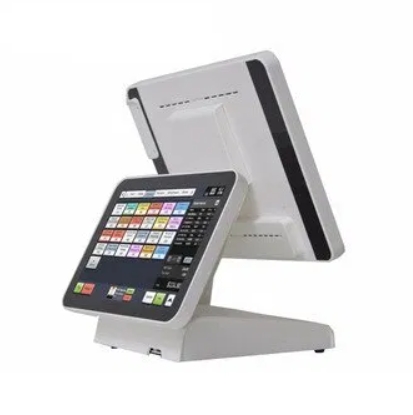
Rather than adding a separate customer display to your existing setup, consider upgrading to an all-in-one POS terminal with an integrated dual-screen design. These modern systems combine your operator touchscreen and customer-facing display into a single compact unit, eliminating counter clutter and cable tangles.

All-in-one terminals offer several advantages over separate displays. They require minimal counter space, leaving more room for merchandise displays. Setup takes under five minutes with no technical expertise required—the integrated unit works straight out of the box. You get unified warranty coverage and support from one manufacturer rather than coordinating between multiple vendors.

Cost Savings: Complete all-in-one systems with built-in customer displays cost less than purchasing separate components, plus save space and trouble caused by mounting the hardware and cables.

The streamlined design also reduces energy costs while delivering powerful performance for demanding retail operations. Modern integrated terminals support contactless payments, loyalty program displays, email capture, and promotional content on the customer's screen—all managed seamlessly through a single device.

Quick Setup: Installation takes less than a minute with no technical expertise required. The integrated unit works straight out of the box, eliminating the complexity of multiple devices, cables, and mounting hardware.

If you're considering a customer-facing display for your own business and want to see what has been working with our customers for years, we can help you. Whether you need a separate display added to your current system or prefer the convenience of an all-in-one integrated terminal, feel free to talk with us now.

Written by:

Professional headshot of the author, Bernard Zimmermann

Bernard Zimmermann is the founding director at POS Solutions, a leading point-of-sale system company with 45 years of industry experience. He consults to various organisations, from small businesses to large retailers and government institutions. Bernard is passionate about helping companies optimise their operations through innovative POS technology and enabling seamless customer experiences through effective software solutions.
LinkedIn Profile link icon


Add new comment

Restricted HTML

  • Allowed HTML tags: <a href hreflang> <em> <strong> <cite> <blockquote cite> <code> <ul type> <ol start type> <li> <dl> <dt> <dd> <h2 id> <h3 id> <h4 id> <h5 id> <h6 id>
  • Lines and paragraphs break automatically.
  • Web page addresses and email addresses turn into links automatically.
CAPTCHA This question is for testing whether or not you are a human visitor and to prevent automated spam submissions. Image CAPTCHA
Enter the characters shown in the image.

Our Christmas Holiday 2025 outlook

POS SOFTWARE

Christmas retail trend 2025

Each year is different. So Christmas 2025 will be different. That is why careful planning is essential to boost your sales. Shoppers today are expected to spend an average of around $667 per person. What they want is convenience. Suppliers tell me that Christmas shopping has already started. If the trend of the last few years continues, it will peak in November during Black Friday and then continue through mid-January. Be prepared for an extended holiday season.

Today, it's becoming evident that retailers across Australia are already gearing up for the festive season.

Analysing Christmas Interest Trends

Based on current trends, the Christmas 2025 holiday season is expected to see cautious but consistent spending. Retailers are generally optimistic about sales growth.

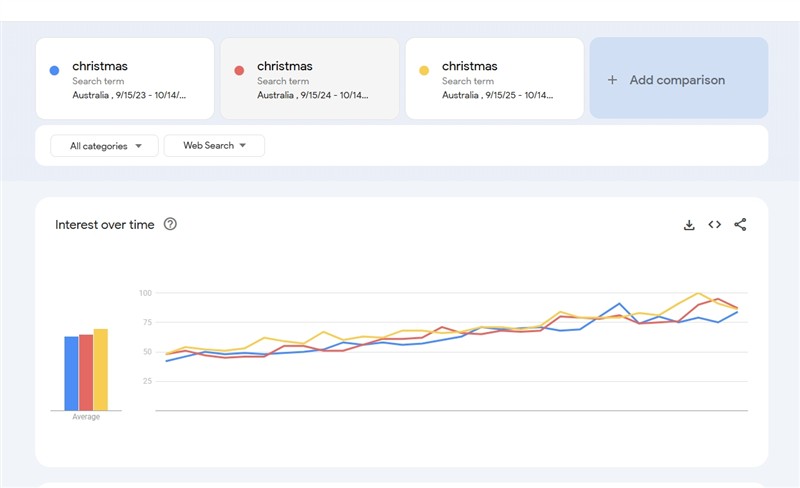
I think this is correct, as a way to measure public interest for the upcoming holiday season, I checked Google Trends which tracks Australian interest over time. The results paint an interesting picture:

Consistent Interest: Over the past three years, public interest in Christmas-related searches in Australia has gone up consistently.

Long-Term Stability: I redid the analysis over eight years, and it basically confirmed my analysis.

As the holiday season approaches, we must be well-prepared to capitalise on the busiest time of the year. Here is the expected pattern.

Black Friday Is the Biggest Day

Black Friday has become the primary shopping event of the Christmas season. It's bigger now than Boxing Day. Shoppers wait for these late-November deals to buy Christmas gifts, so you need to be ready for November.

Products That Sell Well

Some holidays, like Halloween, clearly indicate what sells well. However, Christmas is less predictable. People often purchase items unrelated to the holiday, yet expected popular products include toys, beauty gift sets, books, and small tech devices like earbuds or phone chargers. For toy sales, focus on movie character figures, LEGO sets, educational toys, and outdoor water toys for summer.

Get Your POS System Ready

Your POS keeps everything working when the shop gets busy. Use it to plan stock, speed up checkout, track staff performance, and see what's selling every day.

Check All Your Equipment

Good luck finding a computer technician during the Christmas season. So do the following:

  • Test every register, scanner, receipt printer, barcode printer, and card reader.
  • Check all cables, Wi-Fi, and internet connections. Fix problems now.
  • Charge and test any mobile POS devices you use on the shop floor.
  • Keep spare receipt rolls and a backup printer somewhere easy to find.

Update Your Software Early

  • Do all software updates in October or early November, then don't change anything in December.
  • Load in all your Christmas sales, voucher rules, and special prices ahead of time.
  • Test your discount buttons, gift-receipt printing, gift-card scanning, and lay-by system.

Plan Your Stock

Look at last year's Christmas sales reports to see what sold fast, what didn't sell, and what ran out. Do not rely on gut feel; use your information to see what sold well in your shop over Christmas.

Set Up Your Prices and Sales

Build a clear plan for your sales: Here is what you need to think of Black Friday deals, early-December specials, last-minute gifts, Boxing Day clearance, and January sales.

Track the progress of each sale daily in your POS and allocate more stock to the products that are selling well.

Get Your Staff Ready

Review last year's busy periods and plan rosters for upcoming events, including late-November weekends, mid-December, and the week before Christmas.

Make Your Shop Easy to Shop

Set up gift displays at the front with clear signs and ready-made gift bundles. Highlight top-sellers, staff favourites, and last-minute gifts. Consider offering gift-wrapping and simple wrap-and-ribbon kits at the counter.

Start Christmas marketing with signs, social media, and email newsletters if you use them. If not, consider using these free marketing methods.

Quick Tips by Product Type

These do sell well over Christmas.

Toys: Stock movie characters, LEGO Christmas sets, STEM learning kits, family board games, and water toys for hot weather. Put demo toys where kids can see them.

Beauty: Offer gift sets at clear prices ($30, $50, $100), small travel-size products, and advent calendars. Add small impulse gifts near the register.

Books: Put bestsellers, kids' books, and coffee-table books near the entrance. Put up signs for "Gifts under $30."

Tech: Focus on practical gifts, such as earbuds, bright lights, portable speakers, and controllers. Keep accessories, such as cables and cases, near the main products.

Final note

Start now, space out your sales, and keep the momentum going into January.

Your Christmas Checklist

  • □ Test all POS hardware and backup devices
  • □ Update POS software early; don't change anything in December
  • □ Load sales, gift receipts, vouchers, and lay-by into the system
  • □ Run last year's Christmas sales reports
  • □ Talk to your suppliers now and confirm supplier delivery dates
  • □ Set reorder reminders
  • □ Plan gift displays and signage; get gift wrap ready
  • □ Make staff rosters
  • □ Launch marketing; schedule Black Friday posts now
  • □ Test for busy times and offline payment backups
  • □ Stock gift cards, packaging, and batteries
  • □ Plan extended hours and staff meal breaks

Written by:

Professional headshot of the author, Bernard Zimmermann

Bernard Zimmermann is the founding director at POS Solutions, a leading point-of-sale system company with 45 years of industry experience. He consults to various organisations, from small businesses to large retailers and government institutions. Bernard is passionate about helping companies optimise their operations through innovative POS technology and enabling seamless customer experiences through effective software solutions.

LinkedIn Profile link icon


Add new comment

Restricted HTML

  • Allowed HTML tags: <a href hreflang> <em> <strong> <cite> <blockquote cite> <code> <ul type> <ol start type> <li> <dl> <dt> <dd> <h2 id> <h3 id> <h4 id> <h5 id> <h6 id>
  • Lines and paragraphs break automatically.
  • Web page addresses and email addresses turn into links automatically.
CAPTCHA This question is for testing whether or not you are a human visitor and to prevent automated spam submissions. Image CAPTCHA
Enter the characters shown in the image.

Windows 10 End of Support Now: What Retailers Need to Know

POS SOFTWARE


Windows 10 end of support

Microsoft stopped supporting Windows 10 today.

The Windows 10 operating system is now out of updates, support, and fixes, which means that security risks are present for POS systems that manage credit card transactions and personal data. Approximately 40% of all computers globally are running on the affected systems, and hence, the number of security holes will rise as they are a tempting target. Over time, manufacturers' hardware will no longer be supported, which is why we anticipate an increase in equipment breakdowns, such as printers, scanners, terminals, and touchscreens.

There are four options for your Windows 10 computers.

Option 1: Upgrade them to Windows 11

Approximately 40% of our Windows 10 clients are unable to upgrade to Windows 11. Windows 11 needs more powerful hardware, which can slow down Windows 10. If possible, upgrade to Windows 11 ASAP. It generally runs faster on modern computers, but on old systems, it tends to be slower. I would not suggest hacking systems to get them to run Windows 11, as Microsoft doesn't guarantee updates or support for systems that bypass hardware requirements.

You can check if your computer is compatible with Windows 11 using Microsoft's free PC Health Check tool. This tool tells you whether your hardware meets the minimum requirements. Computers that meet requirements can upgrade to Windows 11 for free through Windows Update.

Instructions on how to do this can be found here.

Will Your Computer Run Windows 11? Check Compatibility in 60 Seconds.

I suggest running it on all the computers in the shop.

Option 2: Use the Microsoft Security Updates Option

If you pay Microsoft, they will give you support for a limited time.

In our experience, few customers opt for Extended Security Updates due to the cost and limited benefits.

Those of you who are using the free backup service using OneDrive can get it free by using your OneDrive account to sync your PC's settings via the Windows Backup feature. To do this, you must first update your Windows 10 to version 22H2 and then go to Settings > Windows Update to find the "Enrol now (ESU)" wizard. Within the wizard, you select "Sync settings to OneDrive" to sign in with your Microsoft account and enrol for free. You will find details on how to do it here.

 Keep Using Windows 10 with Extended Security Updates!

Option 3: Leave them with the higher risk profile in Windows 10

Contrary to what many say, Australian laws do not tell you that you have to upgrade; however, it's not as simple as this, it never is, as the law states businesses holding personal information must "take reasonable steps to protect the information from misuse, interference and loss, as well as unauthorised access, modification or disclosure". Running POS systems on unsupported software may pose a problem with the "reasonable steps" requirement. Continuing to operate systems on unsupported systems may be viewed as negligence and a failure to maintain proper security controls.

Additionally, businesses processing credit and debit card transactions must adhere to the Payment Card Industry Data Security Standard (PCI DSS) requirements. It requires systems to have current security patches to protect against known vulnerabilities. Unsupported operating systems that no longer receive security patches automatically fail these requirements.

The immediate issue for most retailers here is whether they will be allowed to run software that connects to bank credit and debit systems. In the past, when this has occurred, we have seen financial companies cease support for outdated operating systems. We have had to move these systems to other computers in the shop and use older machines in the back for stock recording purposes. We certainly do not recommend attempting to hack these systems to work on older Windows versions, as fines are huge, e.g., $100,000 per month, plus the responsibility for fraudulent transactions may be shifted to you.

Option 4: Replace Hardware for Old Systems**

Systems that cannot run Windows 11 need hardware replacement.

In response to this challenge, we have been offering our clients a computer upgrade deal to help them transition to Windows 11-compliant systems.

Conclusion

There are issues to consider here. If you have any questions, contact our support team to discuss the matter further.


Written by:

Professional headshot of the author, Bernard Zimmermann

Bernard Zimmermann is the founding director at POS Solutions, a leading point-of-sale system company with 45 years of industry experience. He consults to various organisations, from small businesses to large retailers and government institutions. Bernard is passionate about helping companies optimise their operations through innovative POS technology and enabling seamless customer experiences through effective software solutions.

LinkedIn Profile link icon


Add new comment

Restricted HTML

  • Allowed HTML tags: <a href hreflang> <em> <strong> <cite> <blockquote cite> <code> <ul type> <ol start type> <li> <dl> <dt> <dd> <h2 id> <h3 id> <h4 id> <h5 id> <h6 id>
  • Lines and paragraphs break automatically.
  • Web page addresses and email addresses turn into links automatically.
CAPTCHA This question is for testing whether or not you are a human visitor and to prevent automated spam submissions. Image CAPTCHA
Enter the characters shown in the image.

Peak Profits for Halloween Retailer 2025

POS SOFTWARE


🎃 Halloween 2025: Unlock Your Share of the $450M Spend 👻

Halloween 2025

To grab your share of the estimated $450 million in Halloween spending this year, which should see the average buyer spending about $93 this Halloween. What we did was study what is selling right now from a major retailer's Halloween sales.

💰 The Right Price Range

Most Halloween sales now range from $10 to $35. It is the sweet spot now.

Check your POS system now. Look at last year's Halloween sales. See which price points sold best in your shop. This takes only seconds using the price point report.

Here's what customers are buying now:

🦇 Bats and Spiders: 3D bat wall stickers and large, hairy spiders are always popular. They create a significant impact for a low price. This drives more sales.

💀 Skeletons and Grim Reapers: These items are effective because people love the spooky side of Halloween. About 37% of Australians buy costumes this season. Full-sized skeletons and Grim Reaper costumes are top choices.

🎃 Pumpkins: Pumpkins are the main symbol of Halloween. Real pumpkins and plastic pumpkins sell.

⚡ Easy Setup Products

Halloween shoppers want quick results; few are going to go to a lot of trouble to make a Halloween atmosphere. What people want are decorations that work straight out of the box.

🕸️ Spider Web Sets: These sell very well. Bundle them with small plastic spiders. It provides customers with everything they need in one package.

🦇 3D Bat Sticker Packs: Customers can create a swarm of bats on their walls quickly. With little effort, they have a big visual impact.

🎭 Themed Banners and Table Runners: Plastic banners and spooky table covers create an instant party atmosphere.

💡 LED String Lights: Themed lights in orange, purple, or ghost shapes add easy atmosphere.

💡 Sell these items as "Instant Halloween Party Packs". It makes shopping easier for customers. It also increases how much they spend.

👻 Costume and Accessory Sales

Dressing up is a big part of Halloween. Costumes and accessories sell consistently well. This year, kids like Spider-Man, ghosts, and princesses. Adults choose witches, vampires, and cats.

🎭 Core Costumes: Simple costumes, such as those of grim reapers, skeletons, and pumpkins, remain popular. They're safe to stock because they always sell.

🎨 Accessories: Many customers create their own unique outfits. Stock lots of accessories, such as scary masks, face paint kits, and fake blood. These items have good profit margins.

📦 Bundles: Customers think a costume with a matching mask offers better value. Your POS system can easily create and track these bundles.

⚠️ Plan for Leftover Stock

Much Halloween stock won't sell after the holiday. Plan now for items that don't sell. Don't wait until November to consider this, as then you'll be looking at a sale with discounts of 50–75%, which will only attract bargain hunters. Plan your clearance strategy before ordering stock. If possible, buy stock that can be sold after Halloween.

🚀 Last-Minute Shoppers

The final days before Halloween are your most significant advantage. Online stores often struggle to deliver promptly. Customers who need products fast will come to local shops.

Use clear signs in your store: "Halloween Stock In-Store Now!" People aged 35–59 are most likely to celebrate Halloween (34%). Those under 35 follow at 25%. These customers value speed when time is short.

Get ready to boost your Halloween profits?

Written by:

Professional headshot of the author, Bernard Zimmermann

Bernard Zimmermann is the founding director at POS Solutions, a leading point-of-sale system company with 45 years of industry experience. He consults to various organisations, from small businesses to large retailers and government institutions. Bernard is passionate about helping companies optimise their operations through innovative POS technology and enabling seamless customer experiences through effective software solutions.
LinkedIn Profile link icon


Add new comment

Restricted HTML

  • Allowed HTML tags: <a href hreflang> <em> <strong> <cite> <blockquote cite> <code> <ul type> <ol start type> <li> <dl> <dt> <dd> <h2 id> <h3 id> <h4 id> <h5 id> <h6 id>
  • Lines and paragraphs break automatically.
  • Web page addresses and email addresses turn into links automatically.
CAPTCHA This question is for testing whether or not you are a human visitor and to prevent automated spam submissions. Image CAPTCHA
Enter the characters shown in the image.

Digital Signatures for Retail Businesses

POS SOFTWARE


Digital Signatures

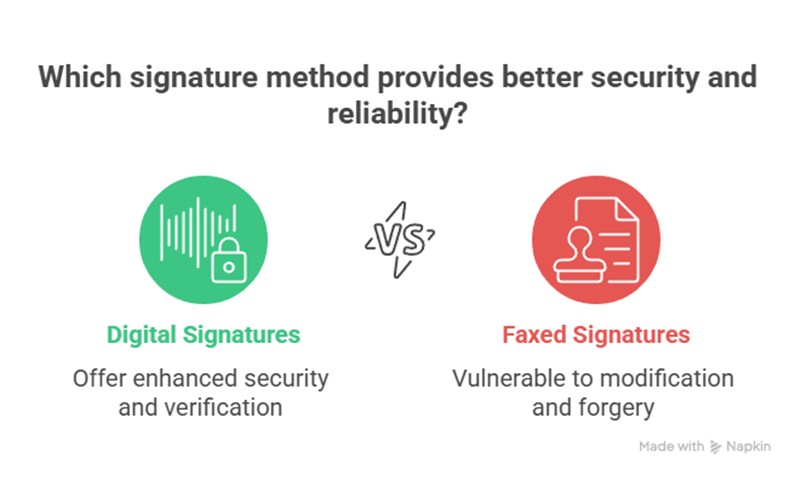
Digital signatures use computer encryption to verify a signer's identity and confirm their agreement. Generally, under Australian law, they are treated as handwritten signatures. What they do is use codes to make a seal that joins the signers to the document. If the document is changed in any way, everyone gets a message that the signature is now invalid. They are preferred over faxed signatures, as a fax signature can be modified and forged.

Signed digital signatures are binding for most business deals. Of course, like any signature, you need identification, proof of intent to approve, and the agreement of all parties.

In my experience, many people forget to obtain some identification, such as a driver's license, which can be fatal in court if they are challenged.

Most exceptions in my experience where digital signatures are not accepted occur when you need to do it in front of a lawyer, a court, and/or witnesses.

Step-by-Step Guide for Retail Use

  1. Log in to your digital signature account.
  2. Upload the document, like an invoice.
  3. The software will send the link to the other party.
  4. I suggest adding the ID checks, such as licence uploads.
  5. Let the recipient sign with a click.
  6. After you sign, the system locks the document and creates a certificate.
  7. You now have independent proof.

It saves a lot of time.

Key Benefits and Common Concerns

The documents travel through secure channels; email is often not considered a safe method for legal purposes.

Digital signatures eliminate the need for printing and waiting for a fax.

One of my customers sent a 10-page document for signing, but what they got was only eight pages. They had to ring up and get them to redo it.

FAQ: Your Questions on Digital Signatures Answered

Q: Are digital signatures legal in Australia?

A: Digital signatures have proven legally binding for most business transactions in Australia.

Q: What is the difference between a faxed signature and a digital signature?

A: A faxed signature appears as an image of your mark. Copying or forgery occurs easily. A digital signature uses advanced security. Software creates a tamper-proof lock that ties all parties and the document. Then you have a public record to track the signing process.

Q: I received an email with a document to sign. How do I know it is secure?

A: Contact the sender to confirm details if doubts exist.

Q: Are there any documents I cannot sign digitally?

A: Most documents signed with faxed methods, like invoices or agreements, can switch to digital. Exceptions generally occur when lawyers, courts, and/or witnesses are required.

Q: What are the main benefits of using digital signatures?

A: Digital signatures prove easier and quicker than faxing. No printing, scanning, or waiting occurs. Better security.

Q: Someone signed a digital document, but a dispute arose. How does the signature prove it was them?

A: This is why you need support with ID verification, like an emailed driver's licence. This is similar to any signature.

Q: Do I need to be a tech expert to use digital signatures?

A: It takes a little getting used to, but it's made to be easy to use.

Q: What happens if a document changes after digital signing?

A: The signature is immediately declared as invalid. All sides get an alert.

Important Disclaimer

This article provides general information, drawing on industry knowledge and official rules, regarding digital signatures in Australia. I have no legal training. I do not offer legal advice. Consult a qualified lawyer to determine the best fit for your business. Then follow all laws fully.

Written by:

Professional headshot of the author, Bernard Zimmermann

Bernard Zimmermann is the founding director at POS Solutions, a leading point-of-sale system company with 45 years of industry experience. He consults to various organisations, from small businesses to large retailers and government institutions. Bernard is passionate about helping companies optimise their operations through innovative POS technology and enabling seamless customer experiences through effective software solutions.
LinkedIn Profile link icon


Add new comment

Restricted HTML

  • Allowed HTML tags: <a href hreflang> <em> <strong> <cite> <blockquote cite> <code> <ul type> <ol start type> <li> <dl> <dt> <dd> <h2 id> <h3 id> <h4 id> <h5 id> <h6 id>
  • Lines and paragraphs break automatically.
  • Web page addresses and email addresses turn into links automatically.
CAPTCHA This question is for testing whether or not you are a human visitor and to prevent automated spam submissions. Image CAPTCHA
Enter the characters shown in the image.

Your scanners not reading correctly?

POS SOFTWARE


Your Scanner is Not Reading Right?


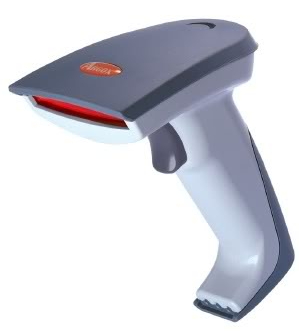
Barcode scanner


Ever had your barcode scanner just quit on you? It's a common complaint we hear from shop owners: a headache when their scanner stops scanning or only works partially. This guide covers the usual suspects and how to fix them fast, so you can get back to serving customers without the drama.

We'll start with the easy stuff.

A dirty scanner window is a common problem, often caused by people placing their fingers on the scanner window. Get out of that habit. Also, dust or grime can cause reading issues. To clean, unplug the scanner and wipe the glass with a soft microcloth.

Are the Cables Loose?

Loose and/or faulty cables are another common problem. If the cable is not connected correctly, the scanner will not be able to talk with your POS System. Worn cables sometimes work intermittently

What to check:

  • Make sure everything's plugged in tight.
  • Look over the cables for frays or breaks. If one's damaged, replace it.
  • Try using a different port on the computer as well.

Is Something Wrong with the Barcode?

With a clean scanner and solid connections, the barcode might be the problem. Check the barcode; some are difficult to read if they are shiny or wet.

What to look for:

  • See if it's torn, faded, or poorly printed.
  • For shiny packaging, angle it to minimise glare.
  • Aim for decent lighting, enough to see clearly, but not so bright that it reflects on you.

Is Your Scanner Old?

These scanners are rugged, but retail is a tough environment for scanners. They are often dropped and damaged. After a few years, the wear and tear add up.

What to look for:

  • Check for cracks or wobbly bits.
  • If the window's off-kilter, it's damaged. In most cases, replacing it is smarter than fixing it, especially for safety and speed.

Signs it's time to retire it:

  • Odd noises like grinding or whirring.
  • Dim, flickering, or no light at all.

At that point, repairs are usually not worth it; you're better off with a new one that comes with a warranty.

Common Scanner Questions

We've got answers to the ones retailers ask us most.

How often should I clean my scanner?

It depends on your shop. If it's a dusty spot, such as a nursery, you may need to clean it daily; otherwise, clean it only when it becomes noticeable. As a rule, I do believe if it is working, do not mess with it. If it has to be done, it only takes seconds to do.

My scanner beeps, but nothing shows on the screen. What's up?

The beep indicates that it read the code correctly; the issue is likely downstream. Check cables, ports, or restart your computer—it's often the fix.

Why won't it read barcodes on phone screens?

Old laser models are designed for use with paper only. For screens, you need a 2D camera scanner—they handle digital codes no problem.

Should I bother fixing an old one?

Rarely. Repair costs can match the price of a new one, and you'll get something faster and warrantied instead.

Keeping Things Running Smoothly

Sorting out these basics can resolve most scanner issues and keep your checkout running smoothly. If it's still acting up after these checks, upgrading might be the next step; many retailers kick themselves for waiting.

Written by:

Professional headshot of the author, Bernard Zimmermann

Bernard Zimmermann is the founding director at POS Solutions, a leading point-of-sale system company with 45 years of industry experience. He consults to various organisations, from small businesses to large retailers and government institutions. Bernard is passionate about helping companies optimise their operations through innovative POS technology and enabling seamless customer experiences through effective software solutions.
LinkedIn Profile link icon


Add new comment

Restricted HTML

  • Allowed HTML tags: <a href hreflang> <em> <strong> <cite> <blockquote cite> <code> <ul type> <ol start type> <li> <dl> <dt> <dd> <h2 id> <h3 id> <h4 id> <h5 id> <h6 id>
  • Lines and paragraphs break automatically.
  • Web page addresses and email addresses turn into links automatically.
CAPTCHA This question is for testing whether or not you are a human visitor and to prevent automated spam submissions. Image CAPTCHA
Enter the characters shown in the image.

Eliminating many GST errors

POS SOFTWARE


A Retailer's Guide to Managing GST in Australia

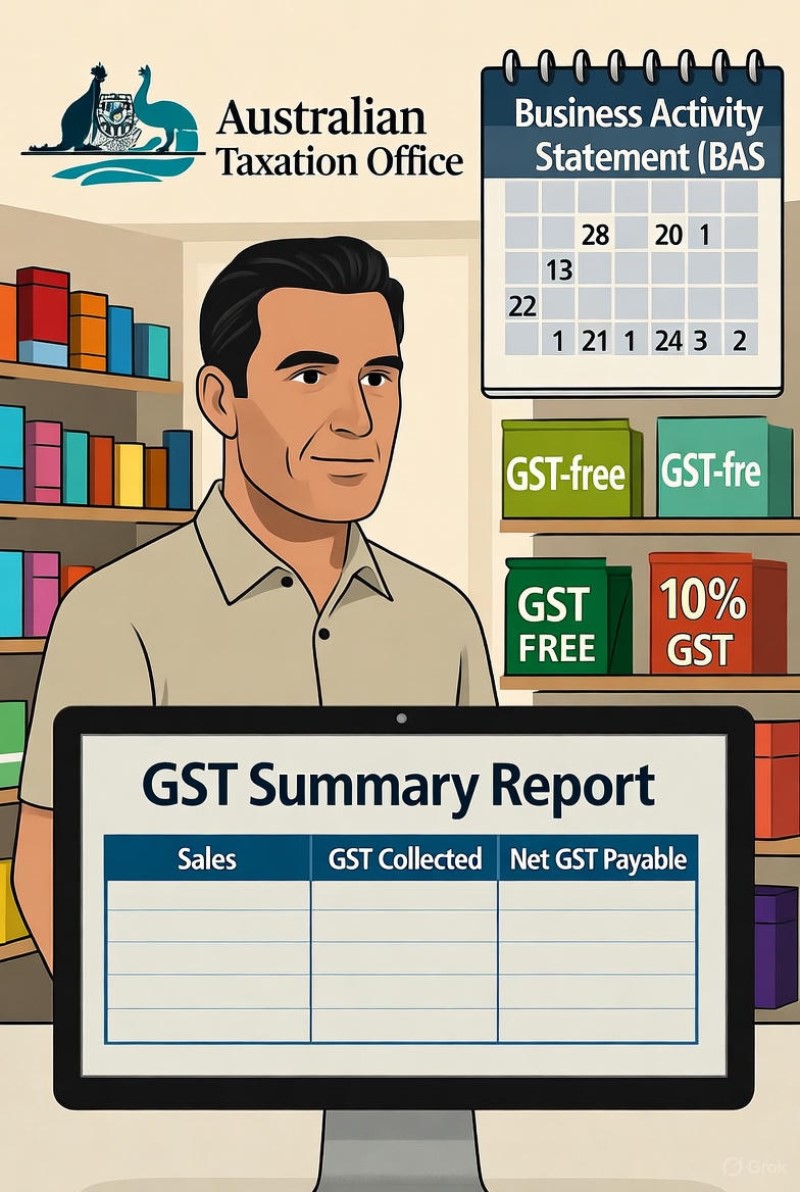
Australian retail businesses must ensure accurate GST compliance to stay financially healthy. Mistakes can lead to excess tax, losses, or costly audits. Most handle GST quarterly. Many struggle with mixed-item sales, some of which are GST-applicable, while others are not.

Common GST Problems in Retail

Shops are likely to encounter inevitable GST mistakes that can result in time and money losses.

  • Incorrect Item Codes: A common and expensive mistake is using the wrong code for an item when it's sold. If you charge GST on an item that is GST-free, or vice versa, it creates problems immediately. This becomes complicated because different products have varying rules, as not every business expense is subject to GST. Some examples include loan interest payments, water, sewerage, and food.
  • Complex GST Rules: Services such as lottery tickets, insurance, and bill payments have distinct tax rules compared to other goods and services.
  • Errors on Supplier Invoices: Suppliers may send invoices with GST errors that are automatically imported into your system. Just because it's electronic, you do not get out of the need to verify the information manually.
  • Understanding Sale Types: Differentiating between 10% GST sales, GST-free sales, and input-taxed sales can be confusing, but correct classification has a significant impact on the GST owed and available credits.

Checking Your GST Each Quarter

Our POS software has a powerful GST auditing tool. This makes your life easier. Here's why it's a game-changer:

Integrated Solution: No more jumping between programs.
Speed and Accuracy: Powered by Microsoft SQL for lightning-fast results.
User-Friendly Interface: Designed with retailers in mind, not tech gurus.

To ensure your BAS is accurate, follow this method to identify and fix discrepancies:

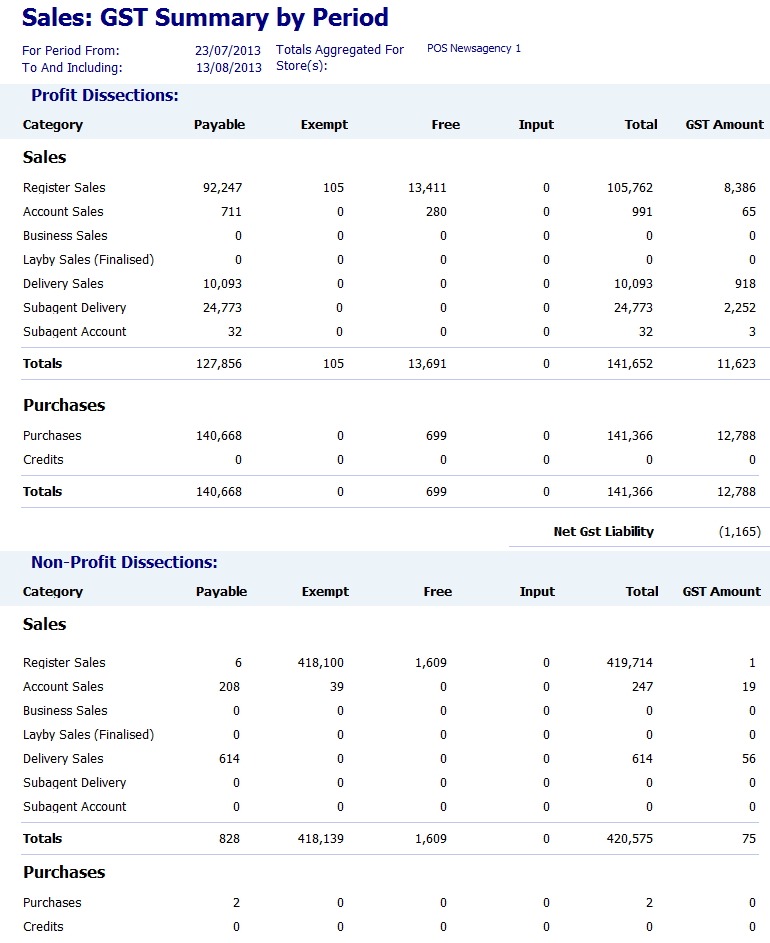
Get a Full GST Report: Run a GST summary for the quarter in your sales system, showing total sales, GST collected, and GST-free sales.

Let me walk you through how simple it is to use:

  1. Go to Register Reports > Sales > GST Summary
  2. Select your desired period
  3. Review the detailed report, including a comprehensive GST breakdown.

This will provide you with a detailed report that includes this information.


GST Summary report


  1. Compare Reports: Match this with your accounting software's GST report and your total sales, as GST is about 10% of that figure.
  2. Find Differences: If totals don't match, compare the monthly and then the daily totals to locate the error.
  3. Investigate and Fix: Review the problematic transaction for coding or data entry errors, correct it, and document the change. Believe me, you do not want to have to explain to the ATO why the figures in one report are different from those in another system.

Real-World Example: Finding a $2,000 Mistake

A newsagent was preparing their quarterly BAS and found a $2,000 difference between their sales data and their accounting software. Using the detailed reports in their sales system, they traced the problem to a single day. The investigation revealed that an insurance payout, which should not have been subject to GST, had been incorrectly entered as a taxable sale. This mistake wrongly increased their GST payment by $2,000. By quickly locating this transaction, they avoided overpaying the tax office and corrected their financial records with minimal effort.

Best Practices for Managing GST

Document Everything: In particular, keep a detailed record of all changes. You need documentation to explain your figures to the Australian Taxation Office (ATO).

  • Utilise Automation: Maximise the features in your sales and accounting software. Set up automatic reports, use the correct item codes from the beginning, and ensure data flows smoothly between your systems.
  • Review: Check your GST records before finalising your BAS. I had one customer who submitted a report stating that they owed $480,000 in GST that quarter, and spent hours on the phone trying to correct it after the ATO contacted him for the money.

Ready to Make Your GST Easier?

An integrated sales system can automate the application and verification of GST, significantly reducing errors, saving you time, and protecting your profits.

*The information provided is general. We recommend consulting a qualified tax advisor for personalised advice tailored to your needs.

Written by:

Professional headshot of the author, Bernard Zimmermann

Bernard Zimmermann is the founding director at POS Solutions, a leading point-of-sale system company with 45 years of industry experience. He consults to various organisations, from small businesses to large retailers and government institutions. Bernard is passionate about helping companies optimise their operations through innovative POS technology and enabling seamless customer experiences through effective software solutions.
LinkedIn Profile link icon


Add new comment

Restricted HTML

  • Allowed HTML tags: <a href hreflang> <em> <strong> <cite> <blockquote cite> <code> <ul type> <ol start type> <li> <dl> <dt> <dd> <h2 id> <h3 id> <h4 id> <h5 id> <h6 id>
  • Lines and paragraphs break automatically.
  • Web page addresses and email addresses turn into links automatically.
CAPTCHA This question is for testing whether or not you are a human visitor and to prevent automated spam submissions. Image CAPTCHA
Enter the characters shown in the image.

Halloween 2025: Unlock Your Share of the $450M Spend

POS SOFTWARE


Unlock Your Share of the $450M Spend.


Halloween 2025

Halloween is now a major retail event in Australia. Spending forecasts are to exceed $450 million. It offers a significant opportunity for local retailers. Read on if you want part of that pie.

Table of Contents

What Aussies Are Buying for Halloween 2025

Recent data from Roy Morgan and the Australian Retailers Association gives us a clear picture of where the money is spent. Focusing on these most popular items is the most innovative way to invest your inventory budget.

The popular Halloween categories are:

  • Lollies: 38% of shoppers buy them to give out as trick-or-treats.
  • Costumes: 37% of customers buy costumes. For themselves, their children, and, interestingly, for their pets as well.
  • Decorations: 32% of shoppers buy Halloween decorations. Partly to make a spooky vibe at home and partly to mark their homes as participating in Halloween.

The largest spenders are people aged 35–59. Family-friendly products are your best option. It's also worth noting the significant increase in pumpkin sales in the week leading up to Halloween.

When deciding what to buy, a Point of Sale (POS) system can be a helpful tool. Look at the best sellers in the period starting a month before Halloween last year, as your POS Software shows you what you sold in your shop last year.

Please take a look at what your competitors are doing; I think you will find costumes, stickers, masks, fake body parts, and more. All of which are selling well now.

Use this to decide what to concentrate on.

For most SMB retailers, every square metre of floor space counts, so you need to be clever about how you display and bundle your products.

Maximise Your Counter Space for Impulse Buys

Use the counter for small, high-margin items that shoppers can quickly grab. Think about:

  • Pre-packaged bags of lollies
  • Fun Halloween-themed pens or other stationery
  • Halloween stickers

These items need little space.

Create "Halloween Packs" to increase value.

Busy parents value convenience, so bundling products into themed packs makes their lives easier and boosts sales. This positions your store as a one-stop shop for Halloween.

Ideas include:

  • "My First Trick-or-Treat Kit": a small bag with a kid-friendly torch, glow sticks, and allergy-friendly lollies.
  • "Quiet Halloween Fun Pack": activity book, crayons, small puzzles.
  • "Ultimate Treat Giver's Pack": assorted lollies in a fun bowl.

Turn safety into A key selling point. Shoppers now prioritise product safety, especially parents. Stand out by prioritising safety and building trust.

  • Button Battery Safety: Ensure toys with button batteries have secured compartments to guarantee safety and compliance. Last year, the ACCC sued some retailers who sold unsafe toys at Halloween.
  • Flame-Resistant Costumes: Stock labelled fire-resistant costumes, as fire is a real problem on Halloween, and explain to staff to inform customers to boost trust.
  • Enhance Visibility: Utilise reflective tape, glow sticks, and flashlights as essential items for trick-or-treating to boost sales. It's a concern as kids will be running around at night in dark costumes and car drivers will not be able to see them. Offer a range of high-margin add-on items. I would suggest marketing these as "trick-or-treating essentials" and display them near the costume section for easy impulse buys.
  • Allergy-Friendly Options: For many families, food allergies are a significant concern during trick-or-treating. My neighbour walked around with her son last year to make sure that the lollies he got were safe to eat. Become the go-to store in your area by offering a great selection of allergy-aware products.
  • Stock face: Stock paint that is marked as safe. Make sure that they have a clear ingredient list. 

For safety, clear signage is the key!

Halloween Marketing

As a local retailer, market your business to position it as the trusted, safe, and reliable choice for Halloween.

Simple signs in your window or around the store can have a significant impact. Try messages like:

  • "Shop Safe, Shop Local This Halloween."
  • "All Our Light-Up Toys are ACCC Compliant. Ask Us!"
  • "Allergy-Friendly "Halloween Treats Right Here in Your Neighbourhood."

Written by:

Professional headshot of the author, Bernard Zimmermann

Bernard Zimmermann is the founding director at POS Solutions, a leading point-of-sale system company with 45 years of industry experience. He consults to various organisations, from small businesses to large retailers and government institutions. Bernard is passionate about helping companies optimise their operations through innovative POS technology and enabling seamless customer experiences through effective software solutions.

LinkedIn Profile link icon


Add new comment

Restricted HTML

  • Allowed HTML tags: <a href hreflang> <em> <strong> <cite> <blockquote cite> <code> <ul type> <ol start type> <li> <dl> <dt> <dd> <h2 id> <h3 id> <h4 id> <h5 id> <h6 id>
  • Lines and paragraphs break automatically.
  • Web page addresses and email addresses turn into links automatically.
CAPTCHA This question is for testing whether or not you are a human visitor and to prevent automated spam submissions. Image CAPTCHA
Enter the characters shown in the image.

Australian Made

POS SOFTWARE


Aussie-Made

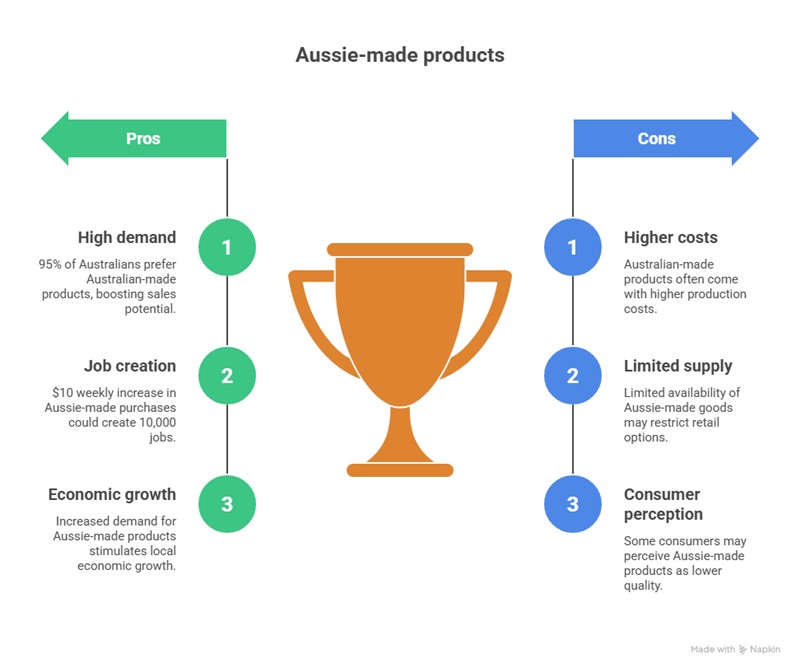
Are you an SMB retailer in Australia wondering if you should go all in on Aussie-made products? The headlines are tempting; a recent Roy Morgan report claims that 95% of Australians are more likely to buy Australian-made products. Plus it would be great if more people would buy Aussie-made, research shows if each household spent an extra $10 weekly on Australian-made products, it could create almost 10,000 new jobs.

Let's explore the true challenges faced by retail business owners and the reality of Aussie-made versus imported goods.

The Hype vs. Retail Reality

On the surface, this appears to be a golden opportunity to align with customer sentiment and boost sales.

But whilst supporting local industry is a powerful ideal, small business owners must ground their strategy in reality. Before overhauling your inventory, it's crucial to look beyond the hype and consider the real-world factors that truly drive consumer behaviour.

Beyond the Hype

The Gap Between Saying and Doing

Most shoppers like to think of themselves as supporters of Aussie-made, but what people say and what they actually do at the checkout can be very different. Surveys capture intentions and aspirations, rather than actual behaviour. When faced with a choice in your shop, factors such as price, convenience, and habit often win over ideals.

Price Still Rules, Especially Today

Although Roy Morgan found that many Australians would pay a little more for Australian-made products, the increase was not substantial. Around half said they would only pay up to 5% more, and just 20% would pay up to 10% more. With rising costs and tighter budgets, today's price usually comes first. If a comparable imported product is significantly cheaper, most shoppers will reach for it even if they wish they could do otherwise.

The Scarcity of Aussie-Made Goods

Here's an often-overlooked truth: in many categories, there isn't an Australian-made option available. Decades of relocating our manufacturing overseas have resulted in the majority of everyday retail goods being imported. You can't sell what doesn't exist. We no longer have the local manufacturing capacity that we had 40 years ago; it has long since disappeared.

Confusing Labels

Whilst we have country-of-origin labelling for most foods, the rules for non-food items are much looser. Today, "Made in Australia" may mean "packed or assembled here."

'Australian-Made' Isn't a Guarantee of Quality

The "Australian-Made" badge speaks to a product's origin, not its quality. Your reputation depends on selling quality and value. The label "Made in Australia" doesn't make their product better.

Things Are Rarely Equal

If you're comparing two identical products at the same price, the Australian-made option is likely to be the better choice. However, in real-world retail, products have costs, quality and a brand. Origin is just one factor alongside your staff's recommendations, product availability, and customer preferences.

Conclusion

The desire to support Australian businesses is genuine, and it deserves respect. But buying local is an aspiration.

It's easy to get caught up in broad trends. However, your best insights come from your point-of-sale system, not surveys. Your POS System shows what your customers really buy (not just what they say they want). Use the information you have for a deeper dive here. Your sales data is real and actionable. Let that guide your next steps.

Written by:

Professional headshot of the author, Bernard Zimmermann

Bernard Zimmermann is the founding director of POS Solutions Australia. Since founding the company in 1983, he has helped thousands of small and medium-sized retailers across Australia streamline their operations with industry-specific POS software and hardware solutions. With over four decades of experience in retail technology, Bernard specialises in helping businesses leverage point-of-sale data analytics to make informed inventory and strategic decisions. His expertise spans newsagencies, pet shops, pharmacies and various specialty retail sectors throughout Australia.


Add new comment

Restricted HTML

  • Allowed HTML tags: <a href hreflang> <em> <strong> <cite> <blockquote cite> <code> <ul type> <ol start type> <li> <dl> <dt> <dd> <h2 id> <h3 id> <h4 id> <h5 id> <h6 id>
  • Lines and paragraphs break automatically.
  • Web page addresses and email addresses turn into links automatically.
CAPTCHA This question is for testing whether or not you are a human visitor and to prevent automated spam submissions. Image CAPTCHA
Enter the characters shown in the image.

Setting your priorities right … P0, P1, P2, …

POS SOFTWARE


Mastering Task Prioritisation: The P0-P4 Framework

A to-do list with checkboxes illustrating task prioritisation

In business or life, we face many tasks that demand our time and attention. Managing inventory, handling customer service, marketing your products, keeping the books—the list goes on and on. With numerous responsibilities, how do you determine what to focus on and when? The most effective method I have found is prioritisation, which is now in your Pos Software.

I will discuss how it works and how it can benefit your retail operation.

Overview of the P0-P4 Framework

Tasks are listed; they can be on paper or in your diary, but nowadays, most people use some software. I find Google Calendar practical and free. However, I will now explain the concept as it was presented on paper, as most of you can easily relate to it.

Now, list your tasks and assign them to each event on the day you plan to work on them, so you have a list for each task. A weekly task planner can help list your tasks throughout the week, allowing you to prioritise what needs to be done first and break down larger tasks into smaller ones. If a task will take a few days, it is best to break it down into smaller tasks that can be completed in a few hours or less.

I recommend that you use the following notation for each of these tasks, which is assigned a number from 0 to 4 based on priority:

  • P0. Your Mum is dying, the kids are in trouble, a guy just had a heart attack in the shop, and nothing else matters. This P0 block everything else and stops all thought of scheduling.
  • P1. The system is down and is needed now.
  • P2. Some essential functions are currently not working, but we can still operate.
  • P3. Some important function is required soon, but it can wait.
  • P4. A non-urgent question that can wait.

This is how it would look on paper: a person goes through the list, prioritises each task and ticks off what they have done.

A handwritten task list demonstrating prioritisation levels from P0 to P4

The general rule is to complete P0 tasks first, then proceed sequentially to P4 tasks as time allows.

This creates an organised method for tackling your most crucial work first. Now, keep reading to see how P0-P4 can make order amid the chaos of retail management.

P0 - Crises Requiring Immediate Action

P0 designates emergency tasks that demand your urgent attention. In retail, P0 situations don't arise frequently, but quick action is crucial when they do.

Examples of potential P0 crises:

  • Your point of sale system crashes during peak business hours
  • A pipe bursts and floods your store
  • Mum is sick, and you need to run to the hospital

These crises require you to stop everything and address the situation. You cannot waste a minute.

Luckily, these events are rare.

P1 - High-Priority Goals

These are important tasks that require your primary focus. Often, they are essential tasks or those with a near-deadline.

Daily P1 priorities for a retailer may include:

  • Generally, they are tasks that must be done now!
  • Handling a customer now with an issue and complaint
  • Last day to order stock for the holiday season
  • Balancing the till at the end of the day
  • Managing tomorrow's staff schedules

These P1 tasks keep your store operating smoothly. Make time for them before tackling less vital work. Use your point-of-sale system's inventory and reporting tools to stay on top of P1 retail tasks.

P2 - Important but Less Time-Sensitive Tasks

P2 tasks are still integral to your business, but aren't as immediate as P1 items. You have some leeway in when you complete them.

Retail P2 tasks could include:

  • Generally, they are tasks that must be done today.
  • Updating store displays and signage
  • Planning for holidays or seasonal inventory
  • Collecting stock for return to a supplier.

Focus on these P2 priorities after handling urgent P0 and P1 tasks. Use your POS system to collect data over time that aids P2 analysis and planning.

P3 - Tasks That Can Wait

P3 contains helpful and non-urgent tasks.

P3 retail tasks may include:

  • It can wait a couple of days
  • Filing old inventory paperwork
  • Rearranging the shelves
  • Analysis of POS reports

Do these when you have time after higher-priority tasks. Avoid letting less important P3 work distract you from critical P0-P2 activities.

P4 - Nice Extras If You Have Time

P4 includes optional tasks that are beneficial but not strictly necessary at this time. Only tackle these if all other work is complete.

Retail examples include:

  • Whenever you have time
  • Learning more about your computer system
  • Cleaning the warehouse in the back
  • Researching new products

These extras can wait until everything else is done. Don't let non-essential P4 work detract from essential tasks.

Benefits of P0-P4 Prioritisation

Consistently using P0-P4 classification to prioritise your retail workload offers many upsides:

Increased Focus - Provides structure so you know what requires attention now versus later. It prevents you from getting overwhelmed.

Higher Productivity - Helps ensure you complete urgent critical work first. It avoids wasting time on less relevant tasks.

Reduced Stress - Gives confidence that you're focusing where needed most. Minimises anxiety. I find myself often worrying about remembering my tasks now; putting it in a systematic order calms me down.

Time Savings - Enables getting the right things done faster. I know what I have to do each day.

Orderly Operations - Keeps your business running smoothly by tackling the most pressing issues first. It avoids problems from neglected tasks piling up.

Better Decisions - Clarifies priorities, enabling you to make informed choices about time allocation and task delegation. Enables data-driven analysis of what matters most.

The overall impact is optimising your productivity and performance.

Implementing P0-P4 Prioritisation with Paper

Implementing P0-P4 takes some upfront planning, but it soon becomes second nature. Follow these steps to apply it:

  1. Review your tasks - Make a master list of your current to-do.
  2. Classify using P0-P4 - Review each task and assign a priority level based on importance and urgency.
  3. Schedule time - Allocate time on your calendar to match the prioritised order.
  4. Execute and revisit - Work through tasks starting with P0 and adjust as needed if new urgent tasks emerge.

Don't let the labelling, Classify using P0-P4, overwhelm you; it rarely matters if you make a mistake in practice. Use a combination of urgent, work-time, and essential tasks. It produces a p0-p8 category. Look at each task for today, and then set

Diagram showing priority levels based on urgency, importance, and workload

Urgent tasks: Are these tasks urgent, or can they be delayed? Urgent tasks cannot be pushed back. As a rule, if not done on time, you cannot do the task.

Important: If they are more important, I will do them first.

Where I disagree with many people, e.g. the Eisenhower matrix, is I believe that Urgent and Important are distinct.

For example

1) The news TV show is happening at 6 pm today. If you miss the deadline, no point switching on the TV at 6:20 pm. Yet if you miss it, it's not the end of the world. You can always catch up on the news later. So, I would mark this as 'Urgent and Unimportant'. Catching up on the news is now a task that is neither urgent (P8) nor unimportant.

2) Picking up my kid from school at 3:30 pm today is Urgent and Important. If my kid has an after-school activity she is happy to do until I come, the task may NOT be Urgent (P8), but it's still Important.

Workload/Duration: Will it require a significant amount of time? I give preference to those that I can do quickly. Ideally, I want to get as many tasks off my lists ASAP so Small gets preference. Another benefit of completing the Small functions is that it boosts your ego, knowing you have accomplished something today.

If I have only a little time spare, I will often go through the list for tomorrow, look at the small items, and do these tasks depending on how Urgent and Important they are.

This ordering works for me.

The Drawbacks of Paper-Based Prioritisation

This P0-P4 framework, which, as you have possibly noticed, is a P0-P8 system, provides an excellent structure for prioritising your tasks and responsibilities. However, managing your master list on paper has some practical challenges.

Repetitive Tasks Are a Hassle

Approximately 40% of your tasks are typically recurring, such as daily register balancing, weekly inventory checks, and monthly rental payments. Using project management tools can automate these repetitive tasks, ensuring efficiency and reducing the risk of oversight. It is easy to forget that on the 15th, I was supposed to send the rent money.

Tasks that cannot be done

Often, you have to do a task and suddenly discover that it cannot be done through no fault of your own, e.g., you are waiting for someone else to do something. In which case, how do you reschedule it? It is now in limbo.

No Visibility of Outstanding Work

Paper lists only show one day at a time. What will happen on a future date is unknown. There is no way of knowing that next Thursday, for example, you will be flat out.

Messy

With a paper system, tasks get crossed off, rescheduled, and shuffled around. This obscures what you need to focus on today and makes your diary appear unprofessional, which is undesirable.

No Progress Tracking

Paper alone cannot analyse time spent on tasks, spot workflow patterns, or identify recurring time-wasters. Missing this data limits your ability to improve your operations.

Pain to Share Priorities

A paper list in the back is useless for communicating priorities to others.

The paper gets lost or left at home.

It is all too typical to work everything out on paper, know precisely what must be done and then suddenly discover you have lost or left that paper somewhere and cannot access it when needed.

I recommend using software, but this post is getting too long for a blog. Stay tuned for my next post in a few days, where I'll recommend how to handle and do this.

Frequently Asked Questions

What are Priority Levels?

Priority levels are a system for categorising tasks or issues based on their importance and urgency. They help you focus on the most critical work and manage your resources effectively.

What is the P0-P1-P2-P3-P4 Priority System?

This is the standard priority system most commonly used.

  1. P0 (Critical): These are the highest priority tasks that require immediate attention. They are often described as "drop everything" issues.
  2. P1 (High): These are urgent and essential tasks, but not as critical as P0. They must be addressed quickly to prevent significant disruption.
  3. P2 (Medium): These tasks are necessary but not immediately urgent. They often contribute to long-term goals.
  4. P3 (Low): These tasks are neither urgent nor highly important. They should be done, but can be scheduled for later.
  5. P4 (Lowest): These tasks have minimal impact.

What is the Priority Rating Scale 1-5?

I do not recommend it. Some organisations use a 1-5 scale, where 1 is the highest priority and 5 is the lowest, instead of a 0-4 scale.

Any quick way of deciding what priority level?

I find that appling a 24-hour test, that if delaying the task by 24 hours won't cause significant damage, it's likely P2 or lower. True P0 tasks are rare and genuinely critical but you know them when you get it.

What is the importance of prioritisation?

Prioritisation is crucial for several reasons:

  1. Resource Management: It helps allocate resources effectively to the most critical tasks.
  2. Stakeholder Alignment: It ensures that work aligns with business goals and objectives.
  3. Customer Value: It keeps teams focused on the most valuable tasks.

Implementing Priority Levels

To effectively use priority levels:

  1. Define Clear Criteria: Establish guidelines for each priority level.
  2. Regular Review: Continuously assess and adjust priorities as needed.
  3. Customise for Your Industry: Adapt the priority system to your specific needs.
  4. Use Prioritisation Frameworks: Consider using frameworks like the Value vs. Effort matrix or Value vs. Urgency to help determine priorities.

Consistency is critical to effective prioritisation. Regularly reviewing and adjusting priorities ensures that you remain focused on the most essential tasks.

Sample P0–P4 Framework for a retail shop

To make the priority levels more tangible, I have included sample tasks directly related to running a shop that sells giftware, books, greeting cards, gifts, and stationery.

  • P0: Existential Crises (Do Immediately, Regardless of Effort)
    These are rare, "drop everything" events. The time they take is irrelevant because nothing else matters.

    • A fire or flood in the store: Requires immediate, sustained action.

    • A significant personal or family emergency: Overrides all business tasks. Dad just died, or the kids at school have no one to pick them up.

    • A store-wide power outage: Requires immediate contact with the power company.

  • P1: High-Impact, Urgent Business Functions
    These are critical operational tasks. While you must do them, knowing the effort helps in planning the rest of your day around them.

    • POS system crashed during morning rush: (High Effort) - This will likely consume a significant amount of time to fix.

    • Balancing the till at day's end: (Low Effort) - A routine, quick task that must be done daily.

    • Placing a missed order for a top-selling weekly magazine due tomorrow: (Low Effort) - A quick phone call or email that prevents a stockout.

  • P2: Important, Less Time-Sensitive Tasks
    This is where effort-based decisions are most valuable. You can choose tasks based on the time you have available.

    • Seasonal planning (e.g., ordering Christmas stock): (High Effort) - Requires research, budgeting, and placing large orders. Schedule this for a quiet afternoon.

    • Updating a window display: (Medium Effort) - Takes some time, but can be done in a couple of hours.

  • P3: Tasks That Can Wait
    These are ideal "filler" tasks. Use their effort level to determine if you can accommodate them.

    • Reorganising the entire book section: (High Effort) - A project to save for a very slow day or after hours.

    • Organising past month's invoices: (Medium Effort) - A good task for a quiet hour.

    • Reviewing a single product category's sales report: (Low Effort) - A quick analysis that can be done in 15-20 minutes at the computer.

  • P4: Optional Extras (When All Else is Done)
    These are growth-oriented or "nice-to-have" tasks, often scheduled based on available time.

    • Researching new local giftware suppliers: (Medium Effort) - Can involve online research and phone calls.

    • Deep cleaning the back stockroom: (High Effort) - A low-priority project for a designated time.

    • Visiting a competitor's store: (Low Effort) - To see what they are doing and what you could be doing better.

Written by:

Professional headshot of the author, Bernard Zimmermann

Bernard Zimmermann is the founding director at POS Solutions, a leading point-of-sale system company with 45 years of industry experience. He consults to various organisations, from small businesses to large retailers and government institutions. Bernard is passionate about helping companies optimise their operations through innovative POS technology and enabling seamless customer experiences through effective software solutions.
LinkedIn Profile link icon


Add new comment

Restricted HTML

  • Allowed HTML tags: <a href hreflang> <em> <strong> <cite> <blockquote cite> <code> <ul type> <ol start type> <li> <dl> <dt> <dd> <h2 id> <h3 id> <h4 id> <h5 id> <h6 id>
  • Lines and paragraphs break automatically.
  • Web page addresses and email addresses turn into links automatically.
CAPTCHA This question is for testing whether or not you are a human visitor and to prevent automated spam submissions. Image CAPTCHA
Enter the characters shown in the image.

How is your business going?

POS SOFTWARE

Get Quick Business Insights from Your POS System

See how your business going?


How is your business going? As an SMB owner, have you wondered, "How are we really doing?" You want quick answers without having to dig into receipts or make guesses. Your POS system holds this info. Using POS sales reports, you get instant insights and can track performance. This guide shows you how to capture a business snapshot quickly.

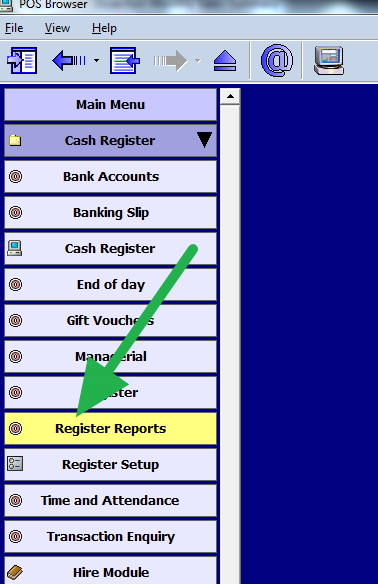
From the following menu, choose the "Monthly Sales Summary."

point of sale reports menu showing the Register Reports option highlighted

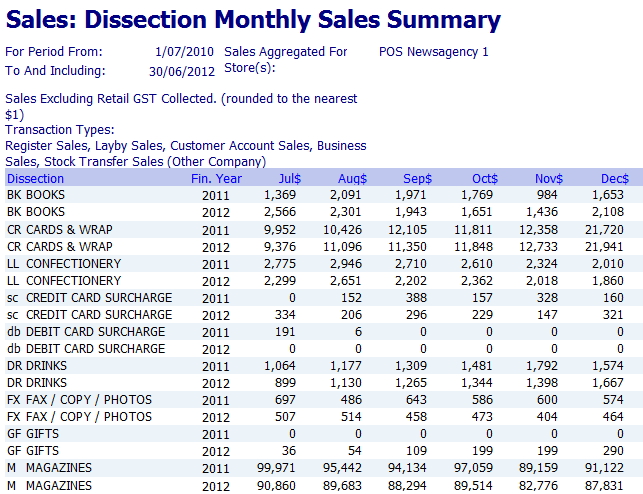
To get a comprehensive view, set the date range for the last 24 months. You can do more and less; please experiment with various options here later once you get a handle on this. The system here will generate a detailed report breaking down your sales by department and month, comparing this year to last year.

A dissection of a monthly sales report showing columns for department, this year's sales, and last year's sales

This report provides sales trends over time, highlighting both increases and decreases.

Once you run the report, don't let the numbers overwhelm you. It's made to be simple. You will see product categories listed on one side, with sales data from this year and last year in columns following them. This layout makes spotting trends easy. Use these five steps to focus on what matters most and uncover the valuable insights in your data.

  1. Start with the Grand Total
    Before you look at anything else, find the total sales figure at the bottom. Is it higher or lower than the same time last year? It is your big-picture number, indicating immediately whether your business is growing or shrinking overall.
  2. Spot Your Big Winners and Losers
    Next, scan the report for the most significant changes in any single department. Which department had the most significant jump in sales? Which one had the biggest drop? These are the areas having the most impact on your business right now.
  3. Focus on Your Star Players
    Remember that some category changes are more significant. A 10% drop in your best-selling area is more substantial than a 50% drop in a minor category. Focus on key areas.
  4. Check Overall Balance
    Think of your business like a see-saw. Growth in some areas lifts you, dips in others pull you down. Are your top categories growing enough to offset declines? This quick check shows if you're winning overall.
  5. Know When to Dig Deeper
    Don't worry about every tiny change. Set a threshold, such as $200 or $300. If a change exceeds that, investigate further.

Turning Insights into Action

Finding clues is beneficial, but the real value lies in using them to make informed decisions. After identifying winners and losers, act on what you've learned.

When Sales in a Category Are Down...

Don't panic. It is your chance to get curious and make improvements. Ask yourself:

  • Are my products still fresh? It may be time to bring in some new items for that category.
  • Is my pricing proper? Take a quick look at what competitors are charging.
  • Could I promote it better? A small sale or relocating the items to a better spot in the shop could help.

When Sales in a Category Are Up...

Great job! Now, build on your success by checking your inventory to avoid stockouts, expanding popular product ranges, prominently displaying top items, and considering price adjustments based on demand.

You're in Control of Your Business Story

Your POS system can provide you with data-driven insights to inform your decisions. Spend a few minutes monthly analysing sales data to understand your business.

Try running your Monthly Sales Summary this week to see what your data reveals.

Want real growth? Give us a call.

Written by:

Professional headshot of Bernard Zimmermann, founding director of POS Solutions Australia

Bernard Zimmermann is the founding director of POS Solutions Australia. With over two decades of experience in retail technology, he specialises in helping small to medium businesses harness their sales data for growth. Bernard is passionate about making complex analytics simple and actionable, empowering countless Australian business owners to optimise their operations, manage inventory effectively, and improve profitability through their POS systems.


Add new comment

Restricted HTML

  • Allowed HTML tags: <a href hreflang> <em> <strong> <cite> <blockquote cite> <code> <ul type> <ol start type> <li> <dl> <dt> <dd> <h2 id> <h3 id> <h4 id> <h5 id> <h6 id>
  • Lines and paragraphs break automatically.
  • Web page addresses and email addresses turn into links automatically.
CAPTCHA This question is for testing whether or not you are a human visitor and to prevent automated spam submissions. Image CAPTCHA
Enter the characters shown in the image.

Email Marketing Guide for Australian Retailers 2025

POS SOFTWARE

Email_marketing_2025

Why Australian Shops Need Email Marketing and

How to Get Started

A Year-Long Guide to Building 1,000 Subscribers and Growing Your Business

Email marketing is one of the most effective ways for Australian retailers to promote their shops. It means sending emails directly to your prospective customers. Industry figures indicate you can make $36 for every dollar you spend. This makes it better than any other method to advertise your business that is known.

Getting it going properly typically requires about 1,000 subscribers and a year of steady effort. Let’s examine how to approach this as a year-long project.

Firstly, why Australian Shops Need Email Marketing

It’s simple: email marketing works so well. Unlike Facebook or Instagram where you pay a lot and few see your posts, emails go directly to your customers.

Email marketing is effective for every type of shop, big or small, no matter what you sell.

Australian Email Laws You Must Know

Before sending emails, you must follow Australian laws to avoid huge fines.

What you must do

  • Ask people if they want your emails before sending them
  • Make it easy for people to stop getting your emails by unsubscribing
  • Tell people who you are in every email

For business customers, the rules are complex. Generally, if a company recently bought from you, you can email about similar products, but it’s always safer to ask first.

Building Your Email List

You need to collect email addresses from customers who want your communications. Our team aims to get four new sign-ups daily. This is easier than it sounds if you simply ask customers.

Make Signing Up Easy

Request only essential info when people sign up, as extra fields reduce sign-up rates.

Only ask for

  • Their first name
  • Their email address
  • Permission to send them emails

Make it worth their time

Give people reasons to join. Effective ideas include:

  • Regular customers earn 5 points per purchase
  • Email subscribers earn 7 points plus a birthday discount
  • Special sales only for email members

Train Your Staff

Encourage staff to ask customers personally to sign up. This face-to-face approach increases subscriptions.

Put Up Signs in Your Shop

Display eye-catching signs about your email list throughout the store, especially near checkout. Keep a printed copy of your privacy policy available. A helpful privacy template for Australian businesses you can use  is available here:

Choosing the Right Email Platform

You could send emails manually, but dedicated email platforms make it easier and more professional. Both recommended platforms comply automatically with Australian laws and offer easy unsubscribe options.

EmailOctopus - Great for Beginners

EmailOctopus is ideal for Australian shops starting out. It offers a free plan allowing up to 2,500 subscribers and 10,000 emails per month.

Why EmailOctopus is good

  • Free to start
  • Easy to use for those not tech-savvy
  • Good customer support
  • Automatically follows email laws

Upgrades with more features start at about $20/month.

BlueFox Email

BlueFox uses Amazon technology to maximise deliverability to inboxes, not spam folders. For $20/month, you get 100,000 emails—enough for most small shops for years.

Why BlueFox Email is good

  • Higher chance emails will be seen
  • Very affordable for many emails
  • Outstanding, helpful customer support

Creating Great Email Content

Many find content the hardest part—yet it’s essential. If sending one email monthly, that’s 12 per year, which is quite manageable.

If writing is difficult, seek help from professionals, skilled family members, or employees.

The 40-30-30 Rule

Balance your emails with:

  • 40% helpful tips and advice
  • 30% sales and special offers
  • 30% community news and local events

This mix helps sell without being pushy since customers get useful info too.

Helpful Information Ideas

Share expert knowledge to build trust.

Examples by shop type

  • Greeting cards - seasonal and holiday cards
  • Gift shops - occasion-specific gift guides
  • Garden shops - seasonal maintenance tips and problem fixes
  • Clothing shops - styling advice and care instructions
  • Pet stores - pet care, training, health tips

Product Sales Content

Don’t only list products: tell stories about how they solve problems or improve lives.

Good ways to sell products in emails

  • Share customer success stories
  • Explain how products solve specific problems
  • Use quality photos of your products

Example: Instead of "New puppies arrived," say "Charlie the Golden Retriever puppy is looking for an active family who loves weekend adventures."

Writing Emails That People Read

Write like talking to a friend using simple words and short sentences. Avoid complicated business jargon that confuses readers.

Good writing tips

  • Put the most important info first as most don’t read beyond the first few lines
  • Use "you" to directly address readers
  • Keep paragraphs short

One Action Per Email

Each email should focus on one clear action to prevent confusion. Examples include:

  • Visit your store for a special sale
  • Buy a specific product online
  • Download a helpful guide
  • Sign up for a workshop

Tracking Your Success

Monitor key metrics monthly to refine your email approach.

Open Rates (Aim for 25%)

Shows how many read your emails. Below 25%? Improve subject lines. Over 30%? Possibly email too rarely.

Click-Through Rates (Aim for 3%)

Shows link clicks. Low rates indicate unappealing content or offers.

Unsubscribe Rates (Keep Under 2%)

High rates suggest too many or irrelevant emails.

Sales Tracking

Most important metric showing revenue from emails. Difficult to track exactly, but any tracking is valuable.

Best Times to Send Emails

Tests show Tuesday mornings (9-11 AM) and Thursday evenings (6-8 PM) perform best, but test your own audience.

Getting Started Step by Step

Set Everything Up

  • Pick your email platform
  • Create a newsletter that suits your business
  • Start asking customers to join your list

Start Sending

  • Send your first newsletter ASAP
  • Plan content monthly for regular emails
  • Get staff to encourage sign-ups
  • Ask readers for feedback on your emails

Make Things Better

  • Improve gradually; each version should get better
  • Plan content for holidays and seasons
  • Keep going despite challenges—professionals persevere

Advanced Ideas for Later

Birthday emails: Send automated birthday discounts, which generate 5 times more sales than regular emails. If you don't have birthdates, use your sign-up anniversaries instead.

Holiday automation: Schedule emails for Christmas, back-to-school, and other busy seasons in advance, staying connected year-round effortlessly.

Getting Help When You Need It

Don’t hesitate to ask for help learning email marketing. Both EmailOctopus and BlueFox have strong support teams.

If writing is challenging, consider hiring freelance writers experienced in crafting emails for SMB businesses to convey your voice.

Start Today

Email marketing may seem challenging at first, but it becomes easier with practice. Start and improve step-by-step. The key is merely to start; once underway, continuous improvement is possible and please do not get turned off by knockers. If you cannot take knockers, what are you doing in business?

Written by:

Bernard Zimmermann

Bernard Zimmermann is the founding director of POS Solutions, a leading point-of-sale system company with 45 years of industry experience, and is now retired, seeking new opportunities. He consults with various organisations, from small businesses to large retailers and government institutions. Bernard is passionate about helping companies optimise their operations through innovative POS technology through effective software solutions.


Add new comment

Restricted HTML

  • Allowed HTML tags: <a href hreflang> <em> <strong> <cite> <blockquote cite> <code> <ul type> <ol start type> <li> <dl> <dt> <dd> <h2 id> <h3 id> <h4 id> <h5 id> <h6 id>
  • Lines and paragraphs break automatically.
  • Web page addresses and email addresses turn into links automatically.
CAPTCHA This question is for testing whether or not you are a human visitor and to prevent automated spam submissions. Image CAPTCHA
Enter the characters shown in the image.

How to Set Up a Best-Selling Product Stand in Your Shop

POS SOFTWARE

Leveraging Best-Selling Product Stands in Retail

A Guide to Boost Sales Using Your POS System and Strategic Placement

Visual marketing top selling stands

A best-selling product stand is a dedicated retail display that highlights your shop's most popular items. It should be placed in an eye-catching spot. Unlike regular shelving that organizes products by category, a best-selling stand gathers your top performers from various departments based on proven sales. Here we'll show you how to leverage a key tool you already own, your Point of Sale (POS) system, to create a best-selling product stand.

Think of it as your shop's "greatest hits" collection. Just like the old music shop, when you came in, we saw a sign of the top 40 songs. Your best-selling stand features your most popular products; it works regardless of what you sell, such as magazines, pet food, greeting cards, or accessories.

Many large retailers use it. Here is a picture I took of it being used in a large department store, Myers. See how Myers uses such stands to increase sales.

Best-Selling Product Stand

The concept is deceptively simple: take the items your customers already buy and make them impossible for other customers to miss. When executed correctly, this simple idea becomes a powerful sales tool in your shop, combining merchandising strategy, customer psychology, and sales data insights to drive sales growth.

Here I will explain exactly how to set up an effective product stand in your shop, step by step, by using your POS system to keep displays profitable and dynamic.

The Psychology Behind Best-Selling Product Stands

At its core, a best-selling product gives social proof. Shoppers don't just see products; they know what others have chosen and trusted. This is social proof, and customers love it.

Generally, shops use signs like "Best Seller" or "Customer Favourite".

Products labelled as "popular" or "best-selling" sell significantly more than unlabeled ones, potentially adding thousands of dollars in sales without extra marketing.

Applying this in practice: Use simple, bold signs with phrases like "Best Seller" at eye level so they're easily seen.

Choosing the Optimal Location

Location is the key to any display's success. Even the most attractive stand will be ignored if placed poorly. I recommend focusing on two prime locations that deliver the highest returns:

The Checkout Counter Zone

Position your best-selling stand within arm's reach of waiting customers, in this prime impulse buy area where they are ready to spend and have time to browse.

Why it works so well: Customers in checkout lines have already made the mental commitment to purchase. They're in a buying mindset, their wallets are out, and adding one more item feels natural rather than like a separate purchase decision.

Such checkout displays increase average transaction values when properly positioned.

Best practices for checkout placement: Focus on small, light items. Ensure displays don't block the flow or cause crowding. Place at natural hand-reach height (90-120cm) for easy access.

The significant issue here is that if they are not queuing up, they do not see it; however, this only applies to impulsive goods. Therefore, my choice would be the entrance.

The Entrance Decompression Zone (My Top Recommendation)

Position your stand 2-3 metres inside the entrance where customers naturally slow down and adjust to your store environment. We call this the "decompression zone", and it is where shoppers go from the outside world into your shop.

Why this location works: Customers entering your shop are forming first impressions and are highly receptive to new information. A well-positioned stand here immediately signals that your shop is organised, customer-focused, and features popular items.

Strategic placement tips:
- Place it where your customers tend to walk around your shop, generally on the left side.
- Avoid blocking the entrance flow—customers should walk around it comfortably.
- Have good lighting so people will see it.
- Keep the display height modest.

Think of your stand as an "interruption point" that turns casual browsing into a buying opportunity, and both the checkout and entrance zones naturally create these positive interruptions.

How to Use POS Data to Select Products for Your Display

Your POS system is an invaluable guide to selecting products that sell. Grounding your choices in real sales data ensures relevance and profitability.

Running Essential Reports

Top-Selling Items Report: Generate a 30-90 day report showing your highest-volume products.

Cross-Sell Analysis: Run your companion sales reports to identify products that are frequently purchased together. For example, if coffee pods appear with specialty biscuits in 40% of transactions, add coffee pods to the display.

Seasonal Performance Data: Review 12-month historical data to spot seasonal patterns. Run your top-selling report for the same period last year to get specific ideas for what sold well this time of year. For example, if you're planning your display for September, look at the top-sellers report for September of last year to see which products were popular then; this gives you concrete, proven items that sold in your shop at that time.

Top-Selling Reports by Quantity and Profit: Run your top-selling report sorted both by quantity sold and by total profit. Both KPIs are essential for different reasons. High-quantity sales reveal what customers are willing to buy. Often, if they buy something, this leads them to additional purchases. However, the reality is that we need high-profit items to generate a profit. Your top-selling report does this already.

Product Selection Strategy

Balanced Product Mix: On your stand have no more than three product departments. Too many and you overwhelm them. If you need to showcase more items, create specialized stands in other areas. Within each category, offer a maximum of 3-5 specific items.

Price Point Distribution:
- Eye level: High-margin or strategic items
- Hand level: Mid-range impulse items
- Lower level: Value items or bulk packages

The 70-20-10 Rule: I have seen this rule of thumb: 70% proven best-sellers, 20% emerging, trending items, and 10% seasonal or promotional products. In practice, this balance ensures consistent sales while testing new opportunities.

Using POS for Ongoing Management

Weekly Performance Reviews: Every week, check which display items sold and which didn't on the stand. Replace your slow-selling items; your POS reports will instantly show this data.

Inventory Level Monitoring: Ensure that your stand has sufficient stock. Nothing kills sales momentum like empty spaces when a stock item runs out.

Display Types & Visual Merchandising Tips

Core Display Types

Pyramid Display: Although it is great for selling, for a best-selling stand where we do not have a central focal point for an item but many items, I am reluctant to suggest it here. It works well if you have sales stars.

Grid Display: I suggest using this display, as it features neat rows and columns that create a clean, organised look for easy browsing. It is perfect for books, magazines, or packaged goods if they have similar sizes. Maintain consistent spacing, say 15cm between items.

Stacked Rows: Horizontal layers are ideal for items that require frontal views, such as greeting cards. Face all products for maximum impact.

Cluster Display: Groups complementary products together, promoting bundle sales. Arrange related items in triangular groupings of 3 to 5 items.

Critical Visual Elements

Front-Facing Layout: Always display products with their front facing forward for clear visibility—train staff to "face up" the display during quiet periods throughout the day.

Lighting: Lighting will enhance the visual appeal of products. If customers can't see it clearly, they won't buy.

Signage That Sells: Use clear signs, I like "Best Seller." Size signs: 10cm x 15cm minimum for visibility. Place at eye level, not above products where they get lost.

Maintain Cleanliness: Clean, uncluttered stands improve shopper focus and perception. Dust and straighten products regularly. A messy display is fine for bargain shoppers, but not for quality items like here.

Maintaining Freshness Through Weekly Rotation

Stale displays lose their power within 2-3 weeks as regular customers become blind to them. Refresh your stand weekly. Aim to change 20-30% of items weekly.

Seasonal Alignment: Rotate to match upcoming events:
- January: Back-to-school, New Year health products
- March: Autumn fashion, Easter items
- June: Winter warmers, Father's Day gifts
- September: Spring cleaning, Mother's Day prep
- December: Summer holidays, Christmas gifts

Leveraging Your POS System for Maximum Impact

Your POS system extends beyond sales tracking to become your display management command centre.

Final Thoughts & Call to Action

Start today with this proven 3-step process:

  1. Analyse your POS data - Pull your top-sellers report and identify 6-9 products that combine strong sales with healthy margins
  2. Choose the correct location - Position your stand either near your checkout counter for maximum impulse buying or in the entrance decompression zone for a lasting first impression.
  3. Set up weekly rotation - Schedule a weekly review. You need to keep the display fresh.

Boost your shop's sales and customer loyalty with an expertly crafted best-selling product stand. It is a simple yet powerful merchandising tool.

Let me know what the top-selling product is that you'll feature on your stand?

Written by:

Bernard Zimmermann


Bernard Zimmermann is the founding director of POS Solutions, with 45 years of experience, now retired and consulting businesses to optimise operations and enhance customer experiences through POS technology.

Add new comment

Restricted HTML

  • Allowed HTML tags: <a href hreflang> <em> <strong> <cite> <blockquote cite> <code> <ul type> <ol start type> <li> <dl> <dt> <dd> <h2 id> <h3 id> <h4 id> <h5 id> <h6 id>
  • Lines and paragraphs break automatically.
  • Web page addresses and email addresses turn into links automatically.
CAPTCHA This question is for testing whether or not you are a human visitor and to prevent automated spam submissions. Image CAPTCHA
Enter the characters shown in the image.

Public holiday support AFL Grand Final

POS SOFTWARE


AFL Grand Final 2025 - POS System Support Coverage

Maintaining Your Business Operations During the Victorian Public Holiday

AFL Grand Final 2025

POS System Support Australia, as your leading POS system support provider, is writing to inform our valued clients about adjusted POS software maintenance support coverage during the Victorian Grand Final public holiday on Friday, September 27th, 2025.

Holiday Support Coverage

Our experienced POS software maintenance team from interstate will provide primary coverage during the Victorian public holiday. Our Victorian staff will also provide additional coverage later in the day.

Service Quality Assurance

We maintain our standard response time guarantees and escalation procedures throughout the holiday period. Your POS system operations remain our priority, with expert technicians standing by to resolve any technical issues quickly.

Grand Final Day Support

We understand that some clients may require technical assistance during Grand Final day. Please schedule non-urgent tasks outside peak viewing times, as our support team remains available for critical issues.

We appreciate your patience as our team works to maintain seamless service during this public holiday period.

Weekend POS Technical Support Australia

Thank you for choosing our POS system solution in Australia for your business needs. We're committed to keeping your operations running smoothly during the holiday weekend.

AFL Grand Final 2025 Predictions

As a Carlton supporter, I don't have much emotional investment in either team, so I'm just hoping for a good match. That said, I don't know if we'll get the thriller we're hoping for - Geelong looks incredibly strong.

Geelong's dominant 38-point qualifying final victory over this same Brisbane lineup demonstrates their clear tactical superiority, so I'm tipping Geelong to claim the 2025 AFL Grand Final against the Brisbane Lions. Their eight-match winning streak has been impressive, and while Brisbane's decision to include injured co-captain Lachie Neale provides an emotional lift, it represents a calculated risk.

My prediction: Geelong by 15-30 points. Let's see how I go.

Update: Well, Brisbane pulled off an upset win. I think it was a good and interesting match, which kept the tension high until the end of the third quarter when Brisbane scored three goals that put Geelong in an impossible position to win the final quarter. Still, they did not give up, and Geelong fought it out till the end.

My end-of-year score is that I won the National Lotteries and Newsagents Association and VANA AFL pool tipping in 2025.


National Lotteries and Newsagents Association and VANA AFL pool tipping.


Written by:

Bernard Zimmermann


Bernard Zimmermann is the founding director of POS Solutions, with 45 years of experience, now retired and consulting businesses to optimise operations and enhance customer experiences through POS technology.


Add new comment

Restricted HTML

  • Allowed HTML tags: <a href hreflang> <em> <strong> <cite> <blockquote cite> <code> <ul type> <ol start type> <li> <dl> <dt> <dd> <h2 id> <h3 id> <h4 id> <h5 id> <h6 id>
  • Lines and paragraphs break automatically.
  • Web page addresses and email addresses turn into links automatically.
CAPTCHA This question is for testing whether or not you are a human visitor and to prevent automated spam submissions. Image CAPTCHA
Enter the characters shown in the image.

Melbourne Grand final day

POS SOFTWARE

Should Retailers Open on AFL Grand Final Day?

Balancing holiday costs with customer opportunities

Packed stadium during the AFL Grand Final

When the AFL Grand Final public holiday takes over Melbourne, the entire state buzzes with excitement. From living rooms to local pubs, almost everyone across Victoria tunes in for the big game. However, for retailers, this festive atmosphere presents a tough business decision: should they open their store on Grand Final Day?

It’s not a simple decision. The day is a public holiday in Victoria, which makes staffing more expensive. But if you stay closed, you could miss an opportunity to catch customers who are already out and about. On the flip side, if you do open, the effort may not be worth it if people don’t even realise your shop doors are open. This is where communication is key and where the right strategy can make all the difference.

Why Customers Get Confused

One of our clients opened their shop on Grand Final Day two years ago, expecting high foot traffic. However, it was quiet because customers thought it was closed for the public holiday. This highlights a common problem: just being open isn’t enough. Unless you actively tell people, they won’t stop by because they think you’re taking the day off like everyone else. The result is wasted wages expense and missed sales opportunities.

However, simply deciding to open isn’t enough. Many retailers discover that unless they communicate effectively, people do not come because they think they are closed. To avoid this costly mistake, retailers need clear visibility strategies that reassure shoppers they are open and worth visiting.

How to Let Shoppers Know You’re Open

If you open on AFL Grand Final Day, please ensure people are aware. Here are ways to spread the word:

  • Bold signage: Clearly display you are open, say "Yes, we’re open!"
  • Social media updates: Post on your social media that you are open.
  • Pre-day reminders: Notify customers now that you’ll be open.
  • On-the-day attention: Use balloons or a framed sign outside your shop so people driving past know that you are open.

The Importance of Early Communication

Start your marketing now. By Saturday morning, most people have made their Grand Final plans; you want to be on those plans.

Final Thoughts

Opening on the AFL Grand Final public holiday can be worthwhile, but only if your customers are aware of it. The cost of extra wages makes it essential that you actually generate sales, and that won’t happen if people assume you’re closed.

This year, if you decide to open, get the message out early and clearly. Use clear signage, social media, and even your POS system tools to remind your customers. Because at the end of the day, shoppers can only support your business if they come into your shop. Start promoting now.

Written by:

Bernard Zimmermann


Bernard Zimmermann is the founding director of POS Solutions, with 45 years of experience, now retired and consulting businesses to optimise operations and enhance customer experiences through POS technology.


Add new comment

Restricted HTML

  • Allowed HTML tags: <a href hreflang> <em> <strong> <cite> <blockquote cite> <code> <ul type> <ol start type> <li> <dl> <dt> <dd> <h2 id> <h3 id> <h4 id> <h5 id> <h6 id>
  • Lines and paragraphs break automatically.
  • Web page addresses and email addresses turn into links automatically.
CAPTCHA This question is for testing whether or not you are a human visitor and to prevent automated spam submissions. Image CAPTCHA
Enter the characters shown in the image.

Reducing dead stock in your shop?

POS SOFTWARE

Dead stock in retail

Turn your POS system into a powerful weapon against inventory waste and cash flow problems.  Dead stock refers to inventory that remains in your shop and fails to sell. It takes up space, uses your money, and doesn't help pay your bills. Often, this stock enters your shop by mistake - someone accidentally orders the wrong item, or your supplier sends you their dead stock.

The good news? Your point of sale system can help you stop this problem before it starts.

What Is Dead Stock and Why Does It Hurt?

Dead stock refers to products that cannot be sold. They sit on your shelves doing nothing useful. Here's why dead stock is bad for your business:

💰 Money Problems

When your money is stuck in products you can't sell, you can't buy the things customers actually want. This hurts your cash flow.

📦 Space Problems

Your shop space costs money every month. Dead stock takes up room that could be used for products that actually sell.

❌ Lost Sales

Every item that doesn't sell occupies space that could be used for a more valuable item. This means you miss out on sales.

🗑️ Waste

Some products, such as food or magazines, spoil or go bad. Then you lose all your money on them.

Shops can't afford these problems. That's where your POS system helps.

How Dead Stock Gets Into Your Shop

You might ask: "If I didn't want this stock, how did it get here?" Here are the main reasons:

  • Someone accidentally orders the wrong thing
  • Your supplier makes a mistake and sends you the wrong products
  • Your computer system doesn't show that you stopped selling something
  • No one checks what's being ordered

The trick is to utilise your POS system to prevent these mistakes before they occur.

How to Mark Items as "Not Wanted"

Your POS system can help you flag products you don't want anymore. Here's how to do it:

Step-by-Step Guide

Step 1: Once you have the Problem Item on screen

Now that you've identified the dead stock, we want to mark it. This will stop others from ordering it, and suppliers who know it's dead stock don't try to provide it to you underhandedly!

A simple and effective method is when you receive stock items in the shop that you'd rather not see again.

Step 2: Press edit in your POS Software

How to censure  a magazine

Click on the item to edit it. Look for a box that says "Discontinued/Cancelled"

Step 4: Mark It as Discontinued

Change the status to "Discontinued." This tells your system you don't want this item anymore.

Step 5: Save Your Changes

Click save. Now your system knows not to order this item again.

Result: From now on, if this item somehow gets delivered to your shop, your POS system will flag it. It will show as "NOT WANTED" and instruct you to return it to your supplier immediately.

A Simple Example

Say you sell magazines. Now, there's one magazine that doesn't sell well; it bombs in your shop, so you no longer want it, and you can now mark it as discontinued.

Three months later, your supplier, who also needs to clear out unsold stock, includes that magazine in your delivery. However, your POS system now detects it immediately. Instead of placing it on your shelf where it would take up space, you mark it for return immediately.

This saves you money and gives you more space to put items that sell.

Other Ways Your POS System Assists

Marking items as discontinued is just one of the many features you need to explore in your POS system. Here are some other useful functions:

🎯 Smart Ordering

Your system can suggest what to order based on what actually sells. This means fewer mistakes.

📋 Return Lists

Some systems make lists of items you should return to suppliers.

📊 Slow Seller Reports

These show you which items haven't sold in months. Then you can decide what to do with them.

🤝 Supplier Tracking

You can view which suppliers are most likely to make mistakes with your orders.

Simple Tips to Control Dead Stock

Along with using your POS system, here are easy things you can do:

  • Train your staff to spot and flag unwanted items
  • Check your discontinued list once a month
  • Only allow automatic reordering for your best-selling items
  • Look at reports that show which items aren't selling
  • Build good relationships with your suppliers so returns are easier

Why a Good POS System Pays for Itself

Some small shop owners think a POS system costs too much. But think about it this way: if your system stops just a few stock mistakes each month, you save more money than the system costs.

Your POS system does more than handle sales. It protects your money, keeps your shop organised, and saves you time fixing problems.

The Bottom Line

Dead stock doesn't generate income. It sits there, using your funds and occupying valuable space. However, with a reliable POS system and a few simple steps, you can avoid this.

By marking unwanted items as discontinued, your system will identify them before they become an issue. This keeps your cash available for stock that actually sells and ensures your shelves are stocked with products customers want.

If dead stock is costing you money, it might be time to upgrade to a more efficient POS system.

Contact our POS experts today to learn how the right system can manage these problems quietly, allowing you to concentrate on serving customers and growing your business.

Your shop works hard for every dollar. Don't let dead stock take it away.

Written by:

Bernard Zimmermann


Bernard Zimmermann is the founding director of POS Solutions, a leading point-of-sale system company with 45 years of industry experience, now retired and seeking new opportunities. He consults with various organisations, from small businesses to large retailers and government institutions. Bernard is passionate about helping companies optimise their operations through innovative POS technology and enabling seamless customer experiences through effective software solutions.



Add new comment

Restricted HTML

  • Allowed HTML tags: <a href hreflang> <em> <strong> <cite> <blockquote cite> <code> <ul type> <ol start type> <li> <dl> <dt> <dd> <h2 id> <h3 id> <h4 id> <h5 id> <h6 id>
  • Lines and paragraphs break automatically.
  • Web page addresses and email addresses turn into links automatically.
CAPTCHA This question is for testing whether or not you are a human visitor and to prevent automated spam submissions. Image CAPTCHA
Enter the characters shown in the image.

A tip on how to use POS System data to improve sales

POS SOFTWARE

Tip to improve sales


Transform your daily operations by unlocking the powerful insights hidden in your point-of-sale system.

Many retailers are unaware of how to access crucial business information from their point-of-sale system. But your POS system holds valuable data that can help you sell more and make better decisions about your stock.

Why Yesterday's Sales Matter - Don't Disappoint Your Customers

Knowing what sold yesterday is one of the most important things you can track. Here's something interesting: about 70% of your best-selling items from yesterday are likely to be your best sellers again today. If you sold many blue t-shirts yesterday, you'll probably need stock of them today too.

Real Impact: Imagine 100 customers come to your shop today. About 70 of them will want to buy the same popular items that sold well yesterday. If you don't have enough stock of these items, you'll disappoint these customers. They might leave empty-handed and go to your competitor instead.

This is why tracking yesterday's sales is crucial. Knowing what's selling well helps you stock enough, preventing lost sales of popular items and satisfying customers.

How to Find Yesterday's Sales in Your POS System

Getting this information is easier than you might think. Here's what you need to do:

  1. Go to your cash register section in your POS system
  2. Look for "Reports" or "Register Reports"
  3. Find the "Top N Sales in a Given Period" option
  4. Enter yesterday's date and see your best-selling products

Do this every day, and you'll start to see this 70% rule at work.

Why This Data Helps Your Business

There's a business rule that says, "If you can't measure it, you can't fix it." Retail stores benefit from monitoring daily sales to make smart stock decisions.

  • If red t-shirts are consistently among your top ten sellers, you know to order more red t-shirts
  • If green shoes never make the list, maybe you should order fewer green shoes next time
  • Most importantly, you must always have the items that 70% of your customers want to buy now

Making Daily Checks Part of Your Routine

Start each day by checking yesterday's sales report. This should become as normal as opening your store or counting your cash register. When you do this every day, you'll quickly learn which products are your money-makers.

You can also use this information to plan. If certain items consistently sell well on weekends, ensure you have extra stock available before Friday. If some products sell better in winter, you can prepare for seasonal changes.

Pro Tip

Set a daily reminder on your phone to check yesterday's sales every morning at 9 AM. After just one week, this will become second nature and your inventory decisions will improve dramatically.

The Bottom Line

Your POS system isn't just a cash register—it's an information hub. Use it to help you understand your customers' needs. Review yesterday's sales to inform better stock decisions.

Ready to unlock the power of your POS data? Contact our experts today to learn more advanced reporting features.

Written by:

Bernard Zimmermann


Bernard Zimmermann is the founding director of POS Solutions, a leading point-of-sale system company with 45 years of industry experience, now retired and seeking new opportunities. He consults with various organisations, from small businesses to large retailers and government institutions. Bernard is passionate about helping companies optimise their operations through innovative POS technology and enabling seamless customer experiences through effective software solutions.



Add new comment

Restricted HTML

  • Allowed HTML tags: <a href hreflang> <em> <strong> <cite> <blockquote cite> <code> <ul type> <ol start type> <li> <dl> <dt> <dd> <h2 id> <h3 id> <h4 id> <h5 id> <h6 id>
  • Lines and paragraphs break automatically.
  • Web page addresses and email addresses turn into links automatically.
CAPTCHA This question is for testing whether or not you are a human visitor and to prevent automated spam submissions. Image CAPTCHA
Enter the characters shown in the image.

Card surcharging ban?: What Retailers Need to Know

POS SOFTWARE

RBA Card Surcharge Changes

What Australian Retailers Need to Know About the Upcoming Payment Reforms

Australian Reserve Bank

The Australian government's election promise was that debit card surcharging would be banned. Most in parliament agree, so it's almost sure that this will happen. Now, the Australian Reserve Bank (RBA) wants to stop stores from charging surcharging fees for Visa and MasterCard credit cards as well. These changes, the RBA claims, would save customers about $1.2 billion each year. The first question is who pays for this $1.2 billion savings: the banks, the business community or the consumer (banks are talking about increasing fees for having a card).

Here is what I know now, and if I find out more, I will let you know here. To read our submission to the RBA on the issue, click here.

Frequently Asked Questions

Q: When do the changes start?

A: I wrote an article about that and when I sent it for verification was soon contacted and assured that the EFTPOS surcharge bans will probably start on July 1, 2026. Credit card surcharges are still being discussed. The Reserve Bank has suggested banning these as well.

Q: Can I still charge fees for direct debit payments after the surcharge ban?

A: Yes, you can still charge fees for direct debit payments. Direct debit is different from card payments because it uses bank account details (BSB and account number) instead of card networks like EFTPOS, Visa, or MasterCard. The surcharge ban only covers card payments made through these specific networks. Direct debit fees must still be reasonable and not exceed your actual processing costs, following current consumer protection rules. It means that businesses offering direct debit can continue charging processing fees for this payment method even after July 2026.

Q: What happens if stores keep charging banned fees?

A: Stores that keep charging EFTPOS fees after they're banned will get in trouble with the government. The competition watchdog now has the power to investigate complaints and fine businesses that break the rules.

Q: Which Cards Are Covered?

A: What types of card payments might be banned?

Confirmed:

  • EFTPOS debit cards (tap, swipe, or insert)

Strong Possibility:

  • EFTPOS payments online
  • Visa and MasterCard credit cards

Unlikely:

  • Phone payments like Apple Pay and Google Pay
  • Overseas premium cards like AMEX

Q: Will stores still be able to charge fees for American Express?

A: Yes, they can still charge extra for cards that come from overseas. But American Express cards that come from Australian banks might be included in the ban. I suspect that cards like Union Pay can probably still have fees. If you are wondering why, well, so am I.

Q: How Should Stores Get Ready?

A: First, figure out how much money you make from EFTPOS fees each month. Look at your payment reports from the last six months. In particular, look at your low-margin departments.

Next, think about whether you can:

  • Raise your prices a little bit to cover the costs
  • Pay the card costs yourself without changing prices

Q: What should stores tell customers who complain?

A: EFTPOS fees are still legal until the ban starts. If customers complain about fees, explain that the changes haven't happened yet. You should have a printed notice explaining when things will change. Many customers think all card fees are already banned because of news stories. Having clear information helps avoid arguments.

Q: Do the rules apply to online stores too?

A: It depends on which payment method customers use. The surcharge ban will apply to both in-store and online transactions, but the rules are different for different card types:

  • EFTPOS online: Since it is rarely used for online shopping, this won't affect most websites
  • Visa and Mastercard online: These surcharges are still being discussed and may be banned, but no final decision has been made yet
  • American Express online will probably still allow surcharges
  • Direct debit online: Not covered by the ban, so you can still charge fees for this

Q: Do small businesses get different rules?

A: No, the rules will be the same for all businesses.

Q: Will bank fees go down?

A: The Reserve Bank wants to lower the interchange fees that banks charge businesses for processing card payments, whether this will result in bank fees going down I think is dubious. One question I would like to ask, if the RBA were to call me up to testify, is why merchant fees have increased in the last six months since the RBA looked into it?

How Are We Preparing for the Change

I doubt there is much we can prepare for. When we know what is happening, we will need to make some significant changes to our POS Software.

Written by:

Bernard Zimmermann

Bernard Zimmermann is the founding director of POS Solutions, a leading point-of-sale system company with 45 years of industry experience, now retired and seeking new opportunities. He consults with various organisations, from small businesses to large retailers and government institutions. Bernard is passionate about helping companies optimise their operations through innovative POS technology and enabling seamless customer experiences through effective software solutions.
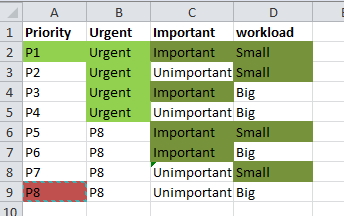
Add new comment

Restricted HTML

  • Allowed HTML tags: <a href hreflang> <em> <strong> <cite> <blockquote cite> <code> <ul type> <ol start type> <li> <dl> <dt> <dd> <h2 id> <h3 id> <h4 id> <h5 id> <h6 id>
  • Lines and paragraphs break automatically.
  • Web page addresses and email addresses turn into links automatically.
CAPTCHA This question is for testing whether or not you are a human visitor and to prevent automated spam submissions. Image CAPTCHA
Enter the characters shown in the image.

It's important to restart your POS Systems

POS SOFTWARE

Why Restart Your POS System Weekly?

Proper system restarts keep your POS reliable, fast, and secure.

Windows 11 restart screen on a POS system

A POS system is the backbone of retail operations. Routine maintenance is essential for smooth business. Restarting your POS weekly may only take a moment, but it helps prevent unexpected issues, crashes, and lag.

The Technical Benefits Explained

There's a crucial distinction between simply shutting down and restarting your POS computer. Most modern Windows systems now use "fast startup"—a feature that saves system information to help the computer boot faster. However, this can be compared to putting a dirty dish back in the cupboard instead of washing it properly: issues remain unaddressed.

  • Memory gets completely refreshed: During use, programs can cause memory leaks, making your system slower and less reliable over time.
  • Network connections reset: Your POS connects to devices like EFTPOS units. These connections can degrade, causing slower transactions or failures. Restarting resets these connections for smoother operation.
  • Updates are properly applied: Windows and POS software updates often require a restart to finish installing, ensuring your system stays secure and up to date.

Two Methods for Restarts

Manual Restart Process

Manual restart steps in Windows 11
  • Click the Start menu.
  • Click the Power icon.
  • Select Restart (avoid just "Shut down").

For multi-terminal stores, restart one POS at a time so you always have a working register available for customers.

Automatic Restart Setup

  • Open Control Panel.
  • Go to Hardware and SoundPower Options.
  • Select Choose what the power buttons do.
  • Click Change settings that are currently unavailable.
  • Uncheck Turn on fast startup (recommended).
  • Save your changes.

This change makes startups a little slower, but ensures your system gets a full refresh every time—removing the need to remember manual weekly restarts.

Frequently Asked Questions

Q: Is "Shut Down" the same as "Restart" on Windows?
A: No. "Shut Down" may use fast startup, which doesn't fully refresh your memory or connections. "Restart" completes a full system reset.

Q: How often should our POS system be restarted?
A: At least once per week is recommended for optimal performance.

Q: Will this interrupt service?
A: Restarting takes only a few minutes. In multi-lane environments, restart terminals one at a time to avoid downtime.

Conclusion

Restarting your POS computer weekly helps maintain reliability, speed, and security, preventing issues from building up. Simple, regular restarts protect your business operations with minimal effort.

Written by:

Bernard Zimmermann

Bernard Zimmermann is the founding director of POS Solutions, a leading point-of-sale system company with 45 years of industry experience, now retired and seeking new opportunities. He consults with various organisations, from small businesses to large retailers and government institutions. Bernard is passionate about helping companies optimise their operations through innovative POS technology and enabling seamless customer experiences through effective software solutions.
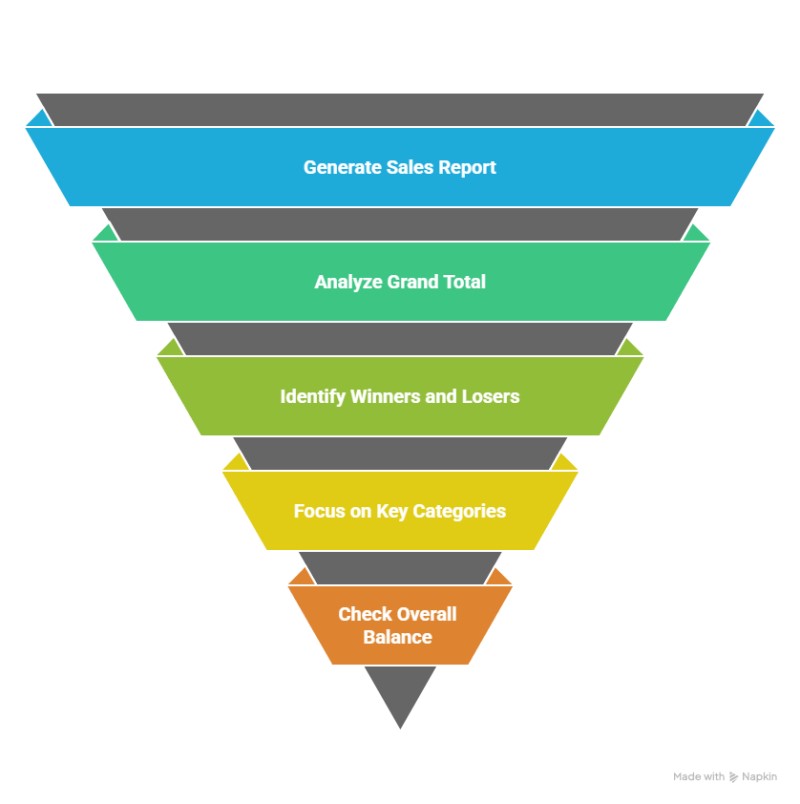


Add new comment

Restricted HTML

  • Allowed HTML tags: <a href hreflang> <em> <strong> <cite> <blockquote cite> <code> <ul type> <ol start type> <li> <dl> <dt> <dd> <h2 id> <h3 id> <h4 id> <h5 id> <h6 id>
  • Lines and paragraphs break automatically.
  • Web page addresses and email addresses turn into links automatically.
CAPTCHA This question is for testing whether or not you are a human visitor and to prevent automated spam submissions. Image CAPTCHA
Enter the characters shown in the image.