Point of Sale Software

Free cloud backup

At the start of the year, I wrote that one New Year Resolution to make this year is to use a cloud backup.

The software has come of age. Now I do not recommend that you replace your existing backup solution, but that you use a cloud to supplement it.

There are many advantages for you to do so.

1. Access: You get access to your data wherever you have internet access. For example, you can access your company's data from home, overseas on holidays, etc.

2. Reliability: If anything is wrong with your regular backups, you have an emergency set online.

3. Easier to use: Because it is automated there is less to remember or do, often it can be set up so its completely automatic.

Two big disadvantages to consider are:

1. The Internet: It will chew up a fair amount of Internet usage. Often people report that it slows down their system. If so we may need to see what we can do.

2. Size limitations: If your data file grows too big, you may find your backup suddenly stops.

3. Check: You need to check regularly that it is working.

We have put together here a document that can show you how to set up a free cloud backup. Please click here.

How to put photos on your stock items

When marketing a product, it's nice to exhibition to a potential customer one or more pictures of it on the customer viewing screen which can simply do in our point of sale.

So here is a quick step by step method to do it with our system. I will show today how I would do one.

Firstly, I get my images either by taking a picture with my phone or camerawhich in practice does not take long of say the top fifty items in your store with your camera. Click, click, click, etc. As a tip put plenty of light on the object and take about five pictures of each or by grabbing them from the web.

There are many royalty-free places in the web to get them, for example.

https://pixabay.com/en/photos/

https://unsplash.com/

Here are some images of oranges, that I took off the web all royalty free.

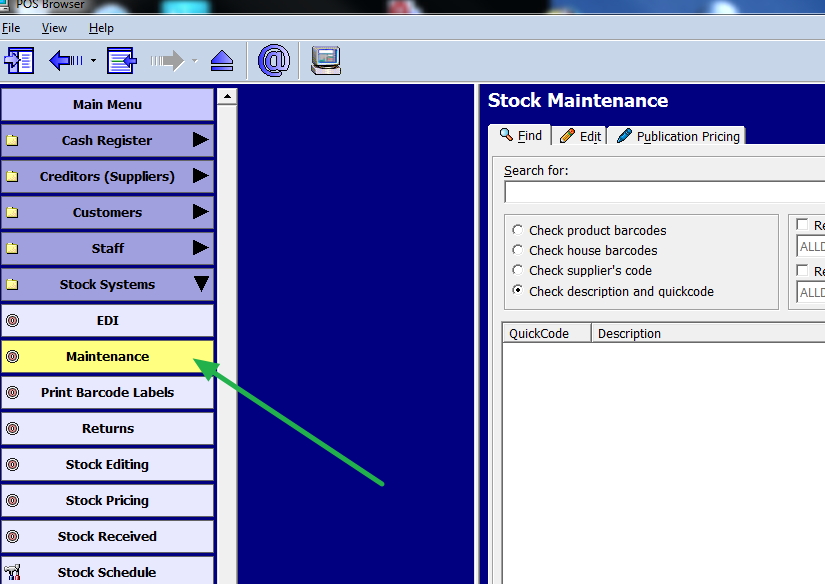
Now I go into stock maintenance

Now call up the item, I wish to edit, in this case orange.

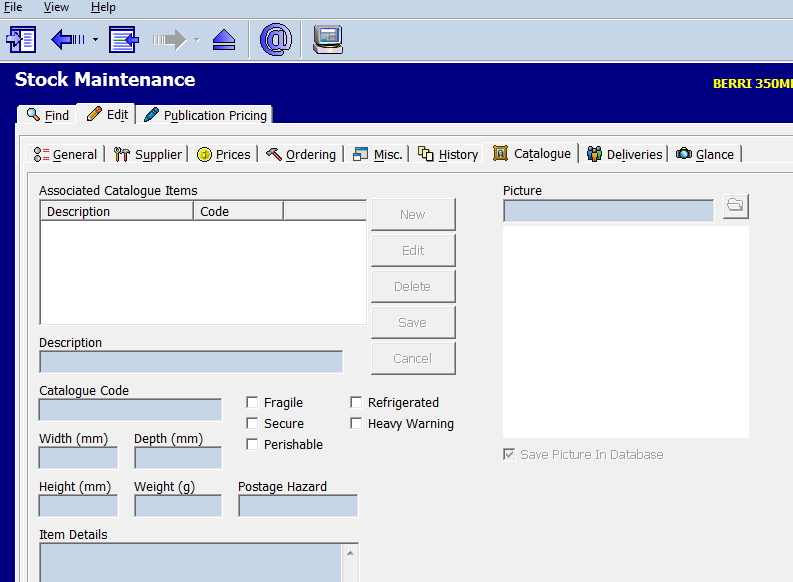
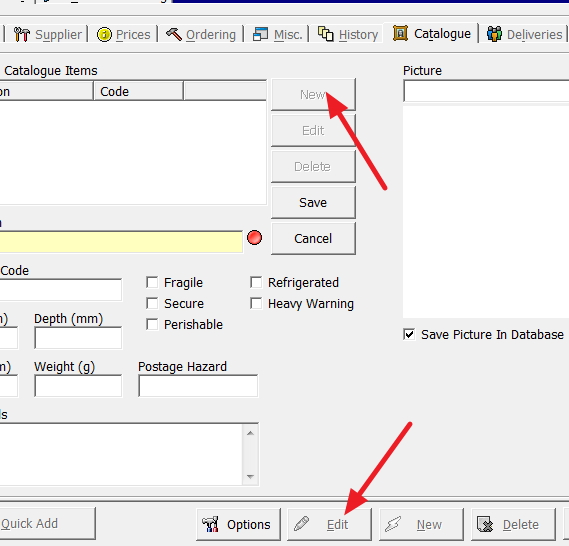
I after that go to catalogue section, and click edit and then new to add a new photo.

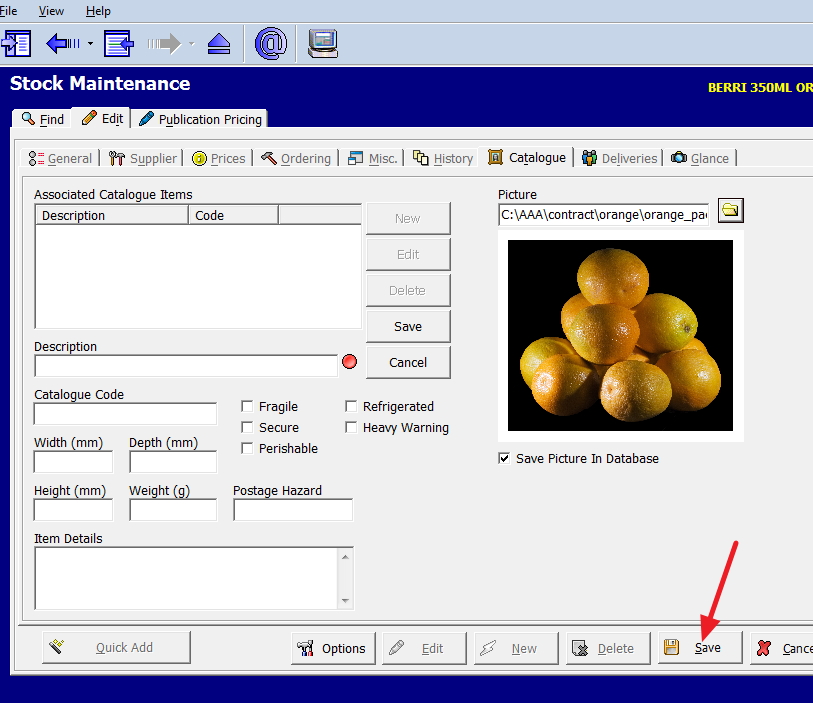
Then select my image and save it. In this case, I decided to use the pack of oranges.

Now I have attached my image.

Windows 10 vs Windows 7 for speed

When all is said and done, what our users want more than anything from a system is speed. The faster it is the better. The less they and their staff wait, the better so we make sure that in our marketspace our point of sale is the fastest, that is why it can do register transactions in seconds.

So now of course, the question people ask us is if they update to windows 10, will they get any speed increase.

Knowing that they would ask this question, among our extensive tests on Windows 10, we tested it for speed.

The answer is *NO*, windows 10 actually runs slightly slower then Windows 7. With our software, it is fairly close we are talking of less than 1%. Not surprising as our software is native to windows and these systems are already made for Windows 10. However, we did notice with some applications like firefox, runs a lot slower. So you need to check with your software vendor as what is the situation with their software.

However, because of the concern, many have on this issue, I wouldn't be surprised if Windows 10's speed performance will be improved soon.

Note we are soon releasing a new system with a way of making dramatic speed improvement, but this will be a discussion on a future post.

All in one

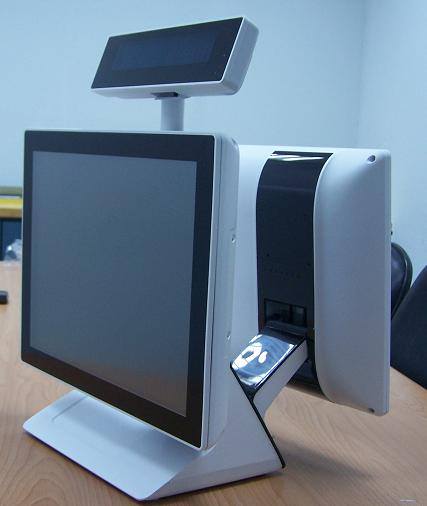
I like these new all-in-one units that are coming out. They are much faster in operation then the older units. Because they do not have a fan, they are very quiet. It can be a real pain having to listen to a fan all day.

They also look very nice, which is important as it helps to get your customer who is facing the screen in the front to look at it where it promotes products in your business displayed by our software to create more impulse buying.

Cover Price Rise For The Courier Mail

[Item 2237] Monday To Friday - Cover Price Rise For The Courier Mail

An automatic update has been issued that will update your prices automatically. Of course please check it afterwards.

As always the people on older systems such as DOS will have to do manual price changes.

Herald Sun price rise

[2016-02-07]: The Monday to Friday edition of the Herald-Sun will change from $1.40 to $1.50 GST inclusive from Monday 8th of February

An automatic update has been issued that will update your prices automatically. Of course please check it afterwards.

Note people on old DOS systems, will have to do manual prices change.

If you handle touch corp, read this.

There seems to be something wrong in some of our sites with their touch system. Version 4 of Touch software is not everywhere updating the products. Please verify to make sure that you have the latest products. If you have any doubts contact Touch support to verify on 1800 286 824

We are currently working with them to see if we can get a list of these problem sites.

Transaction tracking

Often a transaction has a story that needs to be recorded.

What happened recently with one of our clients, for example, is that they sold without realising a book that had pages missing. Many people came back complaining that the book had pages missing. Many did not want their money back; they wanted a new copy. So many of these returns had to be noted.

Many other examples would be that someone gets a very special discount, for some reason.
Another some damaged goods are sold cheaply as an "AS IS"

In all cases and more what we call transaction tracking needs to be done.

Well, our point of sale has an extremely sophisticated transaction tracking system, here is how you use it.

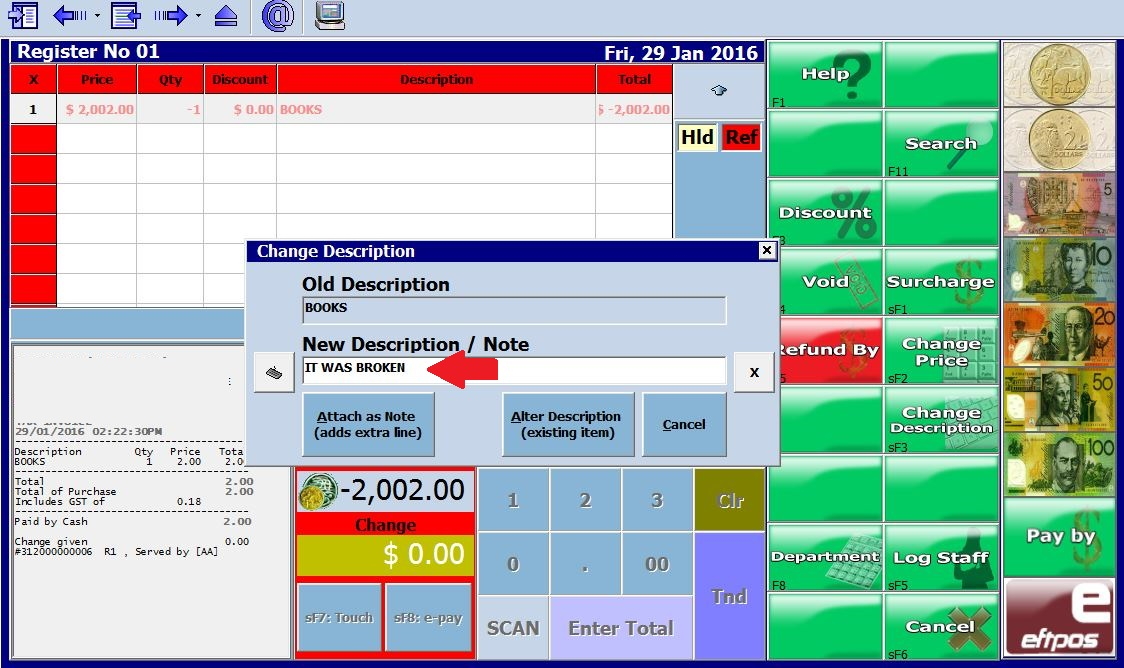
When ringing up the transaction in this case a return there is an item on screen *Change Description*, If this is pressed you can see on screen another option *Attach as Note*.

Now in this case I wrote, "IT WAS BROKEN" which is fine as its a once off but sometimes people that need to go to the next level will use a code, e.g. B5, which is a book with a broken cover and then press "Attach as note", see where the red arrow is.

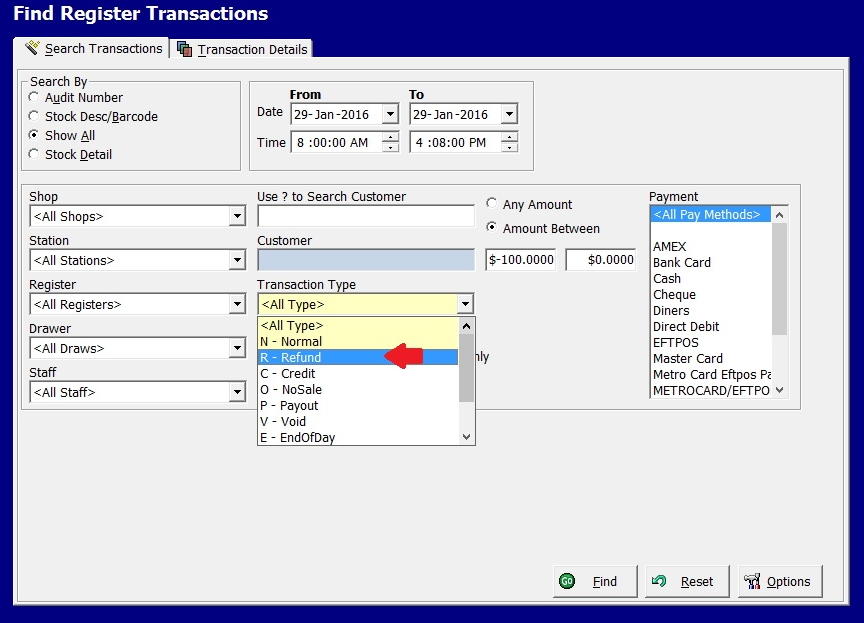
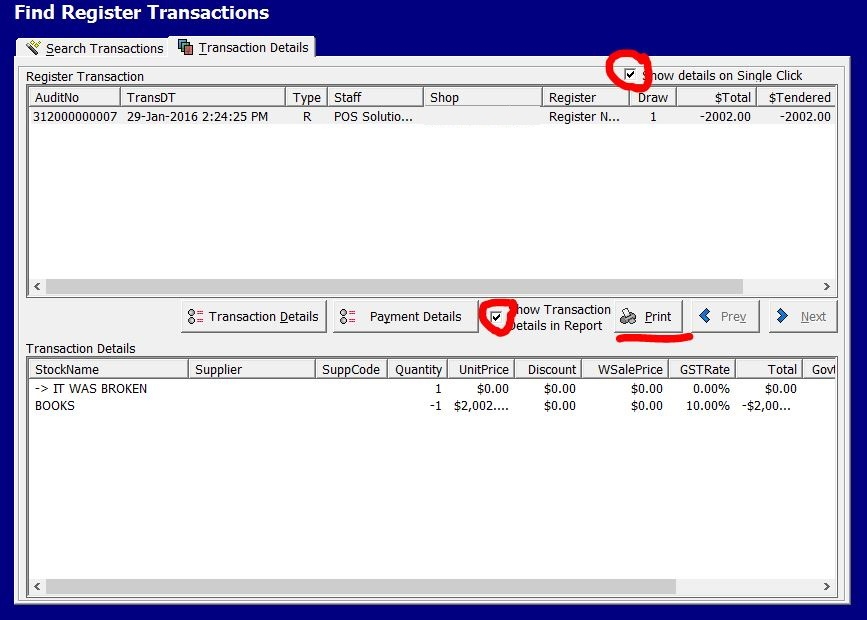
Once the return or any transaction is saved, you have a full reporting and analysis available. For example, in find register transactions

I am looking for this refund done today.

I was able to search for this transaction by a wide range of filters.

And here is a report of the books with the broken covers. Now I can find the one I am looking for.

This is done on a line basis so you can have many different reasons on a transaction.

Just another example of how POS Solutions software is giving retailers more in their software.

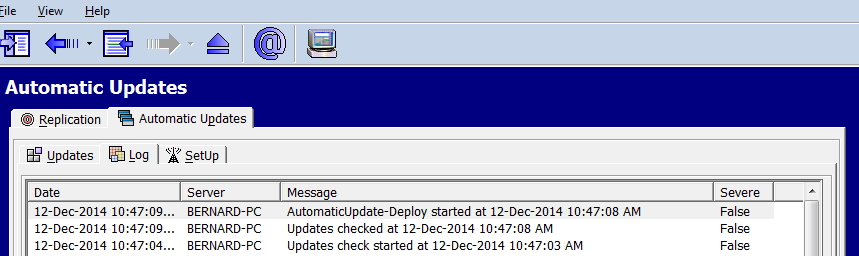
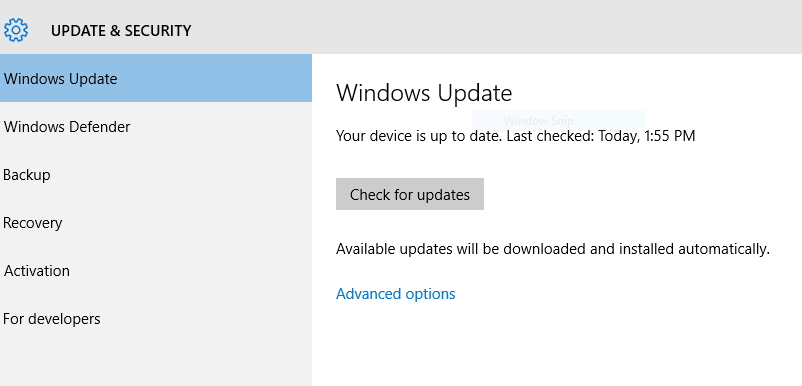
How you can see what happening with automatic updates.

Since 1995, you set how you want the updates done.

https://en.wikipedia.org/wiki/Windows_Update

and windows, your antivirus programs, accountancy packages, etc. are all updated in accordance with your wishes. So saving people time, effort and software support fees. An example a while ago was one particular printer driver released behaved very weirdly. So we released a patch to fix it. Our users got updated without even knowing there was a problem.

Here is a screen shot from windows 95, 20 years ago... did time fly.

Our system as most systems today has enormous flexibility in doing updates. You can turn it off, set it to happen on any day of the week, etc.

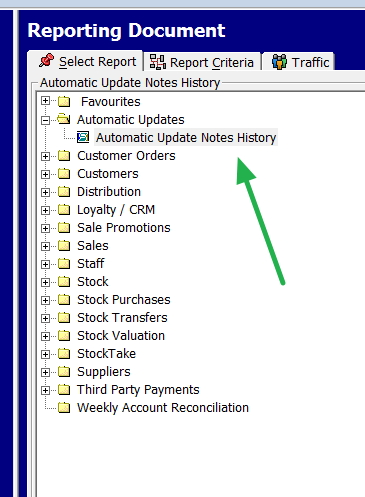
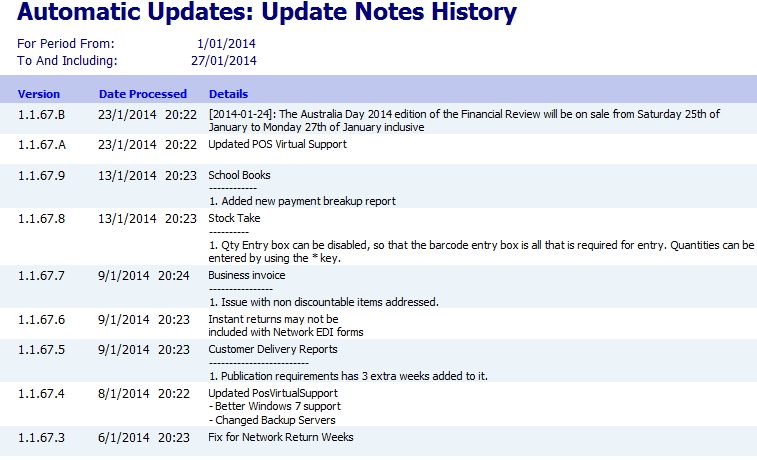
Sometimes though it's nice to review the changes to your system to see what exactly has changed. It's easy to do.

In register reports, select Automatic Update Notes History (see the arrow marked in green)

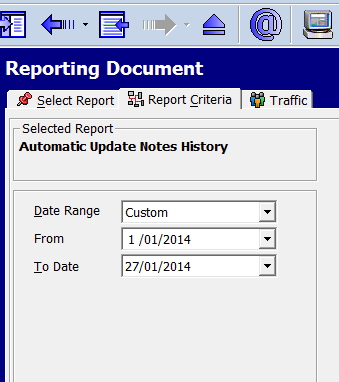
Now enter in the dates, generally I suggest the past month.

Now the detailed notes appear on what was changed.

In this case, a Financial Review price and availability were automatically changed for the long weekend, the virtual support program internal to our software was changed because of a windows update, the school book program... etc.

Local business uses Facebook to catch shoplifting suspect

I do not know the legality of this under Australian law, but it's certainly the future.

A small business in the US put a picture of a suspected shoplifter on their Facebook page and asked their followers to help identify the suspect.

Their Facebook followers started contacting them within an hour; she was soon identified and shortly thereafter, was in police custody. The days of an anonymous shoplifters maybe over.

More details are available here.

See what a rewards program can accomplish.

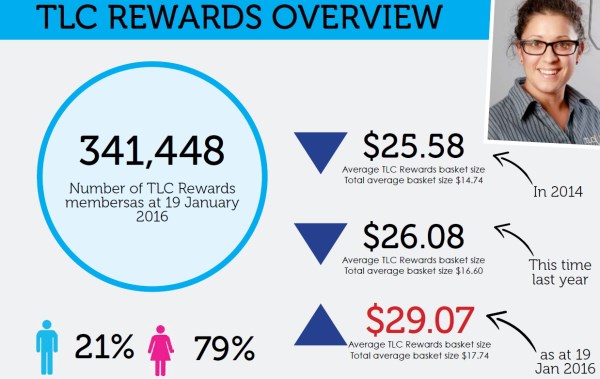
See what the Lucky Charm Rewards program which we wrote for them.

I would say its the most cost/effective loyalty program in our market space.They have about 50 stores so that works out to about 7,000 members per store. A typical purchase in a Lucky Charm shop is $17.74 but reward customers spend $29.07, which is 63% higher. Furthermore, reward members are buying more about 11% more than they did last year.

The best part is that much of the cost is supplier driven.

Its time to review you and your staff passwords

POS SOFTWARE

Hacking passwords is very simple and most point-of-sale systems because they process credit cards, virtual products, and they are on the Internet are desirable targets. You probably read a few days ago that The Park Hyatt Sydney and Melbourne systems were cracked. You only heard it because Hyatt is famous. Many more stores have been hacked. In our market space, one of our competitors has admitted several times that their sites been hacked.

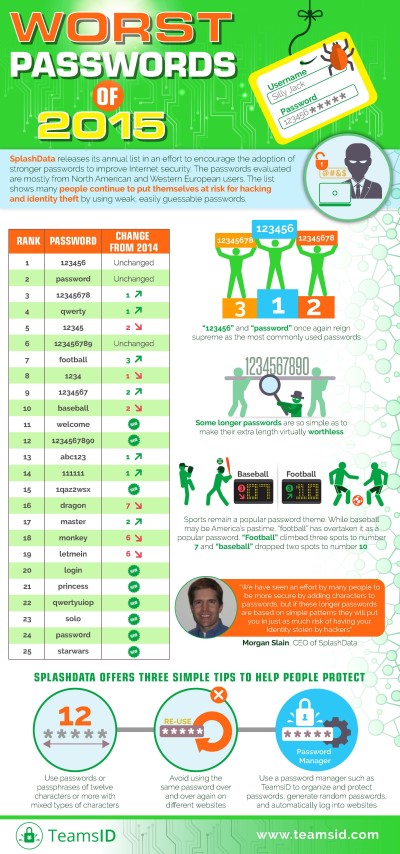
The reason security comes up every year about now is because a list is produced of the worst passwords for the previous year. Here is the start of the list.

Here is a free book by them on the subject which is worth a read.


If your password is on their list, then I suggest you change it.

All a hacker would have to do if he had access to your system, is try these passwords in your system and they would have a reasonable chance of cracking your system. Its not hard to do.

Their are other methods commonly used too. Here are some of them.

The easiest way is to ask, listen or read. Someone in your shop simply asks or is told the password. I have gone to shops and seen passwords written down hanging on the wall. Almost anyone can read them.

As a rule you should never write down your passwords.


Another popular way is guessing, people that are close to you often know much about you, your maiden name, your old address, etc. People often reuse passwords, if I know your password on one site, it may open your system to me.

Hackers often use two other methods, the first is simply try every word in the dictionary.

As a rule never use a word in the dictionary.


If that fails a hacker will try every combination of letters, words and punctuation.

Here is some times how long it would take a hacker to crack your password if they have access to your desktop based on a site howsecureismypassword.


Common words
Karen - Instantly
maiden - Instantly

Every combination
television - 8 hours
infomation - 10 days

Note the longer the password the harder it is to crack.

Finally do not check only yourself, what about your staff?

Furthermore as a rule regularly change your passwords.

A simple way to do this is add the first and last character of last year premiership team at the end of the password. For some more tips on how to make good passwords click here.

My advise do nor sign non disclosure agreements unless you really have too.

POS SOFTWARE

I was reading about the coming closure of Cleo. There were many articles about it. However, I noticed that as late as 14 Jan,

"a spokesman for Bauer Media told Business Insider the magazine would continue to operate. Apparently "The report by the Daily Tele is complete speculation, and we have no plans to announce to staff or issue a statement that we are closing Cleo today,"

However, a few days later they announced it to the staff, and to everyone else that Cleo was closing.
 

The reason why this struck me, is something very similar happened to Network Services.

On the 3rd December 2015, the Australian Financial Review announced that Bauer Media was planning to wind up its Australian distribution business Network Services Company in early 2016 and that Gordon & Gotch would pick up the distribution.


When we and others asked Bauer for more details, we were told blaa blaa blaa and more blaa but if we wanted to discuss it, we would need to sign a non disclosure agreement.

I said if I know about it but am unable to talk about it, what is the point of knowing about it?

What I found interesting was that the share market was not buying that nothing was happening either as there were big volumes in trade the next day here. If it was because of this heavy trading with all the share market cleverness, these guys lost money as they brought at 51 cents and the price of PMP is now 47 cents.

Since then I have heard reports of people that were also clever and did sign these non disclosure agreements. I am not aware of anything they got that was worth signing it and I spoke to a few of them. I think they would have done better to refuse to sign and created a debate on the public merits of this decision, something that I am sure the creators of this decision certainly did not want. This maybe the real reason why they invited these *clever* people who asked to sign these NDA on the promise that they would get the *confidential* information. That SHUT 'EM UP.

My advice to anyone is do not sign these non disclosure agreement forms unless you really have too.

Get more sales out of your employees

When often happens is when we think of ways to increase the turnover – "or how do we sell more?" The first point to consider is what are we doing right? Maybe you are doing something right; you could do more, but it just does not click.

One of the quickest ways to increase sales is to monitor your employee performance. See if one of them is doing something better than the rest.

Our point-of-sale system has some very powerful tools to do this. The one I will talk about now is the staff performance report.

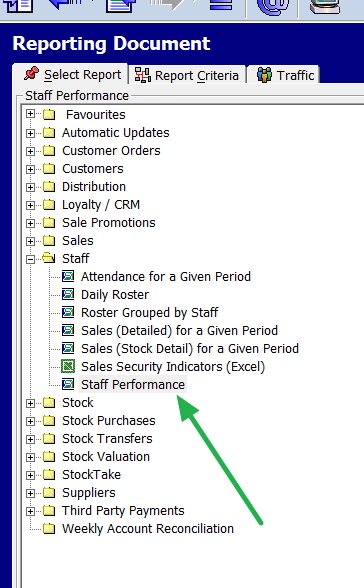
Go to register reports > Staff > staff performance

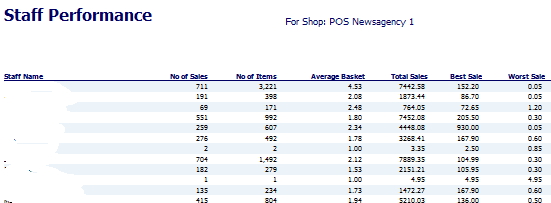
Now in this report put in the dates you are looking at and this will give you much detailed information, among which you will find the following details.

For each staff member, you can see how many sales made, how many items they processed, the basket size, total, etc.

Now you can compare your staff. You can see if something happened which ones were motivated.

Another idea is to use this report to compare your employee's performance over time.

This is an additional example of how POS Solutions can provide you a new insight on performance in your business and so help you to build its economic foundation.

If your business uses stamps or prepaid envelopes

POS SOFTWARE


It is now official there are three speeds to send your letters or statements within Australia,


Regular post now costs $1 and will take 2-6 business days

Priority mail will cost $1.50 and will take 1-4 business days

Express costs $5.75 and has a next-day guarantee. That guarantee means you can get your money back if it does not arrive in time and you complain. In my experience, if you do complain, is it normal to wait over 40 minutes to speak to someone in Customer Service, particularly if it’s a Monday morning?

So now Australia Post is 30% dearer at half the speed.

The problem of speed is almost as significant as cost. Monthly statements have to be there with a reasonable gap before the end of the month. If they are going to take one to six business days, that means they need to be sent out about two weeks before the end of the month, so the books have to be finalised; now as a typical month is about 30 days, we are looking at about 40% of your debt being carried forward another month.

Advantages of paperless email statements.

Besides being excellent for the environment and saving a few trees, they are also suitable for you as you won't have to incur the cost of printing and mailing your statement monthly. They can be done closer to the end of the month, including more of the latest information.

As the statements look very similar to your paper statement and carry the same information, they are now considered legally acceptable for record-keeping purposes.

Plus, sending emails automatically is much easier than a hundred printed emails.

Overall the advantages are so significant that now many businesses are set on you going paperless that they've offered up incentives, discounts, and a chance to win a price to get you to drop your statements.

Let us discuss some of the problems.

Many of your clients do not have or refuse to release email addresses. However, you will find that almost all businesses do have email addresses. I estimate more than 95%. About 18% of people do have email accounts but rarely use them. Many of you may be surprised how many of your clients have email addresses when they discover account-keeping fees.

However, many with email addresses feel that they need to print the email for tax reasons, so they may as well get you to print it and send it to them. I used to be like that too until recently when I decided my wife, my accountant, or someone else was asking for details of an item and could not find it. If it is by email, I can find it by google search. So I switched.

Many find it easier to forget to send their payment as they don’t have that physical bill as a reminder.

Sometimes even if they do have an email account, they do not get it; a typical example is when it gets caught by their spam filters. Another is that their mailbox, for some reason, is down, e.g., full.

Lastly, sometimes people accidentally think it's spam, delete your email without thinking. I know I have done that trick too.

So if you are going to go to email statements, you need to take into account the pros and cons. In practice, you must run both an email and a printed statement. In time, I am sure we are all going electronic.

If you want to know how to set it up email statements, Please click here.
How to up your profit with technology

This is how you use data, not emotion!

Investigate

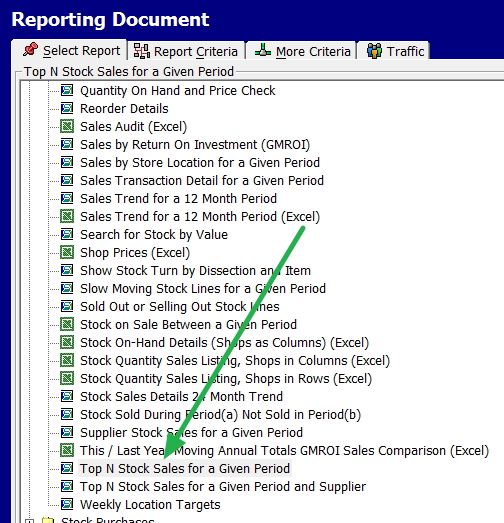
If you go into cash register reports

Select Top N Stock sales for a given period

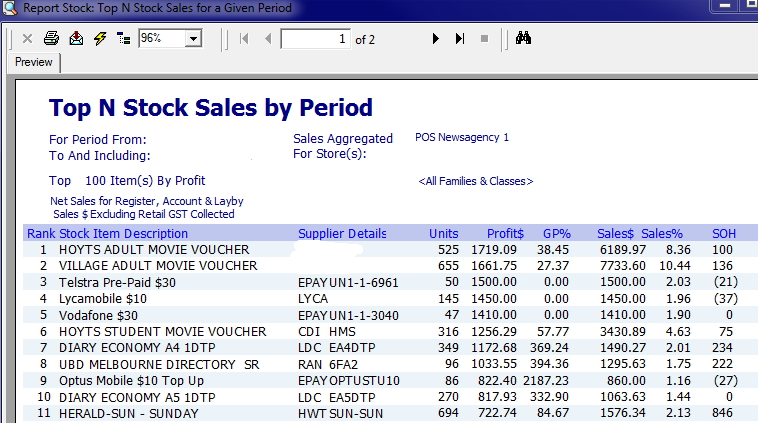
Now select initially a short period say the last few days and ask for a report by profit.

This gives you a list of your most profitable items.

Estimation

Now look through the list to make sure that you have sufficient stock on hand (SOH). A good seller today is most likely to be a good seller tomorrow.

Examination

Check to see what opportunities you have to improve your profit, as these are the items that are working for you.

Are they in the best position? Are they being properly displayed? Maybe they should be in more than one position. Perhaps if you make them a bit more noticeable to your shoppers by locating them at the entrance or the checkout counter, where they can produce more.

Is there any wiggle margin perhaps you can try increasing your prices slightly on these items since they are popular.

Are your employees focusing on them enough?

Dramatic improvements can be made by examining your performance constantly.