
Point of Sale Software

Here are some Articles from the Blog Subject - Retail dashboard -

How to Turn a PosBrowser PDF Report Into an AI Dashboard in Minutes

POS SOFTWARE

What is much easier and quicker for retailers than sifting through a POS report to understand their data is looking at a simple visual screen. Here I will show you how to convert a standard PosBrowser report into a simple AI-generated dashboard. It is not only easier to review but also to share with others.

And it only takes minutes to do.

What Is a PosBrowser AI Dashboard?

A PosBrowser AI dashboard is a visual summary generated from an exported report that automatically turns raw figures into charts and graphs and highlights them.

Here is the basic process.

  1. Run your usual report in PosBrowser and save it as a PDF. Remember the name you saved the report under.
  2. Click on meta.ai.
  3. Please type the + in the box and upload your PDF into an AI assistant.
  4. Now ask the AI to produce a dashboard that shows the exact metrics you want, for example, if I printed out a report on stock sales by category, I might ask for a dashboard that shows the exact measures you need.


Create a stock valuation dashboard by department, top 20 categories, ageing stock, and sales trends over time.
 

Note: For this example, I specifically used Meta AI because it is currently free. Since most of my clients do not have paid AI accounts, I wanted to select a tool that is highly accessible to everyone. While you can use other AI platforms, Meta AI is a great starting point if you want to test this process without any extra cost.

How Do You Check an AI Dashboard Against the Original PosBrowser Report?

The AI can turn a text-heavy report into a cleaner visual summary within seconds or minutes, depending on the platform and file size. However, you must review the visual output against the original report before sharing it with staff or using it for decisions. AI does make mistakes.

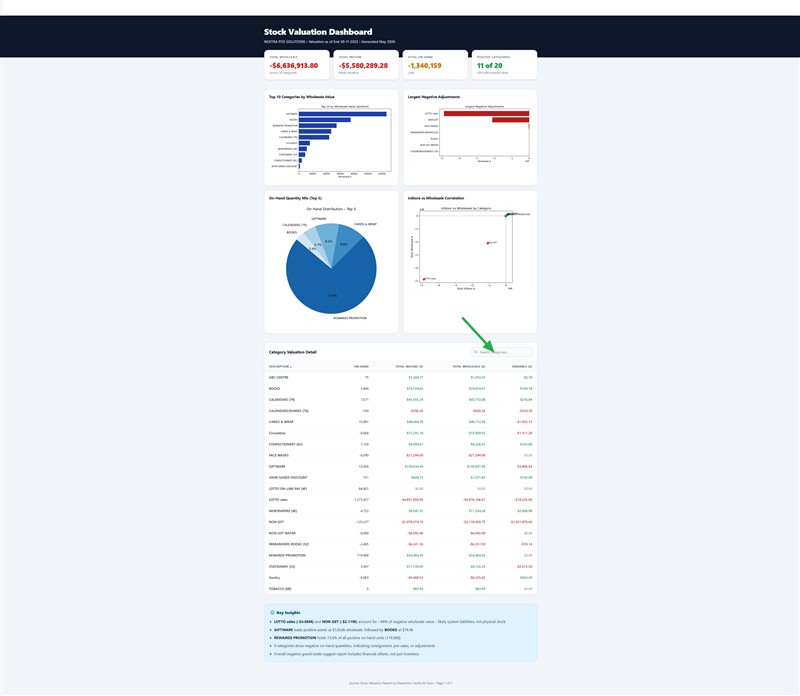
Below, you can see a sample stock valuation report beside the dashboard generated from the same data. The example below shows how a standard POS report became an AI dashboard.The green arrow is where you can add departments to examine.
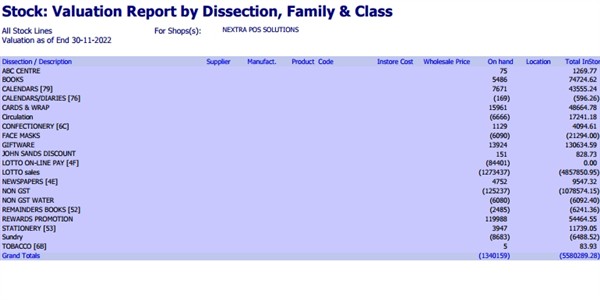
Stock valuation report

Stock valuation dashboard

How to Proceed

I suggest starting off with a few reports you know well, such as a total report. Test how it goes and use this example to improve your requests.

Enjoy.

Written by:

Bernard Zimmermann


Bernard Zimmermann is the founding director of POS Solutions, a leading point-of-sale system company with 45 years of industry experience, now retired and seeking new opportunities. He consults with various organisations, from small businesses to large retailers and government institutions. Bernard is passionate about helping companies optimise their operations through innovative POS technology and enabling seamless customer experiences through effective software solutions.



Add new comment

Restricted HTML

  • Allowed HTML tags: <a href hreflang> <em> <strong> <cite> <blockquote cite> <code> <ul type> <ol start type> <li> <dl> <dt> <dd> <h2 id> <h3 id> <h4 id> <h5 id> <h6 id>
  • Lines and paragraphs break automatically.
  • Web page addresses and email addresses turn into links automatically.
CAPTCHA This question is for testing whether or not you are a human visitor and to prevent automated spam submissions. Image CAPTCHA
Enter the characters shown in the image.

Creating a Dashboard with ChatGPT

POS SOFTWARE

ChatGPT


As a programmer specialising in retail and Point of Sale (POS) systems, I recently embarked on an intriguing experiment: using ChatGPT to create a dashboard without relying on my programming skills. Much discussion has been about ChatGPT enabling non-programmers to write code, with dashboards often highlighted as a key example. I decided to test this claim, and the findings were illuminating.

What's a Dashboard, Anyway?

A dashboard is a visual display that displays important information, commonly called Key Performance Indicators (KPIs). These provide a quick visual overview of the current situation, helping us make informed decisions without the need to sift through large amounts of raw data.

For retailers, dashboards transform massive sales data into actionable insights in seconds.

The Experiment: Following a Non-Programmer's Guide

To simulate the experience of a non-programmer, I followed a YouTube tutorial that promised to teach dashboard creation using ChatGPT.

So, I selected this YouTube here. Please feel free to consider this article as my response article to it.

So, I started with data from our POS software's Sales Report, which has comprehensive insights.

The ChatGPT Experience: Not Quite as Advertised

Data Wrangling Woes

My first hurdle was getting the data into the correct format. While our POS system can export to JSON, I followed the tutorial's suggestion. Later, I found that I had made the correct decision as I would dive into Excel many times to manipulate the data. It became a recurring theme throughout the process.

Contrary to the tutorial's claims, I quickly discovered that a free ChatGPT account wouldn't cut it. The credits ran out faster than a sausage sizzle on a Saturday morning. The experiment would have ended if I had not had access to a paid account. Let me know if anyone wants a paid account, and I offer reasonable offers. So, I switched to the paid account to continue this experiment.

Dashboard Dilemmas

After multiple attempts, I managed to create a basic dashboard. However, getting it to look presentable was another story entirely. As any retailer trying to spruce up their shop window knows, making things look good is most of the work.

Real-World Retail Challenges

Then, I ran into the problem of using real-world retail data in an experiment. In business, things are not cut and dry. I would encounter these problems here.

Consignment Stock

Items on consignment threw off profit calculations, as they had no listed cost.

Gift Cards

These presented a similar challenge to consignment stock.

Payouts

While these transactions affect sales numbers, they don't contribute to profit.

I only discovered these issues through this exercise, and it took time to learn these problems each time. The solution was to return to Excel, adjust the data, and recreate the JSON file. It was like constantly restocking shelves but with numbers instead of products and then recreating the dashboard.

The Programming Plot Twist

By now, I had spent many hours. So, when trying to calculate the total profit, I hit another wall. After many attempts, I had enough, so I resolved this by going outside the tutorial's framework. I had to break character and lean on my programming expertise. I delved into the HTML code generated by ChatGPT to understand what was happening behind the scenes. Only then did I finally wrangle the dashboard into something usable!

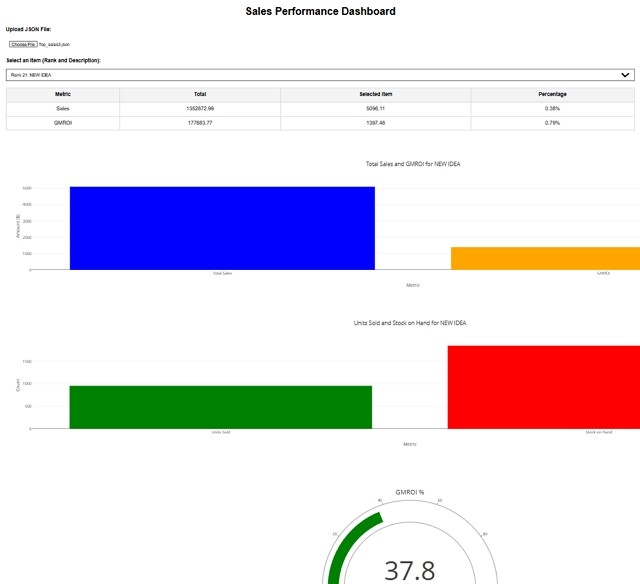
Now I had this, I could select a department, and it would give me these figures and charts.

Stock dashboard made with ChatGPT


Now I had something, but were the figures correct? After five hours of this exercise, I did not check, so it was unusable. In programming and business, it's rarely worth it for one-off jobs. You need stuff that, once done, repeats. Here, you must massage the data extensively before using it. The Bottom Line

It was presented as a quick and easy project for someone with moderate computer skills but turned into a time-consuming ordeal that required the following:

  • Over five (5) hours of work
  • Extensive Excel manipulation
  • The ability to read and understand HTML code
  • A paid ChatGPT account

Even after all that, I hadn't yet verified the accuracy of the figures—a crucial step that would likely take many hours more if they were wrong.

Lessons 

While quickly creating custom dashboards is appealing, the reality is not yet here.

Add new comment

Restricted HTML

  • Allowed HTML tags: <a href hreflang> <em> <strong> <cite> <blockquote cite> <code> <ul type> <ol start type> <li> <dl> <dt> <dd> <h2 id> <h3 id> <h4 id> <h5 id> <h6 id>
  • Lines and paragraphs break automatically.
  • Web page addresses and email addresses turn into links automatically.
CAPTCHA This question is for testing whether or not you are a human visitor and to prevent automated spam submissions. Image CAPTCHA
Enter the characters shown in the image.

