Will a Faster Computer Speed Up Your POS System?
A shop owner asked me lately if he should buy a new computer because his POS system was running slow. It’s an excellent question, as occasionally a new computer is just what is needed to speed up a POS system, but often it is an expensive repair for the incorrect problem. There are several reasons we could slow the POS system down.
If the underlying bottleneck is elsewhere, buying a faster computer will not help. A Grand Pix car is not quick on a dirt road.
Top Takeaways
- A faster computer is beneficial only if the computer itself is the source of the problem.
- There might be various sources of delays.
- A faster computer normally helps the system do more work, but not every task will necessarily go faster. Think of a truck and a car; they often go at the same speed, but a truck carries more. It's not faster.
- A pattern to watch for is that if one computer is slow, it usually indicates that the problem lies with that specific computer. The POS system server or network usually means the complete POS system will run slow.
- If people in the back are doing reports, stock imports and backups, it can slow down the POS system as the system has more work.
- A slow POS system is sometimes the result of a defective system configuration or one computer with a defective part.
- First, diagnose. This solution is cheaper than replacing computers, which won’t cure the problem.
What Is a Bottleneck in POS Systems?
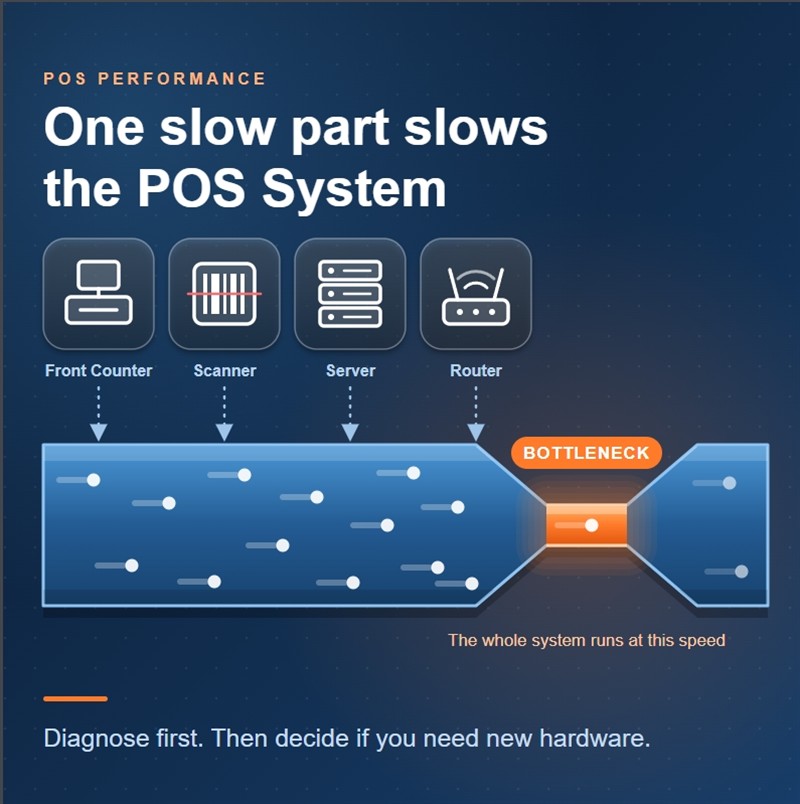
Your POS system has a bottleneck, which is the slowest section of it. Various components can cause the bottleneck, including a computer, the SQL Server, the database, the network, a printer, or a software setup.
A POS system is only as fast as its weakest vital component. A fleet is no faster than its slowest ship.
The Importance of POS Speed in Retail
A slow POS system wastes staff time, irritates customers and can cost you sales. A few more seconds at the checkout doesn't seem like much until you have a queue on a busy morning. Primarily, a slow POS system is a customer service problem; secondarily, it is an IT concern.
What I Tested and What It Told Me
To have a deeper understanding of this, I tested our POS system on machines with more powerful processors: 1, 2, 4 and 8 CPU cores.
I measured two things:
- How many users the system could support at the same time.
- How quickly one user got an answer.
The result was expected. The more power, the more users the POS system can handle together. The improvement in response time was not uniform. But the extra power didn’t help much when the POS system was quiet. There was not enough work to use it. More power made things feel faster when the system was busy.
How to Determine Which Computer Is the Problem
Don’t assume the slow-running machine is the problem. What I look at is an outdated computer with a slow mechanical hard drive, insufficient RAM, ageing parts, too many junk applications, viruses or dust with overheating. One of my customers reported to me a slow computer; when I tested it, I found over 150 viruses on that computer. When I formatted that computer, it ran much faster.
Your usage can slow down a POS system. A computer that is very busy can slow down the whole shop when it is running large, complex reports, stock imports, backups, stock updates, and label printing.
SQL Server and Database Problems: Many times, the SQL Server computer is the problem, as all computers are running slow at the same time. It may run out of CPU, memory or disc space. The setup on the SQL database might not be configured properly.
A faulty switch, a damaged cable, an overloaded router, or a failed network card in a computer might slow down your system.
How to Tell If Your POS System Is Slow
Identify the symptoms before making any financial commitments.
- Write down exactly what is slow.
- Is it on one computer or on all computers? Is the problem present when all the PCs are turned on when all the PCs are on?
- All day? Only in the morning? Only when busy? Only if a report or backup is running?
- Record the length of the delay.
Now you need someone with above-average computer skills to verify it.
- You need to verify the free disc space on your PCs, as well as the RAM usage, CPU usage, temperature, and dust accumulation.
- Your network wiring.
How to Optimise Microsoft SQL Performance
Microsoft SQL Server often responds to simple cleaning. Please come talk to us before they start.
When a New Computer Is the Right Choice
A new computer is a sensible choice if it is clearly the source of the problem. Look out for these signs:
- There is only one slow machine; the rest are normal on the same network.
- That PC is too slow to boot.
- It’s ancient and noisy.
The Cost
A slow POS system costs more than your frustration.
Written by:

Bernard Zimmermann is the founding director at POS Solutions, a leading point-of-sale system company with 45 years of industry experience. He consults to various organisations, from small businesses to large retailers and government institutions. Bernard is passionate about helping companies optimise their operations through innovative POS technology and enabling seamless customer experiences through effective software solutions.