Point of Sale Software

Here are some Articles from the Blog Subject - receipts -

A Retailer's Guide to POS Transaction Notes
POS SOFTWARE

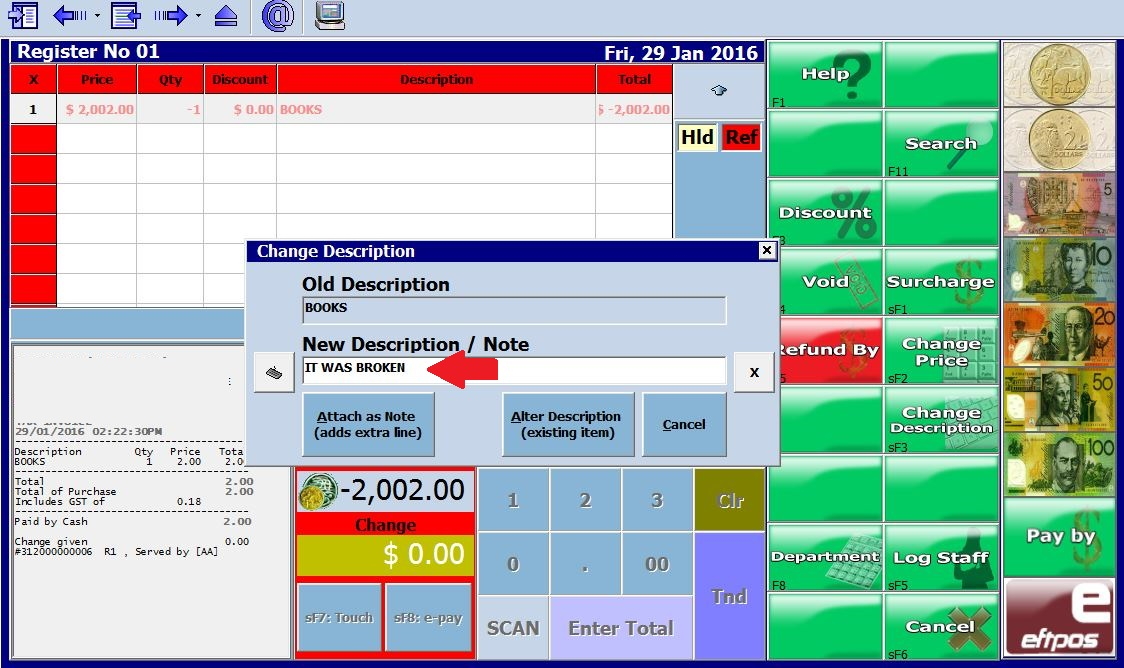
Screenshot of POS interface showing the Attach as Note button highlighted for easy selection

Transaction notes are essential yet often overlooked. They allow retailers to add context to a sale. Documenting issues such as defects, warranty voids, or strict sale conditions provides a paper trail that protects your business and enhances customer service.

These details can often resolve a dispute and possibly prevent a customer from leaving. This guide explores why you should be using notes and how to master them in your POS software.

Why Add Notes to a Transaction?

There are many scenarios where a simple receipt isn't enough. You need to record the "story" behind the sale. Here are the most common reasons to add notes:

Damaged or Defective Items

If an item is sold "AS IS" due to a scratch or dent, a note prevents what sometimes happens: a customer returns it later, claiming they received it in perfect condition.

Strict Conditions

Record specific terms, such as "Not for use in Australia" or "Commercial use voids warranty".

Irregular Transactions

Any sale that falls outside your normal process needs an explanation.

Special instructions for use

Some items sold do require special handling for best performance or danger if misused.

Adding a note provides important details that give context to the transaction. This additional information can be invaluable if there are questions or disputes about that sale. Based on my years of retail experience, I can think of many examples where documented transaction histories would have reduced the time spent on disputes.

Step-by-Step: Adding Notes to Transactions

Our POS software allows you to add notes to any transaction seamlessly. We have designed the process to be quick, so it doesn't slow down your checkout line. Detailed instructions for adding notes are here but the procedure is very simple.

1. Initiate the Note
During a transaction or return, select the Change Description button on your screen.

2. Select "Attach as Note"
From the dropdown menu options, click Attach as Note to open the text field.

3. Enter Your Details
Type the specific reason for the Note. For example, you might type: "IT WAS BROKEN - Spine damage."

4. Save the Transaction
Complete the sale or return as usual. The Note is now permanently attached to that specific transaction record.

Enhanced Reporting and Search

Once these details are captured at the register, they become powerful data points in your back office. You don't have to rely on memory to recall why a refund was processed three months ago.

Finding Specific History

Users can search for specific historical transactions using a wide range of filters. For example, if you need to find a refund issued years ago for a book with a broken cover, you can do so in seconds.

By filtering for keywords like "broken" or "torn," the system will generate a report of all books sold with those specific notes. The person reviewing the transaction history will see precisely why the return occurred.

Simplified Filtering

Searching transactions is simplified with this tool. You can easily pull up all transactions with notes mentioning 'damaged', 'discount', or 'clearance'. This saves you hours of digging through paper receipts or unlabelled digital records.

Train Staff on Procedures

Train staff on proper procedures for adding notes. The notes are only helpful if they accurately and thoroughly document each unique transaction situation. Set clear expectations and guidelines so everyone uses the same language.

Conclusion

Our POS software provides tools you can use. Here, it simplifies accessing information to satisfy customers, streamline operations, and foster growth.

Frequently Asked Questions (FAQ)

Q: Why should I add notes to transactions?
A: Adding notes gives essential context about irregular transactions, clarifying records and ensuring transparency if questions or disputes arise.

Q: What kinds of transactions need notes?
A: Notes are helpful for exceptional situations such as damaged/defective items, special handling, clearance markdowns, customer disputes, or warranty voids. Essentially, record anything out of the ordinary.

Q: How do I add a note to a transaction?
A: When ringing up a sale, select the "Change Description" button and choose "Attach as Note". Type your Note explaining the transaction, which will be saved with the record.

Q: Can I view and edit notes later?
A: Yes, you can view notes on the transaction details screen at any time. Notes can also be accessed and reviewed through transaction reports.

Q: How do notes help with reporting and analysis?
A: Notes allow for more detailed sales data and tracking. You can search and filter transactions by keywords in the notes field to identify trends in returns or defects.

Written by:

Bernard Zimmermann


Bernard Zimmermann is the founding director of POS Solutions, a leading point-of-sale system company with 45 years of industry experience, now retired and seeking new opportunities. He consults with various organisations, from small businesses to large retailers and government institutions. Bernard is passionate about helping companies optimise their operations through innovative POS technology and enabling seamless customer experiences through effective software solutions.




Add new comment

Restricted HTML

  • Allowed HTML tags: <a href hreflang> <em> <strong> <cite> <blockquote cite> <code> <ul type> <ol start type> <li> <dl> <dt> <dd> <h2 id> <h3 id> <h4 id> <h5 id> <h6 id>
  • Lines and paragraphs break automatically.
  • Web page addresses and email addresses turn into links automatically.
CAPTCHA This question is for testing whether or not you are a human visitor and to prevent automated spam submissions. Image CAPTCHA
Enter the characters shown in the image.

Put on your receipt a quote

POS SOFTWARE

A woman reading a quote

Connecting with customers is especially important. Now, with the holiday season, with your receipts, you have a great chance to do this. Our POS system makes this quick and free, transforming receipts into retention tools.

Firstly, include a New Year's quote on receipts.

Why Include a New Year's Quote on Your Receipts?

Customers tend to keep receipts, often for proof of purchase and tax purposes, giving them a long lifespan and a few reads. This is why this simple marketing tactic is so effective.

Although exact figures for physical receipts vary, digital receipts boast a super impressive open rate of up to 75%. No other marketing channel garners such much attention. By leveraging this space, you can proceed to:

  • Spread festive cheer and positive vibes during the holiday rush.
  • Spark conversations about hopes and dreams for the new year.
  • Differentiate yourself from competitors who use standard, boring receipts.
  • Strengthen your reputation as a thoughtful, caring brand.

Read more about the power of receipt marketing here.

How to Choose the Perfect Message

When selecting a New Year's quote for your receipts, focus on impact.

Do a trial run to make sure that text fits on your receipts. 

Great options include:

  • Famous New Year's quotes.
  • Upbeat messages about new beginnings.
  • Playful resolutions related to your products (e.g., "I resolve to eat more chocolate").
  • Sincere notes of gratitude for their support in 2025.

Examples of Quotes to Consider

"Cheers to a new year and another chance for us to get it right." — Oprah Winfrey

"The magic in new beginnings is truly the most powerful of them all.” — Josiyah Martin

"New year—a new chapter, new verse, or just the same old story? Ultimately, we write it. The choice is ours.” — Alex Morritt

Tip: I remember a time when a store printed a Gandhi quote on my receipt. It sparked a discussion about the movie in the shop. With Zootopia 2 dominating the box office now, why not drop some wisdom from the film onto your receipt? Maybe people who saw the movie will comment on it?

Click here for more quote inspiration.

Beyond Quotes: Maximise Your Receipt Footer

Your receipt footer is prime real estate. After an inspiring quote, use it to make sales.

1. Print Your Christmas Trading Hours

Put your Trading Hours directly on the receipt

Just in case, check the official trading hours, check here.

2. Market Your Gift Ideas

Don't just hope customers notice your gift lines—tell them about it on the receipt they just bought! A simple footer message can plant the seed for a return visit.

  • For Hampers: "Forgot someone? We have curated Gift Hampers ready to go!"
  • For Toys: "Check out our new Board Games—perfect for New Year's Eve parties."
  • For Summer Items: "Heading to the beach? Look at our ....."

3. Drive Social Media Connection

Social media is your best friend for retention. Use the bottom of your receipt to request a follow-up explicitly.

The line is simple, and I am sure you have seen it six million times

"Follow us on Facebook" @YourStoreName

Spread Positivity in the New Year

Ready to inspire your customers to use your POS System now to update your receipt. It takes less than 2 minutes.

Written by:

Bernard Zimmermann


Bernard Zimmermann is the founding director of POS Solutions, a leading point-of-sale system company with 45 years of industry experience, now retired and seeking new opportunities. He consults with various organisations, from small businesses to large retailers and government institutions. Bernard is passionate about helping companies optimise their operations through innovative POS technology and enabling seamless customer experiences through effective software solutions.


Add new comment

Restricted HTML

  • Allowed HTML tags: <a href hreflang> <em> <strong> <cite> <blockquote cite> <code> <ul type> <ol start type> <li> <dl> <dt> <dd> <h2 id> <h3 id> <h4 id> <h5 id> <h6 id>
  • Lines and paragraphs break automatically.
  • Web page addresses and email addresses turn into links automatically.
CAPTCHA This question is for testing whether or not you are a human visitor and to prevent automated spam submissions. Image CAPTCHA
Enter the characters shown in the image.

Receipt Marketing: A Powerful Tool to Boost Your Business

POS SOFTWARE

Receipt Marketing: A Powerful Tool to Boost Your Business

A crumpled receipt at the bottom of a shopping bag is one of retail’s most powerful marketing tools. About 92% of Australian consumers check receipts before recycling them, and forward-thinking retailers are transforming this afterthought into a strategic advantage. Receipt marketing is a low-cost, effective marketing technique. It involves adding promotional messages to the point-of-sale (POS) receipts businesses issue after a sale. This article will explore how receipt advertising works, highlight its features, and share ways to turn everyday receipts into powerful marketing tools that can strengthen your business strategy.

Reasons for larger receipts

Small businesses often do small receipts as it is cheaper to print a small receipt than a larger one, but you notice that majors tend to use large receipts. Could you take a look at a supermarket receipt today? They have done their figures. If you'd like something to think about this, you can check out this video.

While small receipts are financially savvy, more significant receipts offer many advantages. 

What Are Its Advantages for Business?

Receipt promotion is a low-cost method businesses can use to increase sales. Special offers are added to the receipts given to clients after the sale.

Receipts promoting offers businesses a few advantages, including:

> A savvy method for contacting the people who buy from you.
> Receipt messages are a minimal expense item.
> Be very flexible with the message, which can urge your customers to return and make extra purchases.
> Offering customised offers and advancements to your customers.
> An easy method for building your shop by adding your shop details.

No matter what the size of your business, receipt promoting offers a financially cheap method for drawing customers.

Ideas for utilising receipt messages

Coupons

People are searching for cash savings, so put an exciting offer on the POS receipt. 
> Try to make it engaging.
> Keep the offer straightforward. A modern consumer will not sit down and try to figure out what you are trying to say. A helpful tip here is to ask a kid about ten years old to read it and tell you what you want to say.
> Make it simple 
> Make the offer real. You have an opportunity to sell; the last thing you want is for the customer to think it's ridiculous. I can assure you the customer will remember that.
> Put a cutoff date on the offer. It creates a need for your customers to move soon.
It may end a common legal problem when an offer is valid. 
> Try to make the offer something that drives more sales to the business. Some items have excellent added sales value. 

Marketing season

There are times of the year when people buy unique goods. You can use your receipt to let your customer know you are in this market, too.

Customer feedback

You can use the receipt to get customer feedback, but I will discuss this in another post as you need special equipment.

Thank you message

Thanking customers can be an easy way to foster business loyalty. Showing appreciation may make customers more likely to buy from your business.

Could you consider saying something like this?

"We appreciate your support for our small local business! Your patronage means a lot to us, and we are grateful for customers like you who help keep us going. We look forward to serving you again soon and wish you all the best!"

Creating Your Receipt Advertisements.

You should work out your message first by following this rule.

The 7-3-1 Rule

Today, receipt marketing thrives on simplicity.

7-Day Maximum Validity  

Change your message every week; there is no point in sending the same message unless it is particularly good. 

If you are going to add a special offer, make it only available for a week. For example, "$5 OFF your next purchase. Valid 7 days from this transaction."  

3-Sentence Maximum Copy  

Shoppers today scan and don’t read. The message is three sentences tops.

One Call-to-Action  

Do not confuse people too much; it should have only one call to action. 


Once you have worked out your message,, you can just go to the main menu and select the Cash Register section.
Choose Register Setup.

After that, select the Receipt option (see the green arrow below) from the menu. 


Now there are many other options available, which we will discuss later.


In this section, you'll see that we've done much work recently.

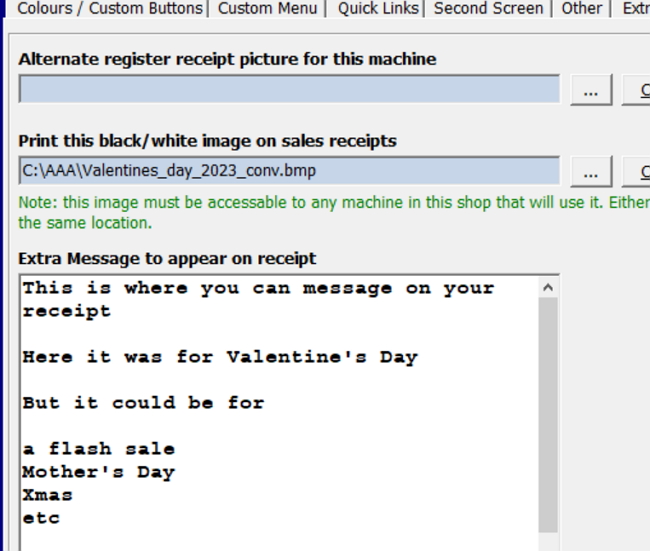
The first option we'll discuss is adding an image to the receipt's top. You'll often use this feature to put your logo on the top of the receipt, but only some use this function.

The next choice is to include an image at the bottom of the receipt. In this instance, the illustration is a Valentine's Day advertisement. The file came from the supplier. 

The last option is the one that is used the most. You can quickly add advertisements to the receipt here. Use this to promote your range of products, items on sale, and/or marketing seasons.

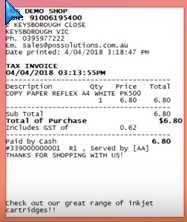
The receipt below illustrates such an advertisement. It promotes the store's extensive inventory of inkjet cartridges.

small receipt from a shop

Conclusion

> Receipt showcasing is a minimal expense. A viable showcasing procedure that gives reasons for a customer to come back.
> Bigger receipts offer many benefits that little receipts can't.
> Receipt messages promoting offer advantages, including connecting with clients.
> Thoughts for receipt messages incorporate coupons. Make the offer genuine, put an end date, promote marketing seasons, thank your customers, and get criticism.


Comments

Is receipt marketing truly more cost-effective and impactful than traditional advertising methods such as print, TV, or online ads? Can it really drive more customer engagement and loyalty, ultimately leading to increased sales and revenue for businesses?

I believe it’s important to highlight that receipt marketing doesn’t necessarily need to be more cost-effective than traditional methods like print, TV, or online ads—it simply needs to be cost-effective on its own. The beauty of this approach lies in its ability to leverage something businesses are already producing: receipts. As a result, the additional cost of including marketing messages is minimal compared to other advertising methods.

Another significant advantage is it targets customers who are already purchasing your products. Unlike traditional advertising, which often focuses on attracting new customers, receipt marketing engages with existing customers who are buyers. This makes it an excellent tool for customer retention and upselling.

Research also supports its effectiveness. For example, supermarkets frequently use receipt-based promotions such as coupons or discounts, which have been shown to drive repeat purchases and boost sales. Coupons printed on receipts often achieve higher redemption rates than those distributed through other channels, underscoring their impact.

Finally, it’s worth emphasising that receipt marketing doesn’t need to outperform other methods across the board; it simply needs to work effectively within its niche. Its strength lies in being a highly targeted, low-cost way to engage customers post-purchase—when they’re already primed for future interactions with the brand. Rather than competing directly with broader advertising strategies, it complements them by filling a unique role in the marketing mix.

This article provides valuable insights into leveraging receipt marketing as a cost-effective strategy to enhance customer engagement and drive repeat business. The emphasis on personalized messages, such as thank-you notes and exclusive offers, resonates well with current marketing trends. For instance, Wendy's has effectively utilized Twitter to engage audiences through their unique brand voice. Their approach to social media marketing serves as a noteworthy example of how brands can build a strong presence on the platform.

Add new comment

Restricted HTML

  • Allowed HTML tags: <a href hreflang> <em> <strong> <cite> <blockquote cite> <code> <ul type> <ol start type> <li> <dl> <dt> <dd> <h2 id> <h3 id> <h4 id> <h5 id> <h6 id>
  • Lines and paragraphs break automatically.
  • Web page addresses and email addresses turn into links automatically.
CAPTCHA This question is for testing whether or not you are a human visitor and to prevent automated spam submissions. Image CAPTCHA
Enter the characters shown in the image.

Proof of purchase

POS SOFTWARE

Retail proof of purchase

Proper proof of purchase practices are critical in retail today. We witness this firsthand through our support channels for retailers who contact us with questions and concerns about proof of purchase issues.

I am not a lawyer, and I would suggest asking the appropriate authorities if you have any queries.

The Significance of Proof of Purchase

  • Customer Assurance: Providing tangible evidence of transactions enhances customer confidence.
  • Legal Compliance: Adherence to proof of purchase regulations is a legal requirement.
  • Conflict Resolution: Proper documentation significantly streamlines dispute management.

Australian regulations

Transactions $75 and above

Should be supplied immediately

Transactions under $75

Proof should be provided upon customer request made within seven days. This can be a problem if they pay in cash. 

Acceptable Forms of Proof

Some examples of proof of purchase:

  • Cash register receipts
  • Handwritten receipts: I recently had a client whose customer demanded extra detail. He felt that the cash receipt did not have enough detail to show the tax implications of the transaction explicitly, so my client rewrote it in an invoice book and stapled the cash receipt to it.
  • GST tax invoices
  • Financial statements (credit/debit card, bank)
  • Lay-by agreements
  • Digital receipts (email, SMS)
  • Photographic evidence of receipts
  • Warranty cards with purchase details:
  • Serial numbers linked to supplier databases can be a problem. A client disputed that he had sold the item, while a supplier stated they had.
     

It's crucial to note that Australian Consumer Law doesn't explicitly define "sufficient proof of purchase. The requirement is that customers must reasonably demonstrate proof of purchase. 

Modern POS software can help you; one client showed a computer listing to a tribunal on the day the person claimed to have brought the item, but his shop had not sold this product. Another report that no sale for the claimed amount had occurred. We're moving towards a world where digital receipt proof of purchase will become the norm rather than the exception.

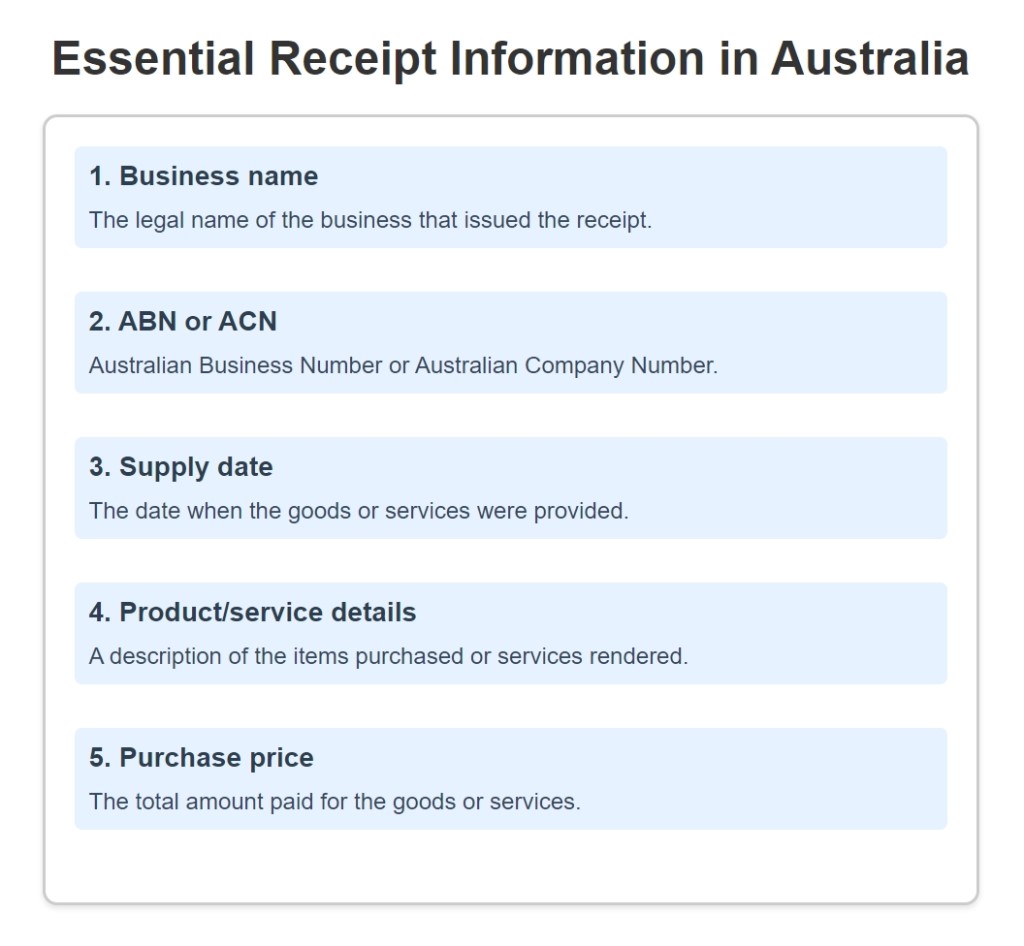
Essential Receipt Information

All proofs of purchase must include:

Essential Receipt Information in Australia

Managing Complex Scenarios

Late Requests and Itemized Bills

While charging for receipts after seven days is permissible, it's generally inadvisable due to potential negative customer impact.

For itemised bill requests:

These tend to be customers with specialised needs, and often, the retailer needs to go manual. In this case, I suggest keeping a record of that receipt. In a dispute, and the customer demands an itemised bill, you should immediately inform them that you reserve the right to charge them for the difference if it exceeds the original amount.

Dispute Resolution

In cases of disputed purchases without clear proof, it's essential to:

  1. Thoroughly investigate your POS System transaction records to check the transaction
  2. Consider alternative forms of evidence
  3. Inform customers about potential additional costs in itemised bills
  4. Balance customer rights with fraud prevention measures

    Handling Difficult Situations

    Several times, people have come into shops with what they claimed were faded receipts—essentially blank pieces of paper. In such cases, it's crucial to ask for alternative evidence. Remember, if a customer can reasonably demonstrate they purchased an item, denying their rights could be breaking the law.

Effective Record Management

The ACCC mandates a 5-year record retention period. To manage this effectively:

  1. Implement a reliable POS system
  2. Regularly back up data
  3. Archive old records before deletion
  4. Keep the backups; you never know when you need them.

Best Practices

  1. Staff Training: Ensure a comprehensive understanding of policies and procedures.
  2. Digital Transition: Utilise electronic receipts for improved storage and retrieval.
  3. Customer-Centric Policies: Prioritise customer satisfaction within legal boundaries.
  4. Clear Guidelines: If in doubt, seek advice from people who can help; most employee organisations can help here.

Conclusion

Adequate retail compliance practices are fundamental to building customer trust and safeguarding business interests. While legal compliance is crucial, the ultimate goal is to foster positive customer relationships while protecting the business.

If you want to know more, click here.

Add new comment

Restricted HTML

  • Allowed HTML tags: <a href hreflang> <em> <strong> <cite> <blockquote cite> <code> <ul type> <ol start type> <li> <dl> <dt> <dd> <h2 id> <h3 id> <h4 id> <h5 id> <h6 id>
  • Lines and paragraphs break automatically.
  • Web page addresses and email addresses turn into links automatically.
CAPTCHA This question is for testing whether or not you are a human visitor and to prevent automated spam submissions. Image CAPTCHA
Enter the characters shown in the image.

Video of printing a custom message on a receipt

POS SOFTWARE

Getting customers to return to your shop is crucial for any retailer. One cool trick is printing custom messages on receipts! A personalised receipt can grab someone's attention whether it's thanks, special offer, or important info. People do read receipts, often a few times and those people are your customeers.

Why Add Custom Receipt Messages?

There are loads of good reasons to use this feature in your point-of-sale software:

Boost Customer Loyalty

Include a discount code for their next visit Promote your loyalty program Share details about an upcoming sale

Increase Sales

Suggest complementary products they might like Advertise new arrivals or seasonal items Offer bundle deals related to their purchase

Strengthen Your Brand

Reinforce your branding with a branded sign-off Share your website, socials, and contact info Include your returns policy and store hours

How to Add a Custom Message

Setting up a custom receipt message in your POS system is super easy! Here's a step-by-step guide using our training video:

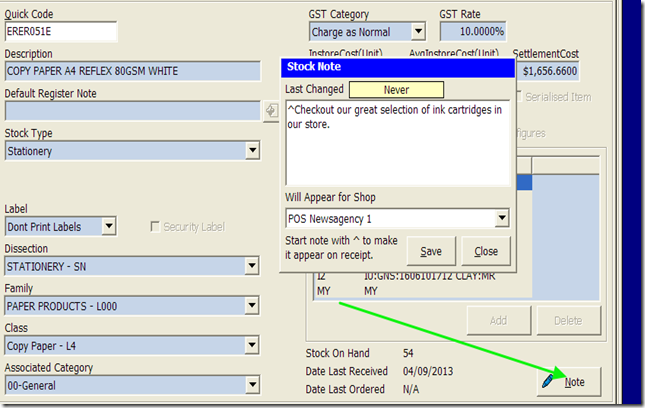
How to set up for an item

Often, when you sell items in the shop, you want to place a particular note on the receipt message to be added at the bottom of the receipt. This is commonly done to suggest new products that a person that purchased this item, specific instructions or offer a special deal related to this product.

Click here for a favourite training video of ours that explains how to use your POS software to put these extra details on your receipts.

It is as easy as that to have a custom message that will now print on any eligible receipts.

Pro Tips

To get the most out of this feature:

  • The timing of when your custom message prints can be just as important as the message itself.

  • Update regularly for seasonal promos

  • Experiment with tone (friendly, funny, urgency)
  • Use capitalization and emojis to stand out. Emojis do work

  • Suggest frequently bought together items ("You bought X, have you tried Y?")

  • Offer instructions on how to use

  • suggested discounts on related products/services

  • Cross-sell subscription programs ("Save on refills!")

Get Creative!

Custom receipt messages are a free marketing channel to surprise and delight customers. So have some fun with it! Craft short, snappy messages that add real value and keep them coming back.

With creativity and the right use of receipt marketing, you can turn this little printed slice of paper into a powerful sales driver for your small business!

What clever messages have worked for your business? Share your best receipt marketing tips in the comments!

Are your receipts too short?

POS SOFTWARE

​Small receipts save paper, so most select the options to give a small receipt like this!

But is this wise? It does save paper and does give the customer what they want a record, but what about the shop? Have you noticed that the majors' receipts include shop offers, opening times etc.? They are not worried about the paper.

Would a larger receipt serve your shop better?

If you want something to think about this, check out this video.

Now let me know what you think?

Add new comment

Restricted HTML

  • Allowed HTML tags: <a href hreflang> <em> <strong> <cite> <blockquote cite> <code> <ul type> <ol start type> <li> <dl> <dt> <dd> <h2 id> <h3 id> <h4 id> <h5 id> <h6 id>
  • Lines and paragraphs break automatically.
  • Web page addresses and email addresses turn into links automatically.
CAPTCHA This question is for testing whether or not you are a human visitor and to prevent automated spam submissions. Image CAPTCHA
Enter the characters shown in the image.