Point of Sale Software

What happens doing a windows 10 upgrade.
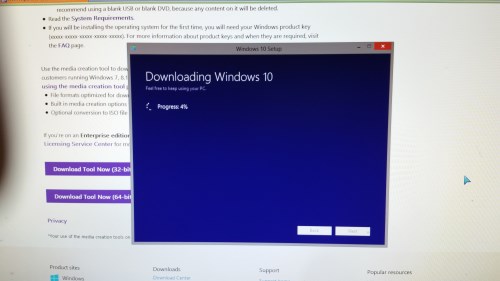
With Windows 10 now released and available for free to users of Windows 7 or later, I was keen on test it out as a new user would. As I am not yet ready to upgrade my work computer, so I decided to try it out on my home machine. Because I am not waiting around until Microsoft gets around to giving me the upgrade on my home computer, I jumped the queue by going direct to Microsoft at https://www.microsoft.com/en-us/software-download/windows10. You can do it too if you have Windows 7 or 8 and if you do not mind the 3GB of download. Clicked and down it will come.

Then I started the upgrade on my personal computer.
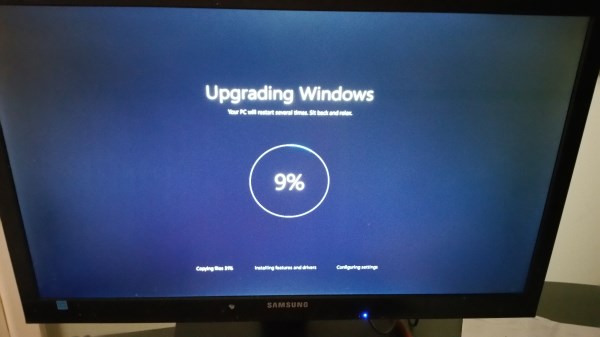
This is where I held my breath! Will it work?

When it finished I checked it out.

The monitor lost most of it clarity, the second monitor did not work. I discovered the video driver it picked was incorrect for Windows 10. So I downloaded the Windows 10 drivers for the main monitor and tried to force it to accept it. It rejected it. After about an hour and a half solid work, I finally got it to accept the video driver. It was not easy. My wife did not make it an easier by continuously going on "I told you to wait until the problems in Windows 10 are worked out!" She is right, but I am not going to wait while the world moves forward.

After the video problem was solved I then tested a few other points.

I had a lot of trouble trying to get a virtual machine running, this maybe a big problem with people with old software, for example, I have a particularly good mortgage rate analysising software written many years ago that I could not get to work in Windows 10. If you intend to run old programs, I would not recommend upgrading.

I also found that the administrator accounts were on my computer deactivated, and now it was using my Microsoft accounts. I was quickly able to fix this problem but since people do use the administrator account for SQL, this will be another problem for people upgrading.

User access was turned on, again easy enough to fix but another point to watch.

Although I did not have this problem, a few people have reported to me that the time zone was changed during the upgrade, again not a big issue to fix but something to watch.

I then tried a few other software packages to see whether they worked. Many had small issues such as the sound system was changed, and my favourite video program had problems playing sound. It turned out to be an option in the video program, which I had to work it out myself as it was not documented on their website.

After a few hours of upgrading and a few more hours of fixing the problems, I was ready to tested our software. It worked like a charm not surprising as we have been preparing for Windows 10 for a while. While running I did notice a small but significant speed increase. Luckily I did not experience any driver issue with printers or scanners but to be fair I did not test many models. In the past, this has always been a major problem with windows upgrades. Our program works fine but some of the hardware, particularly if they are old no longer works.

Working Windows 10 after being on Windows 8 was a real pleasure. I really liked that the speed of starting up was faster.

Overall little has changed from Windows 7. Windows 10 is very much a return to Windows 7 from Windows 8.

My recommendation is that as there are still problems in doing the upgrade to hold off it you can, afterall you do have a year to do the upgrade.

If you do intend to upgrade to Windows 10 now, you do need to be or to have a window professional to do the update as there does appear to be problems. Furthermore, I expect that while running you will find some more problems too in using it as there are too many switches and options to check.

Having said that our software does run on the latest Windows 10 upgrade well.

Note: Although I do not recommend it, after upgrading from Windows 7 or 8 systems to Windows 10, if you do not like it, you can bring your old system back as Microsoft have made it easy to downgrade back.
Where to find loyalty marketing.

The most popular method today for loyalty marketing is email and there are many ways and advantages of collecting email addresses from customers besides for sending people statements by email.

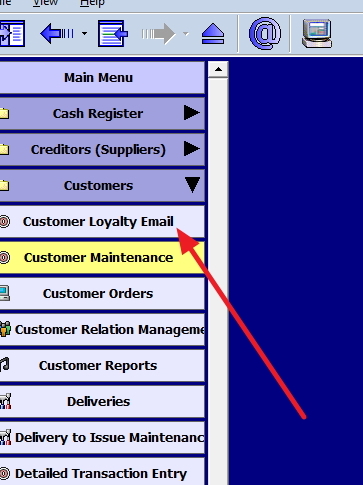
We have a large section for doing such marketing which you will find in register reports marked with a red arrow.

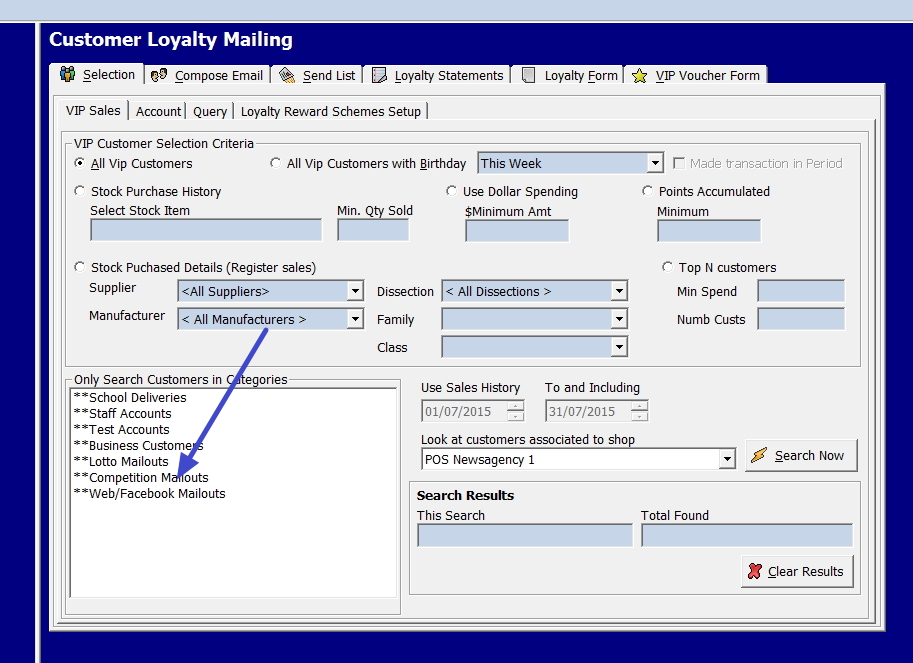
Once you click on it, you will see the following.

Now you can select the special categories you can set up, for example, here it is lotto mail outs, Facebook's clients etc.

Now you can compose say an email to these people advising people on lotto mailouts if say a big draw is going to be held this week. Actually today would be a very good day to have sent out a lotto mailout as tonight is a blue moon, something that is suppose to be very lucky and only occurs rarely. The next blue moon will be January 31, 2018. Many that play lotto might want to have a shot at the luck of blue moon.

The cost to you is nothing, and if anyone comes in, it has paid.

How to search for your slow moving stock?

Say you want to find now your slow-moving stock that you are holding. This is a quick step by step way of doing just that.

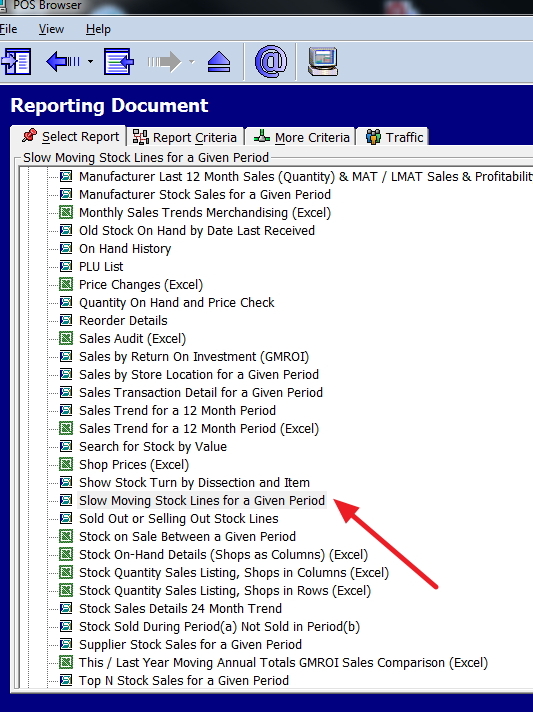
Go to reports and select stock, see the red arrow on the image here.

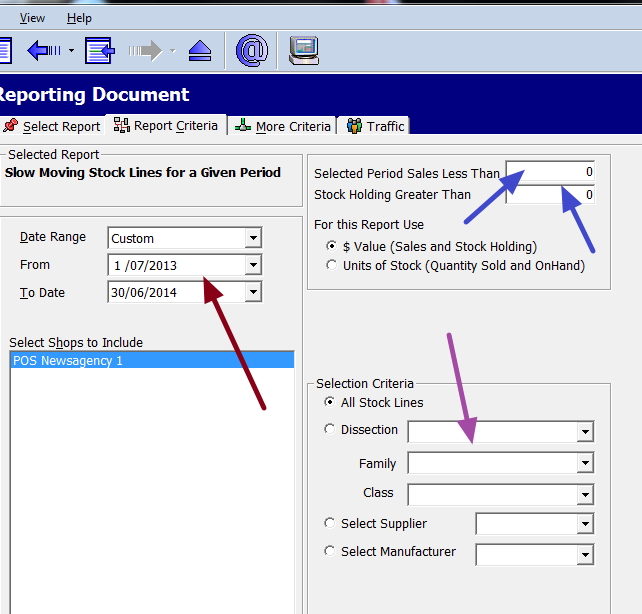
Now enter in the criteria you require.

Where it is brown is the date range, I used a year, but typically you select say three months.

I suggest firstly running this report with no options but the dates, after that and you get a feel of what it looks like and subsequently run this report again with the following options.

Where it is blue enter in the minimum sales figure you would allow and the size of the stock holding.

Where it is purple is where you specify the type of product as normally this is done department by department.

You then get a detailed report, showing among other information the value of the stock holdings and the amount moved in this period.

Let the cull of slow moving stock begin.

The value of a stocktake

Some people have discussed with me recently that as a stocktake is a lot of work of endless counting of ‘whatnots’ and whether it would be better for them to use computer estimates, which would save them some time.

Yes, it is true that in some situations, the ATO will accept estimates notably if your turnover is under $2 million dollars (many of you, please check exactly what constitutes turnover to the ATO), and you can show that you have a reliable inventory system. Taking as one suggested spot checks might help to show whether you do have such a *reliable inventory system* might help. If so you are doing a partial stocktake anyway.

However, I would argue even putting aside the ATO requirements and its potential problems that at least an annual stocktake is important.

What it allows you to do is compare your physical stock with your computer records. This allows you to analyse any discrepancies. This is important information that you probably are not aware of.

We break down these discrepancies into four major reasons - shoplifting, employer theft, vendor errors and administrative errors.

Shoplifting - How can you get an idea of what was stolen unless you do a stocktake? Who knows what is gone?

Employer theft - This is actually the hardest one of all to find. I have seen video footable of a person in tears when they discover a trusted employee who they have known for years has been stealing for them. I have known you for 35 years, since primary school.... What makes this so difficult to find is that these people know your systems and how they work. It is unlikely the computer would much help here.

Vendor errors- In this day of electronic importing and exporting, if someone in the chain makes a mistake, it will get into your system often without any checks. Sometimes you do catch it, for example, an invoice said 10 items and when you count it, you have something else, but sometimes it gets missed.

Administrative errors - People do make mistakes entering in quantities and prices so again by passing the computer checks. Often when people take short cuts when doing a sale as time is at a premium, and they just want to put through sales quickly. A typical example of cutting corners is to use department sales if there is any issue, they bypass the point of sale. If so, your computer would increase your tax liability as it would see your stock holding being the same, but you have made a sale at a pure profit.

Sometimes it can find things that are in the computer, but you are missing. For example, doing a stocktake recently, one of my clients found a large pile of greeting cards stored in a cupboard, which they did not know about. Interestingly the computer quantities were right as they had been stock received. Another example was another client found many items that were past their use by date. The quantities were in the computer too, but they are not sellable.

What you can do with our point-of-sale system is to select a continuous stocktake which allows you to cut the stocktake into manageable sections. So instead of doing one big stocktake jobs, you can do many small say three-hour jobs. Two advantages of this option are that you do not get any sudden surprises, and you get the spot check advantage too.

Furthermore, once you have done a stocktake we have many reports that can help you reconciled your system, and you can do a check to find your overall loses. Current figures suggest somewhere between 0.5% to 2.5% losses, although I have seen much higher figures too.

So it is our company and my own personal advice despite what some are saying that it is best to do a stocktake. If you intend to do what these people suggest, please consult your accountant, and I suggest get their advice in writing.

What are price embedded barcodes?

POS SOFTWARE

Price embedded barcodes are barcodes that have a price built into them.

They are commonly used in supermarkets and grocery stores for items purchased by weight, such as cold meats.

Our point of sale software can read these barcodes already!

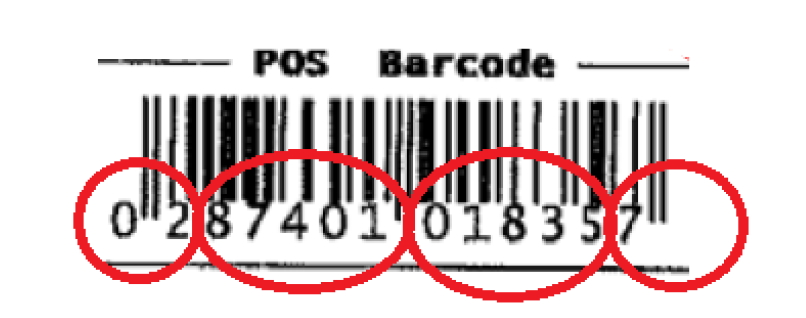
An itemized explanation of a price embedded barcodes of what it is.


Sample Price embedded barcode

The first circle 02, shows that it is a price-embedded barcode.

The second circle 87401 is the product identification code

The price you will see is in the third circle and here is 1837 cents of $18.37

The last circle has a seven which is a check digit that is used by the computer to check that it made a good scan.

Telco vouchers

Touch networks are doing a new promotion now to sell their product in our user base. It is quite a good promotion and if you are interested, I would recommend that you do contact them here.

In the process to show how well their product is, they gave us consolidated figures of the current sales of over 300 sites of ours that are marketing their telco products. We have of course more than that.

Overall it works in commissions over $580,000 a year. As expected there seems to be a massive range in the sales by different store. Some stores are doing much more then others. Some I think are just using Touch to sell to themselves products as a discount.

There has this financial year has seen a drop in profit 9%, mainly due to the big drop in Optus margins. Telstra the biggest, the retailers have seen a growth in margin of 4.4%. Since the Optus is a one-off event, I do expect the next twelve months will see a growth in margins.

Still on an average, its bring into a typical shop about 1290 customers a year which works out to about four customers a day. The current margin is about 5% producing a profit of about $1,921 a year which is not bad considering that there is no cost. Of course in many shops it is producing, much higher figures plus many stores would be generating significant add on sales.

How to do notes

In our system, the how to do notes are available in our software, no need to mess around with a website or stuff like that.

Go to the POS Browser Welcome Document. This is the first screen you see when you start up POS Browser.

On the top left-hand side, click onto Help > Help Topics.

You can choice the subject matter you require there, and it will provide you with further details.

If you are yet to do a stocktake

For most of us, the stocktake is done but a few people have not yet started it. If so I suggest you do it ASAP.

If so and you are unsure what to do, go to the help documents in posBrowser's help files by pressing F1 while in the register and check it out.

The basic one is called

Stocktake: Standard stock take document using Posbrowser on it's own to run the stock take.

If you are new to, the processes to doing a few tiny stocktakes in training to get confidential with the procedure before trying to run the actual stocktake.

Smart retailers advantage on the weather

This recent cold and wet wave sweeping across Australia shows how smart retailers are taking advantage of this weather. For example, one of my clients has prepared a stand for when it is cold and another stand when it rains. When it is cold or wet, the respective stand goes straight go straight to the front. He also checks his drink fridge, not surprising as I have seen figures of 200% increase in drink sales during a heat wave.

Also he checks does he have enough drinks? Not surprisingly as I have seen figures of 200% increase in drink sales during a heat wave. It is easy to create a list of products based on the weather, all you need to do is check the days that were unusually hot, cold, wet, etc. from the bureau of meteorology site here.

Next use a sales report from our system to see what sold well on those days. Now create a list for a hot, cold or wet day.

Now regularly monitor the 14-day forecasts for your area, these long-range forecasts now have reasonable accuracies.

What you need then to do is make sure you are prepared for these coming sales window.

It is clearly important for retailers to pay attention to the weather.

The most important metric in retail

Most businesses will find it difficult to significantly cut costs to the bottom line so what often is better is concentrate on the revenue side. Increased sales immediately can reduce the percentage fixed costs of a business.

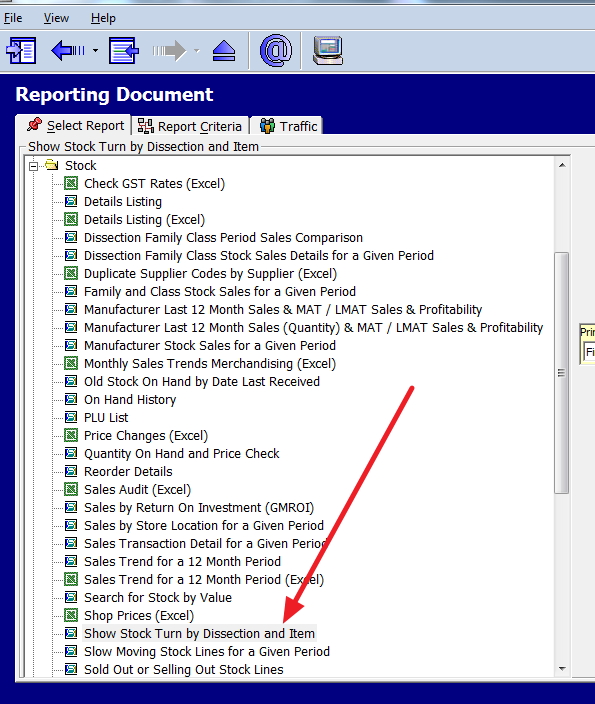
When I discussed stock turns here on how to get your stock turns, the main purchase is to see where you are moving the stock.

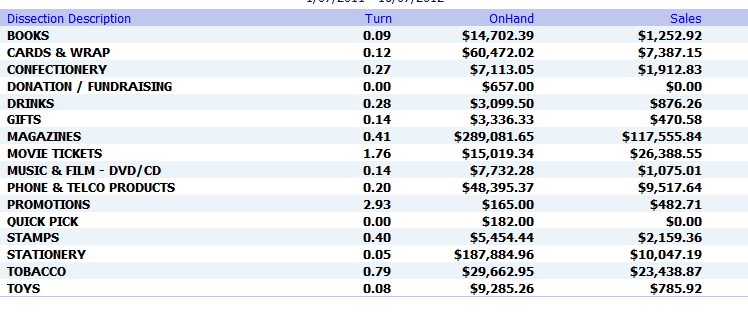
Here is the sample I produced that shows the stock turns by department.

Now beside just going through each department, also consider the most important key metric for almost all retail stores which is the overall profit of goods sold divided by the stock on hand. If this rate is too low, you are probably overstocking, if it's too high, it's probably not good either as you are almost certainly losing sales because you are understocking.

It has to be overall as the shop is a single entity some departments, for example, may be a loss leader, whose main use is to bring people into the shop.

What is high and what is low is a question only experience can tell you in your shop?

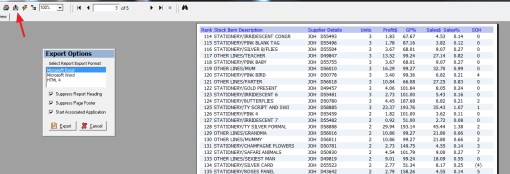
What I would suggest you do is take this above report and export it into excel like this.

Now multiple the sales by the margins to give you a profit. I would suggest you next add in everything, lotto if you have it, phone cards, etc. and divide by the stock onhand figure. This will then give you your metric.

Now compare it to last year and see what happened. Now check to see what delighted you and what disappointed you.

Let me know the result. If we get significant interest, I will see about automating the process.

My cash register security tips for you

POS SOFTWARE

Here are a few security tips that over the years, that over the years I have found.

1) Do not use the same password for every cashier. Making them have separate passwords can enable you to track who was manning the register. Furthermore, have them regularly change it, including your own. A good tip here is write in your diary say once every year that all passwords are to be changed on this date.

And please do not use your name, everyone who works in the shop knows that.

If you want to check out how good, your password is, check it out here.

Do not put your password exactly in but a slight variation say instead of "aa" put in a "bb"

2) Check any transactions that were voided or canceled. This is a common method used to make stock disappear from a store. An alarm bell should ring, if someone returns an item that you have no record of selling.

3) Set up password-protected security on all computers. The computer without security is the one people wanting to hack are looking for.

4) Regularly go over your stock reports to make sales figures match with the computers.

5) Set up security cameras not only covering the shop but also the cash register too.

6) It is not enough to check your computer for virus; you need to check your router/modem. This is what actually takes you to the Internet. What happens is some virus will change the setting in your router allowing them to take control of all of your Internet usage.

I would suggest you test your router too.

I hope this helps.
 

What you can do in preview!

Here is a step by step guide to using the preview to show you the power of it.

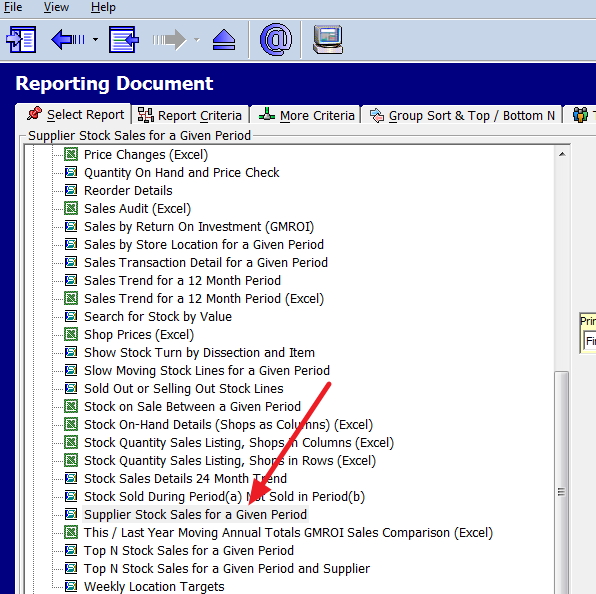
The report I will be working though is Supplier Stock Sales for a Given Period.

You will find it here, marked with a red arrow.

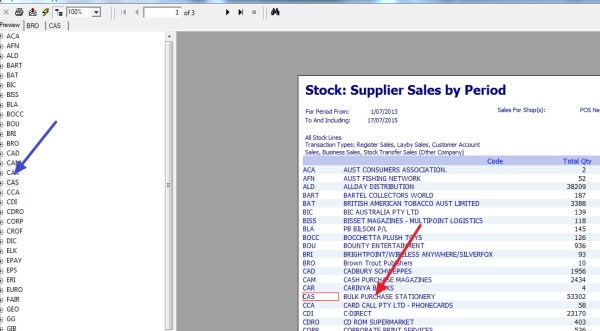
Now for this demonstration, I picked a large period and out popped a report showing a summary of sales by quantity, sales, profit, etc. for each supplier.

Now as you can see some of these have large figures, so let us say I want to look at Bulk Purchase Stationery. Currently I can either click with the mouse on the left side under the preview (marked in blue), or I can directly click on the right (marked with a red arrow). The advantage of the blue is its often easier to find.

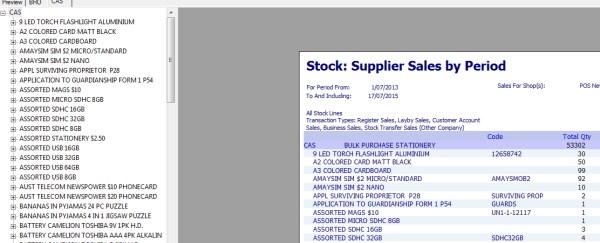
Once I click on this suppler out pops a drill down, where you can see exactly what was sold by that supplier. I can then drill down to where the sale was made (location), or I can export to excel, or word if I want to.

This is just one example of the smart reporting tools only available to our clients, which allows themto check the performance of their suppliers.

How to get your stock turns

A quick report to get your stock turns is available.

Main Menu > Cash Register > Register Reports > expand Stock > select/double click the report “Show Stock Turn by Dissection and Item

Now select the relevant options and then click the View Report button.

A very useful exercise is run it for the last 12 months and after that the 12 months before that. Then export these two years into excel using the export facility and comparing the last two years history.

In particular, what you are looking for is departments where on hand cost is going up but the turns are dropping or departments which the on hand cost is down but stock turns are going up.

EFTpos, banks unable to access - outage

A few of our clients were in for a rude shock today as outage in the bank’s network left them unable to access EFTpos. No-one warned them and they thought their was something wrong with their systems so they rang us up. It took a while before we found out that it was the bank's fault. Then all we could do is tell them is that the bank's had been notified.

This is the third major outage this month that I know in EFTpos.

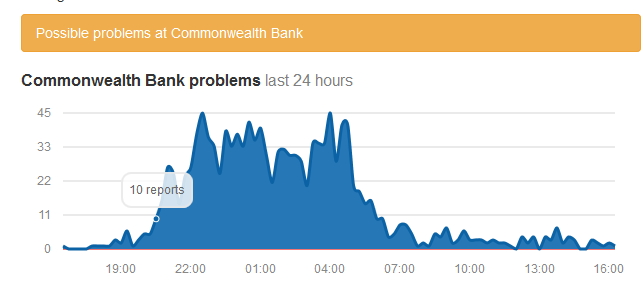
A very good site to monitor this is aussieoutages.com

Looking at it, the Commonwealth bank this week been the worst, here is today's graph of the CBA bank by reports.

Get your key taxation and superanuation dates

The ATO has updated their electronic tax calendar to help businesses better manage their tax obligations. You can download and install it for free here.

Select the most current version, once you download it, set it up for your company so the software can create a 18-month timetable tailored to your business lodgment and superanuation needs.

If you run more than one business, you may need to set up a separate calendar for each.

The ATO also provides here on online list of key dates.

If you want to upgrade to Windows 10

Many of you are now getting messages to register to upgrade to Windows 10. Some of you have asked us about it. It was supposed to become generally available on July 29, 2015, but there is now some doubt about this.

We have tested our software with several of the beta versions that we received from Microsoft. Our software seems to be performing as it should on what we tested it on but we do note that every beta been dramatically different, and we are unsure how the release version will perform.

Furthermore, I personally feel that Microsoft's requirement for memory and storage given its graphic is unrealistically low. I would say any computer you intend to upgrade to Windows 10 should have a minimum RAM of 4 GB and a hard drive of at least 150 GB.

My view is at the moment, if you are entitled to the free update and are planning to switch, register now but wait a while, as you have a year before your free copy expires. Let other people such as us, test the situation first as I am sure just as with previous upgrades of windows, there will be problems as it is still an untried operating system. In the past, the greatest problems have not been Microsoft or our software, but the equipment like the printer and scanner attached to our clients systems. For example the first and second statement printed fine in a laser printer but suddenly 10 pages of half printed statements were printed, or a scanner suddenly no longer worked. The other issue is that this is no minor update. It will take quite a while to do and much will change in your systems. You will need to count on doing some learning. Finally, Microsoft has a 50/50 success rate with operating systems - XP was great. VISTA was a flop. Win7 was brilliant but Win8 is a dog, you could be jumping into a mess.

If you want to learn more, we have prepared an information sheet, click here for details.

You need to check your GST rates

I had a client that had some queries about their GST figures coming out on the receipts. It did not seem to be right. What we discovered happened was that while he was importing supplier files, some of the GST rates in the suppliers' files are wrong. These inaccurate figures were imported into their system and so resulted in the problem.

What I do suggest is that you audit the GST figure regularly if you import suppliers' files that do not come from a approved source like us. To many suppliers leave too many errors in their files.

You will find it in here

Cash register> Register reports > Stock > Details Listing (Excel)

It can be much faster to check if you all departments at once but some prefer to do it by one department at a time.

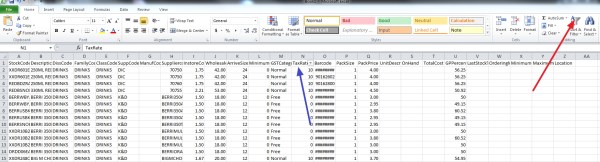
Now you will get a screen that looks like this.

Where the red arrow is click on that "Sort & Filter", now click where the blue arrow is "Tax rate" and now click all the rates that are not 0% or 10% and review them. Then do it again only for 0% tax items and review them too.

Overall, I find this particularly useful is in tracking down GST errors.

Give it a shot and see how you go.

Out of stock causes customer walkouts

I was reading an article by a marketing professor from Emory University, Sundar Bharadwaj, where he did a huge study of 71,000 customers to learn how they reacted to the retailer not having stock of the item they wanted.

He found the following overall.

  • 9% did not purchase the item
  • 15% came back later to buy the item
  • 45% brought something else
  • 31% went to another store.

Overall, the retailer lost nearly 40% of the sales on that item.

It would be worse as what does the customer who goes to another store do on their customer loyalty on their next shopping trip.

Typically, the study stated that the sales loss to a shop was about 4% of turnover.

However, this part was the most interesting, what did they find was the main cause of these out of stock situations, 72% of the time it was the retailer fault?!

While you cannot order limitless quantities, ordering frequently can help.

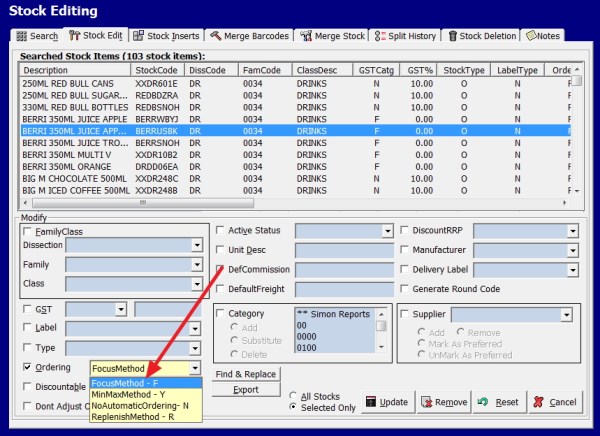
For slow moving items, we recommend using focus ordering, which is available in our system. It is a form of "just in time" method of stock control and allows you to plan how much stock you should have now. Here is how you set it up for these items.

Once set up the computer tracks the stock on hand, estimates the stock level required for these goods in the period (focus), if it thinks that the stock on hand is too low it can send an order to a supplier with the speed and accuracy that no-one can match.

It is easy to set up, and use for details click here.

With effective software, you can control your stock better.

For details on how to do this, please, click here

Reducing out of stock can take a while to set up, it can be difficult, time-consuming and labour expensive but the cost of assuming it does not really matter may be higher still in a business that we tend to service that have perilously thin margins.