Point of Sale Software

Here are some Articles from the Blog Subject - Retail Technology -

Local AI instead of Online AI for Your Business
POS SOFTWARE

Local AI for Your Business

Today, AI can help with writing, legal work, accounting, financial reporting, admin, customer communication, etc., in business. The fact, however, is that today the real choice is not finding the "best AI", but finding an AI that delivers the best value without becoming a massive computer job. Here, we will break down our hands-on tests comparing local vs. online AI to help you choose the exact setup that fits your shop. It can run either locally or online. Now, can a local AI replace an online AI for your business? The short answer is NO, but the real answer is it depends.

Key takeaways

  • Cost is a major factor, with online AI services like ChatGPT generally costing a minimum of $30 to $35 per month.
  • Local AI runs directly on your own hardware and can be free to run if you already own a suitable computer.
  • Online AI is much faster and easier to use for everyday business tasks.
  • Privacy is highly secure with local AI because your sensitive business information never leaves your computer.
  • Hybrid setups that mix local and online AI can work well, but they often become messy in everyday retail use.
  • Information on both systems is roughly the same
  • POS system reports can be easily fed into a local AI, providing insights that are just as good as a paid online service.

What Is a Local AI and an Online AI?

A local AI runs entirely on your own computer, while an online AI runs on a server and is accessed over the internet. For example, a local AI might sit on your PC in your back room, while an online AI can be used anywhere you have internet. This may be a problem if you work both in the shop and at home. My local AI is on my home machine, and I cannot run it at work.

Today, local AI technology has recently taken a massive leap forward as Google released AI software called gema-4-31b-it, which can run on many computers and delivers very good results, sparking immediate interest among some of our clients. It directly addresses the two biggest problems many business owners are considering with AI right now: ongoing costs and data security.

Moreover, the big problem is the technical knowledge required to set it up properly. Based on my conversations with people who have done it, it is not hard, but they all already had a lot of computer skills. Finally, you must remember that cost is not only about money leaving the bank account. If the owner spends three hours trying to fix a local AI model after a software update, the real cost is management time. For example, those three hours could have gone into merchandising shelves, ordering new stock, or supervising floor staff.

How much better this model is compared to others available is debatable; there is a Chinese AI Software model, Qwen3.5, which I have used, and I think is almost as good. There are also some smaller versions, such as gema-4-2b-it, that can run on not-so-powerful computers, which is very good.


How long does a query take?

This depends much on the model that you use. I did a speed test using a question, "when was GST introduced into australia and when does it apply", I ran this many times using Gemma  on my computer

2B it took an average of 4 seconds

4B it took 18 seconds

26 B took 25 seconds

31 B took me 1 minute 10 seconds

Not surprisingly, the larger the model, the better the answer. Now, interestingly, the older QWEN 35 B gave the best answer, taking 35 seconds. Overall, I found QWEN 35 B to be just as good as Gemma 31 B.


But this is the one that everyone seems so excited about gema-4-31b-it, so let us discuss this one. 

How Much Does a Local AI Really Cost a SMB Business?

The true cost of such a local AI depends heavily on the computer hardware you already own, as the software itself can run for free. You generally need a very good computer from 2025 with a powerful graphics card to run a local AI smoothly. Unfortunately, this is not the sort of computer that retailers tend to buy for their shops. For example, a standard shop PC used just for scanning barcodes does not work for local AI. The computers that can run these models are more like the gaming computers that kids buy. If such a computer is already part of your normal business operations, then the local AI is effectively free. However, if you have to buy a $3,000 gaming computer just for the office, the cost isn't worth it.

Moreover, the next problem is the technical knowledge required to set it up properly. Based on my conversations with people who have done it, it is not hard, but they all already had a lot of computer skills.

Finally, you must remember that cost is not only about money leaving the bank account. If the owner spends three hours trying to fix a local AI model after a software update, the real cost is management time. For example, those three hours could have gone into merchandising shelves, ordering new stock, or supervising floor staff.

What Does an Online AI Cost a Business?

An online AI costs a predictable monthly subscription fee, usually starting at $30-$35. For example, a retailer can pay a flat $35 fee to ChatGPT and get instant access to the smartest models available.

This monthly fee gives you access to massive supercomputers without needing to buy one yourself. If you are a heavy user, however, it can cost much more because most online AI companies have strict limitations on how much you can use them per day. For example, one of our users, after writing 50 product descriptions in one morning, hit a limit and was locked out for a while. Because of these usage limits, many serious AI users end up having two different accounts. This means we are looking at about $65 a month to ensure the business never gets interrupted.

Cost is not just cash; it is also your time. 

Is Online AI Easier for an SMB Business?

Online AI is definitely easier to use for a small retail business because the AI company handles all the technical background work. For example, a retailer can sign up with an email address and start writing an advertisement almost immediately. They are designed to be almost trivial to set up and use for the average user. Most of them offer free plans you can set up to test, so the risks are very small. For example, a shop owner can use a free online plan to write a quick Facebook post without entering a credit card.

Moreover, because these tools are so popular, finding help is incredibly simple. Most computer-literate people know how to use them, so it is easy to get staff or friends to help you if you get stuck.

Ease of use drives adoption. If software is hard to use, we will all ignore it.

How Fast Is Local AI Compared with Online AI?

Local AI is often painfully slow to use compared to the near-instant speeds of an online AI service. Even with a good computer, you do not have a supercomputer. For example, when asking a local AI to write a complicated refund policy, you might literally wait minutes for it to type out the words. This speed point should be considered very carefully by anyone who is busy. I ran tests on a $6,000 computer, and even after an online AI had given me an answer, I was still waiting for the local AI to finish. For short answers, local AI was perfectly fine. But when I asked questions that required a long answer, I ended up making coffee while I waited. This slowness makes certain tasks unusable. If you are dealing with a long, complex legal problem, like a rental agreement, where you need to ask 20 different questions back-to-back, the waiting time makes it unusable. What am I supposed to have 20 cups of coffee?

Size of question

A main problem is that local AI cannot handle as big reports as online AI. This is a real problem if you want to run with a lots of information.

What Are the Privacy and Security Trade-Offs?

The main privacy trade-off is that online AI sends your data to the internet, whereas local AI keeps it on your machine. For example, if you feed your profit margins into a local AI, that highly sensitive data is going nowhere. Data security is one of the biggest concerns for SMB retailers right now. When using an online AI service, you have to ask yourself: where is this information going? For example, if you paste a customer's private address into an online AI to format a shipping label, that data is now stored on a foreign server. You must consider who can access this information and what damage it could cause if it falls into the wrong hands. A local AI solves this completely by keeping the information inside your computer.

Privacy is local AI's biggest strength. Your data never leaves your computer.

How Good Is the Quality of Information from AI?

The overall quality of information from a local AI is excellent and often just as good as that of an online AI. For example, when asking a local AI to explain a tricky accounting term, it provided me with a deep, accurate answer.

Then I fed a local AI several long, highly difficult tests and was very impressed by the depth and quality of the information it provided. Overall, I found the answers to be good, and often better, than those from an online AI service.

Having a smart AI locally means you get top-tier brainpower without paying a subscription. However, there are two major problems retailers must watch for in the quality of this information.

How Current Is the Update Information?

This is the most important problem: a local AI's knowledge depends on its date of manufacture. Here, Google trained it up to January 2025; as such, it knows absolutely nothing about the recent RBA surcharge ban. It also does not know the local prices of the products I asked about. In business, one often needs the most up-to-date information. Well, you cannot get such answers here. What you need is a plugin that is very slow in use.

For SMB businesses, this lack of current events makes a local AI impractical for many uses. This is why I do not believe a local AI is a total solution.

AI Hallucinations

An AI hallucination is when the AI goes crazy and confidently makes up nonsense. One of the biggest problems with AI is that, when asked a question, it can simply make up answers. It happens with any AI, and with the state of today's technology, you have to check the answers yourself manually. While I would not say that in my tests, "local AI hallucinates more", it definitely had fewer safety checks. This is because online AI companies have gone to great lengths to address this problem.

You need to check the local AI much more carefully. There is an old warning about free advice: if it is free, you'd better check it.

How Can Local AI Work With Your POS System?

I found that local AI can easily process and analyse daily reports, as long as they are small and generated by your POS software. For example, I exported a few weekly sales reports and fed them directly into the local AI to identify which items are selling best. I specifically wanted to know how this technology handles raw retail data. I had absolutely no trouble doing so, and I was incredibly impressed with the quality of the information that I got back. The local AI instantly read the numbers, spotted the trends, and gave me a clear summary of what was happening in the shop. For example, the AI correctly noticed that umbrellas sold rapidly yesterday and suggested I move them to the front counter.

For this specific job of crunching numbers, I consider the local AI comparable to the paid online service. It will allow you to get free deep insights from a Point of Sale (POS) system without ever uploading your private sales figures to the internet.

Should an SMB Business Use a Hybrid AI Setup?

A hybrid setup is when a business uses both a local AI and a free online AI simultaneously. For example, a shop might use a private local model to read their financial reports, and a free online service to look up current news.

Because many online AI tools offer free plans, many SMBs want to try both. You may consider it, although it is much messier as you need to manage two systems.

Moreover, for many, it is clearly an attractive idea. You keep your privacy when required, while still using online AI when you need web access, faster speeds, or fresher information.

It will work if you are clever. What you might do is go to an online service and ask it, "What factors are important for reviewing a commercial lease?" Now, you get the answer, put it into a local AI, and say, "Based on this online output, what do you think of my private lease document?" It will work, but it's not a good solution as there is always more to consider.

Where Does Each AI Fit Best in Retail?

We were all very impressed with the quality of local AI information, but this is really a decision about the correct fit.

First, for most SMBs, an online AI is a better starting point. It is simply easier, faster, and much more polished for beginners.

Moreover, local AI makes perfect sense when you already have the gaming-style hardware, care strongly about your privacy, and are happy to spend more time.

Where online AI usually fits best

  • Marketing campaigns and seasonal store promotions.
  • Finding current product information from suppliers.
  • Researching current events and news.
  • Asking general legal or business questions.

Where local AI usually fits best

  • Writing internal notes and staff procedures.
  • Sensitive drafting that should stay only with you.
  • Repetitive writing on a machine you already own.
  • Use cases where avoiding monthly fees matters more than fast speed.
  • Processing private financial reports.
  • Analysing reports from a pos system.
  • Customer communication and email drafting.

Conclusion: Making the Right AI Choice

Ultimately, you do not have to choose the most famous AI; you have to choose the one that makes your retail life easier. If you want instant help with marketing and do not mind a small monthly fee, online AI is your best bet.

However, if you want to analyse sensitive reports from your pos system and already have a strong computer, local AI is an incredibly powerful, free tool. Take a look at your shop's daily tasks, try out a free online plan to get a feel for it, and then decide if bringing the brainpower locally is worth the setup time.

Experiment further

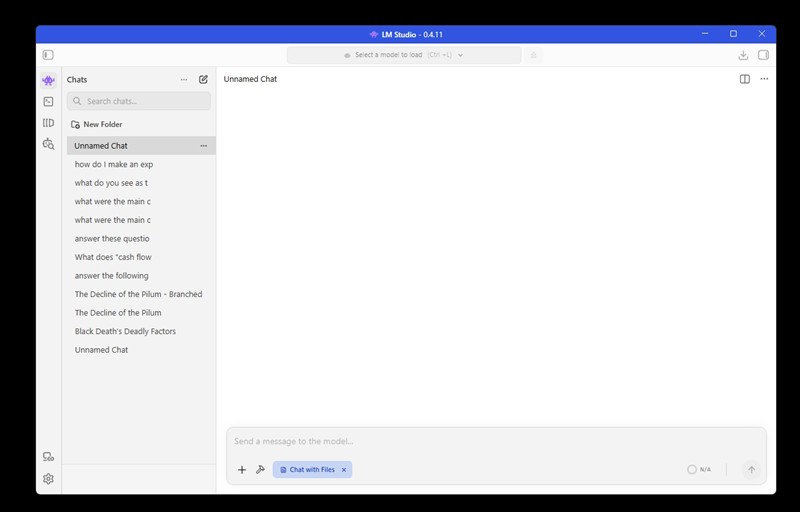
If you want to experiment on your computer, visit LM Studio and download a copy. You can find instructions on how to get started there. There’s also a mobile version available on Google Play, which is handy if you’re somewhere without internet access.

To run a decent AI in LM Studio, you'll need a computer with sufficient video memory (VRAM) to process AI models smoothly. For instance, if you want an AI to securely analyse offline sales data from your Point of Sale (POS) system, you need at least an 8 GB NVIDIA graphics card, the more the better, my VRAM is 64GB, and it's slow. Next, your system RAM needs about 32 GB and using an SSD would be good to ensure the AI remembers long conversations without lagging. 


Written by:

Bernard Zimmermann


Bernard Zimmermann is the founding director of POS Solutions, a leading point-of-sale system company with 45 years of industry experience, now retired and seeking new opportunities. He consults with various organisations, from small businesses to large retailers and government institutions. Bernard is passionate about helping companies optimise their operations through innovative POS technology and enabling seamless customer experiences through effective software solutions.


Add new comment

Restricted HTML

  • Allowed HTML tags: <a href hreflang> <em> <strong> <cite> <blockquote cite> <code> <ul type> <ol start type> <li> <dl> <dt> <dd> <h2 id> <h3 id> <h4 id> <h5 id> <h6 id>
  • Lines and paragraphs break automatically.
  • Web page addresses and email addresses turn into links automatically.
CAPTCHA This question is for testing whether or not you are a human visitor and to prevent automated spam submissions. Image CAPTCHA
Enter the characters shown in the image.

Your Virtual Cashier: Something Worth Thinking About

POS SOFTWARE

virtual cashier


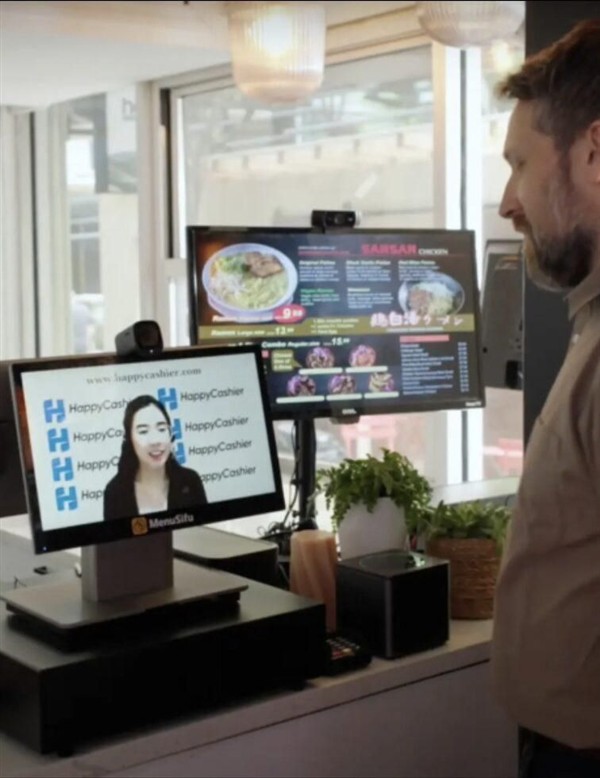
I was at a retail meeting recently, and the topic that got people talking and thinking was "virtual cashiers." It is already happening in America. Here's how it works: instead of having a cashier standing at your counter, you have a screen. On that screen is a real person, live via video, like Zoom. That person is working in another country, maybe the Philippines or India, but they are is your cashier in your shop.

The setup depends on what kind of business you run.

For Quick-Service Businesses

Say you run a fast-food shop; the virtual cashier works just like a regular cashier. They greet the customer, take the order, enter it into your POS system, and guide the customer to tap their card on the payment terminal. Between customers, they can answer your phone, monitor your security cameras, or handle other tasks.

For Retail Shops

If you run a newsagency, chemist, pet shop, or similar business, it works as a hybrid between self-checkout and a staffed counter. The customer scans their own items with a barcode scanner, while the virtual cashier monitors everything via a camera feed. They can help if a barcode won't scan, handle age verification for tobacco, or answer questions. Most importantly, they watch to make sure everything gets scanned, which will address the biggest problem with self-checkouts: theft. Today, self-checkout theft can be 16 times higher than with traditional cashiers. Some are going back to cashiers, and so few SMB retailers are rejecting them.

The Money Side of Things

Let me be blunt about the costs.

Right now, if you employ a casual cashier in Australia, you're paying around $27 per hour base rate, plus often casual loading. Then there's superannuation at 11.5%. And weekends? That's when it really hurts: 150% on Saturdays and 175% on Sundays. If you're open seven days a week, 12 hours a day, you're looking at over $85,000 a year for one full-time cashier position.

Now compare that to virtual cashier rates. Even if you're paying double or triple the local rate in India or Pakistan, you're looking at $6 to $9 an hour. That is a potential savings of $60,000 or more per year, per position. It's no wonder that so many were interested in the retail meeting.

As a virtual cashier watches the transaction through a camera, another major cost-saving is theft, since the customer knows someone is watching. They can't "accidentally" forget to scan items, and it's harder to swap barcodes, the banana trick where people swap a barcode on a cheaper item onto a dearer one..

What would be needed to set it up?

When we thought it through, it did not seem as complicated as it might sound.

  • Professional remote desktop software so the virtual cashier can control your POS system
  • A monitor facing the customer showing the cashier's video feed
  • At least two cameras, one pointed at the customer, and the other at the scanning area
  • Good quality microphone and speakers for a clear two-way conversation
  • Reliable, fast internet (this is not negotiable; it would need to be business-grade, not home broadband)
  • Recording capability for any disputes or investigations
  • We could easily make it better with our AI 

So yes, there's an upfront cost for this equipment, but when you're saving $60,000 a year, it's minor. 

I am sure we could do it right now with some of our clients.

Will Customers Accept This?

This is the $60,000 question?

Here's what we know: Australians already use self-service checkouts. A friendly face on a screen is actually more personal than such machines. Today, in call centres, customers call businesses every day and speak to someone overseas, often without even knowing it. I know a medical clinic that uses remote receptionists in India. These receptionists book appointments through the practice software.

According to reports in the USA, early feedback from places using these virtual cashiers is mixed: some do not like them, while others say their customers do.

Things to Consider

It's worth thinking about.

I'm not going to pretend this is a perfect solution, nothing is, and there are legitimate concerns, but the reality is that your retail margins are tight and getting tighter. Labour costs keep going up. Theft keeps eating into your profits and your customers are increasingly comfortable with technology.

Now ask yourself what matters most to your customers? The lowest price, or a local person behind the counter? My gut feeling is that most will vote with their wallets.

Written by:

Bernard Zimmermann


Bernard Zimmermann is the founding director of POS Solutions, a leading point-of-sale system company with 45 years of industry experience, now retired and seeking new opportunities. He consults with various organisations, from small businesses to large retailers and government institutions. Bernard is passionate about helping companies optimise their operations through innovative POS technology and enabling seamless customer experiences through effective software solutions.


Add new comment

Restricted HTML

  • Allowed HTML tags: <a href hreflang> <em> <strong> <cite> <blockquote cite> <code> <ul type> <ol start type> <li> <dl> <dt> <dd> <h2 id> <h3 id> <h4 id> <h5 id> <h6 id>
  • Lines and paragraphs break automatically.
  • Web page addresses and email addresses turn into links automatically.
CAPTCHA This question is for testing whether or not you are a human visitor and to prevent automated spam submissions. Image CAPTCHA
Enter the characters shown in the image.

The future of Retail: Where we are in the AI Revolution now

POS SOFTWARE

https://walterwrites.ai/The future of Retail: Where we are in the AI Revolution now

Update: I wrote this article a few weeks ago and was asked about the other free AI model, GWEN, that was recently released. So, I decided to test this one, too, and add it to the list. It's an excellent AI model. Also, for the sake of completeness, I decided to add Microsoft Copilot. So here is the updated list.


No one has talked about artificial intelligence (AI), and now it seems people are talking about little else. We have been actively involved in AI for several years now.

In retail, AI promises to boost sales and reduce operational costs in the POS system. Like everyone else in business, those leveraging AI will stay competitive in a rapidly evolving market. 

Comparison of AI Models

A good leaderboard of what AI models is available here.

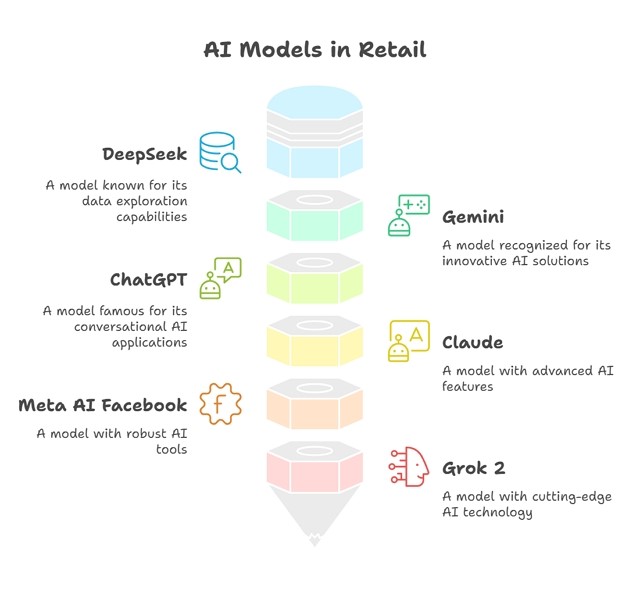
But these are not measured on what our clients now use and the problems they encounter. So, to understand the current landscape of AI needs in retail, we compared several leading widely available AI models:

1) DeepSeek

2) Gemini

3) ChatGPT

4) Claude

5) Meta AI Facebook

6) Grok 2

7) GWEN

8) Microsoft Copilot


We tested these models on real-world scenarios that retailers encounter, such as product descriptions, inventory management, customer service, and sales forecasting. We then combined the answers, amended them by hand and came up with answers that we scored 40. We then compared each AI's answer to this score of 40. All of this took us a lot of work.

Our test results showed that Gemini (Google) was the top performer, scoring 39 out of 40. It also offered a comprehensive package with many additional benefits, making it an attractive choice for businesses seeking a robust AI-powered POS system.

Claude excelled in writing capabilities, scoring 37, which makes it most suitable for tasks requiring explicit and engaging content.

ChatGPT and Grok 2 scored 36, demonstrating their ability to handle various tasks effectively. What we liked about Grok 2's answers is that they contained advanced information on items the other AIs did not have. If, for example, a new game came out and you wanted to see what people thought about it, Grok 2 gave the best response. I cannot wait to see Grok 3, which is overdue now.

DeepSeek scored 35 despite being significantly cheaper. It offers impressive performance at a fraction of the cost of other models, making it ideal for businesses requiring API access.

GWEN scored 34, which is a bit lower than Deepseek's, but like Deepseek, it is free. We weren't that impressed with what the AI model could achieve compared to the other models mentioned; it also lacks an API, which could lead to issues in usage.

Microsoft Copilot scored 32, but like Deepseek, it is free and integrates well into Microsoft products that many of my clients use. Again, we weren't impressed with what the AI model could achieve, but if you use Microsoft products, it fits well into the suite. 

However, Meta AI (Facebook) struggled, scoring only 30, but was still included in the assessment due to its potential in specific use cases. Overall, I would not recommend it as your primary AI.

Recommendations

Gemini is likely the best choice if cost is not a concern due to its superior performance and additional features. Google's support and integration capabilities make it an excellent solution for businesses seeking a comprehensive AI-powered system.

However, DeepSeek presents a compelling option for those prioritising cost-effectiveness. At only 2% of the cost of ChatGPT, it delivers nearly comparable results, making it an attractive choice for businesses requiring API access.

Grok 2 is particularly noteworthy, especially with its upcoming update. Its integration with X (Twitter) offers access to a vast source of real-time data, which can be invaluable for businesses that must stay informed about the latest trends and news.

AI in POS Systems: Promises

English and spelling

Not everyone is good at English with AI lousy spelling, and people with bad grammar can communicate in writing better. It also allows them to communicate better with non-English speakers.

Marketing material

AI can be successfully used to write marketing material. A client wanted to create fancy names for their lotto syndicate, so they used AI to help them.

Real-time Predictive Analytics

AI analyses sales data and market trends to forecast demand, helping businesses optimise and prepare for busy seasons. For example, a retailer can use AI to predict a surge in demand. As trends overseas tend to come first before they hit us, they can tell us where the market is going.

Personalised Marketing

AI could provide tailored recommendations and promotions based on customer purchase history and preferences, fostering loyalty and boosting sales.

Dynamic Pricing Optimisation

We like that it can better set prices in real time based on demand. Companies dealing with marketing events often have goods that sell well in that season, but the demand for the product collapses as soon as it's over. We are hoping AI can help us with this, too.

Implementation Challenges

Implementing AI in POS systems can present challenges. The answers are often not as good as they look. They are often wrong, and it's hard to argue with it because they look so right.

The future

It is unclear where the AI market is going. Will consumers want a low-budget or medium-budget, or are they prepared to pay for an expensive system? One company told me they spend $200/month on ChatGPT, which is $2,400 annually. Will the consumer bear that?

The other issue is whether a business needs a car or a truck in AI. In the context of retail POS systems, AI is not just about speed or luxury; it's about finding a solution that can handle the workload efficiently. Businesses need a reliable truck rather than a sports car to carry a heavy load rather than speed.

I am sure there are privacy issues, too. Some AIs are specially built with that in mind. But this all would involve a deeper discussion of data privacy, security, and compliance (such as GDPR or Australian privacy laws) beyond the scope of this post. 

Some industry research shows that over 70% of retailers plan to adopt AI within the next two years. I would not be surprised if it will be closer to 100% in one year, as AI can enhance competitiveness and drive growth.

FAQ: Frequently asked questions

Q: What is the role of AI in POS systems?

A: AI in POS systems promotes boosting operational efficiency.

Q: Which AI models were compared in our tests?

A: The models tested included DeepSeek, Gemini, ChatGPT, Claude, Meta AI (Facebook), and Grok 2. These were evaluated in real-world scenarios such as product descriptions, inventory management, customer service, and sales forecasting.

Q: What were the results of the AI model comparison?

A: Gemini (Google) scored the highest at 39 out of 40, offering a comprehensive package with additional benefits. Claude excelled in writing capabilities, scoring 37. ChatGPT and Grok 2 scored 36, while DeepSeek scored 35 despite being significantly cheaper. Meta AI (Facebook) scored 30.

Q: Which AI model is recommended for businesses with no budget constraints?

A: Gemini is likely the best choice due to its superior performance and additional features. Google's support and integration capabilities make it an excellent solution for comprehensive AI-powered systems.

Q: What about cost-effective options?

A: DeepSeek is a compelling choice for businesses prioritising cost-effectiveness. It offers impressive performance at a fraction of the cost of other models, making it ideal for those requiring API access.

Q: How does AI improve communication in retail?

A: AI helps individuals with limited English proficiency communicate more effectively in writing. It also facilitates better communication with non-English speakers.

Q: Can AI assist with marketing tasks?

A: AI can be used to write marketing material, such as creating product names or promotions. It can also help generate engaging content.

Q: What are the benefits of AI in predictive analytics and personalised marketing?

A: AI analyses sales data and market trends to predict demand, assisting businesses in preparing for peak seasons. It also offers personalised recommendations and promotions based on customers' purchasing history, enhancing loyalty and driving sales.

Q: What challenges are associated with implementing AI in POS systems?

A: Utilising AI can present challenges, such as ensuring the accuracy of AI-generated responses and integrating AI with existing systems. Additionally, although AI responses may seem correct, they can still contain errors.

Q: What does the future hold for AI in retail?

A: The future of AI in retail appears promising, as over 70% of retailers plan to adopt AI within the next two years.

Q: How does the analogy of a "truck" apply to AI in POS systems?

A: In retail POS systems, AI is not just about speed or luxury; it's about finding a solution that can handle the workload efficiently. Businesses need a reliable "truck" rather than a sports car to carry a heavy load effectively.

Q: Are there privacy concerns with AI in POS systems?

A: Yes, very much so. Some AI systems are claimed to be designed with privacy in mind. It remains an essential consideration for businesses implementing AI solutions.

Q: Is a POS system AI?

A: A POS system itself isn’t AI but can be integrated with AI to enhance its capabilities.

Update: The federal and SA governments have blocked access to DeepSeek over its network and directed public servants to stop using and remove it from devices. More details are available here. There are security concerns over the product. 


Add new comment

Restricted HTML

  • Allowed HTML tags: <a href hreflang> <em> <strong> <cite> <blockquote cite> <code> <ul type> <ol start type> <li> <dl> <dt> <dd> <h2 id> <h3 id> <h4 id> <h5 id> <h6 id>
  • Lines and paragraphs break automatically.
  • Web page addresses and email addresses turn into links automatically.
CAPTCHA This question is for testing whether or not you are a human visitor and to prevent automated spam submissions. Image CAPTCHA
Enter the characters shown in the image.

Deal with Hallmark cards; please read this

POS SOFTWARE

Exciting Hallmark Cards Trial: Enhance Your Retail Experience

As a retail and POS systems expert, I'm thrilled to share information about an innovative trial involving Hallmark Cards and POS Solutions that could benefit your small retail business. This collaboration aims to enhance customer engagement and boost sales by uniquely integrating Hallmark technology into our POS system.

The Hallmark Cards Trial: An Exciting Opportunity

How It Works

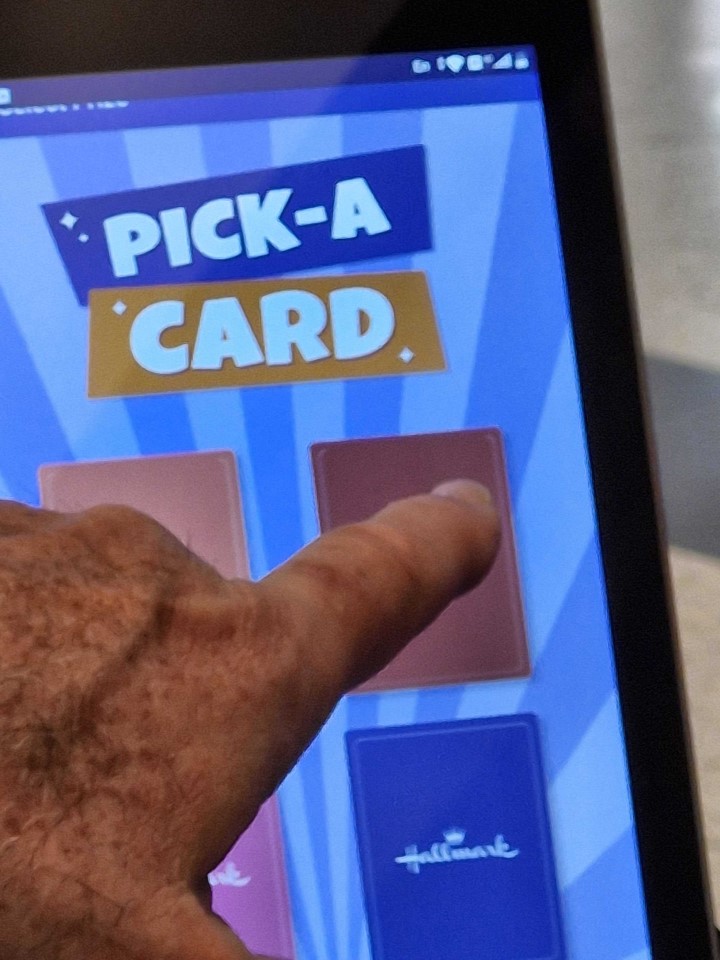
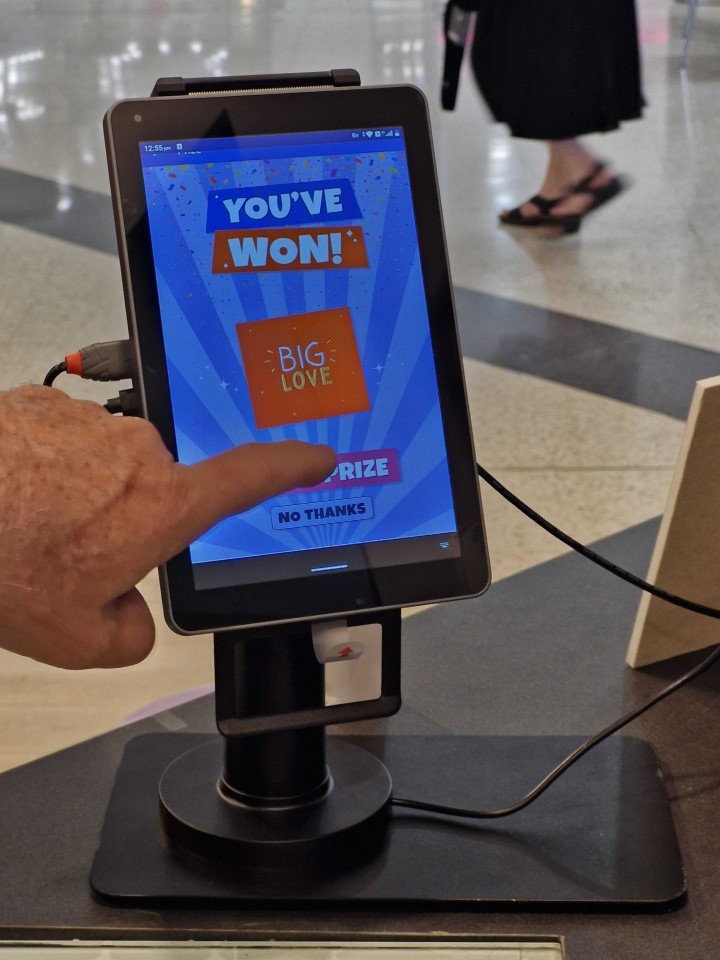
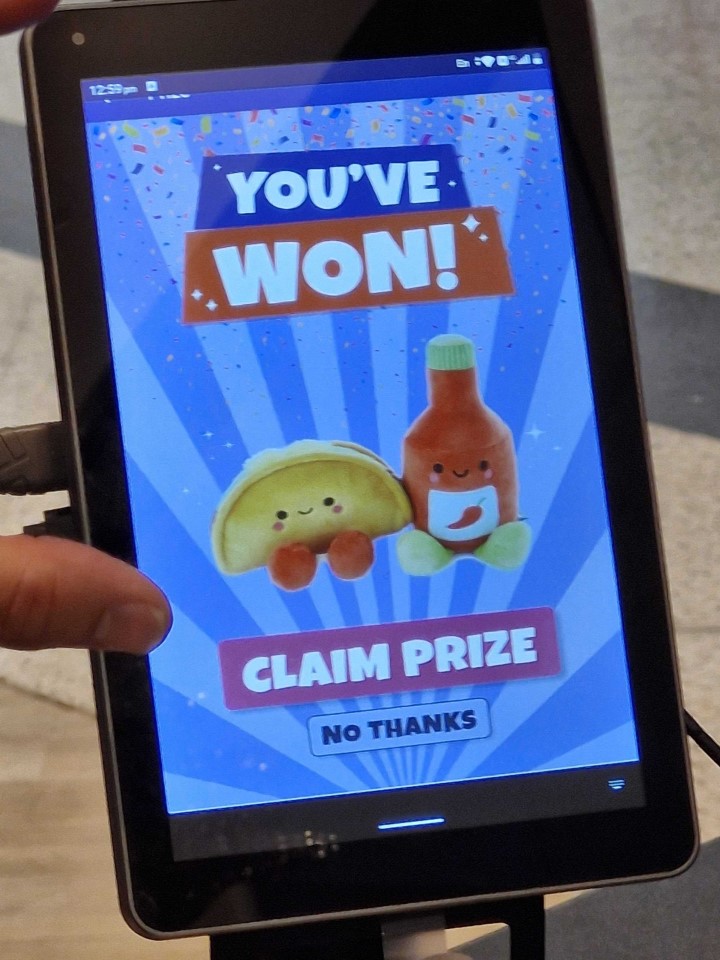
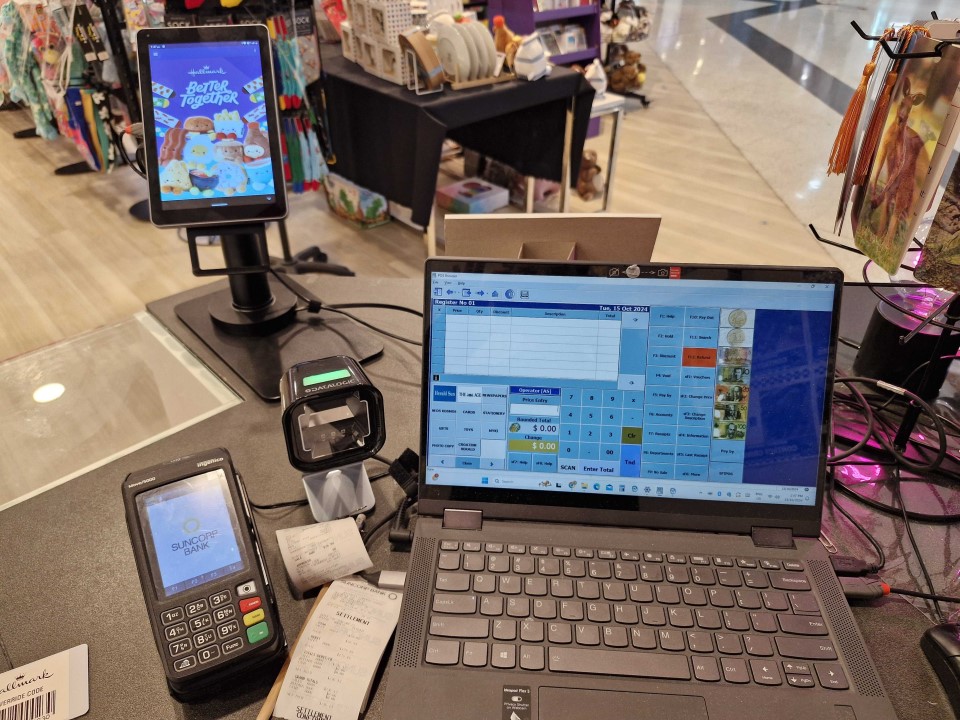
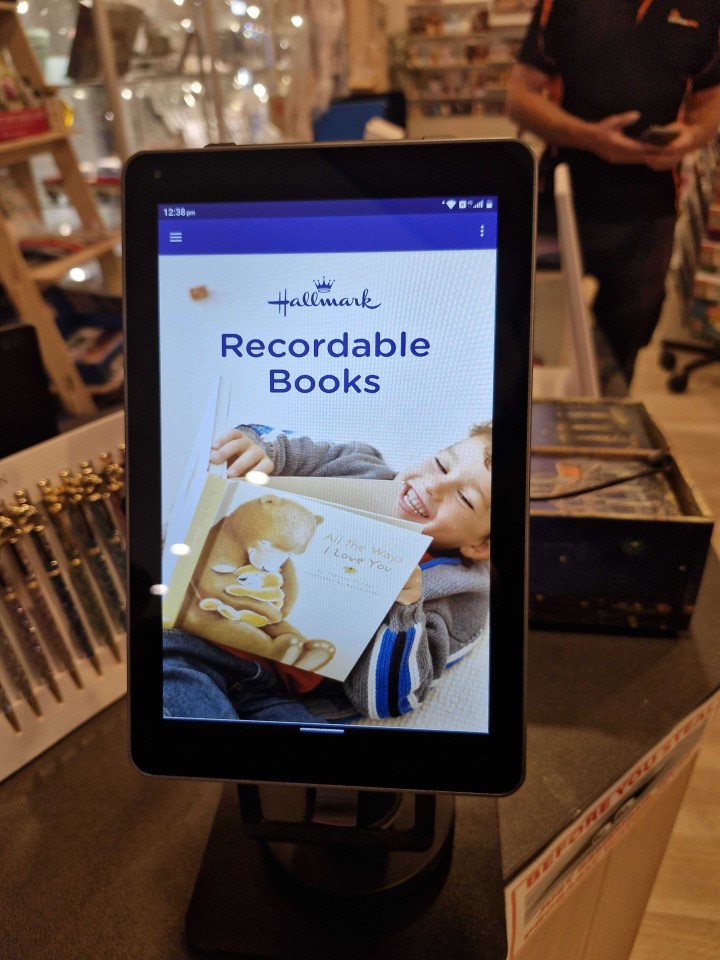
When a customer purchases a Hallmark card at your store, our POS System captures the barcode during the sale process. We then trigger the Hallmark system to present an engaging competition on its screen, which offers your customers a chance to win a prize by selecting a card.

You can see what it looks like here.

The Hallmark Card Stand

The Hallmark Contest

Hallmark Card winner


Hallmark Card winner

Setup for the Hallmark contest


Benefits for Your Business

Enhanced Customer Experience

This interactive element excites the purchase process, potentially increasing customer satisfaction and loyalty.

Increased Foot Traffic

As word spreads about the competition, more customers may visit your store to participate.

Greeting Card Competition

The competition could encourage additional purchases of Hallmark cards and other products in your store.

Costs

No cost. Registration is free.

Trial Locations and Requirements

Your stthat it is must already sell Hallmark cards to be eligible.

We are currently seeking participants in Melbourne and metropolitan New South Wales. NSW offers more flexibility than Victoria. Once we have settled in, we will expand the area.

Why Consider Participating?

Retail Innovation

By participating in this trial, you're positioning your business at the forefront of retail innovation.

Gather Valuable Data

The trial will provide free insights into customer behaviour and preferences, which could help you in future business decisions.

Strengthen Partnerships

We hope collaborating with established brands like Hallmark will open doors for future opportunities and partnerships.

Final Decision by Hallmark Cards

While expressing interest is the first step, Hallmark Cards will ultimately decide whether your store is accepted for the trial. Even if you meet the initial criteria, Hallmark will have the final say in selecting the trial participants.

Next Steps

If you want to participate in this exciting trial, please act quickly. Here's what you can do:

Assess Your Eligibility

Confirm that your store is in Melbourne or metro NSW and that you sell Hallmark cards.

Contact POS Solutions

Reach out to express your interest and ask to be put on the trial

Please understand that the selection process is by Hallmark, which reviews all potential participants.

The trial offers a unique chance to enhance your POS System capabilities and customer engagement at no cost.

It's an opportunity to test innovative retail technology that could give your store a competitive edge by offering a unique experience.


Frequently Asked Questions (FAQ)

Q: How much does it cost to join the trial?
A: Nothing

Q: What equipment is needed to participate?
A: You'll need our POS system. Our team will work with you to ensure your current system can integrate with the Hallmark technology.

Q: Will this slow down my checkout process?
A: The system is designed to be quick and efficient. I doubt it will add any time to a typical transaction.

Q: How will this affect my existing Hallmark card sales?
A: The trial aims to boost engagement and potentially increase sales.

Q: Can I opt out of the trial if, for any reason, it is not working?
A: Yes, you can opt-out at any time. We value your feedback and will work with you to address any concerns.

Q: How will my customer data be handled?
A: It will not be, and in any case, all customer data is handled in compliance with Australian privacy laws.

Q: Will I receive training on how to use the new system?
A: Yes. We provide comprehensive training for you and your staff before the trial begins.

Q: What happens after the trial ends?
A: Based on the trial's success, we hope it continues and that they expand the program.

Update: When this was first published, as it was new, we did not know if there were any costs to join the program; we have received confirmation that there is no cost. The article was updated.


Add new comment

Restricted HTML

  • Allowed HTML tags: <a href hreflang> <em> <strong> <cite> <blockquote cite> <code> <ul type> <ol start type> <li> <dl> <dt> <dd> <h2 id> <h3 id> <h4 id> <h5 id> <h6 id>
  • Lines and paragraphs break automatically.
  • Web page addresses and email addresses turn into links automatically.
CAPTCHA This question is for testing whether or not you are a human visitor and to prevent automated spam submissions. Image CAPTCHA
Enter the characters shown in the image.

Using science for Smarter Retail Inventory management

POS SOFTWARE

Economic Order Quantity

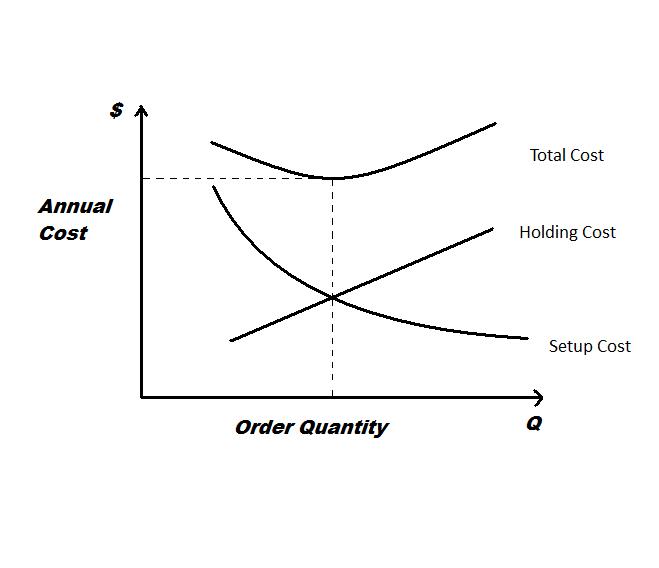
Economic Order Quantity(EOQ): A Deep Dive into the Science of Inventory Management

Over many years, I've seen firsthand how crucial effective inventory management can be. One tool that started the science of modern inventory management is the Economic Order Quantity (EOQ) formula. Since I received an enquiry about it last week, I thought I would explore the concept and show how it can benefit retailers.

The Origins of EOQ

A bit of history: in 1913, a mathematician named Ford W. Harris was pondering a theoretical shop stock control. He wasn't thinking about colourful products or bustling aisles. Instead, Harris was fixated on a more fundamental question: How often should a shop order its stock to keep costs down and do inventory optimization?

He derived his formula called EOQ, and modern inventory management was born.

Breaking Down the EOQ Formula

The formula he derived is this:

EOQ = Sqr(2 x D x K / h)

Where:

  • D = is how much you sell in a period.
  • K = Cost per order
  • h = Holding cost per unit (how much it costs you to have the stock sit in your shop for a period)

Generally, it's over a year, so let's break this down with a real-world example and see what it can tell us.

A Real-World Example: The Stationery Shop

So I took a stationery shop that uses our POS System. Here's how we would use the EOQ formula to find how many times we should order to give us the best profit.

Annual Demand (D)

It sold 60,575 items last year in the shop. That's a lot of pens and paper!

Cost per Order (K)

I asked the woman who was in charge of the stationery order, and she told me that each order there was about

  • 3 hours to place an order @ $25/hour
  • 4 hours to pick up the order @ $25/hour
  • $10 for petrol
  • $20 for delivery fees

Total: $205 per order

Annual Holding Cost per Unit (h)

This is where things got eye-opening. We included:

  • Bank fees and overdraft: 2.5%
  • Shrinkage (a polite way of saying 'theft'): 1.5%
  • Portion of rent: $15,000 a year
  • Other costs from profit and loss: $10,000

When we crunched the numbers, it came to $1.08 per item per year. That's a lot if you think about it.

Let us do the calculation.

Now we have the figures, let us calculate the following:

EOQ = √[(2 x 60,575 x 205) / 1.08]

Let's break down the calculation step by step:

  1. First, multiply 2 x 60,575 x 205 = 24,835,750
  2. Then, divide this by 1.08: 24,835,750 / 1.08 = 23,014,583.33
  3. Finally, take the square root: √23,014,583.33 = 4,797.35

Rounding to the nearest whole number, we get 4,797. That is a lot of ordering. 

Interpreting the Results

When we plugged all this into our EOQ formula, it suggested ordering 4,779 times a year. That's many times every day!

I don't know about you, but I've never met a retailer who wants to place orders daily. It's just not practical.

Practical Tips from EOQ

While the EOQ formula does not here give you a perfect ordering schedule, it does highlight some crucial points:

  1. Holding stock is expensive: $1.08 per item per year adds up quickly. Our total inventory of 60,575 items is $65,421 annually, just in holding costs!

  2. Frequent, smaller orders can be cost-effective. This approach aligns with many successful retailers' formula of order to do its' "little and often" philosophy. 

  3. One size doesn't fit all: What works for our stationery shop might not work for a pet shop or a newsagency. 

How do you derive your figures using POS Solutions?

Calculating a simple EOQ requires three variables, which I will discuss point by point, quoting two departments as an example for you to work with as an example of stationery that I used above.

The demand quantity (D)

This is the quantity of goods moved.

There are two ways of doing this: the top sales report will give you this figure.

Cost of ordering (K)

I just asked about the procedure used in the shop and then costed it.

Holding costs (h)

Your profit and loss will help you here. If you are doing it by department, take a reasonable percentage of the total costs. 

I got the average stock holding to calculate my holding costs. So I went to the stock turn report in the stock reports. 

The Bottom Line

Executive summary

Here are some practical tips:

  1. Calculate your holding costs: You might be surprised at what you find. Include all inventory costs, such as warehouse space, insurance, and potential depreciation. Your profit and loss will tell you most of this.

  2. Review your ordering process: Write a typical order scenario in your shop. While doing so, I suggest you streamline this process to reduce costs. Maybe bulk ordering certain items could lead to discounts that offset increased holding costs. 

  3. Consider a mix of strategies: Perhaps you should place frequent orders for fast-moving items and less frequent orders for others. Use EOQ as a starting point, but adjust based on your business's unique needs.

  4. Use technology to your advantage: Our POS system can help you track inventory and make smarter ordering decisions frequently and accurately.

EOQ does not offer a flawless ordering plan. It indeed confirms certain crucial aspects of inventory management. 

Over the years in retail, I've seen that the most prosperous retailers use data and their gut feelings. So, while you should crunch the numbers, don't discount the value of your gut feelings.

Frequently Asked Questions (FAQ)

What is Economic Order Quantity (EOQ)?

Economic Order Quantity is an analytics formula for determining the optimal number of times to order stock to maximize profit.

How is EOQ calculated?

The EOQ formula is: EOQ = √[(2 x D x S) / H], where D is annual demand, S is setup cost per order, and H is holding cost per unit per year.

What are the benefits of using EOQ?

EOQ is a theoretical construction that helps balance ordering and holding costs, minimise total inventory costs, and optimize stock levels.

Can EOQ be used with seasonal products?

Probably not. EOQ becomes less effective if, over some time, you have fluctuating demand.

What's the difference between EOQ and reorder point?

EOQ determines the best number of times to order, while the reorder point is an inventory management system that concerns inventory levels. The EOQ may help you to derive this reorder point.

How can I implement EOQ in my business?

Your profit and loss statement and your POS System will give you the information you need to calculate your shop's EOQ. If you do so, please let me know what you get.


Add new comment

Restricted HTML

  • Allowed HTML tags: <a href hreflang> <em> <strong> <cite> <blockquote cite> <code> <ul type> <ol start type> <li> <dl> <dt> <dd> <h2 id> <h3 id> <h4 id> <h5 id> <h6 id>
  • Lines and paragraphs break automatically.
  • Web page addresses and email addresses turn into links automatically.
CAPTCHA This question is for testing whether or not you are a human visitor and to prevent automated spam submissions. Image CAPTCHA
Enter the characters shown in the image.