

It is the heat of the holiday now; precise inventory management isn't just important, it is critical. It is not normal times, and the greatest threat to your holiday profits is running out of stock. Empty shelves do untold damage to your profit and reputation.
Right now, we need to look not just at stock on hand, particularly at your most profitable winners. This is where in your retail point of sale system the GMROI (Gross Margin Return on Investment) report becomes so essential.
Why Standard Stock Reports Aren't Enough
Standard stock reports tell you what you have; they don't tell you how well it is performing. This is critical during our current time crunch.
Running out of a poor, profitable item isn't a disaster, but running out of a highly profitable one is a disaster. Now you need to know which items are driving your profit so you can ensure they are on the shelf.
The Report You Need: GMROI
We have a unique report in our software that lets you check your current situation immediately. It uses GMROI.
What is GMROI?
It stands for Gross Margin Return on Investment. In simple terms, it calculates how many dollars of profit you get back for every dollar you invest in your inventory. Today, it is considered the most important KPI in retail.
The Formula:
It is calculated by: (Units Sold x Profit) ÷ Average Stock Cost.
The Benchmark:
While it varies by shop, a healthy retail target is often cited around 3.2. This means for every $1 you spend on stock, you get $3.20 back a year. I suggest, while doing this, that you review your figures and decide what you feel your figure should be.
How to Run the Report
You can find this data quickly in your POS system:
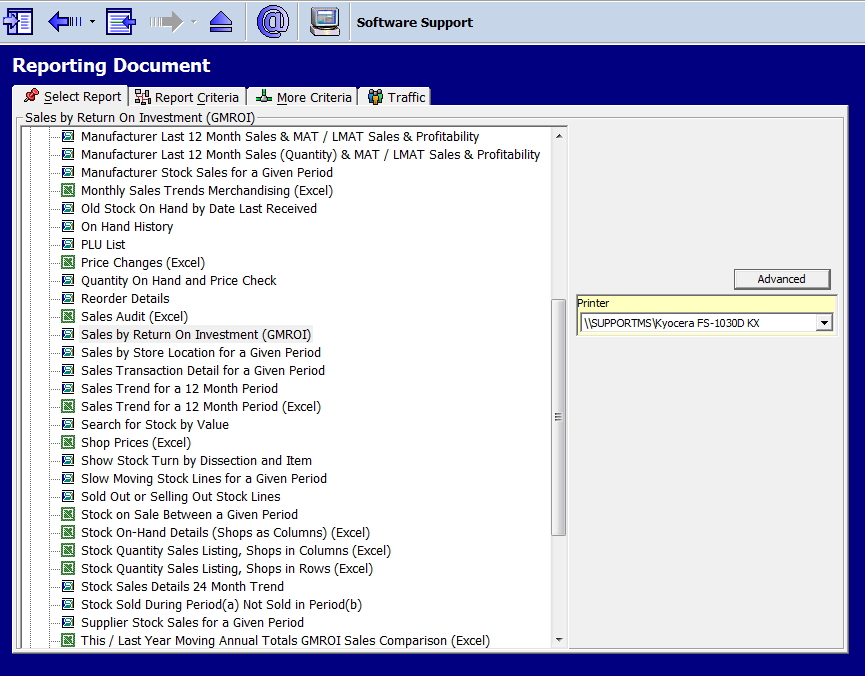
Go to the Cash Register Reports section.
Select the GMROI report (see the selection highlighted in the image below).
I recommend running this by the Department to keep the list manageable.
Once you run it, you will get a detailed list like this:
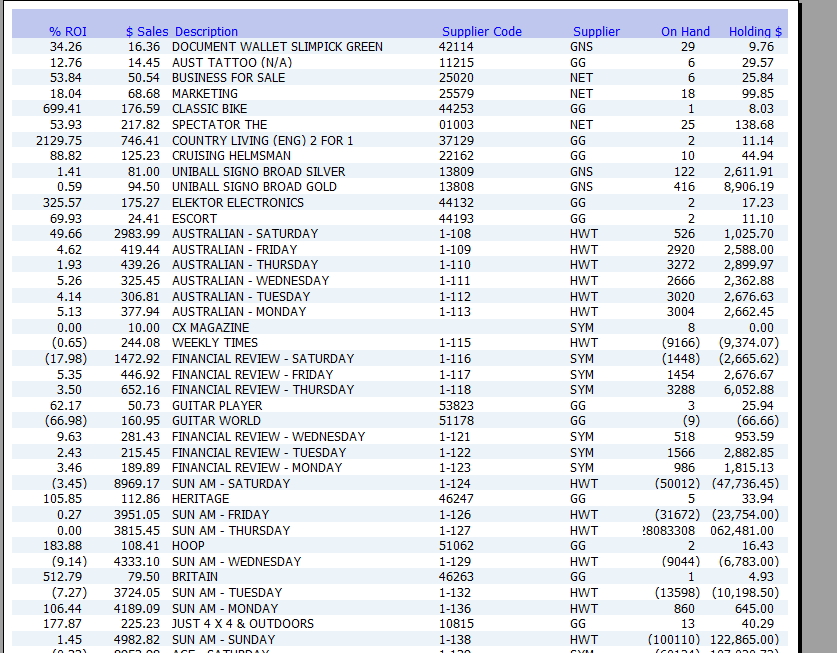
I find it quicker and easier to use excel in your Ad Hoc reporting, see my article on the power of Ad Hoc reporting here. You can sort, filter, etc there.
Analysing Your Results
As you can see, the report lists your items alongside their ROI figures. Now, what we are looking for are items with decent sales and high ROI% figures, but low stock-on-hand figures.
The "Ghost Stock" Reality Check
Unfortunately, the reality is that this is what the computer thinks: that high GMROI items are desirable, which also makes them targets for theft.
You must walk the floor with this report.
If the computer says you have three items on hand, but the shelf is empty, you have "Ghost Stock." You are losing money every hour that the shelf sits empty. It might be in the back room, behind the counter, or stolen. Find it, or correct the stock count immediately so your automated re-ordering kicks in.
Take Action Today
Don't wait for the new year. Run this report now and get your stock out there to maximise your Boxing Day and January sales:
High ROI / Low Stock
Urgent! Check the back room. If you have stock, get it on the floor immediately. If you are out, mark this for immediate re-ordering as soon as suppliers open.
Low ROI / High Stock
These items are tying up your cash. Mark them down for your clearance sales to free up shelf space and money. You can worry about this later, say for your flash sale in January.
Written by:

Bernard Zimmermann is the founding director of POS Solutions, a leading point-of-sale system company with 45 years of industry experience, now retired and seeking new opportunities. He consults with various organisations, from small businesses to large retailers and government institutions. Bernard is passionate about helping companies optimise their operations through innovative POS technology and enabling seamless customer experiences through effective software solutions.

