
Point of Sale Software

Here are some Articles from the Blog Subject - retail cash management -

End-of-Day POS Reconciliation: A Checklist for Retailers
POS SOFTWARE

End-of-Day POS Reconciliation
End‑of‑day reconciliation is the process of comparing what your POS says happened (sales, refunds, payouts, payments) with what actually happened in your till, EFTPOS batches and bank deposits. It must be a daily habit in business, and it is critical, as you're dealing with high transaction volumes, mixed payment types, and a wide product range. Implementing a disciplined end‑of‑day POS routine is essential for a retailer to tighten cash control, catch errors early, and turn daily sales data into better decisions.

The goal of end‑of‑day

The objective is not just "balancing the cash drawer"; it's to confirm that:

  • POS totals by payment type equal your physical cash and EFTPOS/card batches for the trading day.
  • Non‑sales movements (refunds, payouts, debt collection, supplier cash payments) are properly recorded and explained.
  • Key sales, stock and customer patterns are captured so you can refine rostering, stock and merchandising.

When this is done well, your accounts, tax records and management reports all line up, and discrepancies are small, documented and understandable.

Daily end‑of‑day checklist

Run your close in the same order every time. A typical 10–15 minute routine looks like this:

  1. Close the trading period in the POS
    • Confirm today's date, store and registers.
    • Ensure there are no open sales, parked transactions or draft invoices that belong to today.
  2. Generate and print key reports
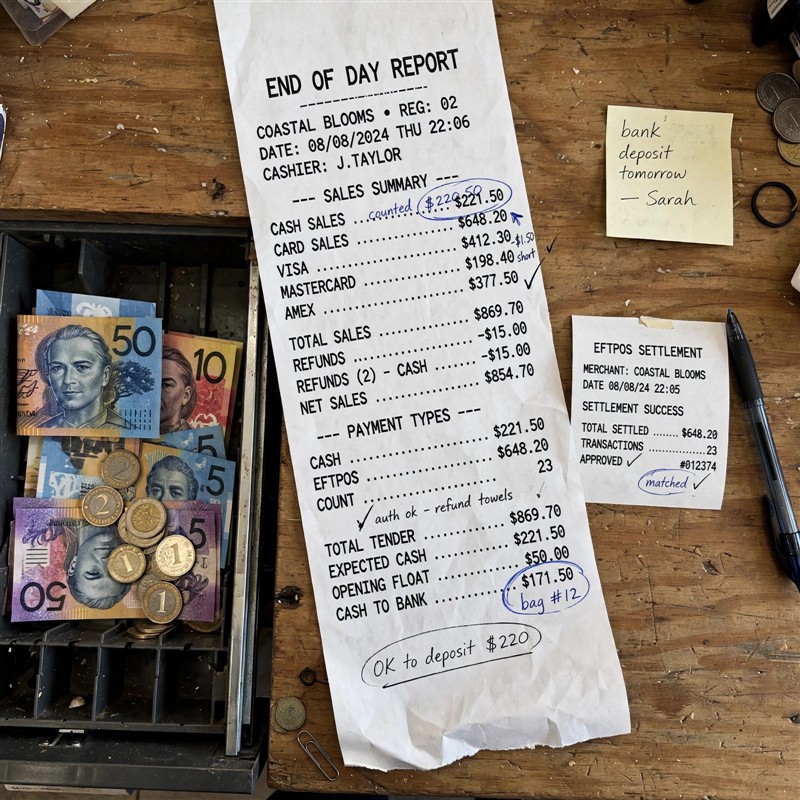
    • End‑of‑day summary (Z‑report/closing report) with totals by payment type.
    • Customer, product, hourly, payment type and register breakups (see next section).
    • Refunds, voids and discount/price‑change reports.

    Print and file these; keep paper copies, as they are the best proof for ATO audits.

  3. Count and reconcile each cash drawer
    • Take each drawer to a quiet area, count by denomination, and record the total on a cash count sheet.
    • Separate the opening float from the day's takings.
  4. Reconcile EFTPOS and card payments
    • Close the batch on each EFTPOS/card terminal and print the batch totals.
    • Match these against POS card totals for the same period.
  5. Review non‑sales money movements
    • Confirm payouts, cash supplier payments, refunds and other withdrawals are recorded and supported by receipts.
  6. Investigate and document variances
    • Record any differences between POS and physical/batch totals, note the date, the reason if known, and have a supervisor/owner sign off. In many cases, this evidence has proven invaluable.
  7. Secure cash, back up and lock up
    • Prepare the bank deposit, reset floats for tomorrow, secure cash in the safe, and ensure the POS has synced/backed up the day's data.

The essential reports to run

Your POS can provide much more than a single closing total. At end‑of‑day, focus on these views:

Customer breakdown

Analyse customer transactions to understand basket size, repeat visits and key segments. For a Dingley Village newsagency, this helps you see how family shoppers, commuters and "quick lotto and milk" customers behave across the week.

Product/dissection breakup

Review sales by product category to spot top‑performing items and slow movers: magazines, books, cards, gift lines, stationery, lotteries and add‑on items. While it's fresh in your mind, a spike of anything can be very enlightening.

Hourly breakup

Hourly sales let you see trading peaks and quiet periods across the day.

Payment type breakup

Tracking sales by cash, EFTPOS, credit card, gift voucher and other tenders makes reconciliation faster and highlights shifts in customer behaviour. For example, sustained growth in card/contactless usage may justify changing your EFTPOS plan, while cash‑heavy periods might call for more frequent cash drops to the safe.

Register breakup

If you run more than one till, check which register or cashier has problems. Many people do it several times a day. Separate closes per register reduce cash mixing and make it easier to identify where variances are coming from.

Optional graphs

Graph views are useful while you're still learning patterns, but experienced retailers often revert to tabular reports for speed and clarity. Use graphs when explaining trends to staff or in management meetings.

Cash reconciliation: the simple formula

For each drawer, use this formula:

  • Opening float
  • Plus: cash sales
  • Minus: cash refunds
  • Minus: cash payouts/withdrawals

Equals: expected drawer total.

Compare this expected total to your counted cash. Record the difference (over or short) every day, even if it's small. Consistent small variances often reveal training issues or chronic process errors.

EFTPOS and card reconciliation

Card payments don't live in the till; they live in terminals, processor batches and bank deposits. At end‑of‑day:

  • Run the batch/settlement report on each terminal and note the total card sales and refunds.
  • Match this against the POS card total for the same period; they should agree.
  • If integrated EFTPOS is used, confirm the POS shows the batch as settled and note any failures before you leave.

Later (often the next day), match processor net deposits to your bank statement, taking fees into account. Doing a clean daily match POS → batch totals makes weekly and monthly reconciliation much easier.

Handling discrepancies and variances

Your article already emphasised "Investigate discrepancies immediately"; turn that into a small policy:

  • Set a threshold: e.g. variances under a few dollars are logged and monitored; above that, they trigger recounts and manager review. In my experience, any variance is worth chasing.
  • Document every variance: amount, drawer/register, cashier, probable cause (incorrect change, missed payout entry, EFTPOS error, etc.). Staple these notes to the printed closing report or attach them to the digital record.
  • Escalate material differences ASAP, not weeks later when memories have faded.

This habit protects you if there's ever an ATO enquiry, insurance claim or internal investigation.

Inventory and exception review

End‑of‑day is also the right moment to review "exceptions" – things that distort margin and stock numbers:

  • Refunds and returns, especially for higher‑value books and gift lines.
  • Voided sales or deleted transactions, checking for patterns around particular staff or categories.
  • Manual discounts and price overrides, which can signal pricing errors or misuse.

For magazines, books and cards, spot‑checking top sellers and frequently refunded items helps you catch mis‑priced lines, missing barcodes or shrink quickly, rather than discovering them at stocktake time.

Roles, sign‑off and multiple registers

To avoid "everyone thought someone else did it", always define roles clearly:

  • Cashiers count and record their own drawers using a standard cash count sheet.
  • A supervisor/owner reviews the reconciliation, variances and reports, then signs off.
  • Each register is closed separately, with its own report and cash count; cash is not mixed between tills before counting.

This creates a clear chain of custody for cash and closing reports, which is useful for both trust and external audits.

Security, cash handling and backups

A good close ends with clean numbers and secure assets:

  • Separate tomorrow's float from today's takings.
  • Prepare the bank deposit (cash and coins).
  • Please never leave significant cash in the tills overnight.
  • Confirm that your POS has synced with the cloud, or that backups/exported reports have finished successfully, before shutting down systems.

Using your end‑of‑day data strategically

Once the mechanics are solid, use your daily reports to drive decisions:

  • Hourly and customer breakdowns inform rostering and staffing
  • Product/category breakups show which magazine ranges, kids' books, cards and gift lines deserve more space, better placement, or promotional focus – and which lines should be marked down or retired.
  • Payment type trends help you negotiate EFTPOS fees, plan cash handling procedures and decide whether to introduce new payment options.

This is where end‑of‑day stops being "admin" and becomes a daily management tool.

Updated FAQ

How long should end‑of‑day take?

With a well‑set‑up POS and a disciplined routine, most small retailers can complete end‑of‑day in 10–15 minutes. It can blow out if variances are large, reports aren't configured, or staff skip steps during the day.

Can I automate end‑of‑day?

You can automate parts of the process – exporting sales data, emailing reports, even pre‑filling reconciliation sheets – and this often saves time. However, a daily human review of cash, card batches, refunds, and exceptions is essential; the closer you are to the event, the easier it is to investigate and resolve issues properly.

How often should I perform these procedures?

At least once every trading day. Delaying end‑of‑day reconciliation makes discrepancies harder to trace and increases the risk of compounding errors in your accounts and tax records.

What if my cash drawer doesn't balance?

Treat every variance as a signal:

  • Recount the drawer, verify the float, and check that all payouts/refunds are recorded.
  • Review the POS cash report and receipts for any obvious mistyped amounts or missed entries.
  • Document the variance and reason; investigate recurring patterns across days or staff.

Written by:

Bernard Zimmermann


Bernard Zimmermann is the founding director at POS Solutions, a leading point-of-sale system company with 45 years of industry experience. He consults to various organisations, from small businesses to large retailers and government institutions. Bernard is passionate about helping companies optimise their operations through innovative POS technology and enabling seamless customer experiences through effective software solutions.

 

Add new comment

Restricted HTML

  • Allowed HTML tags: <a href hreflang> <em> <strong> <cite> <blockquote cite> <code> <ul type> <ol start type> <li> <dl> <dt> <dd> <h2 id> <h3 id> <h4 id> <h5 id> <h6 id>
  • Lines and paragraphs break automatically.
  • Web page addresses and email addresses turn into links automatically.
CAPTCHA This question is for testing whether or not you are a human visitor and to prevent automated spam submissions. Image CAPTCHA
Enter the characters shown in the image.

Cash Handling Fees Are Going Up: What Australian Retailers Need to Know

POS SOFTWARE

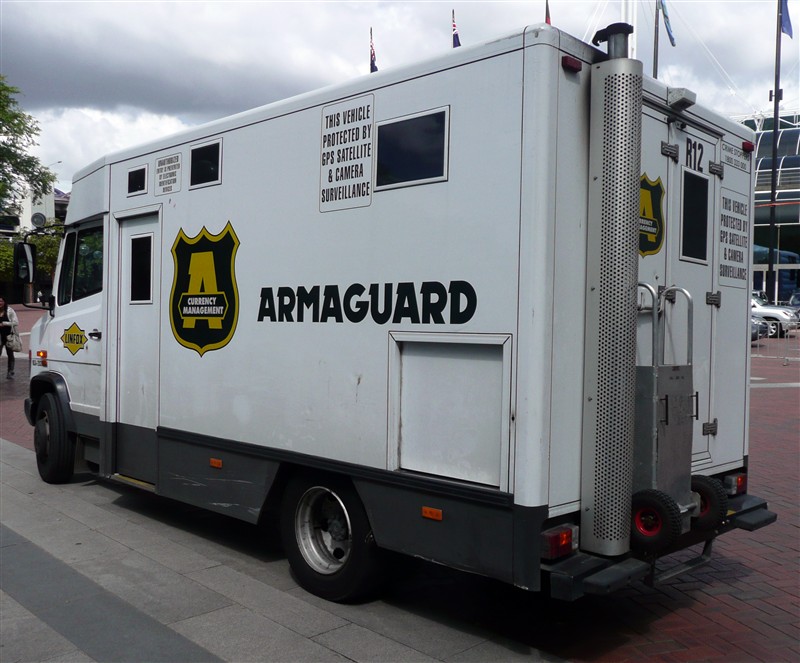
Armaguard - Wikipedia


Most Australian retailers know Armaguard has faced serious financial pressure. Still, fewer realise that new pricing changes are likely to increase cash-handling costs and affect how reliably cash can be accessed.

Key Takeaways

  • Armaguard pricing changes are intended to support Australia's cash distribution network.
  • Cash-in-transit services move physical currency between banks, retailers and ATMs.
  • Armaguard needed major financial support to stay operating.
  • Lower cash usage is increasing the cost of handling cash for small retailers.
  • Reliable cash access depends on a financially sustainable cash-in-transit network.
  • POS cash reporting helps retailers measure true cash handling costs and profitability.
  • Regional retailers face greater exposure because banking and ATM access are thinner.
  • The ACCC has allowed collaboration, but pricing outcomes may still evolve.
  • Retailers need to balance cash resilience against rising operating costs.

Why Armaguard Matters to Australia's Cash System

Since the merger of Armaguard and Prosegur, Armaguard has become central to Australia's cash system, handling about 90% of the physical currency moving between banks, retailers and ATMs. That makes it a key part of keeping cash available across the country.

How Close Was Armaguard to Trouble?

Armaguard was under severe financial pressure, and major banks plus large retailers stepped in with about $50 million in support to keep it operating for 12 months. That support was designed to prevent default and give Australia time to build a more sustainable long-term pricing model.

This shows how important Armaguard is to the cash system. If the company is under stress, the entire cash distribution network feels it.

So the Armaguard new pricing model is part of a broader effort to keep cash distribution alive. As the main cash-in-transit provider in Australia, any pricing change affects the wider cash distribution network.

Price of Cash

For most small and medium retailers, the price of cash is not just one visible fee. This Armaguard fee is often hidden in banking fees, while other costs are more visible, such as cash handling time, reconciliation work and security.

These costs are likely to rise, making cash more expensive to support. Some clients are already asking for electronic payment only, although in practice many will still accept cash if needed.

Problems with Cash Distribution

Getting cash has become harder because bank branches and ATMs have been closing in many areas. That makes a stable cash distribution model more important.

Although this plan aims to improve distribution, the benefits will likely be shared unevenly because high-volume retail areas are easier and cheaper to serve. Lower-volume and more remote locations may continue to face the same access problems.

Effect on Retailers

Small and medium retailers are affected more than larger ones. Bigger retailers are usually in high-volume areas and often have more bargaining power over EFTPOS and card rates, making it easier for them to lean away from cash.

Smaller shops also often do not generate enough cash to offset cash-handling costs. More retail trade is now happening online through electronic payments, which further reduces the role of cash for many businesses.

What Should Retailers Do Next?

Your POS system can show how much cash your store actually handles through sales reports and end-of-day reports. You can then calculate what cash really costs your business, including banking, reconciliation and staff time.

Review your sales history to see which transactions are still being paid in cash. That gives you a clearer view of whether cash is still worth the handling cost in your shop.

Conclusion

Armaguard pricing changes are not just a fee story. They are about whether Australia can keep its cash infrastructure functioning sustainably.

For SMB retailers, the smartest move is to measure cash handling costs in your POS system and decide whether your current cash process still makes sense. If cash is still valuable to your business, manage it better. If it is becoming too expensive, make adjustments based on real data rather than guesswork.

Written by:

Bernard Zimmermann


Bernard Zimmermann is the founding director of POS Solutions, a leading point-of-sale system company with 45 years of industry experience, now retired and seeking new opportunities. He consults with various organisations, from small businesses to large retailers and government institutions. Bernard is passionate about helping companies optimise their operations through innovative POS technology and enabling seamless customer experiences through effective software solutions.


Add new comment

Restricted HTML

  • Allowed HTML tags: <a href hreflang> <em> <strong> <cite> <blockquote cite> <code> <ul type> <ol start type> <li> <dl> <dt> <dd> <h2 id> <h3 id> <h4 id> <h5 id> <h6 id>
  • Lines and paragraphs break automatically.
  • Web page addresses and email addresses turn into links automatically.
CAPTCHA This question is for testing whether or not you are a human visitor and to prevent automated spam submissions. Image CAPTCHA
Enter the characters shown in the image.

Finding the Right Cash Box for Your Business

POS SOFTWARE

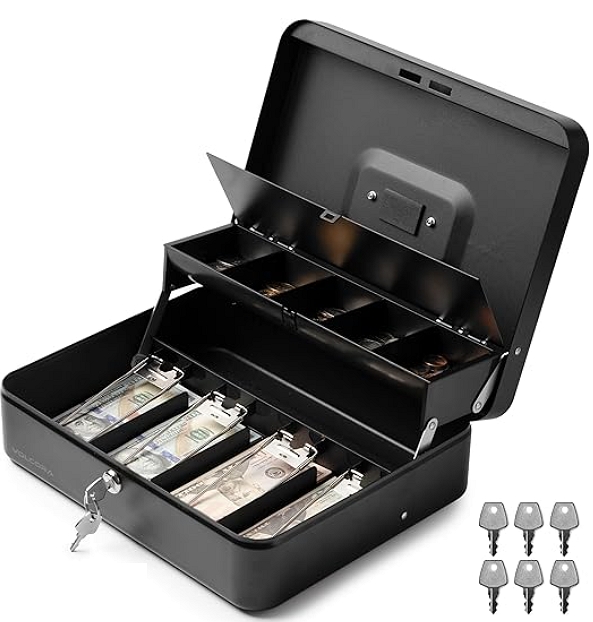
Sturdy cash box

A cash box is a secure, portable container that keeps cash, coins, receipts, and small valuables safe, commonly used outside the shop. For a retailer, protecting the money is vital to their business operations. An efficient and secure cash management system helps you stay organised and minimise losses from mishandling or theft. It is excellent in the shop, but you will need a cash box now and then to store money outside the shop.

Security

These are in demand, commonly for retailers who operate at markets, fairs, or pop-up events.

Pros and Cons of Cash Boxes

Before we discuss features, consider the advantages and disadvantages of using a cash box in your retail operation.

Pros:

  • Durable and sturdy construction
  • Easy organisation of cash and coins
  • Portable and compact for mobile businesses
  • More affordable than high-security safes
  • Versatile use for money, receipts, or small valuables

Cons:

  • Limited security, because they are portable, they are easy to steal. A person can grab them and run away.
  • Not hard to steal if left unsecured
  • Some models have quality issues
  • Limited capacity and often not suitable for large amounts of cash

Let's evaluate the advantages and disadvantages of different cash box systems.

Key Features to Look For

Based on my experience, these are the essential characteristics of a cash box.

Sturdy

The reality is that most of these cash boxes will not last five minutes against a determined person, but that is no reason to make it easy for someone to break into them. This is why I prefer metal cash boxes. Unfortunately, they sometimes make the cash box too heavy.

I like rubber feet to add stability on uneven surfaces.

Simplicity

Remember, a cash box's purpose is to store cash; anything beyond that is a bonus. If the cash box doesn't handle some money efficiently, then nothing else matters.

The simpler they are, the better. Every function is just something that can go wrong.

Security

It is a pain to use a key to open and close them. We suggest having a latch and a lock. In my experience, many need more substantial locks. Make sure you get a decent lock.

Make sure you have a spare key; they do get lost.

Bright colours make your cash box easier to look after, thanks to improved visibility. For added peace of mind, one of our customers anchors their box to a stall using a drilled hole and a lock.

Sized for Your Needs

Please consider the volume of cash you need to handle. A small box might suffice for low-volume businesses, but you'll need more if you deal with many notes and coins.

The compartments should be roomy enough to accommodate multiple stacks of bills and rolls of coins without overflowing.

Make sure that the cash box can handle Australian notes. Chinese and US cash boxes often can't handle our Australian notes. I wonder why people sell them to Australian retailers, but they do.

  • Removable trays
  • Enough compartments for different denominations
  • Tiered cantilever designs for easy access
  • Ensure you have enough room in the cash box to handle change.
  • Test the compartments before buying.

Portability and Protection

Since you'll move the box around to collect cash deposits, find one that is lightweight yet sturdy. Look at fireproof and waterproof options that offer extra security to protect your money.

Can it be secured to a table? One client drilled a hole into the cash box and used a bike lock to secure it to the stand.

Maintenance

A well-maintained cash box lasts forever if it is correctly cared for.

Periodically check the lock mechanism to ensure smooth operation

Conclusion

Consider a cash box as an investment in your business's security and efficiency.

Written by:

Bernard Zimmermann


Bernard Zimmermann is the founding director of POS Solutions, a leading point-of-sale system company with 45 years of industry experience, now retired and seeking new opportunities. He consults with various organisations, from small businesses to large retailers and government institutions. Bernard is passionate about helping companies optimise their operations through innovative POS technology and enabling seamless customer experiences through effective software solutions.



Add new comment

Restricted HTML

  • Allowed HTML tags: <a href hreflang> <em> <strong> <cite> <blockquote cite> <code> <ul type> <ol start type> <li> <dl> <dt> <dd> <h2 id> <h3 id> <h4 id> <h5 id> <h6 id>
  • Lines and paragraphs break automatically.
  • Web page addresses and email addresses turn into links automatically.
CAPTCHA This question is for testing whether or not you are a human visitor and to prevent automated spam submissions. Image CAPTCHA
Enter the characters shown in the image.