Point of Sale Software

Here are some Articles from the Blog Subject - Local searches -

Check Your Shop's Local Web Presence Audit Step by Step. This is important!

POS SOFTWARE

Looking for a business online to shop


Today, many shops are losing customers because shoppers now look online before shopping. What you need to do is review your local online presence. Then fix the biggest issues, and make your shop easier to find.

Key Takeaways Box

  • Conducting a local online audit to show you what customers see when they search for you.
  • Use private or incognito search. This is as it provides a clearer view of what customers see.
  • An incorrect business name, address, or phone number will confuse shoppers and search engines.
  • A Google Business Profile helps your shop appear in Google Search and Google Maps.
  • An incorrect location can lead customers to the wrong shop, so you should test directions yourself.
  • Some simple tricks can help Google and shoppers know what you sell.

What Is a Local Web Presence Audit?

A local web presence audit is a simple check of how your shop appears online. For example, a customer might search for "lotto near me", "dog food <suburb>", or "magazines <suburb>" before deciding where to shop.

Next, this audit looks beyond your website. For example, it also checks your Google Business Profile, business name, address, phone number, social pages, map pin, and how your shop appears in search results.

Also, this kind of audit is not hard. For example, you can do it in less than half an hour with a phone, a computer, and a simple checklist.

Fact: wrong details lose sales.

Why Local Web Presence Matters

A local web presence matters because many shoppers often search first and visit second. For example, if they need a card, magazine, gift, or stationery item quickly, they usually look online before they leave home.

Next, local SEO works best when your business details are clear and consistent across the web. For example, if your shop name is one thing on Google and another thing on Facebook, search engines can get mixed signals.

Also, your online details shape trust. For example, if something looks wrong, for example, your address looks wrong, many customers will choose another shop.

Clear local data builds trust.

Search for Your Shop Like a Real Customer

On a paper list note:

  1. Your business type, e.g. newsagency, pet shop, chemist, etc.
  2. Top three products you sell
  3. Name of your shop
  4. Phone number of your shop

Searching like a real customer means using the same words and search habits a shopper would. Since I mainly use Chrome, I tend to use Edge in private mode for this work, but in truth, Chrome in incognito mode works well too. This helps reduce the effect of my online usage.
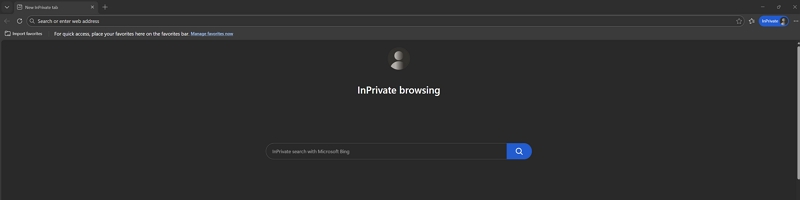
Edge in private mode

You need to do the Local Web Presence Audit in four stages:

  1. With your computer using Google
  2. With your computer using Bing
  3. With your smartphone, using Google
  4. With your smartphone, using Bing

Smartphone results can differ from computer results, and it's about 50/50 which shoppers will use.

For each stage:

Put your business type into the search and add your suburb, e.g., "gift shop <your suburb>" or "Flower shop near me", etc.

Check what you see, note whether your shop shows up, and whether what the search says about you is correct.

Now search for the top three products you sell, e.g. you may say "lotto near me", "dog food near me", "butcher <your suburb>".

Check what you see, note whether your shop shows up, and whether what the search says about you is correct.

After that, search your exact business name on its own. For example, this shows whether your main listing is easy to find and whether old pages, old addresses, or other shops appear instead. Check spelling, punctuation, and the trading name. For example, if one listing says "Smith's Newsagency" and another says "Smiths News & Gifts", you may be making it harder for search engines to connect the dots.

Tip: Search like a customer, not like the owner. If you are unsure what customers searching for you use, why not ask your customers? Make sure you use the words that real people use. For example, "school supplies near me" is often better than a formal term that customers never type.

How Do I Check My Google Business Profile and Map Pin?

In my experience, most problems stem from errors in your Google Business Profile. Your Google Business Profile is one of the most important local listings you have because it helps your business appear in Google Search and Google Maps. For example, when someone searches for a nearby shop, the map result often shapes the visit before the website does. I have discussed how to set it up and fix it here.

https://www.possolutions.com.au/blog/boost-your-shop-sales-with-google-business-profile

A modern business needs to have this right. Fix any errors straight away. For example, if the pin is off, move it to your real front door and check that the address matches what appears on your website.

A map pin can make or break a visit.

Finally, also important to look at your business category and photos. For example, good categories and fresh shopfront photos help customers understand what you sell before they visit. Use your POS system's sales reports to make sure that all your major stock items are listed.

How Do I Review My Facebook and Social Media Pages?

Your social media pages should support your local search presence and help shoppers trust your shop. For example, when someone searches your business name, a good Facebook page can confirm that your store is active and real.

Next, ensure your business details match across all platforms. For example, your Facebook page, Instagram bio, and website should all show the same name, address, phone number, and web link.

Then, look at your last ten posts. For example, if the page has been quiet for six months, it may make shoppers think the business is not active.

Also, post what people buy. For example, show new stock, seasonal products, popular gifts, school supplies, card displays, or shopfront photos.

After that, make your posts useful. For example, short posts like "New puzzle books in store now" or "Mother's Day cards now available" can turn a search into a visit.

Finally, check your contact buttons. For example, a customer should be able to call, message, or get directions with one tap.

How Do I Check My Competitors Online?

Checking your competitors online helps you see what local shoppers see first and what people are looking for now. For example, if three nearby shops appear before you for the same product search, you need to know why.

Next, search the same phrases and note who shows up. For example, look at their Google listings, photos, reviews, website pages, and social media activity.

Then, look for patterns. For example, they may use clearer category names, better shopfront photos, or better local wording than you do.

Also, copy the structure, but not the wording. If it's working for them, it can work for you too.

Conclusion

A local web audit is a simple way to make your shop easier to find. When shoppers search online, they need to see the right name, the right products, and the right location without confusion.

Written by:

Bernard Zimmermann


Bernard Zimmermann is the founding director of POS Solutions, a leading point-of-sale system company with 45 years of industry experience, now retired and seeking new opportunities. He consults with various organisations, from small businesses to large retailers and government institutions. Bernard is passionate about helping companies optimise their operations through innovative POS technology and enabling seamless customer experiences through effective software solutions.


```

Add new comment

Restricted HTML

  • Allowed HTML tags: <a href hreflang> <em> <strong> <cite> <blockquote cite> <code> <ul type> <ol start type> <li> <dl> <dt> <dd> <h2 id> <h3 id> <h4 id> <h5 id> <h6 id>
  • Lines and paragraphs break automatically.
  • Web page addresses and email addresses turn into links automatically.
CAPTCHA This question is for testing whether or not you are a human visitor and to prevent automated spam submissions. Image CAPTCHA
Enter the characters shown in the image.

Google Maps: Steps to Improve Your Business

POS SOFTWARE

Google maps 2025

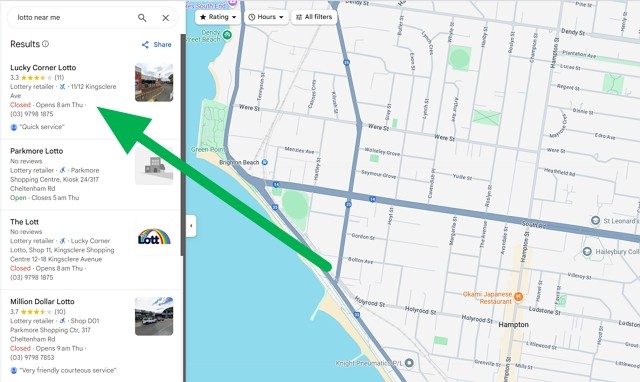
This is a typical map that customers call daily to search locally for goods and services they use. See the green arrow, which they look at in the Google suggested listings of the businesses they are looking for now. I have spoken about this before and must talk about it again, as in 2025, local search in Google has become a cornerstone for businesses. Today, there is a dramatic rise in "near me" searches, and now nearly half of all Google searches have local intent, which has grown by 500% in recent years. It translates directly to sales, as 76% of local searchers visit that business within 24 hours, and 28% of those searches result in a purchase often in an hour. I suggest you go through the complete list of the items on this website I linked to.

Many more people are now searching for local shops on Google. Google Maps Marketing is crucial for enhancing your visibility and customer engagement.

Why Local Search Matters

For example, if a customer searches for "lotto near me," they want a lotto agency near them; almost certainly, this is a potential customer looking to buy. Today, this local search is pivotal in driving foot traffic and sales to shops. We want to target customers with high purchase intent, as 28% of these local searches result in a purchase, often within an hour.

Local search is critical for SMB businesses. You, David, can compete with the Goliaths.

How Google Maps Marketing Works

Google Maps Marketing involves promoting your name in local search results. It requires you to claim your Google Business Profile, ensure consistent business information across the web, and encourage positive reviews to improve your visibility and attract customers.

Setting up your Google Business Profile is the first step in Google Maps Marketing. Make sure your profile is fully completed and is correct. Please ensure you have accurate and up-to-date information. Put in your business name, address, phone number, and hours of operation. It's also important to categorise your business correctly and include relevant services in your business title. The ones you need to categorise are the ones that people are searching for you.

Ready to improve your local visibility? Let us proceed.

Understanding Google Maps Ranking Factors

Let us examine the key factors that influence rankings and why you can, as David, compete with the Goliaths out there.

Firstly, Google Maps is what we call a zero-sum game. That means there are limited spots, and if you are in, someone else is out. So, we need to push the factors that get us in so we get the place.

Now, the three primary factors that determine your spot in Google Maps are:

Relevance

Relevance in Google Maps rankings refers to how well your business matches the customer's request. If I am a potential customer looking for, in this case, lotto, you have lotto. You must ensure that your Google Business Profile lists you with lotto.

To enhance relevance, businesses should focus on the following strategies:

Correct Categorisation

Ensure your business is listed under the most accurate category. Google provides a list of categories that you can choose from when setting up your Google Business Profile.

Keyword Optimisation

Include relevant keywords of your business in your description.

Distance

This one is difficult as there is little you can do about the distance between you and the customer. Distance plays a crucial role in Google Maps positions. The fact is that businesses closer to the search location are more likely to appear in search results. However, distance is balanced with relevance and prominence to show the most relevant results.

Prominence

Prominence is determined by your business's online reputation and offline credibility. It includes positive reviews, high ratings, and mentions online. Being active online does help.

Basic Optimisation Steps

Introduction to Optimisation

Optimising your Google Maps presence is crucial for improving visibility and attracting more local customers. The process involves several key steps that help ensure your business appears prominently in search results. These basic optimisation steps can enhance your online presence and drive more foot traffic to your business.

Claiming your Google Business Profile

Claiming your Google Business Profile is the first step in Google Maps optimisation.

Steps to Claim Your Google Business Profile:

  1. Verification Process: Verify your business through Google My Business. This typically involves receiving a phone call from Google. From experience with many of my customers, it is not easy. It often needs to be done a few times until it happens.
  2. Complete Profile Information: Ensure your profile includes accurate business information. Double-check your name, address, phone number, and hours of operation.
  3. Business Categories: Choose the most relevant categories to improve your business's relevance in search results.
  4. High-Quality Photos: Take high-quality photos of your business with your smartphone to enhance visibility and engagement.
  5. Description and Keywords: Write a compelling business description with relevant keywords to improve your profile's visibility.

It will take you a few hours of work, but it's worth it.

  1. Encouraging Reviews: Encouraging people to review you is critical. Positive reviews improve your visibility in search results and build trust with potential customers. Ask customers to give you some reviews. Do not worry about negative reviews. We all get them. If you are in business, you need to have a thick skin. It goes with the territory.

Need help implementing these changes? Give me a call.

social media certificate

Monitoring and Improving Rankings

Monitoring your local search rankings is essential to understanding how well your business is performing in Google Maps and identifying any needed improvements. While there are tools advertised to provide insights, asking your customers is the most effective way to gauge your progress.

Asking Your Customers

Asking your customers how they found your business is a straightforward, simple and robust method for understanding your local search performance. This approach allows you to gather firsthand information about your visibility. Ask them what they are looking for, what they used and why they picked you.

This way, you will get:

Direct Feedback

Customers can provide direct feedback on how they discovered your business, helping you understand which marketing efforts are most effective.

Personal Connection

Engaging with customers builds trust and strengthens your relationship.

Insights into Search Behavior

Understanding how customers search for businesses like yours can help you better meet their needs.

Questions to Ask:

What Did You Search For?

Ask customers what keywords or phrases they used in Google Maps to find your business. It helps you understand which search terms are most effective for your business.

How Did You Find Us?

Please inquire about the steps they took to find your business.

For example, you might ask a customer: "What did you type into Google Maps to find our lotto shop?"

Do tests

Go to the parking lot near your shop. Now, search Google Maps for your business's services, such as "lotto near me."

What happens, what appears?

Do the same test in another part of your shopping centre, and try again.

Continuous Improvement

Once you get some answers, change your listing till you get it right.

Conclusion

Understanding Google Maps can help you leverage this technology to attract more customers in 2025.

Frequently Asked Questions (FAQ)

Q: What is Google Maps Marketing? A: Google Maps Marketing involves making your online presence appear prominently in local search results in Google Maps.

Q: Why is Google Maps important for local businesses?

A: Google Maps is crucial for local businesses as customers will use it in 2025. It drives foot traffic and sales and provides a platform for businesses to compete locally. Most importantly, it reaches customers with high purchase intent.

Q: How do I optimise my Google Business Profile?

A: Fill it out; not just 60% of many do. Ensure it is complete with accurate information and has the relevant keywords.

Q: How often should I update my Google Business Profile?

A: Until you bed it down, probably every month, and after that, once every three months just to check it out.

Q: What are the costs associated with Google Maps Marketing?

A: Everything I have said here is free. We can discuss later the paid stuff.

Q: How long does it take to see results from Google Maps? A: Generally, businesses notice improvements within a few weeks.

Add new comment

Restricted HTML

  • Allowed HTML tags: <a href hreflang> <em> <strong> <cite> <blockquote cite> <code> <ul type> <ol start type> <li> <dl> <dt> <dd> <h2 id> <h3 id> <h4 id> <h5 id> <h6 id>
  • Lines and paragraphs break automatically.
  • Web page addresses and email addresses turn into links automatically.
CAPTCHA This question is for testing whether or not you are a human visitor and to prevent automated spam submissions. Image CAPTCHA
Enter the characters shown in the image.

Reach customers on Google for free

POS SOFTWARE

Google my business!

People today often ask Google for the closest one and directions when they want to go shopping for their goods and services. These people are good customers as they are going now to shop.

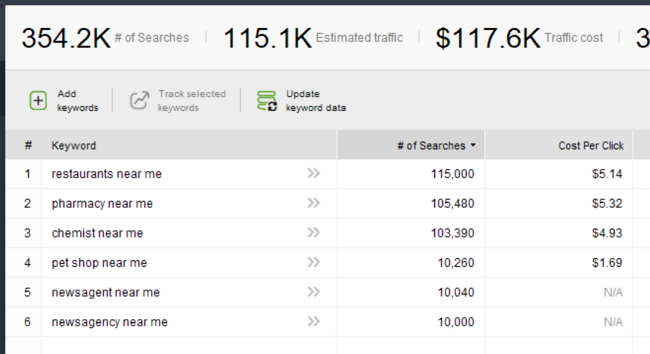
Here is a report of Australian searches done now per month of people asking for directions to some of our popular customer types.

Now people that search are not looking for something small like a chocolate bar. The odds are they are looking at something of reasonable size with a need.

Now pick the line that applies to you and do some calculations. For example, there are 3,000 newsagents in Australia, so we have (10,040+10,000 searches)/(3000 newsagencies) monthly. That is about seven people per newsagent monthly.

Check on Google and see what happens when you search "<your business type> near me" and who comes up.

Now there is no cost, and it takes little time. To put yourself into this equation now, click here.

There are several others, but consider that Google has 93.3% of all searches, Bing 4.7%, and many share the rest.

So I would, since it is free and quick, consider putting yourself in Microsoft Bing, too; click here. I doubt I would worry about the rest of them.

Add new comment

Restricted HTML

  • Allowed HTML tags: <a href hreflang> <em> <strong> <cite> <blockquote cite> <code> <ul type> <ol start type> <li> <dl> <dt> <dd> <h2 id> <h3 id> <h4 id> <h5 id> <h6 id>
  • Lines and paragraphs break automatically.
  • Web page addresses and email addresses turn into links automatically.
CAPTCHA This question is for testing whether or not you are a human visitor and to prevent automated spam submissions. Image CAPTCHA
Enter the characters shown in the image.