Point of Sale Software

Here are some Articles from the Blog Subject - Local SEO -

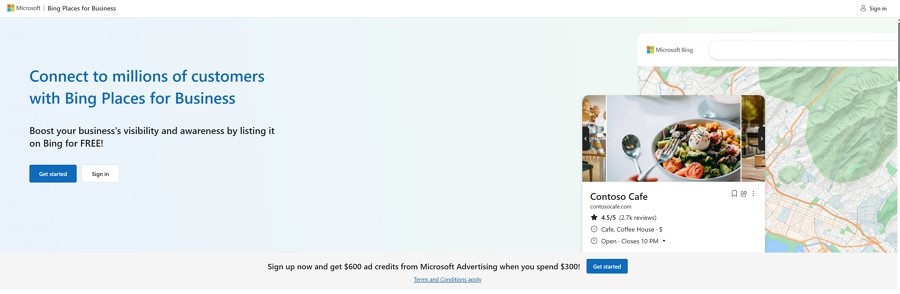
Boost Your Shop using Bing Places for Business

POS SOFTWARE

Bing for business

We all know Google is the big player in search engines. Many retailers spend time worrying about their Google ranking. I have seen large shops have an SEO person to make sure it goes well. But if you ignore Bing Places for Business, you are missing out on customers.

In 2025, setting up your shop on Bing is not just "nice to have." It is a smart move to grow your business. Does it cost you NO!

According to Microsoft data, about 17 million people in Australia use its search network each month.

Here is a secret many retailers miss: many of these users are at work, where their work computers have Bing set as the default search engine. Its windows default and these people search during the workday, this is when most people buy. These people have money.

If your shop isn't on Bing, you are invisible to them.

Why You Should Care About Bing

A potential customer asks their computer, "Where can I find a gift shop near me?" Are you there in the answer?

If your business isn't listed correctly on Bing, the computer will recommend someone else, since the AI won't know you exist.

You want your shop to be the answer.

The good news? You can get this sorted in 5 minutes.

How to Set Up Your Profile Quickly

You don't need to be a wizard, as there is a shortcut that saves you heaps of time.

If you already have a Google Business Profile, and you should have, if not, see how to set one up.


Now, once you have a Google Business Profile, you can copy all that information straight over to Bing. Here is how you do it:

Go to the Bing Places Website:

Head over to bing.com/forbusiness. You will need a Microsoft account (like Outlook or Hotmail) to sign in.

Claim Your Business:

Search for your shop's name. If you see it, click "Claim this business." If you don't see it, click "Add new business."

Use the Import Tool:

This is the best part. Choose the option to "Import from Google Business Profile." This pulls in your address, hours, and photos instantly.

Check Your Details:

Look closely at your Name, Address, and Phone number. It must be 100% correct. If it's not, you could miss out on customers.

Write a Good Description:

Tell people what you do. Use simple words that customers search for. For example: "Your local newsagency for books and gifts. Find us inside Albert Village Shopping Centre, right near Woolworths."

Pick Your Categories:

Don't just pick "Retail." Be specific. Here, for example, I would select "Book Shop," "Greeting Card Shop," or "Stationery Supplier." This helps the right people find you.

If you are unsure what to write here, use your sales reports in your POS Software.

Then put in a simple words customers search eg "gluten-free bakery," "men's work boots" or "dog toys."

Add Photos:

Good ones, pictures sell products. Upload bright, clear photos of your best displays, here is how to take photos for your business

Make sure that your top-selling item in a department is listed.

Don't Make These Common Mistakes

I have seen many shop owners make small errors that cost them sales. Watch out for these traps:

The verification process.

Although "Import from Google" is fast, sometimes you will find that Microsoft will require a manual postcard/phone verification, if so do not give up, they are just trying to make sure the information is accurate and what you say is true. Fill it out. Then keep an eye out, as sometimes it gets lost in their system.

Wrong Opening Hours:

A potential customer can get angry after driving to your shop only to find the doors locked, even though the profile said you were open; you may also get a negative review. Constantly update your hours for public holidays.

Bad Map position:

If you are in a big shopping centre, make sure the location is correct at your front door. Sometimes they are way off. This helps people find you easily. What is the point of telling people all this information if they cannot find your shop?

How to Get even More Customers Through the Door

Once your profile is set up, you can use a few tricks to get more attention.

Post Special Deals:

Bing lets you post "Deals" right on your listing. You could offer "20% off all magazines" or a special bundle price. This grabs attention quickly.

I think Bing's "Deals" feature is more prominent and easier to use than Google's.

Reply to Reviews:

It is very important to ask your regulars to leave a review. Always thank them. If a customer leaves a negative review, respond politely to resolve the issue. This demonstrates that you care.

Conclusion

Fixing your Bing Places for Business profile is an easy win. It doesn't cost money, and it takes minimal effort. Probably about 5 minutes.

Make sure your details are correct, that your profile looks good, millions of Australian shoppers use Bing and Microsoft tools and don't leave those sales on the table.

[Claim Your Free Bing Places Listing Now]


Update: This article had to be rewritten as Bing procedures changes recently

Written by:

Bernard Zimmermann


Bernard Zimmermann is the founding director of POS Solutions, a leading point-of-sale system company with 45 years of industry experience, now retired and seeking new opportunities. He consults with various organisations, from small businesses to large retailers and government institutions. Bernard is passionate about helping companies optimise their operations through innovative POS technology and enabling seamless customer experiences through effective software solutions.


Add new comment

Restricted HTML

  • Allowed HTML tags: <a href hreflang> <em> <strong> <cite> <blockquote cite> <code> <ul type> <ol start type> <li> <dl> <dt> <dd> <h2 id> <h3 id> <h4 id> <h5 id> <h6 id>
  • Lines and paragraphs break automatically.
  • Web page addresses and email addresses turn into links automatically.
CAPTCHA This question is for testing whether or not you are a human visitor and to prevent automated spam submissions. Image CAPTCHA
Enter the characters shown in the image.

Google rolls out new 'What's Happening' Feature

POS SOFTWARE

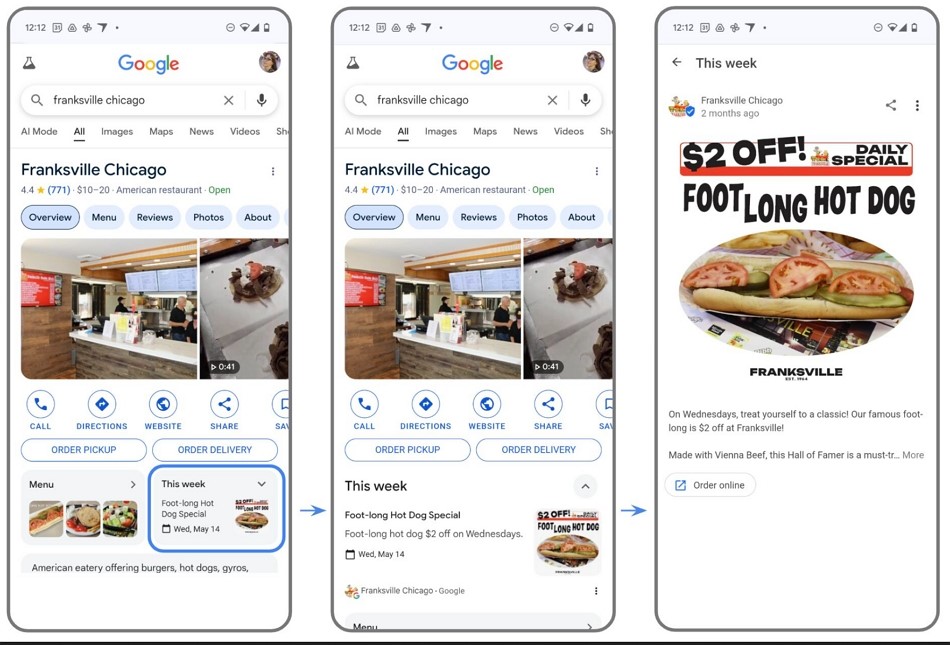
Google's new "What's happening" feature

Google has just launched "What's Happening" for its Google Business Profiles. You can display daily specials alongside your business listing if you are a restaurant or bar. This offers a valuable opportunity to increase your visibility at the critical time when customers are making dining decisions.

It is said that it will soon be rolled out to other businesses.

What is the "What's Happening" Feature

When potential customers search for dining options in your area, they'll immediately see your current promotion before any other business information. This placement ensures that your most compelling offers receive maximum visibility when it is critically needed.

Currently, you have nothing to lose, as it's free.

Implementation Options for Your Business

I was thinking about how you can use the "What's Happening" feature.

Try it out by publishing this content directly through your Google Business Profile dashboard.

If you like it, connect your existing Facebook or Instagram profiles to sync relevant content to your Google Business Profile automatically. If it works, this would eliminate the duplicate work while maximising the exposure of your existing content across platforms.

If you are our client, we are happy to assist you as we always like to maximise our clients' benefits.

Optimisation Strategies

I am sure that Google's algorithm will favour current, engaging content that they are looking for. So to extract maximum value from the "What's Happening" feature, you would need to:

- Focus on a straightforward offer rather than overwhelming potential customers with multiple options.

- Use action-oriented language, e.g. "Book today" or "Try our new menu", as it's designed to drive immediate response, so you need something that is for an immediate response.

- Clearly say when promotions begin and end to create urgency and manage customer expectations

- Keep it up to date; customers will only be disappointed and lose trust if they come for an old offer that is no longer available.

- Note each promotion to see which ones work for you to refine your approach over time

Integration with Point of Sale Systems

If it takes off, we will undoubtedly integrate. I can already see some automation, as the POS system knows

- Your excess inventory can be used to reduce wastage.

- Performance analytics can be utilised.

- Automated scheduling is no problem for your POS System.

How to do it

To implement the "What's Happening" feature for your hospitality business:

Access Your Business Profile

Sign in to your verified Google Business Profile.

Review Profile Verification

Please ensure your business details are current and accurate

Select Implementation Method

For starters, till you get going, I suggest picking manual posts

Create Your First Update

Highlight your most compelling current offer or upcoming event—something simple like the deluxe premade range of sandwiches, 50% off now to 4:00 p.m. today. Remember, unsold sandwiches are often binned if not sold by 4:00 p.m. Also, I must say that excessively offering such discounts rarely does a business much good in the long term.

Review

See how it goes, I suggest experimenting a lot. Its very hard in advance to know what motivates your customers.

Please tell me

I would love to know how it goes for you.

One problem I noticed is that it only supports one location. If your business has multiple locations, you may have problems. One solution might be to make one business profile for each location.

Conclusion

It's free and does represent a significant opportunity for Australian businesses to enhance their online visibility and connect with customers.

I would say, "What do you have to lose?"


Written by:

Bernard Zimmermann


Bernard Zimmermann is the founding director at POS Solutions, a leading point-of-sale system company with 45 years of industry experience. He consults to various organisations, from small businesses to large retailers and government institutions. Bernard is passionate about helping companies optimise their operations through innovative POS technology and enabling seamless customer experiences through effective software solutions.


Add new comment

Restricted HTML

  • Allowed HTML tags: <a href hreflang> <em> <strong> <cite> <blockquote cite> <code> <ul type> <ol start type> <li> <dl> <dt> <dd> <h2 id> <h3 id> <h4 id> <h5 id> <h6 id>
  • Lines and paragraphs break automatically.
  • Web page addresses and email addresses turn into links automatically.
CAPTCHA This question is for testing whether or not you are a human visitor and to prevent automated spam submissions. Image CAPTCHA
Enter the characters shown in the image.

Google Maps: Steps to Improve Your Business

POS SOFTWARE

Google maps 2025

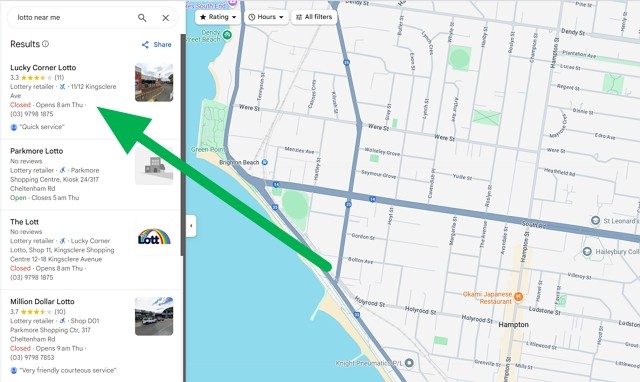
This is a typical map that customers call daily to search locally for goods and services they use. See the green arrow, which they look at in the Google suggested listings of the businesses they are looking for now. I have spoken about this before and must talk about it again, as in 2025, local search in Google has become a cornerstone for businesses. Today, there is a dramatic rise in "near me" searches, and now nearly half of all Google searches have local intent, which has grown by 500% in recent years. It translates directly to sales, as 76% of local searchers visit that business within 24 hours, and 28% of those searches result in a purchase often in an hour. I suggest you go through the complete list of the items on this website I linked to.

Many more people are now searching for local shops on Google. Google Maps Marketing is crucial for enhancing your visibility and customer engagement.

Why Local Search Matters

For example, if a customer searches for "lotto near me," they want a lotto agency near them; almost certainly, this is a potential customer looking to buy. Today, this local search is pivotal in driving foot traffic and sales to shops. We want to target customers with high purchase intent, as 28% of these local searches result in a purchase, often within an hour.

Local search is critical for SMB businesses. You, David, can compete with the Goliaths.

How Google Maps Marketing Works

Google Maps Marketing involves promoting your name in local search results. It requires you to claim your Google Business Profile, ensure consistent business information across the web, and encourage positive reviews to improve your visibility and attract customers.

Setting up your Google Business Profile is the first step in Google Maps Marketing. Make sure your profile is fully completed and is correct. Please ensure you have accurate and up-to-date information. Put in your business name, address, phone number, and hours of operation. It's also important to categorise your business correctly and include relevant services in your business title. The ones you need to categorise are the ones that people are searching for you.

Ready to improve your local visibility? Let us proceed.

Understanding Google Maps Ranking Factors

Let us examine the key factors that influence rankings and why you can, as David, compete with the Goliaths out there.

Firstly, Google Maps is what we call a zero-sum game. That means there are limited spots, and if you are in, someone else is out. So, we need to push the factors that get us in so we get the place.

Now, the three primary factors that determine your spot in Google Maps are:

Relevance

Relevance in Google Maps rankings refers to how well your business matches the customer's request. If I am a potential customer looking for, in this case, lotto, you have lotto. You must ensure that your Google Business Profile lists you with lotto.

To enhance relevance, businesses should focus on the following strategies:

Correct Categorisation

Ensure your business is listed under the most accurate category. Google provides a list of categories that you can choose from when setting up your Google Business Profile.

Keyword Optimisation

Include relevant keywords of your business in your description.

Distance

This one is difficult as there is little you can do about the distance between you and the customer. Distance plays a crucial role in Google Maps positions. The fact is that businesses closer to the search location are more likely to appear in search results. However, distance is balanced with relevance and prominence to show the most relevant results.

Prominence

Prominence is determined by your business's online reputation and offline credibility. It includes positive reviews, high ratings, and mentions online. Being active online does help.

Basic Optimisation Steps

Introduction to Optimisation

Optimising your Google Maps presence is crucial for improving visibility and attracting more local customers. The process involves several key steps that help ensure your business appears prominently in search results. These basic optimisation steps can enhance your online presence and drive more foot traffic to your business.

Claiming your Google Business Profile

Claiming your Google Business Profile is the first step in Google Maps optimisation.

Steps to Claim Your Google Business Profile:

  1. Verification Process: Verify your business through Google My Business. This typically involves receiving a phone call from Google. From experience with many of my customers, it is not easy. It often needs to be done a few times until it happens.
  2. Complete Profile Information: Ensure your profile includes accurate business information. Double-check your name, address, phone number, and hours of operation.
  3. Business Categories: Choose the most relevant categories to improve your business's relevance in search results.
  4. High-Quality Photos: Take high-quality photos of your business with your smartphone to enhance visibility and engagement.
  5. Description and Keywords: Write a compelling business description with relevant keywords to improve your profile's visibility.

It will take you a few hours of work, but it's worth it.

  1. Encouraging Reviews: Encouraging people to review you is critical. Positive reviews improve your visibility in search results and build trust with potential customers. Ask customers to give you some reviews. Do not worry about negative reviews. We all get them. If you are in business, you need to have a thick skin. It goes with the territory.

Need help implementing these changes? Give me a call.

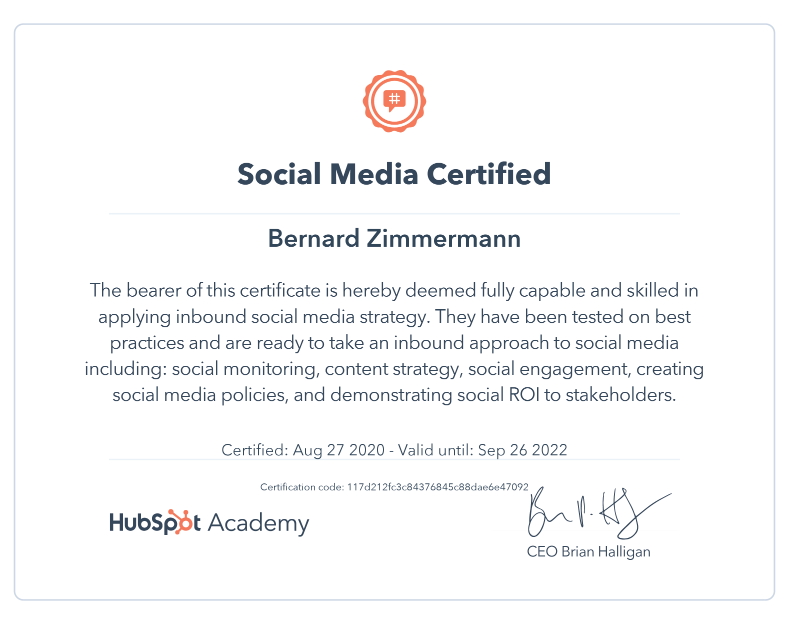
social media certificate

Monitoring and Improving Rankings

Monitoring your local search rankings is essential to understanding how well your business is performing in Google Maps and identifying any needed improvements. While there are tools advertised to provide insights, asking your customers is the most effective way to gauge your progress.

Asking Your Customers

Asking your customers how they found your business is a straightforward, simple and robust method for understanding your local search performance. This approach allows you to gather firsthand information about your visibility. Ask them what they are looking for, what they used and why they picked you.

This way, you will get:

Direct Feedback

Customers can provide direct feedback on how they discovered your business, helping you understand which marketing efforts are most effective.

Personal Connection

Engaging with customers builds trust and strengthens your relationship.

Insights into Search Behavior

Understanding how customers search for businesses like yours can help you better meet their needs.

Questions to Ask:

What Did You Search For?

Ask customers what keywords or phrases they used in Google Maps to find your business. It helps you understand which search terms are most effective for your business.

How Did You Find Us?

Please inquire about the steps they took to find your business.

For example, you might ask a customer: "What did you type into Google Maps to find our lotto shop?"

Do tests

Go to the parking lot near your shop. Now, search Google Maps for your business's services, such as "lotto near me."

What happens, what appears?

Do the same test in another part of your shopping centre, and try again.

Continuous Improvement

Once you get some answers, change your listing till you get it right.

Conclusion

Understanding Google Maps can help you leverage this technology to attract more customers in 2025.

Frequently Asked Questions (FAQ)

Q: What is Google Maps Marketing? A: Google Maps Marketing involves making your online presence appear prominently in local search results in Google Maps.

Q: Why is Google Maps important for local businesses?

A: Google Maps is crucial for local businesses as customers will use it in 2025. It drives foot traffic and sales and provides a platform for businesses to compete locally. Most importantly, it reaches customers with high purchase intent.

Q: How do I optimise my Google Business Profile?

A: Fill it out; not just 60% of many do. Ensure it is complete with accurate information and has the relevant keywords.

Q: How often should I update my Google Business Profile?

A: Until you bed it down, probably every month, and after that, once every three months just to check it out.

Q: What are the costs associated with Google Maps Marketing?

A: Everything I have said here is free. We can discuss later the paid stuff.

Q: How long does it take to see results from Google Maps? A: Generally, businesses notice improvements within a few weeks.

Add new comment

Restricted HTML

  • Allowed HTML tags: <a href hreflang> <em> <strong> <cite> <blockquote cite> <code> <ul type> <ol start type> <li> <dl> <dt> <dd> <h2 id> <h3 id> <h4 id> <h5 id> <h6 id>
  • Lines and paragraphs break automatically.
  • Web page addresses and email addresses turn into links automatically.
CAPTCHA This question is for testing whether or not you are a human visitor and to prevent automated spam submissions. Image CAPTCHA
Enter the characters shown in the image.

Boost Your Shop Presence with Review Plaques

POS SOFTWARE

Here is a secret: why do some local shops attract customers? The answer is that online reviews can make or break a small business in today's digital-first world. Here's the catch: Satisfied customers often exit your store silently, while dissatisfied ones eagerly voice their complaints online. To thrive in today's digital marketplace, motivating content customers to share their positive experiences is crucial. As a store owner, you may ponder effective strategies to encourage happy patrons to spread the word about your business in the digital realm.

Enter the review plaque - a simple yet effective tool that may help.

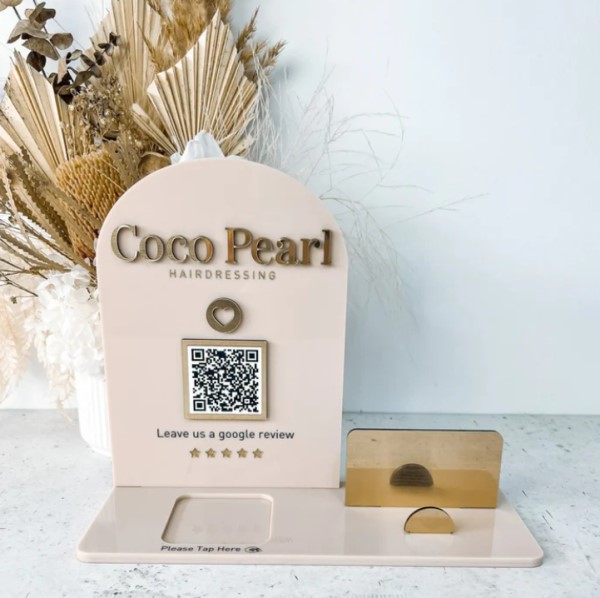
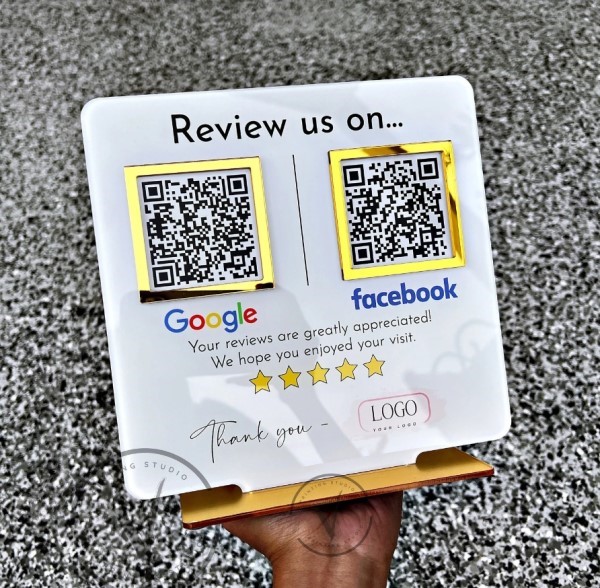
Google review plaque


Facebook and Google review plaque


What Are Review Plaques?

Review plaques are small, smart devices that sit on your counter. They allow customers to quickly leave reviews for your business with a simple phone tap. 

How Do They Work - Local SEO?

The process is straightforward:

  1. As a customer completes their purchase.
  2. You ask about their shopping experience in your shop.
  3. If they're satisfied, you invite them to leave Customer feedback
  4. Ask them to tap their mobile on the review plaque if they agree.
  5. Their phone opens your Google or Facebook review page
  6. Your customer can now immediately write a review on the spot

It's that simple!

The Impact of Review Plaques

Recent studies here have shown impressive results:


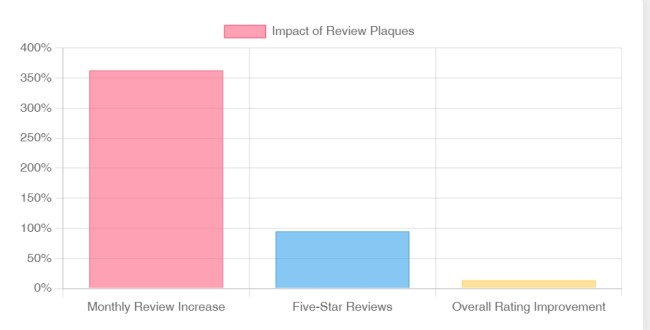
The Impact of Google Review Plaques

One retailer reported jumping from an average of one review per month to a whopping 18 reviews! I am sure it improved their Google My Business ratings.

Pros and Cons

Let's break down the advantages and potential drawbacks:

Pros:

Local, authentic reviews - Google and Facebook do not like it if you use fake reviews. Online, they can be ruthless. I had a client thrown right down Google ranking for doing just that.

Limited to in-store use - If they leave the shop, the customer cannot use them.

Cons:

Some customers may be too busy; after all, they are shopping.

Cost-effective

Takes counter space

Timely feedback

Possible customer pushback

Cost

They're relatively inexpensive, ranging from $20 to $80. For the best results, I recommend investing in a quality plaque around the $40 mark - after all, it'll be front and centre on your counter!

The Bigger Picture: Local SEO and Customer Trust

In a world where consumers often search for "newsagent near me" or "pet shop near me," positive reviews can significantly impact your visibility and credibility. Review plaques offer a simple way to encourage satisfied customers to share their experiences, potentially drawing in new shoppers who trust the opinions of their neighbours.

It works for much more than just these industries; for example, I would want to push "POS System near me" or "POS Software near me."

Ready to Give It a Go?

If you decide to try a review plaque in your shop, we'd love your results! Local SEO strategies like this can make a real difference to small retailers, and we're always eager to learn from our customers' experiences.

Have you used review plaques in your shop? Please, you must share your experiences!

Add new comment

Restricted HTML

  • Allowed HTML tags: <a href hreflang> <em> <strong> <cite> <blockquote cite> <code> <ul type> <ol start type> <li> <dl> <dt> <dd> <h2 id> <h3 id> <h4 id> <h5 id> <h6 id>
  • Lines and paragraphs break automatically.
  • Web page addresses and email addresses turn into links automatically.
CAPTCHA This question is for testing whether or not you are a human visitor and to prevent automated spam submissions. Image CAPTCHA
Enter the characters shown in the image.

How Hard is it For You to do well Locally on Google? Easier Than You Think.

POS SOFTWARE

Many clients look at the net, throw their hands in the air, and say they cannot get there. 

Now, I admit that a small retailer to rank well in local Google search results may seem daunting. But it is not really. The way Google makes the rules now, David can compete with Goliath. You can gain visibility and attract more local customers searching online with some effort.

The Local Opportunity

  • About 28% of all Google searches are looking to buy products or services from local businesses. That's a massive number of customers.

  • For most suburb searches, Google initially suggests three local businesses. You want to be one of them!

  • Many suburbs don't have much local competition online for your type of business.

The Bottom Line: It is very achievable for a small retailer to do well in their local Google.

What Impacts Your Local Ranking Difficulty

  • Competitiveness of your industry in the geographic area

  • Strength of existing competitors' SEO and online presence

  • Size of the area - suburbs are relatively small

  • Your online presence.

The Best First Steps

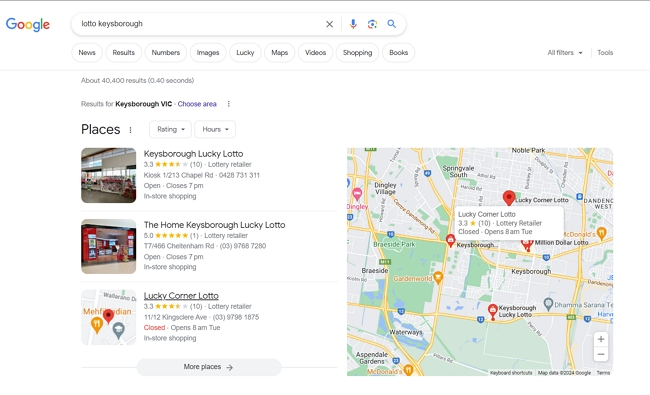
Do some searches for your key products/services + your suburb name. See what the competition is doing. For example, if you are a newsagency in my suburb, Keysborough you might try. 

"lotto Keysborough"

Search for lotto in Keysborough

There is not one big company here; I know some of these people personally; they are smart operators but not major. 

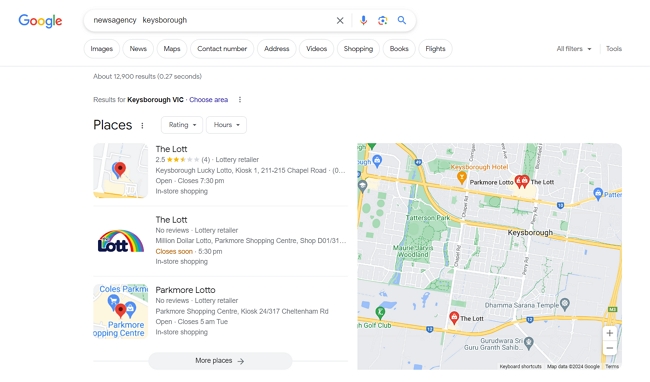
"newsagency Keysborough"

Search for newsagencies in Keysborough

It is the same story with the others I check

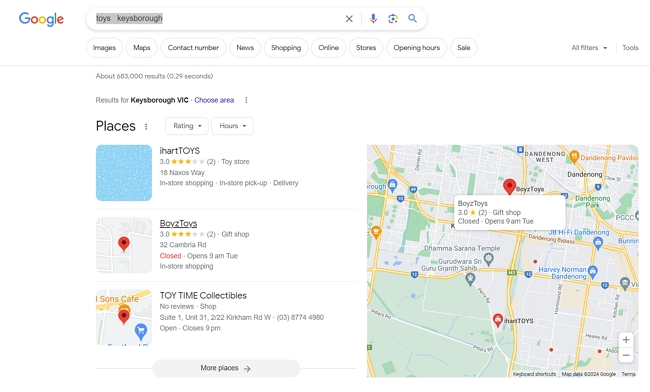
"Toys Keysborough"

Search for toys in Keysborough

I decided to look at other products.

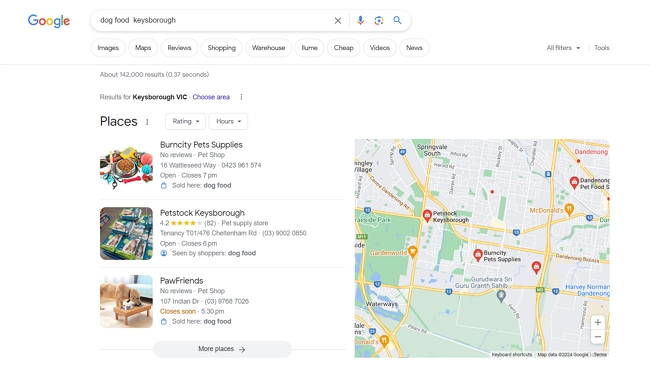
"dog food Keysborough"

Search for dog food in Keysborough

One big retailer out of three.

My research on the local competition in my suburb shows one small retailer would have a real chance to rank well!

You can gain more visibility and customers in local search results with the right local SEO tactics! It is very doable for small local retailers who put in the effort.

Add new comment

Restricted HTML

  • Allowed HTML tags: <a href hreflang> <em> <strong> <cite> <blockquote cite> <code> <ul type> <ol start type> <li> <dl> <dt> <dd> <h2 id> <h3 id> <h4 id> <h5 id> <h6 id>
  • Lines and paragraphs break automatically.
  • Web page addresses and email addresses turn into links automatically.
CAPTCHA This question is for testing whether or not you are a human visitor and to prevent automated spam submissions. Image CAPTCHA
Enter the characters shown in the image.