Point of Sale Software

Here are some Articles from the Blog Subject - Google My Business -

The Definitive Guide: How Shop Owners Can Improve a LinkedIn Profile in 20 Minutes

POS SOFTWARE

Linkedin

Your suppliers and business partners often look you up online before they meet with you. It's how business is done today. The main source is LinkedIn. A bad LinkedIn profile will hurt your business. It will make you look less credible. I have a fix for this here that takes at most 20 minutes.

What happened recently is that after a career change, I updated my own LinkedIn profile. Did not think much about it until a week later, when I checked LinkedIn before a meeting with a bank official about some upcoming changes. It told me what sort of a guy he was and what he was in the bank. Then, almost immediately, I had a meeting with a retailer, and just before I talked, I automatically checked him up on LinkedIn too. That profile told me almost nothing. He did not look very credible.

"Retailers often underestimate how much trust is won or lost before the first call. A clear LinkedIn profile helps banks, suppliers, and local partners understand both the business and the person behind it.”

Ultimately, that contrast exposed a gap. So I checked some more and found many of my clients also had poor LinkedIn accounts, so I decided to make a tool to fix them.

Key Takeaways

  • LinkedIn profile quality shapes first impressions before meetings, supplier calls, finance discussions, and store visits.
  • Specific retail detail makes a business easier to trust than vague labels such as 'Owner' or 'Self-Employed.'
  • Personal credibility helps readers understand the experience, systems knowledge, and operational skill behind the shop.
  • Retail context explains what you sell, who you serve, and why your business is worth contacting.
  • AI assistance improves wording best after accurate facts about the business are already in place.
  • Twenty-minute updates are enough to improve a headline, About section, Experience section, and Skills list.

Core Definitions

  • LinkedIn profile is a public professional summary that explains who you are, what your business does, and why someone should trust your business.
  • Retail LinkedIn optimisation involves updating your headline, About section, Experience section, and Skills so readers can understand your business quickly.
  • LinkedIn headline is the first short description most people see, so it should state your role, shop type, and product focus.
  • Business credibility on LinkedIn involves specific facts about your store, your customers, and the experience behind the business.
  • AI rewriting involves improving clarity after accurate facts about your products, location, role, and strengths are already in place.

What Is a LinkedIn Profile for a Shop Owner?

It is a professional page that explains the business and emphasises your role.

Why Does LinkedIn Matter for Independent Retailers?

LinkedIn matters for independent retailers because they deal with a complex network of stakeholders who verify credibility online. You also deal with suppliers, banks,

Consequently, a weak profile creates uncertainty and leaves the other person guessing what you actually do. A label such as 'Owner at Self-Employed' says almost nothing about the business, the products, or the experience behind it. For example, leaving your skills section blank deprives a prospective landlord of knowing your strong background in retail operations.

Conversely, a strong profile makes that easier. what sort of person you are, and what experience you bring to the table. Someone should be able to see in seconds what you are skilled at, what sort of operational, technical, or commercial experience you have. If LinkedIn shapes their thoughts about you before the first conversation.

How Can Shop Owners Improve a LinkedIn Profile in 20 Minutes?

Improving a LinkedIn profile in 20 minutes requires focusing only on the core sections that drive immediate credibility. Simply follow these six structured steps.

Step 1: Research other people's profiles similar to yours

What you are looking for are strong LinkedIn profiles from people like you. Pay attention to their headline, About section, Experience section, and the way they explain their business.

Step 2: Starting

If you don’t have a LinkedIn account, create one; if you have one, log into it.

Now check your existing email, phone number, and location are completely up to date. Verify that carefully. It will do you damage if these details are wrong.

Step 3: What Business Details Should You Add First?

Then, fill out your profile with the basics. Do not worry about perfect wording, spelling, grammar, etc., yet; get the facts down first so the profile accurately reflects what you did.

Make you your present position shows what the business you are in does, not just what you do in the business for example, not just I am responsible for buying, merchandising, customer service, supplier relationships, and day-to-day store operations in Johnson's Pet shop but add to this that Johnson's Pet shop which sells pet foods, toys.... in the Morrabbin area for over 30 years."

When you are happy with it, save it. Then print out your LinkedIn profile to PDF, see the green arrow below
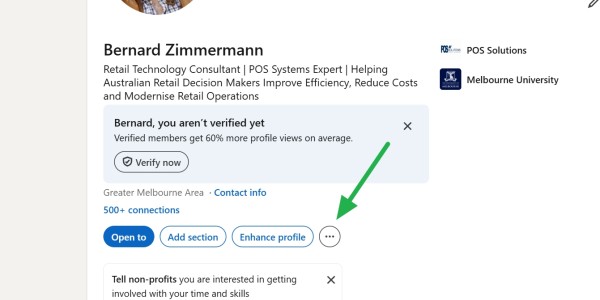
How to print a profile to a PDF in LinkedIn

Step 4: AI prompt

Now run the AI prompt below on that PDF. You can use any AI for this prompt. I tested it on ChatGPT, Grok and Claude.

Act as a world-class LinkedIn Strategist and Personal Branding Expert. Your task is to audit my current LinkedIn profile and then provide a fully optimised, high-conversion rewrite that maximises visibility, credibility, and conversion (job offers, follows, or sales).

## Step 1 – Clarifying Questions
First, ask me exactly 4 specific, probing questions to tailor the entire process to my situation. These must cover:
- My primary conversion goal (getting hired, attracting clients, growing my audience).
- My target audience (exact job titles, industries, decision-makers).
- My unique value proposition and differentiators.
- The specific roles or industries I want to rank for in recruiter/ATS searches.

Do not proceed with the audit or rewrite until I answer.

## Step 2 – Audit & Gap Analysis
Once I’ve answered your questions, analyse my profile data (provided below) and explicitly list critical gaps, missing opportunities, and errors for each section, using these criteria:
- **Headline** – Is it searchable by keyword? Does it hook the right audience in under 220 characters?
- **About** – Does it tell a compelling story? Does the first line hook? Is my personality clear? Are relevant keywords naturally placed?
- **Experience** – Are bullet points impact-driven? Do they show measurable results with a clear cause-and-effect? Are there more than 3 bullets per role?
- **Skills** – Is the list relevant and ATS-friendly? Are the top 3 skills aligned with my target roles?

Present the audit as a short, bulleted list of findings before the rewrite.

## Step 3 – Full Optimisation & Rewrite
After the audit, deliver an optimised, copy-paste-ready version of every profile section. Strictly follow these rules:

1. **Headline** – Max 220 characters. Lead with a high-volume keyword, then a hook that speaks to my target audience and goal.
2. **About** – Write a compelling narrative (max 2,600 characters) that opens with a hook, shows personality, weaves in 4-6 priority keywords naturally, and ends with a clear call-to-action aligned to my conversion goal.
3. **Experience** – For each role, keep a maximum of 3 bullet points. Rewrite every bullet using a flexible impact formula: **Action Verb + Quantifiable Result + Method/Context**.  
   *Bad example (avoid):* “Accomplished X by doing Y.”  
   *Good examples:* “Boosted revenue by 35% by redesigning the client onboarding flow” or “Cut support tickets in half after launching an AI-powered knowledge base.”  
   Vary your action verbs (e.g., grew, reduced, launched, scaled, transformed) and tie every line to a measurable outcome.
4. **Skills** – Provide a prioritised list of the top 10 skills I should display (pinned top 3 in bold). These must be high-volume, ATS-friendly terms for my target industry/role.
5. **Keyword List** – Supply a separate list of 10-15 high-volume, ATS-friendly keywords to integrate across the entire profile. Mention in parentheses where each keyword is best placed (e.g., Headline, About, Experience, Skills).
6. **Tone & Style** – Match the writing to the platform: professional yet warm, scannable, and packed with industry-specific language that resonates with my target audience.


It can turn rough facts into clearer, more professional wording without changing the real meaning, as business people want to read. Many of you will be surprised by how you sound after the prompt does its magic.

Now review it. One of the good points of AI is that you can ask it to add, change, or delete parts. A common change, in my experience, is dates.

Step 5: Updating LinkedIn

This tends to be the messy part. What you have to do is paste the newly generated text into your LinkedIn page. While doing this, make any last-minute changes you feel are appropriate.

Step 6: Review Your Profile

I find reading it aloud helps ensure it sounds like a real person and feels natural.

Make sure the facts are accurate and demonstrate your competence.

Conclusion

You have probably now spent a very profitable 20 minutes. Many people update their profiles every 3 to 12 months.

Conclusion

I do believe strongly that today we all must be as professional as possible, and a strong LinkedIn profile acts as a silent ambassador for your retail business. All it takes is just 20 minutes.

Written by:

Bernard Zimmermann


Bernard Zimmermann is the founding director of POS Solutions, a leading point-of-sale system company with 45 years of industry experience, now retired and seeking new opportunities. He consults with various organisations, from small businesses to large retailers and government institutions. Bernard is passionate about helping companies optimise their operations through innovative POS technology and enabling seamless customer experiences through effective software solutions.


Add new comment

Restricted HTML

  • Allowed HTML tags: <a href hreflang> <em> <strong> <cite> <blockquote cite> <code> <ul type> <ol start type> <li> <dl> <dt> <dd> <h2 id> <h3 id> <h4 id> <h5 id> <h6 id>
  • Lines and paragraphs break automatically.
  • Web page addresses and email addresses turn into links automatically.
CAPTCHA This question is for testing whether or not you are a human visitor and to prevent automated spam submissions. Image CAPTCHA
Enter the characters shown in the image.

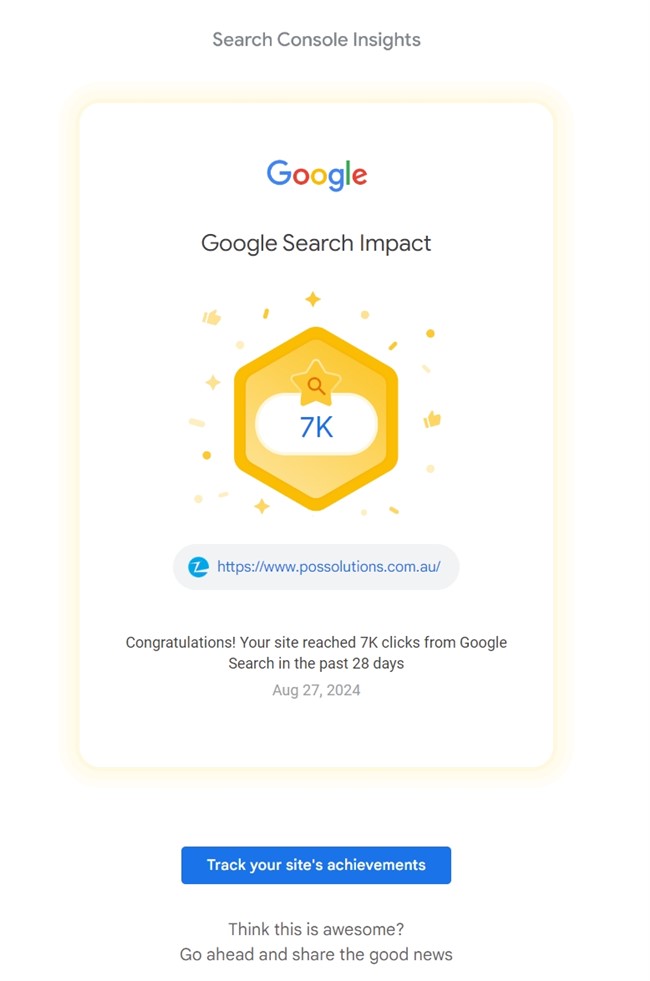
Celebrating Our Blog's Success: 7,000 Views in 28 Days!

POS SOFTWARE

Google search impact

As the primary writer for our blog, I'm so pleased to share some exciting news. Our recent post about POS systems for Australian retail shops has hit a remarkable milestone: over 7,000 views in just 28 days! This level of engagement is truly phenomenal, considering the natural and small market it addresses, and it shows that we're striking a chord with our target audience.

Why Our Message is Resonating

Addressing Real Retailer Needs

Our blog post isn't just about a POS system—it's about solving real problems. We've used our knowledge to create content that speaks directly to their needs, offering practical solutions to everyday issues.

Jargon-Free Communication

We've consciously tried to break down complex POS features into easily digestible information. One reader's comment stood out:

"Finally, I read a tech article that I can understand without a dictionary!"

This feedback reinforces our commitment to transparent, accessible writing.

Actionable Advice for Immediate Implementation

Our blog doesn't just describe our POS system—it provides practical tips that retailers can immediately implement. This approach has resonated with our readers, as evidenced by the high engagement rates.

The Numbers Speak Volumes

Let's break down what 7,000 views in 28 days means:

  • 250 views per day on average
  • Approximately ten views per hour
  • A new reader engages with our content roughly every 6 minutes

These figures are a testament to the relevance and quality of our content.

What This Means for Our Future Content

This success has given us valuable insights into what our audience wants. Moving forward, we'll continue to:

  1. Focus on real-world problems and solutions
  2. Use clear, jargon-free language
  3. Provide actionable advice
  4. Engage with our readers to understand their evolving needs

Wrapping Up

The incredible engagement with our blog post - 7,000 views in just 28 days - is more than just a number. It indicates that we're providing valuable, relevant information to people interested in POS systems. This success motivates us to continue creating high-quality, user-focused content that addresses the real needs of Australian retailers.

As we progress, we're excited to build on this success and continue serving our growing readership with insightful, practical content about POS systems and retail technology.

Add new comment

Restricted HTML

  • Allowed HTML tags: <a href hreflang> <em> <strong> <cite> <blockquote cite> <code> <ul type> <ol start type> <li> <dl> <dt> <dd> <h2 id> <h3 id> <h4 id> <h5 id> <h6 id>
  • Lines and paragraphs break automatically.
  • Web page addresses and email addresses turn into links automatically.
CAPTCHA This question is for testing whether or not you are a human visitor and to prevent automated spam submissions. Image CAPTCHA
Enter the characters shown in the image.

Boost your shop sales with Google Business Profile

POS SOFTWARE

Your Google Business profile

Modern times demand modern methods, which means retailers must embrace online visibility. Today, in Australia, online visibility means Google, which means you need a Google Business Profile. What good is your "Open" sign if a shopper today looking for a particular business pulls out their smartphone and searches to find a product you sell?  If Google does not know you, they will recommend someone. Then, that customer will likely follow Google's directions to someone else.

Let me show you some examples of Google searches in Australia for some local businesses; I will pick three examples: a newsagency, a pet shop and a cafe.

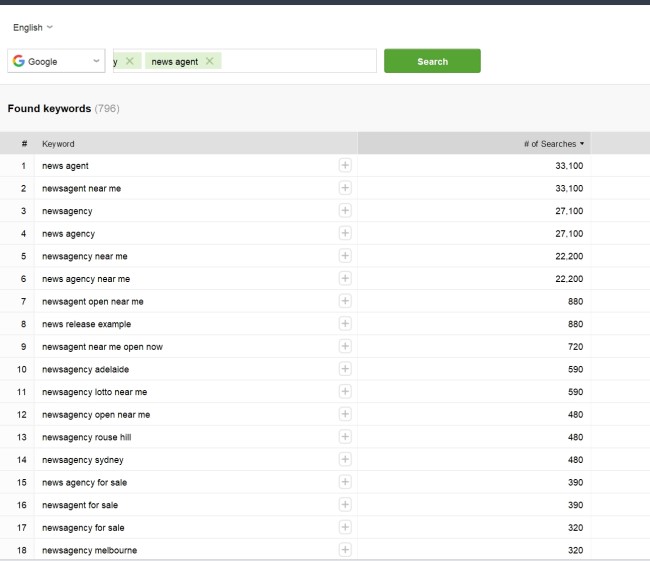
I entered my SEO analytics provider, set Google, and then said newsagency. I asked what the top 18 things people search for when they look at newsagency are.


If you look at the list, location is more than half the searches. People are looking for a newsagency if we assume that 3,000 newsagencies in Australia is about 81,000/3,000 = 27 monthly searches per newsagency. 

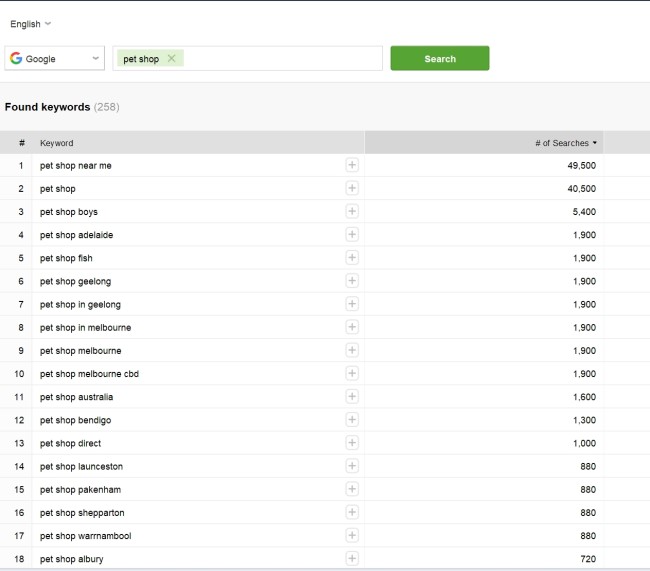
Let us look at pet shops, and the situation is the same.


There are about 2,300 registered pet shops, which is about 62300/2300 =27  searches per pet shop a month. Interesting, it is the same.

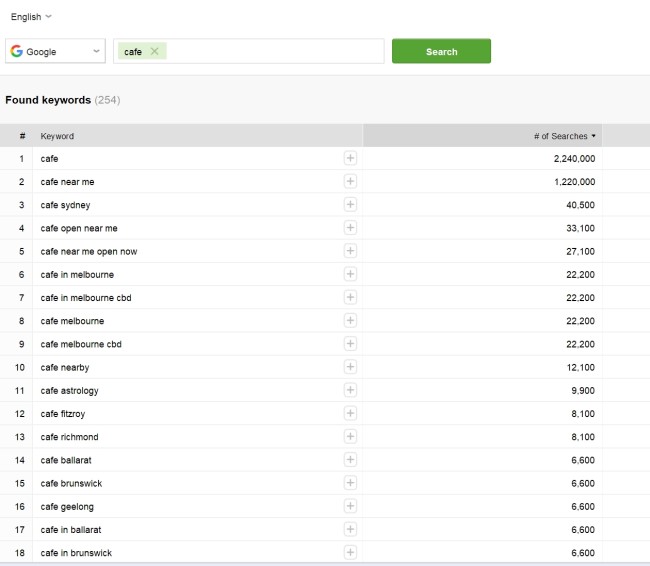
Finally, let us look at cafes; it's the same story. 

We are looking at about 1,400,00 searches, and as we have about 26,124 Cafes and Coffee Shops businesses in Australia, we are looking at 53 searches per month for each cafe.

In all cases, many potential customers will use Google to look for locations for businesses that are almost certainly at the end of their buying cycle and ready to buy.

Ask yourself, "Why cannot they Google my business? Maybe it will increase sales if they find your business. We call this local SEO." 

For retailers seeking expert assistance, a comprehensive GMB management service can help you optimize your profile for maximum visibility.

A Note on Industry Collaboration

Despite our general policy of not referencing other industry players, we feel it's important to highlight our agreement with industry colleagues on this topic. The vital role of online presence for retailers has been a consistent theme in our industry dialogues, and it's gratifying to see a unified strategy emerging to support businesses in their digital evolution.

Why Google Business Profile Matters

In today's digital landscape, people often turn to Google when searching for local businesses. A well-optimised Google Business Profile ensures your shop appears in local search results and Google Maps. This increased visibility can lead to more foot traffic and sales. We call that Local search optimization to help with your business marketing. Today, 46% of all Google searches have local intent.
 

Tips

1. Check Your Google Business Profile

Check if you have one. If you have not, start making one. You may need to claim the existing one for your business listing.

2. Check the Information

Ensure the information about your business is correct and up-to-date, including:

  • Business name
  • Address
  • Phone number
  • Website
  • Opening hours

3. Choose the Right Category

Select the most appropriate category for your business to help Google understand what you offer.

Optimizing Your Profile for Local Searches

1. Add High-Quality Photos

Upload attractive photos of your store's exterior, interior, and products. Visual content significantly influences potential customers' decisions, so do not be afraid to take hundreds of pictures to find the right ones. You want to showcase your business.

2. Encourage and Respond to Reviews

Positive reviews boost visibility and credibility. Encourage satisfied customers to leave reviews and always respond to them, whether positive or negative. Go to your favourite customers and ask them. Tell them it's a big favour if you could give us one. 

3. Use Local Keywords

Include keywords that local shoppers might use when searching for your products or services in your business description. A simple way of doing this is to ask your customers what words they would use online if they planned to look for your product XYZ.

Verifying Your Google Business Profile

This is very important, as I see so many people messing up at this step. Verification is crucial for your listing to be found by searchers as this process has changed significantly since last year, so do the following to verify your business:

  1. Sign in to your Google account and go to google.com/business. Check it is verified it is not
  2. Select your business and click "Verify now."
  3. Choose your preferred verification method (usually by mail, phone, or email).
  4. Follow the instructions provided by Google to complete the verification process.

Monitoring and Analyzing Performance

Google Business Profile provides insights into how customers find and interact with your profile. Use this data to:

  • Understand which products or services are most popular
  • Identify peak times for customer interest
  • Refine your marketing strategies

Elevate Your Local SEO

In today's digital-first retail environment, harnessing free tools like Google Business Profile can be a game-changer. Implementing these strategies and maintaining an active profile will significantly boost your visibility to local shoppers seeking your products. Remember, consistency is key—keep your profile fresh and engaging. Seeing our industry unite to support retailers' digital growth is inspiring. We're fostering a vibrant local business ecosystem through knowledge sharing and collaboration. This cost-free advice can potentially drive substantial foot traffic to your store. Embrace these digital opportunities and increase your sales!


FAQ: Google Business Profile for Australian Retailers

What is a Google Business Profile? 

A Google Business Profile is your business's digital storefront on Google. It's like an "Open" sign for the digital age, helping potential customers find you when they search online.

Why is it important for Australian retailers? 

In Australia, online visibility often means Google visibility. Our research HERE shows that local businesses receive significant monthly searches:

  • Newsagencies: ~27 searches per month
  • Pet shops: ~27 searches per month
  • Cafes: ~53 searches per month. These searches are often from customers ready to buy, making your Google presence crucial.

How do I create or claim my Google Business Profile?

  1. Click here.
  2. Sign in with your Google account 
  3. Enter your business information
  4. Choose the appropriate category
  5. Add your location and service areas
  6. Provide contact details and website information
  7. Verify your business

If you have trouble give me a call.

What information should I include in my profile? 

Ensure your profile includes:

  • Accurate business name
  • Correct address
  • Up-to-date phone number
  • Website URL
  • Current opening hours
  • Appropriate business category
  • High-quality photos of your store and products

How can I optimize my profile for local searches?

  1. Add high-quality photos of your store and products
  2. Encourage and respond to customer reviews
  3. Use local keywords in your business description
  4. Keep your information up-to-date
  5. Post regular updates about promotions or new products

How do I verify my Google Business Profile?

  1. Sign in to your Google account
  2. Click here.
  3. Select your business and click "Verify now"
  4. Choose your preferred verification method (mail, phone, or email)
  5. Follow Google's instructions to complete the process

Can I track how my profile is performing? 

Yes, Google Business Profile provides insights into how customers find and interact with your profile. Use this data to understand popular products, identify peak interest times, and refine your marketing strategies.

Is a Google Business Profile free? 

Yes, creating and maintaining a Google Business Profile is completely free.

How often should I update my profile? 

Keep your profile updated regularly. Change business hours, contact information, or services immediately. Post new photos, respond to reviews, and share updates about promotions or new products to keep your profile fresh and engaging.


Add new comment

Restricted HTML

  • Allowed HTML tags: <a href hreflang> <em> <strong> <cite> <blockquote cite> <code> <ul type> <ol start type> <li> <dl> <dt> <dd> <h2 id> <h3 id> <h4 id> <h5 id> <h6 id>
  • Lines and paragraphs break automatically.
  • Web page addresses and email addresses turn into links automatically.
CAPTCHA This question is for testing whether or not you are a human visitor and to prevent automated spam submissions. Image CAPTCHA
Enter the characters shown in the image.

How Hard is it For You to do well Locally on Google? Easier Than You Think.

POS SOFTWARE

Many clients look at the net, throw their hands in the air, and say they cannot get there. 

Now, I admit that a small retailer to rank well in local Google search results may seem daunting. But it is not really. The way Google makes the rules now, David can compete with Goliath. You can gain visibility and attract more local customers searching online with some effort.

The Local Opportunity

  • About 28% of all Google searches are looking to buy products or services from local businesses. That's a massive number of customers.

  • For most suburb searches, Google initially suggests three local businesses. You want to be one of them!

  • Many suburbs don't have much local competition online for your type of business.

The Bottom Line: It is very achievable for a small retailer to do well in their local Google.

What Impacts Your Local Ranking Difficulty

  • Competitiveness of your industry in the geographic area

  • Strength of existing competitors' SEO and online presence

  • Size of the area - suburbs are relatively small

  • Your online presence.

The Best First Steps

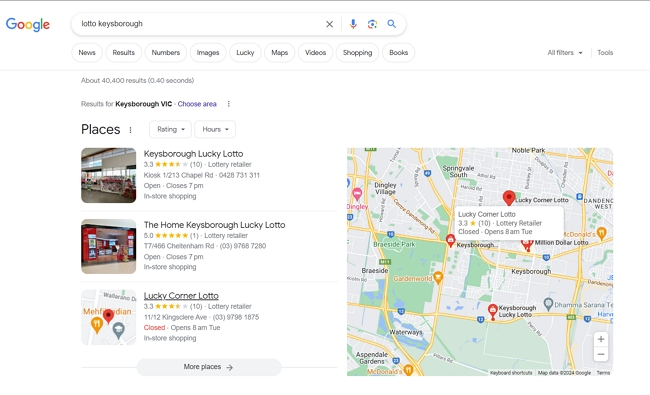
Do some searches for your key products/services + your suburb name. See what the competition is doing. For example, if you are a newsagency in my suburb, Keysborough you might try. 

"lotto Keysborough"

Search for lotto in Keysborough

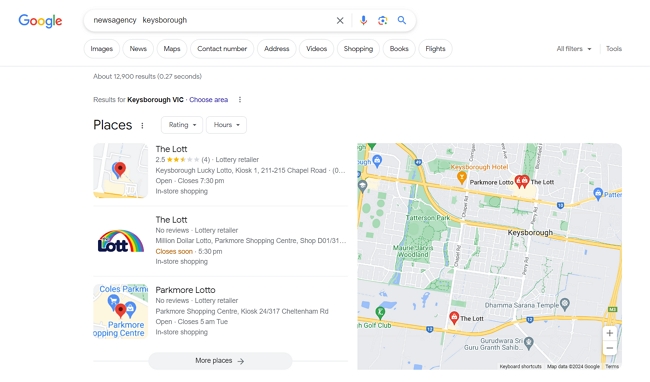
There is not one big company here; I know some of these people personally; they are smart operators but not major. 

"newsagency Keysborough"

Search for newsagencies in Keysborough

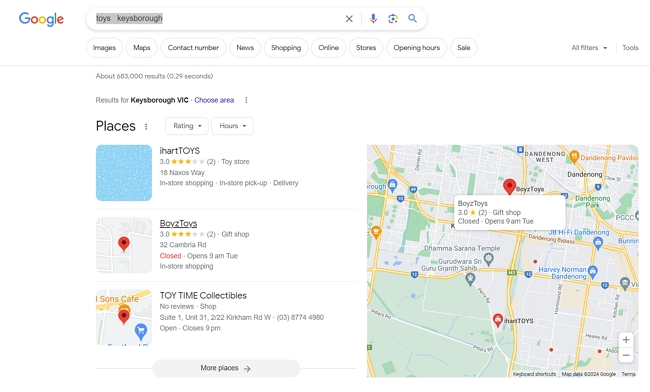
It is the same story with the others I check

"Toys Keysborough"

Search for toys in Keysborough

I decided to look at other products.

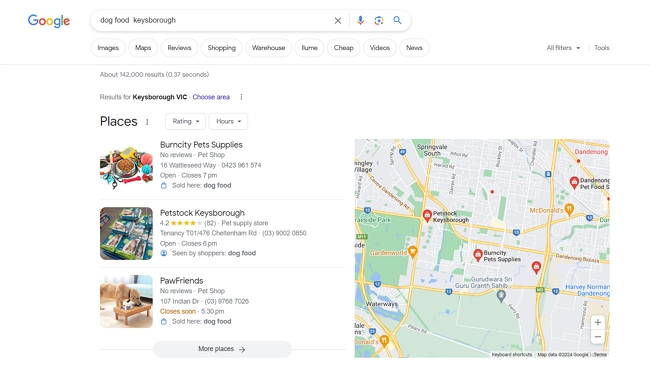
"dog food Keysborough"

Search for dog food in Keysborough

One big retailer out of three.

My research on the local competition in my suburb shows one small retailer would have a real chance to rank well!

You can gain more visibility and customers in local search results with the right local SEO tactics! It is very doable for small local retailers who put in the effort.

Add new comment

Restricted HTML

  • Allowed HTML tags: <a href hreflang> <em> <strong> <cite> <blockquote cite> <code> <ul type> <ol start type> <li> <dl> <dt> <dd> <h2 id> <h3 id> <h4 id> <h5 id> <h6 id>
  • Lines and paragraphs break automatically.
  • Web page addresses and email addresses turn into links automatically.
CAPTCHA This question is for testing whether or not you are a human visitor and to prevent automated spam submissions. Image CAPTCHA
Enter the characters shown in the image.