

Employee theft is a significant concern to retailers today. It undermines profits. It also hurts, as it involves breaking trust. Industry data shows retail crime costs Australian businesses about $8 billion and is increasing, with staff responsible for roughly 40% of shrinkage. The problem is that it's often small, daily losses that add up over a year.
As I have noted here the problem has gotten worse, particularly after COVID. Others are noticing it too.
The good news is that you likely already have the tools to stop it. Your Point of Sale (POS) system is more than just a cash register; it's your first line of defence.
Make Each Operator Accountable
A crucial first step is to assign each staff member their own cash drawer. This makes them personally responsible. Your POS system can drive many drawers from a single computer. This means each operator can work and reconcile their till without affecting others. This protects you because any missing funds are clearly linked to a single person, not the whole team. I suggest doing this immediately.
Info: Use blind balancing. Here, at the end of each shift, the person balancing counts the cash and enters the total into the POS System. Then see what the POS system expects. This prevents a dishonest staff member from simply matching the anticipated amount by quietly adjusting the drawer.
How to check your security KPIs?
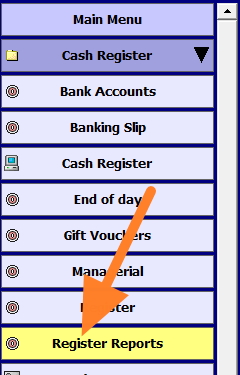
To check these security KPIs, go to the cash register reports. (see orange arrow)
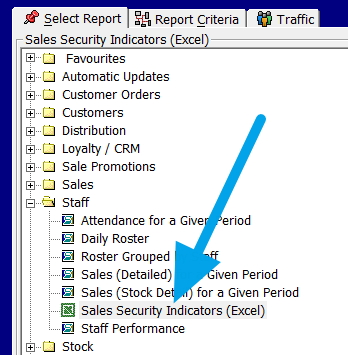
Then select Staff and click on "Sales security indicators" (see blue arrow)
Select the required period.
A report will pop up with many indicators.
Using Your Sales Security Indicators
You can now use your POS reports to spot patterns that indicate theft.
In your POS system, these are called Security KPI's. They show how each operator uses sensitive functions at the register. The fact is that dishonest behaviour is usually a habit. This is because if a method works, an offender will typically repeat it, and so that repetition shows up as a pattern.
From your reports menu, run this report for at least four weeks. I prefer whole weeks over months because months vary in the number of Mondays, Saturdays, and so on. Four weeks provide enough data to identify real patterns rather than isolated errors.
The Key Indicators to Watch
When you run the report, look closely at these specific numbers for each staff member:
No Sales
This counts how often the cash drawer is opened without a sale being recorded. A consistently high number here is a major red flag. It suggests someone may be opening the till to remove cash while pretending to give change or "check" a price.
Voids and Error Corrections
You need to distinguish between a "line void" (fixing a single wrong item) and a "wholesale void" (cancelling the entire transaction). A person with many full-sale voids, especially during busy times, deserves closer attention, as what is commonly done is to enter the sale to show the customer the total, then void it if the customer pays cash.
Refunds and Negative Items
Watch for frequent refunds or items with negative prices. Be particularly careful if you see cash refunds processed when no customer is at the counter.
Average Sale Value and Items Per Sale
Compare each operator's average dollar sale and items per transaction to the store average. A consistently lower staff member may be under-ringing items. This is often a sign of "sweethearting," when one charges a friend for a single cheap item while handing over several expensive ones.
Interpreting the Numbers in Context
Numbers only make sense when you understand the context of your shop. You are not looking for perfection, as everyone makes the odd mistake. You are looking for patterns that stand out.
Keep these factors in mind when comparing staff:
Experience levels:
A junior working the Saturday rush will naturally have more transactions and mistakes than a senior on a quiet Tuesday morning.
Shift patterns:
Always compare like with like. Compare a Saturday staff member to another Saturday staff member.
Seasonality:
When you're really busy, like the lead-up to Christmas, you will see more scanning errors simply due to time pressure.
Look for staff whose indicators remain abnormally high across different periods, not just during the busiest weeks.
Linking POS Activity With CCTV
Finally, use your POS Software information with your security cameras. If your report shows an unusual refund, void, or "no sale" event at a specific time, go to your video footage for that exact moment.
Look:
- Was a customer actually present?
- Did cash change hands?
- Does the screen show the same items?
I have seen reports list transactions, but the camera told a different story. In one case, we clearly saw the employee pocket the money during a transaction flagged by the report as suspicious. This combination of complex data and visual evidence is the most effective way to confirm if you have a training issue or a theft problem.
Conclusion
Securing your shop means you have to monitor constantly. Utilising the security KPI's in your POS system can help spot likely risks early and safeguard your hard-earned profits.
Written by:

Bernard Zimmermann is the founding director of POS Solutions, a leading point-of-sale system company with 45 years of industry experience, now retired and seeking new opportunities. He consults with various organisations, from small businesses to large retailers and government institutions. Bernard is passionate about helping companies optimise their operations through innovative POS technology and enabling seamless customer experiences through effective software solutions.

