Point of Sale Software

Here are some Articles from the Blog Subject - Retail banking -

Why the 2026 RBA Surcharge Ban Still Leave Big Banks Better Off

POS SOFTWARE

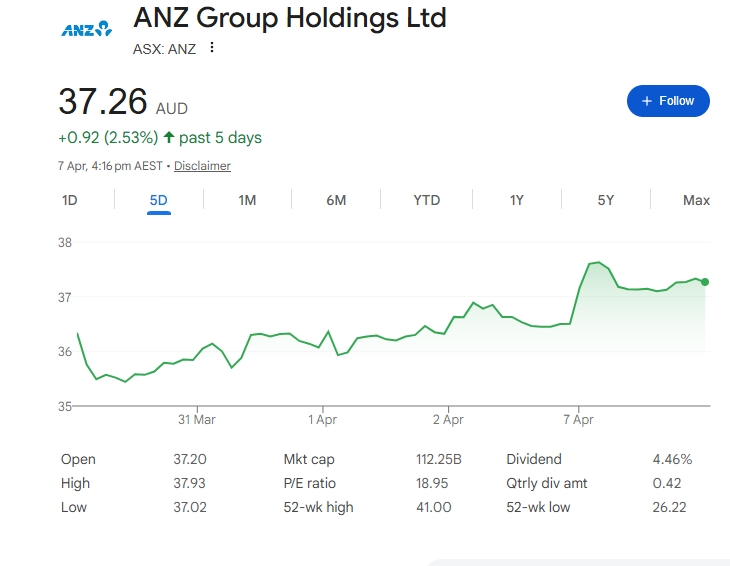
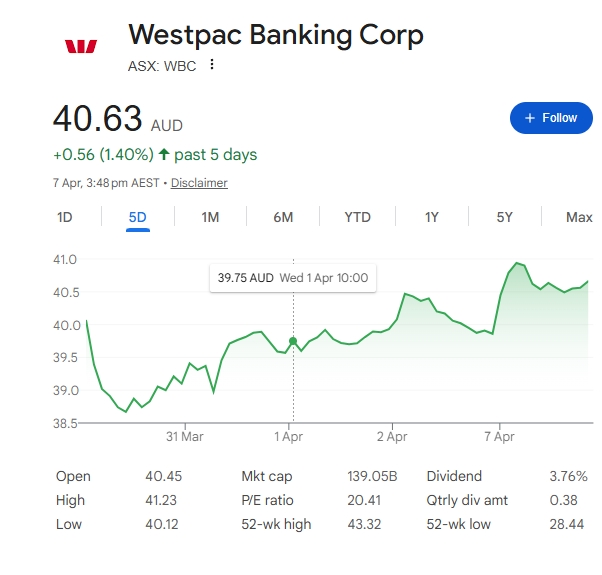
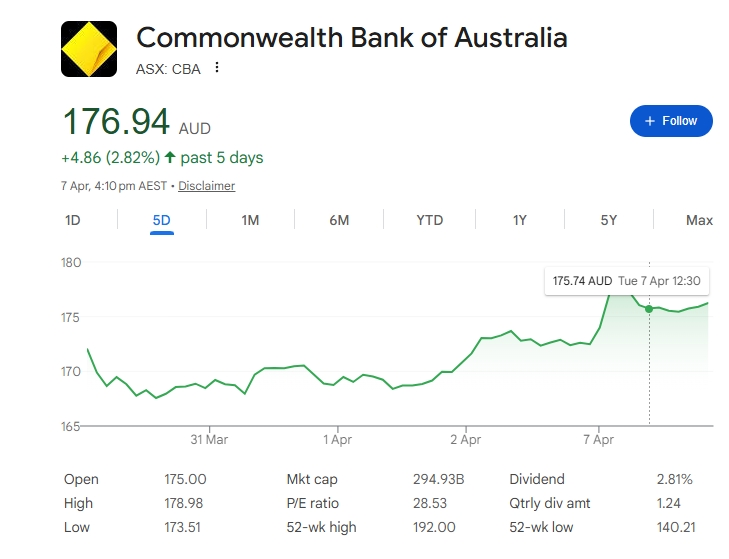
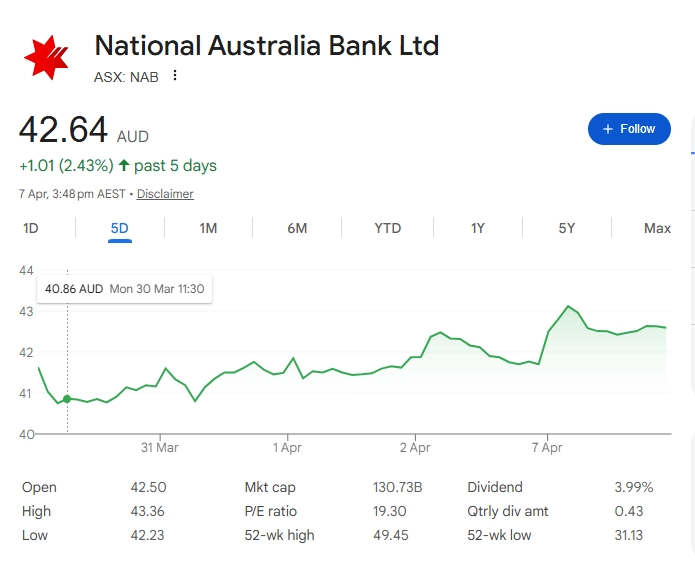
What I said a few days ago, looking at the RBA's 2026 surcharge reform, was that “the big banks... are certainly winners,” even though many said it looked negative for their fee income so disputed my claim. Here are some interesting charts of Bank Shares over the past few days. The RBA decision was announced on 31 March, and all the big banks’ share prices have been up since then. Check them out here, the RBA decision was on 31st March. Can anyone name any major reason for these price rises in this period other than the RBA decision?

NAB share price April 2026

ANZ share price April 2026


westpac share price April 2026

CBA share price April 2026


Key takeaways

  • The RBA’s March 2026 conclusions paper confirmed a ban on surcharges from 1 October 2026.
  • The same package also includes lower interchange fees and stronger transparency rules.
  • The announcement looked negative for bank fee income on the surface.
  • Major bank shares still rose after the RBA announcement.
  • That market move suggests investors may have expected a worse outcome.
  • Retailers still need to prepare for the loss of visible card surcharges at checkout.
  • POS reporting and merchant fee review will matter more once the ban starts.

What is the 2026 RBA surcharge ban?

The 2026 RBA surcharge ban is a payments reform that ends card surcharges on debit and credit card transactions from 1 October 2026, while also lowering some interchange fee caps and improving fee transparency. The RBA set out that direction in its March 2026 conclusions paper after consultation.

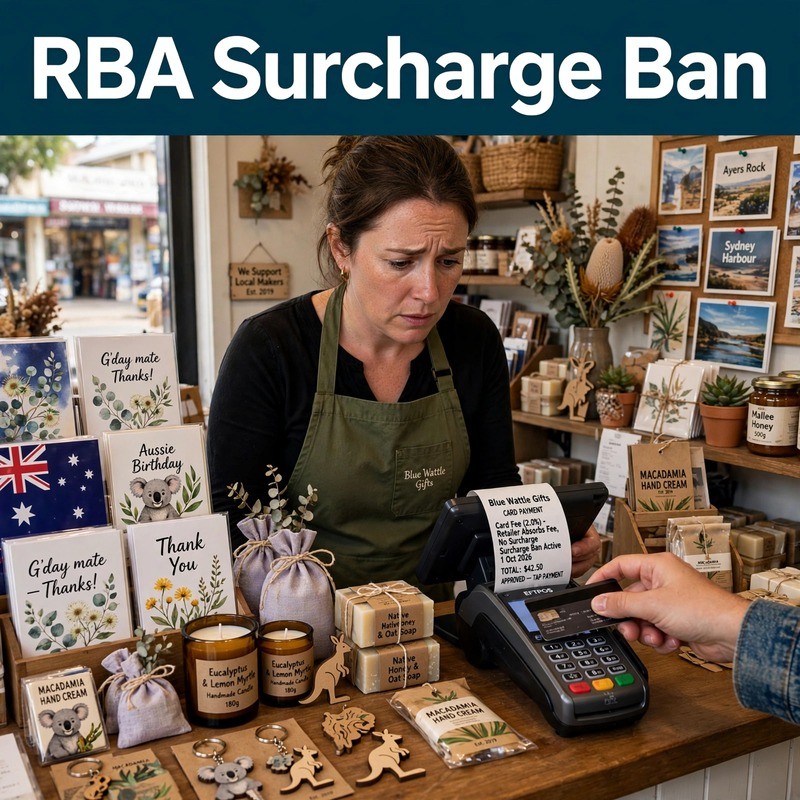
First, this was not just a loose discussion. It was the RBA’s final public position at that stage, and the market treated it as a concrete policy decision. A retailer that once added a 1.5 percent surcharge at the terminal will need to remove that charge and rethink how it recovers payment costs.

Why did bank shares rise?

Bank shares rose because the market likely saw the final package as less damaging than feared. When investors hear a reform that could cut fee income, they do not only ask whether it is negative; they also ask whether it is better or worse than what they had already priced in.

Next, that matters a lot. If traders expected a harsher crackdown on bank and payments revenue, then a more limited package can still push shares higher. In other words, a “bad” policy can still lift shares if it was not as bad as the market feared.

Why did the reaction look odd?

The reaction looked odd because the announcement clearly affected fee income, yet the bank sector still went up after the news. The investors did not read the reform as a disaster.

Moreover, this is where the story gets interesting. If the RBA’s package had really threatened bank earnings in a major way, you would expect a much clearer negative market response. Instead, the share price move implies investors either expected worse or believed the effect would be manageable.

What does the share move mean?

The share move may mean investors thought the banks could absorb the change. It may also mean the reform leaves the wider card system intact, which protects transaction volumes even if some fee settings are trimmed.

For example, a bank can lose some surcharge-related or interchange-related income and still look strong if card use remains high. That is why the market can treat the reform as a short-term negative but a longer-term non-event, or even a mild positive.

Why this matters for retailers

Retailers should not confuse a bank-share rally with a win for merchants. The fact that shares rose does not mean the reform automatically helps small shops.

Instead, the practical issue is that retailers lose a visible way to recover card costs. A shop that used to show a card surcharge at checkout will need another way to protect margin, whether through pricing, fee negotiation, or tighter cost control.

What changes at the checkout

The biggest change for retailers is the checkout experience. The surcharge line disappears, but the underlying payment cost does not.

That means retailers need to understand the full cost of taking cards, not just the visible fee passed to the customer. A POS system that shows payment-type sales, average transaction value, and card-cost impact becomes much more useful once surcharging is no longer available.

How to prepare

Retailers should review their merchant statements, terminal fees, and POS reports now. The goal is to know exactly what card acceptance costs before the October 2026 deadline.

Tip: Prepare early by analysing how much each payment method costs your business. This makes it easier to plan alternative recovery strategies when surcharges are gone.

Next steps

Clearly, we have questions about the RBA’s rationale for its decision, but the immediate point for retailers is that the stock market is not your main problem here. Your real issue is how to manage payment costs when you can no longer add a visible surcharge at checkout. The RBA decision should reduce bank fees, help alleviate some of the fee differences faced by small and large retailers, and provide greater transparency into bank fees.

Retailers should take four steps before 1 October 2026:

  1. Review current merchant fees and terminal charges.
  2. Check POS reporting for payment-method visibility.
  3. Revisit pricing to make sure margins still hold.
  4. Talk to payment providers about lower-cost alternatives or better fee transparency.

Prepare your shop for the 2026 RBA surcharge ban


Update:

Update:
Since the article first went live, it has become a hot topic. Several have questioned the link between the 2026 RBA surcharge ban and the rise in bank shares. That is a fair point, and it is worth explaining the facts in plain terms.

First, it is true that Suncorp’s share price fell during this period, which at first glance seems to contradict the idea that the RBA decision helped banks. But Suncorp is no longer a normal bank for most investors. Suncorp Group sold Suncorp Bank to ANZ in 2024, took the money, and later returned cash to shareholders. Today, the listed company is more of an insurance business than a bank, so its share move does not tell us much about investors saw the surcharge ban. 

Second, the good share reaction was not just in banks. Payment companies listed on the ASX, such as Tyro and SMP, also rose after the announcement.

Third, that the banks’ shares rose because of the better profit numbers they announced back in February and the interest‑rate move in March. That is true, they did rise, but here the timing is a problem. We are now in April, and those profit updates and the March rate move happened earlier. If those were the reasons, you would expect the share price lift to show up in February and March, not now in April. Instead, the rise lines up most closely with the announcement of the 2026 surcharge ban. Also you need to explain why investors reacted the same way to non‑bank companies in Debit and Credit Crads. Payments players like Tyro and SMP saw their shares rise too, even though they do not benefit from the same upside from bank‑style profits or rate changes.

Third, investors liked that the surcharge ban applies to both debit and credit card transactions from 1 October 2026. When the extra checkout fee disappears for both, customers have the same price whether they use debit or credit. That will make people more likely to use credit cards, because the “extra cost” they used to see is gone. This is what we stated in our submission here. More credit card use means higher fees. The investors would also have liked the bank's comments that new fees will need to be created or some fees will need to be increased to cover the loss.

All of this does not weaken the article’s original point. It just sharpens it. The investors see the final package as positive and manageable rather than a big hit.

Written by:

Bernard Zimmermann


Bernard Zimmermann is the founding director of POS Solutions, a leading point-of-sale system company with 45 years of industry experience, now retired and seeking new opportunities. He consults with various organisations, from small businesses to large retailers and government institutions. Bernard is passionate about helping companies optimise their operations through innovative POS technology and enabling seamless customer experiences through effective software solutions.




Add new comment

Restricted HTML

  • Allowed HTML tags: <a href hreflang> <em> <strong> <cite> <blockquote cite> <code> <ul type> <ol start type> <li> <dl> <dt> <dd> <h2 id> <h3 id> <h4 id> <h5 id> <h6 id>
  • Lines and paragraphs break automatically.
  • Web page addresses and email addresses turn into links automatically.
CAPTCHA This question is for testing whether or not you are a human visitor and to prevent automated spam submissions. Image CAPTCHA
Enter the characters shown in the image.

How to manage unlimited bank accounts in your POS software.

POS SOFTWARE

Multi bank accounts

Managing a retail business in Australia now requires financial agility. While many shops start with a single bank account, growth often demands juggling funds across multiple institutions to secure the best loans and merchant rates.   However, without a central information centre, this strategy can cause issues. Over the years in retail, I've seen the challenges owners face when reconciling transfers across different banks. It's called Banking Chaos, but it's easier to use our POS System.

Why Multiple Accounts Are Happening

Retailers rarely choose this complexity; business necessity drives it.

1. Smart Financing Requires Flexibility

We all need a business loan at some point in our ventures. Different institutions offer various interest rates and terms. Often, the best financing deal may not come from our current bank. If we choose a better offer, we need to open a secondary account solely for loan disbursements.

2. EFTPOS Savings

We all want to save on merchant fees. Sometimes, a third-party EFTPOS provider offers a much better rate or service than your main bank. To get that 0.5% saving or faster transaction processing, you often need to settle funds into a specific account provided by the EFTPOS provider.

3. "Bucketing" for Tax and Bills

Experienced retailers often place GST, PAYG withholding, and superannuation into a separate holding account to avoid accidentally spending this money.

This leaves many retailers splitting their finances. But this doesn't have to be a major headache. You can keep it under control by using your point-of-sale system as your financial hub, managing as many bank accounts as you need.

Separating Your Funds

Beyond external bank accounts, you also need to manage our fund allocation. Think of your revenue like a stream of water. If funds are mixed, it becomes difficult to determine the intended purpose. It looks like you have a lot of money, but a lot of that money might already be spoken for. This is a common problem with GST and lotteries.

Maintaining separate accounts simplifies your tracking for accurate cash flow analysis even if physically they sit in the same account.

Centralise Control: Your POS as a Financial Dashboard

This is where a modern POS system shines. It acts as your central dashboard. It doesn't matter how complex your banking is in the real world; your software should make it as simple as possible.

Our system allows you to define all these different accounts, loans, savings, trading, and tax holding rights in the setup.

Receipting to the Right Landing Spot

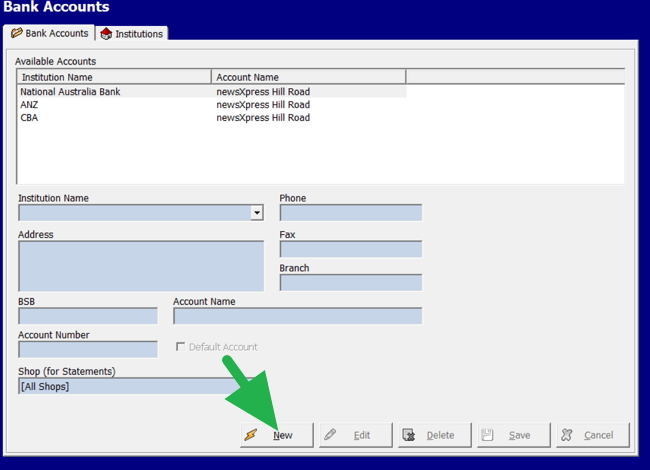
When a customer pays at your counter, our system allows you to receive the payment to the specific bank account the funds will be deposited into.

If they pay using a specific card terminal that settles into Bank A, the POS System records the payment for Bank A. If they pay cash and you deposit it into Bank B, the system records it as a Bank B deposit. This means your records match reality in real time.

How to Set Up Accounts in Your POS

We have designed this to be as painless as possible. Adding a new bank account or a new "bucket" to your POS system is quick.

  1. Navigate: Go to the main menu and select "Bank Accounts."
  2. Add New: Click the green "+ Add" button.
  3. Details: Enter the details. This serves as your label. You might name one "NAB Trading" and another "Lottery Holding." You can add BSB and account numbers for your own reference.
  4. Repeat: Do this for every distinct place money lands or needs to be tracked.

That is all there is to it!

The Result: Total Financial Flexibility

The POS stores these details securely. You can access any linked account at any time.

With the ability to add unlimited accounts and switch between them at will, your POS software makes managing your business banking easier.

Written by:

Bernard Zimmermann


Bernard Zimmermann is the founding director of POS Solutions, a leading point-of-sale system company with 45 years of industry experience, now retired and seeking new opportunities. He consults with various organisations, from small businesses to large retailers and government institutions. Bernard is passionate about helping companies optimise their operations through innovative POS technology and enabling seamless customer experiences through effective software solutions.


Add new comment

Restricted HTML

  • Allowed HTML tags: <a href hreflang> <em> <strong> <cite> <blockquote cite> <code> <ul type> <ol start type> <li> <dl> <dt> <dd> <h2 id> <h3 id> <h4 id> <h5 id> <h6 id>
  • Lines and paragraphs break automatically.
  • Web page addresses and email addresses turn into links automatically.
CAPTCHA This question is for testing whether or not you are a human visitor and to prevent automated spam submissions. Image CAPTCHA
Enter the characters shown in the image.