
Why is the POS scan rate important?
Your cashiers must process transactions quickly and accurately. This keeps lanes moving. Bad barcodes slow checkouts and frustrate family shoppers buying magazines, books, gifts, or greeting cards. What we need to do is boost POS Software scan rates.
We have a unique KPI specially designed for this, %Scan. This KPI metric measures the percentage of retail barcode scans versus manually keyed entries. Using it will improve retail checkout efficiency.
How to Check Your POS Scan Rate
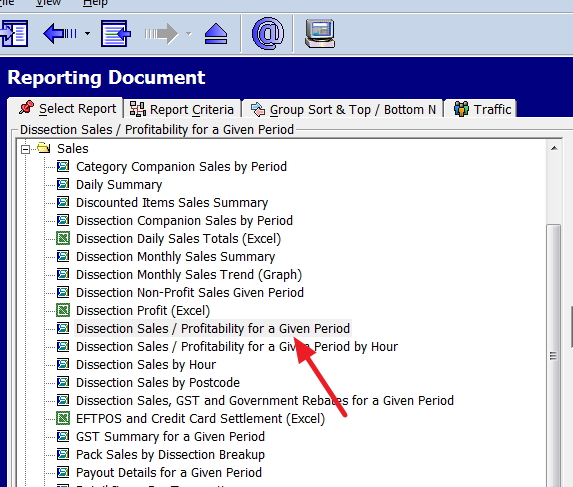
Go to the cash register reports
> Select Sales,
> Then "Dissection Sales/Profitability for a Given Period."
Set it for the past three months (or 12 for trends) and run the report.
You will get a report that looks like this one. Now, look at the last row marked.
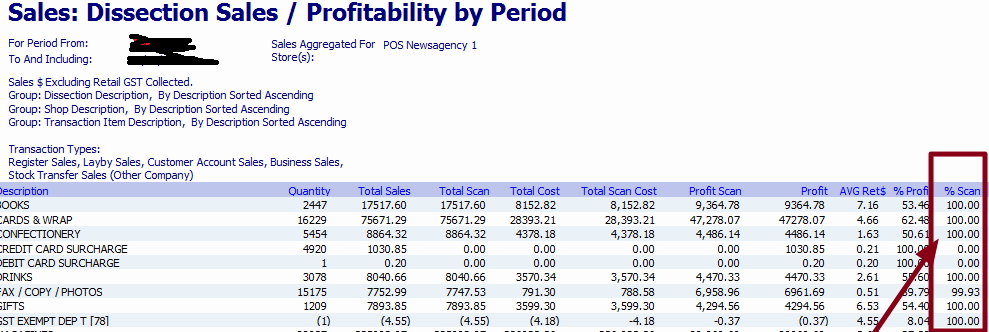
Now run down the list.
You are looking for dissections with high quantities and low scan rates, as these are the big problems here.
Now, examine the %Scan column in the last row or breakdown. Look at the Total Scan. If you are doing a lot of scans and your %Scan rate is low, you have a problem. You need a higher %Scan to deliver quicker transactions and shorter queues in your shop, and it also gives you more accurate inventory data. Besides, it is a pain for staff, as it reduces manual entry errors (Industry figures indicate about one error per 300 characters in manual entry for cashiers).
How to improve the POS scan rate?
To improve POS efficiency, start here:
Test scanners
First, for reliable performance, we often find that when we examine the %Scan, the problem lies with the scanner. If so, clean the scanner lenses and adjust angles. Consider it part of your POS system troubleshooting.
Avoid glare or shiny surfaces.
The problem sometimes is that the objects you are scanning are bright, which causes glare. I have noticed this often happens with frosty drinks and plastic covers on greeting cards. You need to be careful here.
Audit barcodes
Ensure that barcodes are clear on products. If they are real problems, talk to the suppliers, as poor barcode quality leads to unscannable items, forcing manual transaction entries that slow checkout lines and increase human errors, causing lost sales and customer frustration. In the worst case, consider printing in-house barcodes for these products.
Standardise barcode placement
Often, the cashier cannot find the barcode. In your shop, make a policy that all in-house barcodes should be in the same place, eg on the top left, at the rear middle, etc. It does not matter where; just be consistent. I prefer the bottom rear over the front; it covers some of the product.
Conclusion
Run your POS scan rate report now to spot low-scanning categories to check out your speed retail.
Then monitor %Scan trends. Just because you get it right now does not mean a problem will start to appear soon.
Written by:

Bernard Zimmermann is the founding director of POS Solutions, a leading point-of-sale system company with 45 years of industry experience, now retired and seeking new opportunities. He consults with various organisations, from small businesses to large retailers and government institutions. Bernard is passionate about helping companies optimise their operations through innovative POS technology and enabling seamless customer experiences through effective software solutions.

